
- NewsmagBlock settings tutorial
- NewsmagCategory tag on modules/blocks
- NewsmagtagDiv Composer Tutorial
- NewsmagWeather Widget
- NewsmagExchange widget
- NewsmagInstagram widget
- NewsmagHow to use the Visual Composer plugin
- NewsmagIntroduction
- NewsmagFooter templates
- NewsmagCustom ad spots
- NewsmagLoading image effects
- NewsmagSmart sidebar
- NewsmagFeatured images
- NewsmagGeneral settings
- Newsmag7 days post sorting
- NewsmagTheme thumbs
- NewsmagExcerpts introduction
- NewsmagTheme colors introduction
- NewsmagtagDiv slider gallery
- NewsmagVideo playlist
 jzee
jzee PS: So, I used to manage a support desk.
While you’ve been helpful and kind as we work through my issues, this brings me to another related issue for video playlists.
So, as mentioned, this was my main attraction to the theme.
Well, so … stopped short on vimeo. Waiting for their fix on that.
Then, as if I wasn’t able to read basic items to get a youtube playlist going, you re-gave me some help.
It’s OK, I get it. Not everybody looks at the basics.
Even now, I could be missing something.
BUT, before i send for help, usually, typically … not always but typically, I check everything i can to get it working.
On this youtube playlist thing, just like that simple block text style edit i’m trying to do, I’ve basically spent way too much time trying to get these things into place.
Is there something else i can check for the youtube playlist not working? I re-generated my api credentials, just in case.
I’ve also filled in all fields for the element, related to getting a playlist going.
Nothing. Just the silly red tag telling me to enter an id for the playlist.
For support, what I was getting at earlier is:
I learned early on that my challenge as the support agent or then the owner of the team is to not just tell the user how a thing worked.
My revelation in that position was that anyone can do that.
What I learned was I had to crack the mystery of why it wasn’t happening for … them. 🙂
So, on my end, “all engines appear to be up and running.”
Now what? Thx.
(Nothing personal, Calin. I just need to get this simple stuff resolved. You do great work. I do appreciate all of your help! You must be swamped, too.)
 DDN-Magazine
Hello
I’d be grateful for advice about filters please.
I have a custom taxonomy (‘Location’) with values like ‘England’, ‘Wales’ etc.
I have a block on a page set to show posts from a specific category (‘Training’) using the category filter, and using the filter type ‘Filter by Taxonomies’ listing the ID’s (as shown in the screen capture).
I’d expected the filter behaviour to only return posts from the category, e.g. a ‘Training’ post with the taxonomy value ‘Wales’. Instead, the filter returns posts from ANY category that have the taxonomy value ‘Wales’.
Is this the correct behaviour please? If so, is there any way to use the filters to only show posts from a specific category?
https://www.drinkanddrugsnews.com/ddn-help/training/
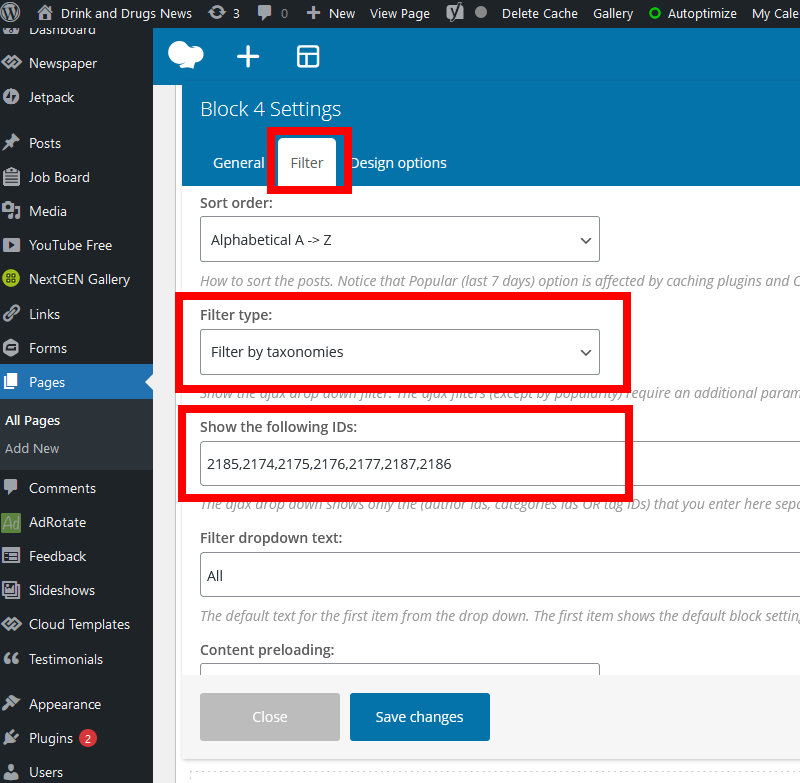
Thanks for your time
 Anamaria
 Hello,
Unfortunately, our theme has the option to display only the primary category on the blocks.
Thank you for understanding!
 Calin
Calin Hi,
The Newsmag theme use for footer standard templates -> https://i.imgur.com/gaCw54n.png and some of them have have prebuild blocks set, like footer style 1 have in each column (column Footer 1, 2 and 3) some elements set, to add some extra elements you need to go in appearance > widgets and and set the elements in the column footer that you want to be display -> https://i.imgur.com/y6Te3eV.png
I hope this will help you!
Anamaria Hello,
You can add the time to be displayed on the post/block in WordPress -> Settings -> General in Date Format =>https://www.screencast.com/t/jhKh8tlwS8 where you can set the Date and Time Format => https://wordpress.org/support/article/formatting-date-and-time/ and look like this https://www.screencast.com/t/G00Fku87DYO
Thank you!
 Yuri Mason
  Bettina
 Hello!
I’m talking about this setting: https://www.screencast.com/t/a8ztTouUgN
This one could be found in any block element which you use in your page. Just edit with TagDiv Composer, click on that block element and click on the mobile viewport: https://www.screencast.com/t/XDQJedlggSB
So, check if the setting is set up like in here: https://www.screencast.com/t/a8ztTouUgN
Thank you!
 RajeshS
 Hi Bettina,
Following a suggestion to disable all but TagDiv Plugins and then reactivate the plugins one by one I discovered that the problem I was having was in fact caused by a plugin conflict with a plugin called…..
“Page scroll to id”
Disabling that plugin has fixed the problem for me. Many thanks to Alex at TagDiv for pointing the issue out to me.
Many thanks all.
Bettina Hello Martin!
You should apply for the second block an offset:1, so in this mood you will have in the second block the latest posts and not the one from the first block.
Hope that helps you!
Thank you!
Anamaria Hello,
A solution could be to use the unique article option, follow this guide: https://forum.tagdiv.com/unique-articles/
This option automatically removes duplicate posts from the page.
Also, another solution is to set the offset posts on the blocks => https://www.screencast.com/t/Tsiu65TSaRS -> https://www.screencast.com/t/YbkmVbsBrnk
Hope this helps you!
Thank you!
 iniatisg
Hello,
I am working on flex block 3, so that i can use it on the top of my page.
The issue is that module 1 takes 50% of the screen, module 2 takes 50% of the screen.
I would like to have module 1 take more space e.g. 70% of the screen. Is that possible?
I am looking for something like the following site:
Anamaria Hello,
The mobile theme comes with its own templates for page, post, category, etc so your current templates from the desktop theme will get converted to the mobile theme layout, the page content is made without builders in mobile editor => https://www.screencast.com/t/xbgZG8kH also, the options that are provided to edit the mobile theme version are limited (this keeps the things simple).
This can be found at the bottom of every page when editing https://forum.tagdiv.com/the-mobile-theme/
For example, to create a contact page you can use only the elements from the mobile editor (so you can only add the elements that are present in the toolbar, without shortcodes(blocks) and the shortcode for the contact form (if you copy-paste the code will not work).
You can check this video about the Newspaper theme version on mobile -> https://www.youtube.com/watch?v=SpGkOnJeNZY
Thank you!
 EDFU
EDFU Hello, thank you. I have to Blocks for displaying the posts. The first is a big one with full width and display only one post (Big Grid Full 1). Here we want to show the latest post. This works well.
Below we want a list of the former posts. This Block 23 also show the newest post which is already displayed at top in Big Grid Full 1. We have now the same posts twice and this is what I want to change.
I hope it is now more understandable.
Best regards,
Martin
Anamaria Hello,
Unfortunately, for Flex Block 3, you can’t achieve that, but if you want you can use Flex Block 2 or Big Grid Flex.
Thank you!
 Vlad S
 Hello!
Unfortunately none. Without adapting them to the Newspaper theme ( which will take a lot of custom work ) you cannot use reusable blocks in Newspaper Theme. The recommended option is to use tagDiv Composer and Newspaper Theme together to build your website.
Please note that custom work is not covered by the support team.
Thank you!
Anamaria Hello,
This subject has been discussed already here: https://forum.tagdiv.com/topic/post-loop-category-2/ please check it.
Also, you can’t use CSS to filter a block, the CSS is for style, if you want to do some custom code to filter the block you need to have good skills to implement code PHP, JavaScript, MySQL and so on.
If you really want to change this you can contact our custom work team here: https://tagdiv.com/premium-customization-services/
Thank you for your understanding!
Anamaria Hello,
I’m not sure I fully understand what you are looking to edit.
But, if you referring to this block => https://www.screencast.com/t/zPcr4V9j7, then you can’t change the color of the title for each post, you can set only the general color for hover and text for all posts on that block.
Thank you for your understanding!
 discdemo
 Thx but real quick those are not sidebar elements, right? The block title colors …
Calin Hi,
For example, for all elements that are set in the sidebar, you can use this custom css:
body .td-ss-main-sidebar .block-title span  {

background-color: #fe123e;

color: #ffffff;

}
Or you can add on those elements an extra class -> https://i.imgur.com/8qcuC0I.png also this can be done with tagDiv Composer, too -> https://i.imgur.com/GbWwqF3.png
Also you can use our guide from here to inspect the theme classes.
Or if you remove the body class -> https://i.imgur.com/dGFk7xQ.png then all elements that has an option for color will apply.
I hope this will help you!
Anamaria Hello,
I just inspected your website and now seems the block called “Explore NYC Safely” is displayed also, on mobile => https://www.screencast.com/t/fiSVnNYGXUwf -> https://www.screencast.com/t/bc8dKy8VFn99
Did you manage to solve your issue?
Thank you!
Yuri Mason Yuri MasonHi,
When i am publishing a featured video post the video is resized and comes out in a block that cuts off the thumbnail – https://untitledperth.com.au/shecodes-australia-founder-kate-kirwin/
Although when previewing the post from wordpress the dimensions look fine. This is how it should be  drop box image
I’ve viewed the posts on different devices and they all come up as the boxed version. This is something that has recently occurred just out of the blue. Please help, it’s frustrating!
 Elias517
Hi,
I have a question: Below the menu bar on my website/mainpage, I have the widget “Big Grid Flex 4” with three images/articles. Below, I have the “Flex Block 1” in which I want to display all other articles. Right now, the articles are shown by date. This means that the newest articles are show first and the older ones later. However, the problem is that the big grid above displays the three newest articles, which are at the same time also displayed in the flex block. But I want that no article is shown twice. Hence, the flex block should not display the articles which are already presented above in the big grid. How can I do that?
I do not want to change the categories of each post so that just certain categories are shown above or below.
Thank you!
 Tim4962
 update: Story; i’m ok 🙂
Using the tagDiv Composer, I highlighted the individual boxes and header names on top of the block. It took me many hours to figure it out. Once I did that, I saw that I could edit it.
I am ok now! 🙂
Don’t be surprised if I come up with a question or so in the next few days. This hasn’t been easy; I’m used to doing things the easy way; code edit. lol
I knew that I never wanted to do anything with WordPress until I saw a site I liked, purchased it for $50.00, and had problems. I saw your NewsScript loved it and trashed the other site. But I am so new to WordPress that it was not easy, so I hired someone to install it. Only this guy knew what he was doing.
After about 36 hours of struggling with not much sleep and some videos, I reuploading the database, which fixed some errors, now I can see some light. But I am far from over.
So at this time, I am ok; thanks, Tim. I like the news script, and I will continue to move forward until all is well and I get the prize of knowledge.
Thanks Again!
 nycinsider
Hi,
Some blocks I created on my site’s page are not showing on mobile view. It works fine on other screen.
I checked through the CSS and found out that a couple of them had their display set to none
For instance, @media (max-width: 767px) { .tdi_34 { display:none !important; }}
I tried overwriting this in Custom CSS but it would not work.
How can I get this fixed. All the blocks on that page not showing up on mobile view.
Thanks



