
- NewsmagBlock settings tutorial
- NewsmagCategory tag on modules/blocks
- NewsmagtagDiv Composer Tutorial
- NewsmagWeather Widget
- NewsmagExchange widget
- NewsmagInstagram widget
- NewsmagHow to use the Visual Composer plugin
- NewsmagIntroduction
- NewsmagFooter templates
- NewsmagCustom ad spots
- NewsmagLoading image effects
- NewsmagSmart sidebar
- NewsmagFeatured images
- NewsmagGeneral settings
- Newsmag7 days post sorting
- NewsmagTheme thumbs
- NewsmagExcerpts introduction
- NewsmagTheme colors introduction
- NewsmagtagDiv slider gallery
- NewsmagVideo playlist
 mainage
1. When a user clicks the main menu (main category) on the main page, I want to make the posts in each category (including sub-categories) exposed on a single page.
2. For example, the main menu A (main category) has subcategories a, b, c, and d. When the user clicks A, I want to show posts registered in category A as well as posts in all subcategories a, b, c, and d on one page.
3. Currently, we set the [Popular(last 7 day)] filter using [Big Grid Flex 1] at the top (4 columns). Below that, the [Latest] filter is set using [Flex Block 1].
4. We applied the same settings mentioned in step 3 above to the page showing each post for every main menu.
5. We set [Category Filter] of [Big Grid Flex 1] and [Flex Block 1] to A on the page displayed when we click the menu (category) called A. By the way, when we click the B, C, D, E, F menu, all categories of the page displayed are set to A.
6. We want A menu page = A category, B menu page = B category… Is there any way to set this up? Please help us.
 Rodtatser
Как убрать из футера эту надпись “Дон Корлеоне”? Находится в блоке <div class=”block-title”><span>Дон Корлеоне</span></div>
 Vlad S
 Hello !
For the flex block setting please make sure that this tab is empty: https://www.screencast.com/t/jQd907I0T
For the separator border please save it and sens us a screenshot of how it looks like after it is saved.
Thank you !
 pyro2212
 All posts on the website. Example: https://daily-motor.ru/autonews/81522, block related articles.
 Calin
Calin Hi namastec, I recommend to try the flex blocks, those can be edited with tagDiv Composer per viewports -> https://i.imgur.com/7mOhQ8K.jpg -> https://i.imgur.com/6JyssVP.png
Hope this will help you!
Vlad S Hello !
If you are using flex blocks you are able to remove that from block settings as you can see here: https://www.screencast.com/t/WrANTUldRcRu
For normal blocks we will be needing a link to your website in order to see what css code will work.
Thank you !
 john123
I am using newspaper theme in three sites, all three sites have the same post layout on home page and all settings are same, still, two site post rendering on the home page is different in one site if post-render in main grid still the post again render in its own catagory, means post-render in all category associated with it even if its render in the main top grid( https://prnt.sc/vuszrf )……. in second site if post render in page top grid again it will not rendering in associated catagory grid ( https://prnt.sc/vut1wu ), what is issue is there any setting issue, as all block and setting are same in all site
 xyq146353
 Hi
I used Flex Block 4 here, how to remove the words “continue to the category”
Screenshot: https://snipboard.io/4OGbIl.jpg
Calin Hi,
Usually this issue is related to a firewall or security module which blocks admin-ajax.php request. Please verify the console for error while saving the settings on the Theme Panel, usually it displays a 403 or 404 error.
If you don’t use a security plugin, please ask your host about this, maybe you have a security module which blocks this.
If you use a plugin like Wordfence please set it in learning mode.
Hope this will help you!
Let me know the results!
Calin Hi,
Wat part from header do you want to make clickable ? please provide some details, normal the logo has the link to homepage and also if is a cloud header, then you can set the link you want using tagDiv Composer -> https://i.imgur.com/4jNHUIu.jpg
Also to have some more control over the entire website you can use a pro demo (cloud templates) therefore you can use tagDiv Composer to edit it -> https://i.imgur.com/oxgzXlz.jpg -> https://i.imgur.com/q9COFxh.jpg -> https://i.imgur.com/rngHwFr.jpg
Also if is a block title you can click on it and add the url here -> https://i.imgur.com/4jIabSj.jpg -> https://i.imgur.com/OLVt7hI.jpg
Hope this will help you!
Thank you!
Calin Hi,
For me using only the theme plugins the video thumb is look normal https://i.imgur.com/nPiKg7O.jpg -> https://i.imgur.com/SP5ZlNX.jpg -> https://i.imgur.com/vj9hSPV.png now if you are using some extra plugins, is possible to change the quality. Now you can replace the featured image but this will be change only for blocks inside the post will be set the original thumb from youtube.
Thank you!
Calin Hi,
Please make sure that you do not have any conflict plugins, please deactivate ALL plugins except tagDiv plugins (theme plugins), also if you are using child theme or cache plugin, deactivate them, clear all cache and try again.
If the problem persists, please verify the console for error while saving the settings on the Theme Panel, usually it displays a 403 or 404 error.
If you don’t use a security plugin, please ask your host about this, maybe you have a security module which blocks this.
If you use a plugin like Wordfence please set it in learning mode.
Also sometimes this is a plugin conflict, but you already tested this.
Hope this will help you!
Let me know the results!
Calin Hi squallhajime,
I think that you are referring to a similar small editor -> https://i.imgur.com/WK2rE82.png
In the most of the cases this problem can be fixed by adding an extra code, please set this code in functions.php -> wp-content/plugins/td-composer/legacy/Newspaper/functions.php
add_action('admin_head',function() { echo '<style>.td-gutenberg-editor .editor-styles-wrapper .wp-block {max-width:726px;}</style>'; });
If the problem persists, please send us an email at contact@tagdiv.com and provide admin login. Include a link to this topic in the email. Let us know.
Let me know the results!
Thank you!
 ni5
ni5Hi I am new to tagDiv forum, just bought the theme yesterday. I came from a bootstrap css framework theme and now I am struggling to understand the css framework here. Could someone explain me how to create a html grid for desktop and mobiles like col-md, col-sm & col-xs?
 crodexter
Hello,
How can I remove author name (username) from blocks?
Globally or withing definition of block?
I use Newspaper 10.
I searched forum but can’t find it.
Thank you
 mitchtobin
Hi-
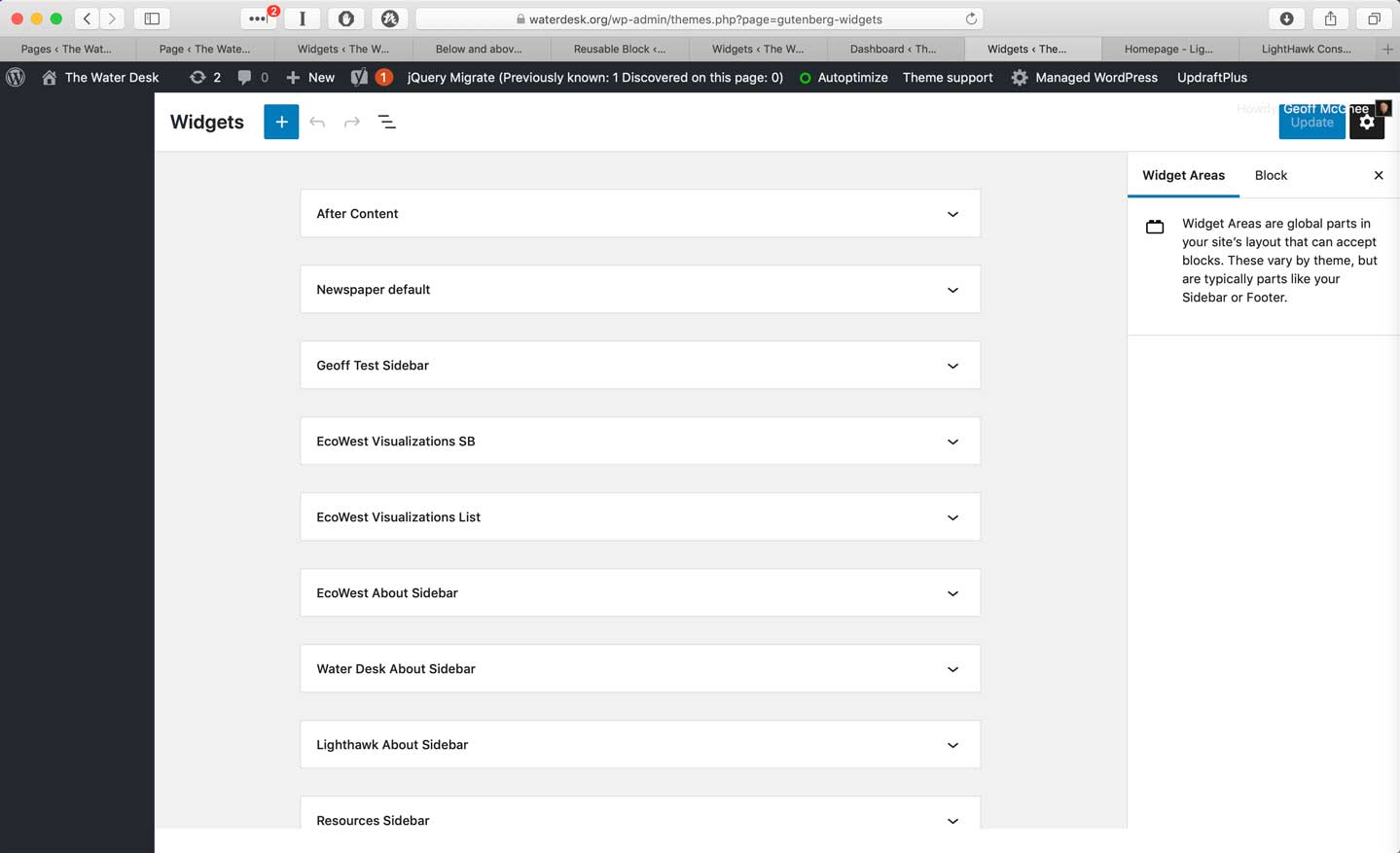
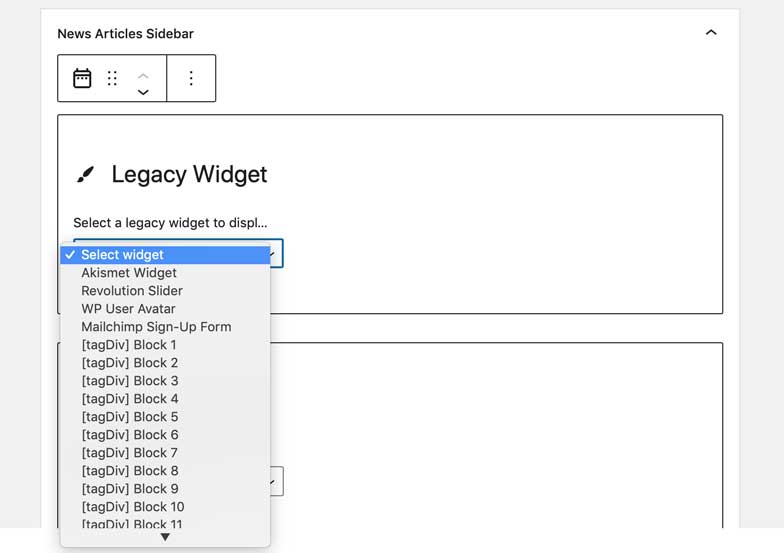
I discovered that Gutenberg has now caused the WordPress widget interface to change completely. I no longer see my tagdiv widgets and think that they have been rolled into the “legacy widget” dropdown menu.
I was relieved that the widgets appear to be displaying okay on the live site even if the editing UI has changed. But I think if I want to make any changes going forward, I’ll have to:
a) master the new widgets UI and find a way to configure the Tagdiv widgets
b) or wait for instructions from Tagdiv about what’s coming next. Will you be updating your widgets so that they work in the block interface?
Please advise! I’m surprised not to see other people posting about this!
Thanks so much.
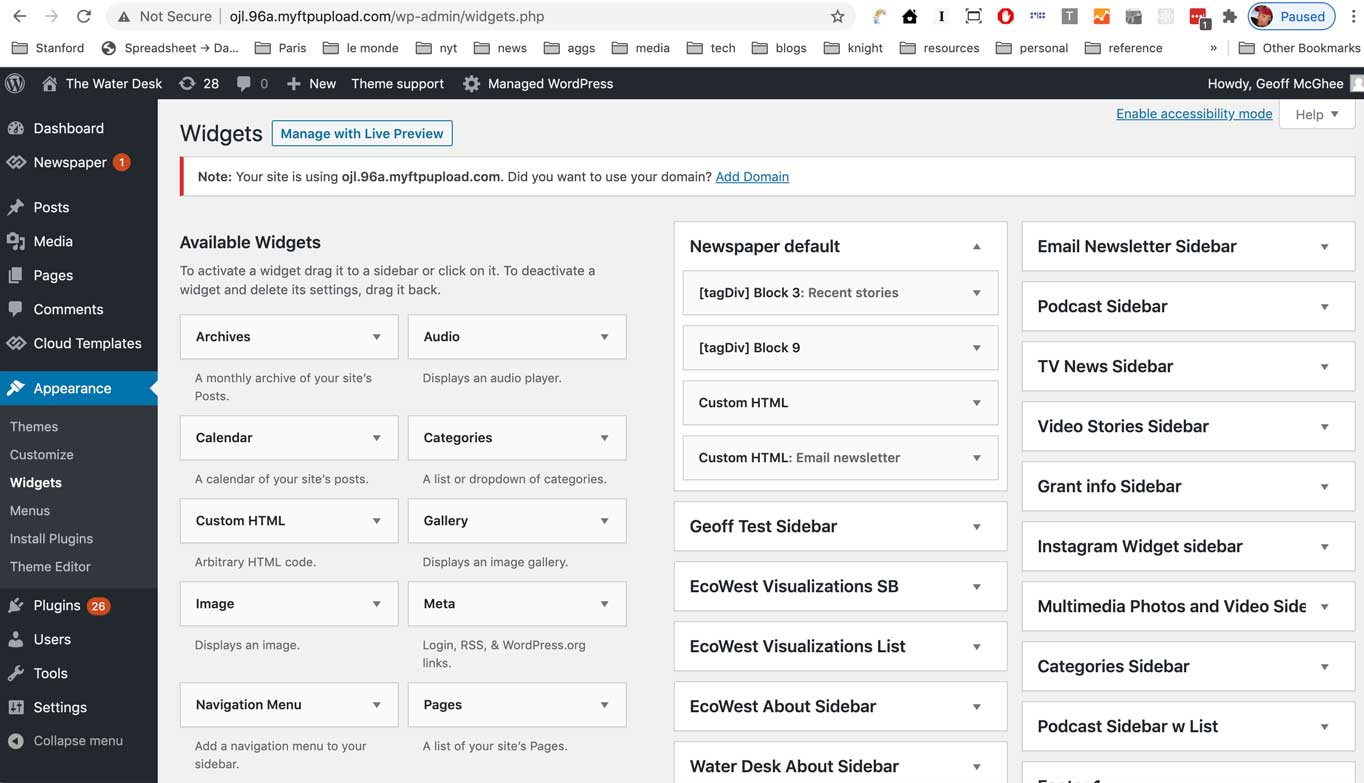
Gutenberg 8.8 widget screen
Gutenberg 9.4 widget screen
Gutenberg 9.4 legacy widget ui – can I config tagdiv widgets here?
 A388
A388 Thanks for the reply.
Is this on any roadmap? For me and I think many, it’s a real blocker. Both Newspaper and Disqus are quite popular, so it is disappointing that the theme and plugins do not work together. The Universal Code is a mere work around.
 digitalmago
Hi everyone,
I’m trying to change the text (the default is black) and line (the default is yellow) from the Side Bar.
I’m using the Tag Div Block 4 widget but I’m not able to find the location where I can control its CSS colors.
Could you please let us know how can we change it?
Example: https://ibb.co/D7bTVPJ
Widget: https://ibb.co/tKXpkch (the only template that is available is Block Header 1 – Default
Thanks,
Mario
pyro2212Good afternoon. We are faced with the problem that in the block of related post in desctop version have very bad quality of thumbs. In other places and mobile theme thumbs look ok.
https://ibb.co/g9kb3YC
Vlad S Hello !
Unfortunately blocks will not work in this case. What you can do is the following:
Add a row and stretch it: https://www.screencast.com/t/fJq9KKDAqnzZ
Set the row layout: https://www.screencast.com/t/vwBjgy3huu
Add inner row element in each column: https://www.screencast.com/t/R5xtjX5Xg
Set the Inner Row layout: https://www.screencast.com/t/BPrRcI2vmq2
After you have created your columns I would recommend using image info box as you can see here: https://www.screencast.com/t/7E04VuGM8PP
Thank you !
 willough3
Today I’ve found the entire site and each page appeared as if Composer was never there – just blocks of code everywhere. I re-uploaded the theme and now it looks like I have to start over adjusting each page in the theme panel. This will cost many many hours of work. Critical questions are needing immediate answers from TagDiv are:
– What happened?
– Can I rectify the latest version of the site before the crash?
– How does this get prevented again?
Please and thank you.
 Findolfin
Hi
I’ve installed your theme on a fresh WordPress installation. I importet your Estate demo including content.
However: If I tried to change the displayed post on the blue block on the top left it is not possible.
I go to Element > Filter and change the Category Filter to another category. But then the post block says ‘no posts’. It just works with one category: Inspiration.
Every other category is not displayed it doesn’t matter if it is an importet category from your demo or a new category I created. Every category has at least one post in it.
If I set it back to ‘All categories’ the newest post shows up but this is not what I want. I want to show tha latest post of a specific category.
 pzl
pzl I am having a lot of pain changing the pre-defined ones. In detail, I’m referring to the Theme Panel > Block Settings > Thumbs on Modules / Blocks. Accordingly, I will like to edit from 1920×0 to 1200x 628 and the rest of the thumb sizes in that multiple. This is because all my images are based on that size.
Consequently when I try to create a new page template or to start from scratch, nothing works and all my images are cropped up in a way or another. Given that I have already spent a lot of time trying to make things work, it is frustrating that nothing is working so far.
All in all, I merely wanted two designs – one for homepage (and category page will inherit this design), and another page for single post (and other pages will inherit this design).
If we cannot change the default ones, then I will face a lot of unnecessary images being generated whenever I upload a new image. This is for sure inefficient and unnecessary. Therefore, I hope you can guide me through and help me out as this is taking too much time without any improvement.
Thank you.
 Mirek Pawlinski
Hello, it has not worked for several weeks now.
BLOCK HEADER TEMPLATE . It is not possible to set it to any other than the basic template. Thanks
 notjustpcs
 Morning,
I have had a play around and come across a few more anomolies:
1) When I select the offset, it isn’t lining up correctly. There are 8 posts preceeding the new one, and yet when I choose the offset as 8 – it repeats the last 2 posts from the preceding block into the new one.
2) Doing it step by step, I have realised that I can post a new block, and a features block but it is when I select the offset that the problem happens and it says ‘no posts’.
3) I have checked the posts, and they are all saved the same way and are made to be public (besides they would have appeared on the site before, as they get pushed further down the page as new articles are added).
4) If I click offset on another topic, it does work. However the posts displayed in the editor page as being the offset ones are different to those shown when I click publish.
5) I disabled all non tag div plugsins, same problem still occuring
6) I did try re-downloading the tag div composer plugin and it did not make a difference.
7) I have downloaded the cache plugin (no difference) and I can’t see how to attach an image on the forum. Have copied and pasted instead below.
Theme config
Registration key i 01c275e3 – **** – **** – **** – f0d7051abaa3 Reset key
Theme name i Newspaper
Theme version i 10.3.8
Theme database version i 10.3.8
HTTP channel test wordpress
Installed demo i Default – demo ID: default | install type: no_content
Theme Mobile Newspaper mobile version
php.ini configuration
Server software i Apache
PHP Version i 7.3.24
post_max_size i 32M – You cannot upload images, themes and plugins that have a size bigger than this value. To see how you can change this please check our guide here.
max_execution_time 1500
max_input_vars 3000
SUHOSIN installed false
PHP extensions
mbstring available
GD library available
WordPress and plugins
WP Home URL i https://fake-booze.com
WP Site URL i https://fake-booze.com
WP version i 5.5.3
WP multisite enabled i No
WP Language i en_US
WP Memory Limit 128 MB/request
WP_DEBUG False
Caching plugin WP super cache – for best performance please check the plugin configuration guide here.
Thanks!



