- NewspaperFlex Block Builder and Flex Loop Builder
- NewspaperHow to use the Flex Blocks cache option
- NewspaperHow to edit modules for Flex Block X
- NewspaperHow to insert a block inside the content of a post
- NewspaperFlex Block Settings Guide
- NewspaperMeta Info on Modules and Blocks
- NewspaperTheme modules and blocks
- TutorialsDefault Block Settings Guide
- NewsmagBlock settings tutorial
- NewsmagCategory tag on modules/blocks
- NewspaperThumbnails – Fix strange looking images on blocks
- NewspaperBlock settings tutorial
- NewspaperCategory Tag on Modules/blocks
- ApiPractical example – How to add a new Block and Module
- Apitd_api_block::delete
- Apitd_api_block::update_key
- Apitd_api_block::update
- Apitd_api_block::add
- ApiAPI – Blocks – Introduction
- NewspaperWP Rocket and Newspaper Theme: Optimization Guide
 Catalin
 Hi,
If you want to have this section in the Sidebar, notice that you can add a simple block to your sidebar where you need to filtrate it by Popular Video and also, the sort that block by your Video Category. Check the Block settings from here -> https://forum.tagdiv.com/newsmag-block-settings-tutorial/
Thanks for your understanding!
 InPa
InPa That’ s too bad! I hope you’ll change that in future!
Is it possible to put a link to blocks like “more” to read more about a categorie, as the filtered catogorie site will be open?
 Simion C.
 Hi,
Despite the template used for the category pages on desktop, the mobile theme will use it’s own template. That is the case for author pages, tag pages, etc. The mobile theme has a template for all of them which will be used.
Only pages may be blank if you do not enter content in the mobile editor for each of them
– https://forum.tagdiv.com/the-mobile-theme/
The exception is the mobile homepage, this will display a top grid with featured posts and a latest articles section, so it will not be empty.
1. AMP has become widely used, our old dedicated AMP plugin did the job for a while. A decision has been made to discontinue this plugin and instead use the official up to date AMP plugin, which can be integrated with the mobile theme. In the coming update more options will be added.
2/3. You can design the category pages as you want, use the predefined category templates or cloud templates. These will be used on desktop, on mobile when the mobile theme is active, the mobile template will apply regardless. This theme demo has the mobile theme active, check a category page on mobile to see how it will look
– https://demo.tagdiv.com/newspaper_local_news/category/tech/gadgets/
These mobile templates are AMP valid as well, since 9.6.
4. The mobile theme is created for mobile, if you do not use the mobile theme the responsive version will take place. Meaning the website will adapt for mobile or the device used. Be careful when you design templates with the composer, always check how it will look on mobile.
For example while a flex block with 3 modules per row looks alright on desktop
– http://prntscr.com/myaglu on mobile this will not be so good – http://prntscr.com/myagw0
So in this case set the block to display 1 module per row – http://prntscr.com/myah9s
Most settings are per viewport, check and configure them differently for each when needed.
5. Some examples of what exactly is happening would be very helpful. The only instance when pages would be blank is if we are referring to actual pages. With the mobile theme active each page will require 2 versions, one for desktop built in any way possible with the theme and one for mobile built with the mobile editor – http://prntscr.com/myajbc
Let me know.
Thanks
 Seyfert
Hello Tagdiv Team,
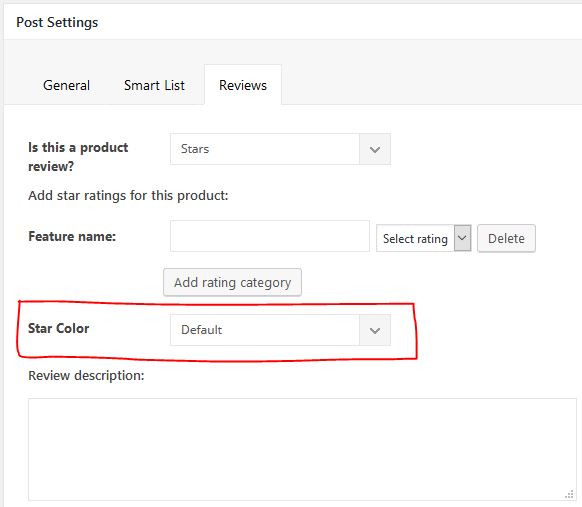
i want to add Option (on Single Post) to change the color of Stars Review. Like this:
https://i.ibb.co/k97gPg5/single-post.jpg (https://ibb.co/61MRqRr)
My Steps:
1. Added html to
“/includes/wp_booster/wp-admin/content-metaboxes/td_set_post_settings.php”
on Line 341
— — —
<div class=”td-meta-box-row”>
<span class=”td-page-o-custom-label”>Stars Color</span>
<div class=”td-select-style-overwrite td-inline-block-wrap”>
<select id=”starsColor” class=”td-panel-dropdown”>
<option value=””>Default</option>
<option value=”green_stars”>Green</option>
<option value=”red_stars”>Red</option>
</select>
</div>
</div>
— — —
2. Added CSS
— — —
.green_stars .td-icon-star {
color: green !important;
}
.red_stars .td-icon-star {
color: red !important;
}
— — —
3. and now where can i add this class to change the stars color on Frontend?
The result, that i want:
https://i.ibb.co/68dvp7m/starscolor.jpg (https://ibb.co/sCB5Dd2)
Can u help me pls?
Regards
 Calin
Calin Hi,
Unfortunately this is not possible using our theme, our blocks/modules will show only the post that you have on your website, can not show external post, sorry!
Thank you!
Calin Hi,
The drop-down filter (img) should appear if the settings from the Categories>Category global settings -> CATEGORY PULL-DOWN FILTER is enable (img), you do not need to do other settings, but if you are using a cache plugin you’ll need to clear all cache.
Or maybe you are referring on ajax category from blocks -> https://www.screencast.com/t/dXsX1uSGyw
Block settings guide -> https://forum.tagdiv.com/block-settings-guide/
If there is still a problem please provide some more details and some screenshots.
Thank you!
InPaHi,
I’d like to show posts of an external link (www.aroundabouttravel.de) in block 2. Is that possible? Or what can I do instead?
Best wishes
Inken
 35milimetros
 Hi Catalin. Thank you for the help. Now it is fixed and I can see my website correctly in my mobile device.
A few questions:
How can I change the number of post which appear in Recent Articles block, in homepage?
How can I change the Articles and Popular Categories in Footer for other?
How can I translate and change the links of the sub-footer (Disclaimer, Privacy, Advetisement, Contact…?
Thanks again!
Simion C. Hi,
So you are using footer template 1, the one with the two predefined blocks and a categories block
– https://forum.tagdiv.com/footer-templates/
The editor picks block displays featured posts (posts from the featured category), so if you have posts in the featured category they should appear there.
What exactly do you mean that the other blocks cannot be updated?
I could take a look at it, post a link to the website and some more details if possible.
Thanks
Catalin Hi,
I have checked that section from your website and I saw that your images are not correctly chosen for that kind of block 18, sorry! I will explain to you why is not correct. Pleae, notice that the first image of this block uses the module mx8 if the block is used for three columns. (696*385px -> https://www.screencast.com/t/GmajyR5R) Please look at the following screen to understand why you bring bad results with Block 18, from here -> https://www.screencast.com/t/tfOm1dBnLBt Shortly, your images are not good and you need to replace them with another bigger images.
Hope this helps!
Thanks for your understanding!
InPa Hi,
I just realised, that the sidebar is fixed because of several blocks 2!?
How can I insert other blocks over two colums? I’m only allowed to insert a block under a column..
Calin Hi,
In footer are more styles, some of them comes with a set content, in order to remove it you need choose a footer template that is empty and you can set in footer widgets with blocks that you want to show, for example -> https://www.screencast.com/t/wQnryIm1bo -> https://www.screencast.com/t/YIvVDaCIHyw -> https://www.screencast.com/t/2o0GOzaPU2
Thank you!
Calin Hi,
1. Please provide some more details and some screenshots about this, for me is working to set more blocks with the same content -> https://www.screencast.com/t/ErJI3Yb1WdAQ
-> https://forum.tagdiv.com/block-settings-guide/
2. You can add those banners using the new header builder that was include in v9.5 -> https://tagdiv.com/header-main-menu-newspaper-theme/
3. For pages you can use tagDiv Composer and set a -> https://www.screencast.com/t/Qv8rD4ru7p
-> https://www.screencast.com/t/ajibC5Xm
-> https://www.screencast.com/t/JJbibq8crV
-> https://www.screencast.com/t/2fOktBfjyo
if you are using latest articles widgets Sidebar ads -> https://forum.tagdiv.com/sidebar-ads/
Thank you!
Calin Hi,
Please use the display inline block option from css
-> https://www.screencast.com/t/zyVdTsRnB
-> https://www.screencast.com/t/G5eOZVPYJJ8l
Thank you!
 bobbymc
 Thanks. Would like to filter more broadly excluding all with a particular tag from the Category block.
For example I have a “Creative” category which focuses on ads from Asia. I have another that features ads from outside of Asia. I would like to list both those types of posts in the “Creative” category but not have them both show up in the block.
 danielpaulchristie
 Thanks, Simion!
I actually deleted the Mobile Theme plugin (after getting rid of the AMP didn’t help). So when you were looking at it, that was without either plugin installed or activated. Doing that “fixed” things.
I have reinstalled and activated both, so you can see the issue. I think it’s okay on a mobile (from what I see), but they somehow mess up things on my desktop (e.g., https://danielpaulchristie.com/dealing-with-discouragement/)
I wonder if you could help me with some smaller related ones. These are why I actually started fooling around with the Mobile Theme and AMP settings and messed things ups.
(1) My font doesn’t carry over for formats, and I don’t know why. Here is a screenshot of it on my phone (https://prnt.sc/my2uoe) vs. on my desktop (https://prnt.sc/my2tfm). This applies on a normal browser or incognito for both respectively, so it doesn’t seem to be cache. (This wasn’t fixed by uninstalling the plugins.)
(2) I don’t know why the blockquotes/box quotes come out different on the desktop (https://prnt.sc/my2tys) vs. mobile (https://prnt.sc/my2uqg). I can’t find separate settings, so I thought they were under the same one (theme panel >> theme fonts >> post content). They are in caps and way too big for the mobile, so I would like to change that. Right now the desktop format is really wide because of the other issue with the plugins, but you can see it is in normal case.
Thanks,
Daniel
 bharathadigopula
Hello guys,
Tagdiv one of the greatest WP theme developers. They created a great and light weight theme designs for bloggers, businesses, entrepreneurs, niches and more.
The Newsletter theme worlds #1 selling and using theme. Why the #1 because they (they) deserved it.
They recently released Newspaper v9.6 it’s a totally big fail on the theme development.
How can I say fail matter, yeah it’s true, newspaper v9.6 big fail.
Whenever they released v9.6, the forum filled with so many problems.
1. AMP
The AMP works fine only when I’m using mobile plugin. Ofcourse, the amp works also without mobile plugin but I can’t monetize my site with Ads.
The ads (article, top, bottom, inline, etc) only managed by mobile plugin.
*today are the most of the people using mobile devices to reading our blog posts.
*Some bloggers only earn money only for monetizing ads.
2. Mobile theme
Mobile theme is perfectly good. But some users didn’t like that. Because the desktop structure is different and mobile theme structure is totally different.
The mobile (plugin) theme displays only 3 blocks featured posts and recent posts.
So, when user visit our site he/she immediately goes back. Then our bounce rate very huge impact.
Internet have huge blogs, we need to beat some one.
So, theme design must be impressive.
* The person who have using v9.6 they can’t monetize AMP ads without mobile plugin. (It is totally big disappointed right.!)
* Ok, when we ready to use the mobile plugin we can’t change mobile menu text type (roboto, lato, open sans, ubuntu etc.) it’s comes from default.
***There are so many others, but these are the main reasons affect our blogging career.
Please think blogger point of view they only earn money from monetize, sponsored content, affiliate etc.
Most of the users come with mobile devices. When the user feels not good the site then he immediately goes back. *Bounce rate will be very high.
Kindly, please take this an serious issues.
We will wait for the successful v9.7 with stunning features.
If anything wrong for me, I really apologize.
 goodnews
 I figured it out now. I can’t remove the row unless it’s populated with a block. Then the option appears to discard the whole section. It’s an odd workaround, but I have to drag in a dummy element and then carefully highlight the “row” tab at the top left to drag the whole thing to the delete button at the bottom right of the screen.
goodnewsI installed one of the demos. I’m making original pages, and when blocks show the Author & Date, they’re formatting as…
“Author Name x Date”
… with the “x” in the middle.
So in some blocks that don’t show the Author name, like Block 7, I get this annoying “x” before the date.
I’d rather not have the “x” between these meta tags ever.
Where can I edit or remove this character?
Thank you.
InPaHi,
the sidebar fixed on blocks: http://www.aroundaboutmunich.de
I’d like to unfix it. Is that possible?
Best
Inken
 Roberto Falbo
 Hello, Calin
In the case thats if dont have this featured category, how do i get post for those 3 blocks ?
Calin Hi,
The mobile theme is a plugin that provide you a better speed then responsive version of theme, but in order to achieve that speed you’ll need to use for pages that are made with builders ( tagDiv Composer, WPBakery ) only the classic editor also for mobile theme the content for pages need to be set in mobile editor -> https://www.screencast.com/t/ebUIzt4se
Please check our documentation for the Mobile Theme: Automatic Optimization for Mobile with Newspaper Theme -> https://tagdiv.com/mobile-theme-automatic-optimization-for-mobile-newspaper-theme/
For those 3 blocks you’ll need to feature posts that have set feature category -> https://forum.tagdiv.com/featured-posts-2/ -> https://www.screencast.com/t/QsJ6ppY4
In order to set a menu for mobile theme you’ll need to go in appearance>menus https://www.screencast.com/t/1AXsFLJism
Thank you!
Simion C. Hi,
That is the comment count, it can be disabled in the Theme panel->Block settings
– http://prntscr.com/mxuo6a
I wish you a nice day as well! Let us know if you have more questions.
Calin Hi,
I checked your website and your mobile automatic amp is working -> https://validator.ampproject.org/#url=https%3A%2F%2Fwordofdecor.com%2Fkakie-byvajut-terrasy-varianty-dizajna%2F
https://search.google.com/test/amp?id=gJXrMpkJX1m5WIHUgtl6lQ
I think that you do not understand very well how is this working, the mobile theme with automatic amp, now they have the same layout.
For those 3 blocks you’ll need to feature posts that have set feature category -> https://forum.tagdiv.com/featured-posts-2/ -> https://www.screencast.com/t/QsJ6ppY4
That white space is the pace were one ads should be place -> https://www.screencast.com/t/Ec3Yk8IgnEBz
Here is an example with the code for auto ads that need to be set in theme panel -> https://prnt.sc/mxnext
Also the ads for mobile post need to be set in mobile ads
-> https://www.screencast.com/t/MRkU3KfJV8
-> https://www.screencast.com/t/OB5YvqP3kFye
For this error https://prnt.sc/mupdgl here is the fix.
You’ll need to go in wp-content/plugins/td-mobile-plugin/td-mobile-plugin.php
and at the bottom of file set this code
$theme_options = get_option( 'td_011' );
https://prnt.sc/mv165e
https://www.screencast.com/t/NclX3sIf
Thank you!
Simion C. Then use your own featured image, set the video in the post content at the beginning and use post template 5 or 12. These templates do not display the featured image in the post page.
This way you will have a featured image to display in blocks and grids, while in the post page this image will not appear. I believe this is what you want to do.