- NewsmagBlock settings tutorial
- NewsmagCategory tag on modules/blocks
- NewsmagtagDiv Composer Tutorial
- NewsmagWeather Widget
- NewsmagExchange widget
- NewsmagInstagram widget
- NewsmagHow to use the Visual Composer plugin
- NewsmagIntroduction
- NewsmagFooter templates
- NewsmagCustom ad spots
- NewsmagLoading image effects
- NewsmagSmart sidebar
- NewsmagFeatured images
- NewsmagGeneral settings
- Newsmag7 days post sorting
- NewsmagTheme thumbs
- NewsmagExcerpts introduction
- NewsmagTheme colors introduction
- NewsmagtagDiv slider gallery
- NewsmagVideo playlist
 Bogdan B.
 Hello,
Unfortunately this represents customization which is not covered by the theme support. We have not tested this method so i cannot say for sure how to get the second date to show up in the block. You will need to create separate fields for each date and then call them in the module files. If you do not know how to do this you can hire a freelancer to help out as we do not have a customization department.
Thank you!
 Catalin
 Hello Szentmaxi,
1)Unfortunately, our theme does not have any such an option that allows you to display the subtitles of your posts in blocks/modules, sorry! If is not what you mean, please provide more details so I will be able to provide a more accurate response.
2)Please check all of our list of blocks and you will see that only one block has active this button ->Read More, like Block 12, as you can see here -> https://demo.tagdiv.com/newsmag/block-12/
3)If you want to remove the More from Author tab for each post, you should use the code below and place it in Theme panel->Custom CSS area.
The code is ->
.td_block_related_posts .td-related-right {

display:none!important;

}
The result is here -> https://www.screencast.com/t/dYFZ2m2NP4
4)Notice that our theme has an option which allows you to hide the date from blocks/modules and from post pages, like this -> https://www.screencast.com/t/OwarQc7Nsej -> https://www.screencast.com/t/KH3nNG4EoHMa If you want to hide the date only in certain places, you should use a bit of CSS code (by category IDs) to do this.
5)If you are using the same post template for the entire website, notice that you can do this from Theme panel. First of all, at the post template, you should leave just active From panel -> https://www.screencast.com/t/gzNCZvvW and then, from panel you should choose your general post template which will be used on your site, like this -> https://www.screencast.com/t/gCDwW7toZi1J For more information about this feature, please consult the documentation here -> https://forum.tagdiv.com/newsmag-post-templates/
Thanks for your understanding!
 mariateviu
Hi, any sort order in my site is not working. In my home page I have filters like: Popular (all time), Random Post and Lastest.
My site: http://www.mariateviu.com.br
My active plugins:
Add Logo Admin
Akismet Anti-Spam
Anti-spam
Contact Fome 7
Duplicate Post
Easy Forms for MailChimp
Envato Markest
Font Awesome 4 Menus
Icegram
Jetpack
MailChimp for WordPress
PixelYourSite
Poet Types Order
Redirection
Slider Revolution
tagDiv Composer
tagDiv Mobile Theme
tagDiv Social Counter
tagDiv Speed Booster
UpdraftPlus – Backup/Restore
WP Super Cache
WP User Avatar
WP-Mail-SMTP
WPBakery Visual Composer
WPML Widgets
Yoast SEO
I really need of this filters working… Please, can help me?!
 Sharozdawa
 getting this error “Warning: Illegal string offset ‘limit’ in /srv/users/serverpilot/apps/ohcelebrity/public/wp-content/themes/Newspaper/includes/shortcodes/td_block_big_grid_9.php on line 20” while creating new page via td composer
 Chris217
Hi there,
I am experimenting with the different theme demos (without demo content).
When I try to make a nice homepage with blocks and edit it in the tag div composer the work space seems different than it should be. E. G. there is no possibility to save the work…
Please check attached image on the given webpage Watch Screenshot…
Whats the problem?
Regards, Chris
Chris217Hi there,
I am experimenting with the different theme demos (without demo content).
When I try to make a nice homepage with blocks and edit it in the tag div composer the work space seems different than it should be. E. G. there is no possibility to save the work…
Please check attached image…
Regards, Chris
 Evgeny
Hi,
in our site design we have a vertical left side menu http://joxi.ru/KAgPJoignblQrl
What would be our steps in order to modify Newspaper theme to implement this vertical menu?
Should we use a child theme, or modify existing theme through API? And if use API, which block will it be, custom header style?
As we understand we need to move template’s grid for this, how we can do this?
Our menu should be also fixed, so no scroll on it while move a page down.
Second question, how we can make a blank template, for landing page for example, so no theme’s header/ footer/ background is injected in this template? As now in simple blank template we have all the theme’s settings, and cannot make any blank page we need.
Thanks 🙂
 TheY
TheYHey guys,
Is it possible to get the bottom box as available in the big grids for a block? So with a background color behind the title. In this case I would like the layout on Block 14. Thanks!
 Siddharth Singh
 Hi,
Can we limit the length of Post Title in Block 9.
Thanks for all your valuable suggestions.
 riealeksandra
 Hi Bogdan, thanks for your reply. I understand how the search function works, however it’s not very precise. The issue is not with a one-word search, but when I try to find posts about the color of link text, it’s really difficult. Searching for “url color”, “link text color” etc. brings up way too many results.
Anyhow, something must have changed since the update, because this was not an issue before. Earlier I was able to change the color of link texts within the building blocks, in this case the text block. Now I’m not. I haven’t changed any of the theme colors.
Also, wouldn’t changing the accent color change lots of other elements as well, not only link text color?
Hope you can help.
 kpkurankar
Hello,
I can not open “New Post” page. it remains blank and I can’t add or type anything there and following message appears at the bottom of the page. however I can edit the already created posts.
Please tell me how to solve the issue. I didn’t upgraded Visual composer but this message appeared automaticaly from 1 day.
deprecated and are no longer supported in newer versions of Visual Composer.
o Contact Form 7Place Contact Form7
o RowPlace content elements inside the row
o Text BlockA block of text with WYSIWYG editor
o SectionGroup multiple rows in section
o IconEye catching icons from libraries
o SeparatorHorizontal separator line
o Separator with TextHorizontal separator line with heading
o Message BoxNotification box
o Facebook LikeFacebook “Like” button
o Tweetmeme ButtonTweet button
o Google+ ButtonRecommend on Google
o PinterestPinterest button
o FAQToggle element for Q&A block
o Single ImageSimple image with CSS animation
o Image GalleryResponsive image gallery
o Image CarouselAnimated carousel with images
o TabsTabbed content
o TourVertical tabbed content
o AccordionCollapsible content panels
o Pageable ContainerPageable content container
o SectionSection for Tabs, Tours, Accordions.
o Custom HeadingText with Google fonts
o ButtonEye catching button
o Call to ActionCatch visitors attention with CTA block
o Widgetised SidebarWordPress widgetised sidebar
o Posts SliderSlider with WP Posts
o Video PlayerEmbed YouTube/Vimeo player
o Google MapsMap block
o Raw HTMLOutput raw HTML code on your page
o Raw JSOutput raw JavaScript code on your page
o Flickr WidgetImage feed from Flickr account
o Progress BarAnimated progress bar
o Pie ChartAnimated pie chart
o Round ChartPie and Doughnat charts
o Line ChartLine and Bar charts
o Empty SpaceBlank space with custom height
o Post GridPosts, pages or custom posts in grid
o Media GridMedia grid from Media Library
o Post Masonry GridPosts, pages or custom posts in masonry grid
o Masonry Media GridMasonry media grid from Media Library
o Old TabsTabbed content
o Old TourVertical tabbed content
o Old AccordionCollapsible content panels
o Block 1
o Block 2
o Block 3
o Block 4
o Block 5
o Block 6
o Block 7
o Block 8
o Block 9
o Block 10
o Block 11
o Block 12
o Block 13
o Block 14
o Block 15
o Block 16
o Block 17
o Block 18
o Block 19
o Block 20
o Block 21
o Block 22
o Block 23
o Block 24
o Block 25
o Big Grid 1
o Big Grid 2
o Big Grid 3
o Big Grid 4
o Big Grid 5
o Big Grid 6
o Big Grid 7
o Big Grid 8
o Big Grid 9
o Big Grid 10
o Big Grid 11
o Big Grid 12
o Big Grid Full 1
o Big Grid Full 2
o Big Grid Full 3
o Big Grid Full 4
o Big Grid Full 5
o Big Grid Full 6
o Big Grid Full 7
o Big Grid Full 8
o Big Grid Full 9
o Big Grid Full 10
o Big Grid Slide
o News ticker
o Video Playlist
o Video Playlist
o Ad box
o Image box
o Author box
o Authors box
o Homepage post
o Popular category
o Slide
o Text with title
o Weather
o Exchange
o Instagram
o Pinterest
o List Menu
o Social Counter
o Revolution SliderPlace Revolution slider
o Revolution Slider 5
o WP SearchA search form for your site
o WP MetaLog in/out, admin, feed and WordPress links
o WP Recent CommentsThe most recent comments
o WP CalendarA calendar of your sites posts
o WP PagesYour sites WordPress Pages
o WP Tag CloudYour most used tags in cloud format
o WP Custom MenuUse this widget to add one of your custom menus as a widget
o WP TextArbitrary text or HTML
o WP Recent PostsThe most recent posts on your site
o WP CategoriesA list or dropdown of categories
o WP ArchivesA monthly archive of your sites posts
o WP RSSEntries from any RSS or Atom feed
 pavel@earnware.com
 Hey,
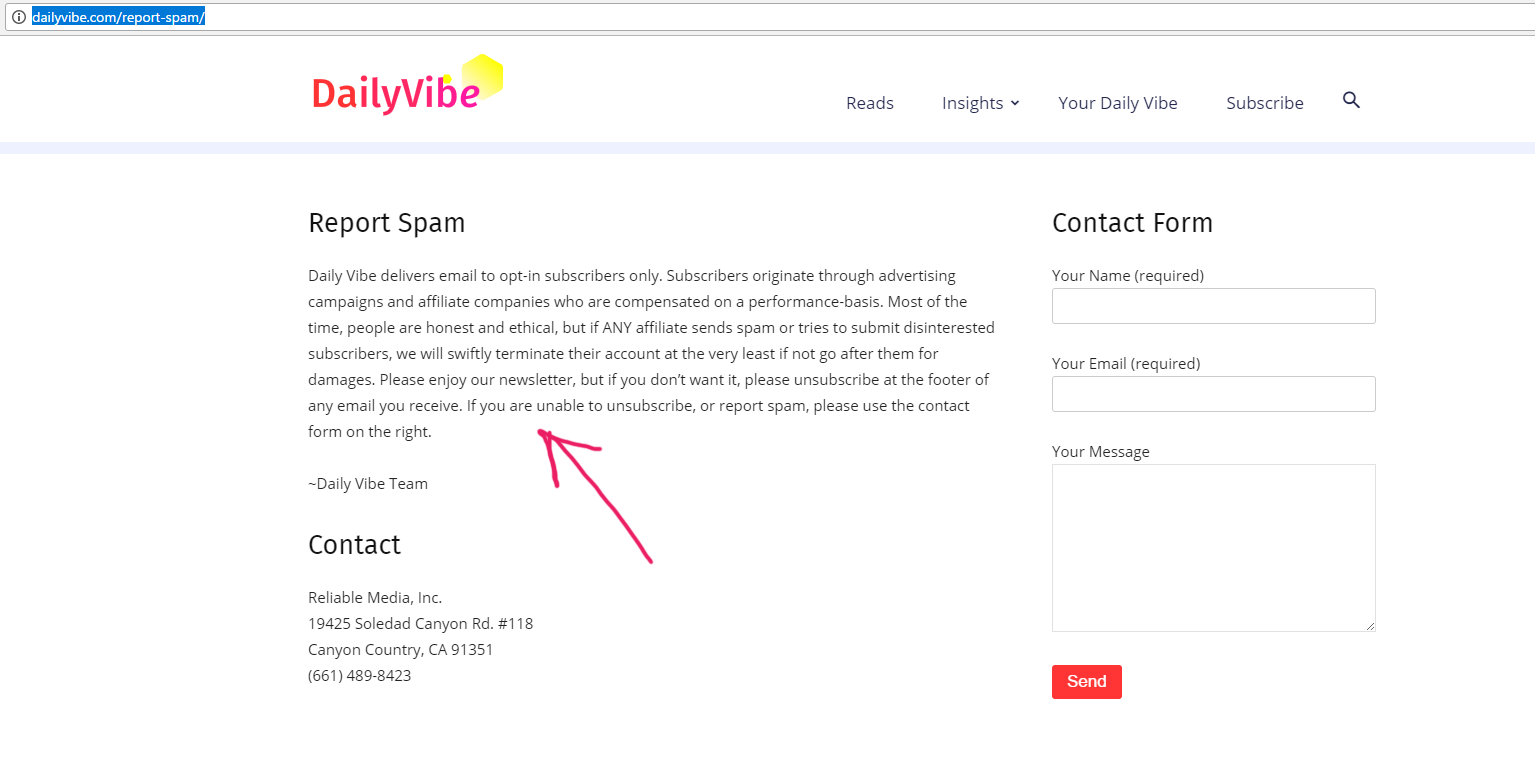
Here is the page: http://dailyvibe.com/report-spam/
So front end screenshot: Here
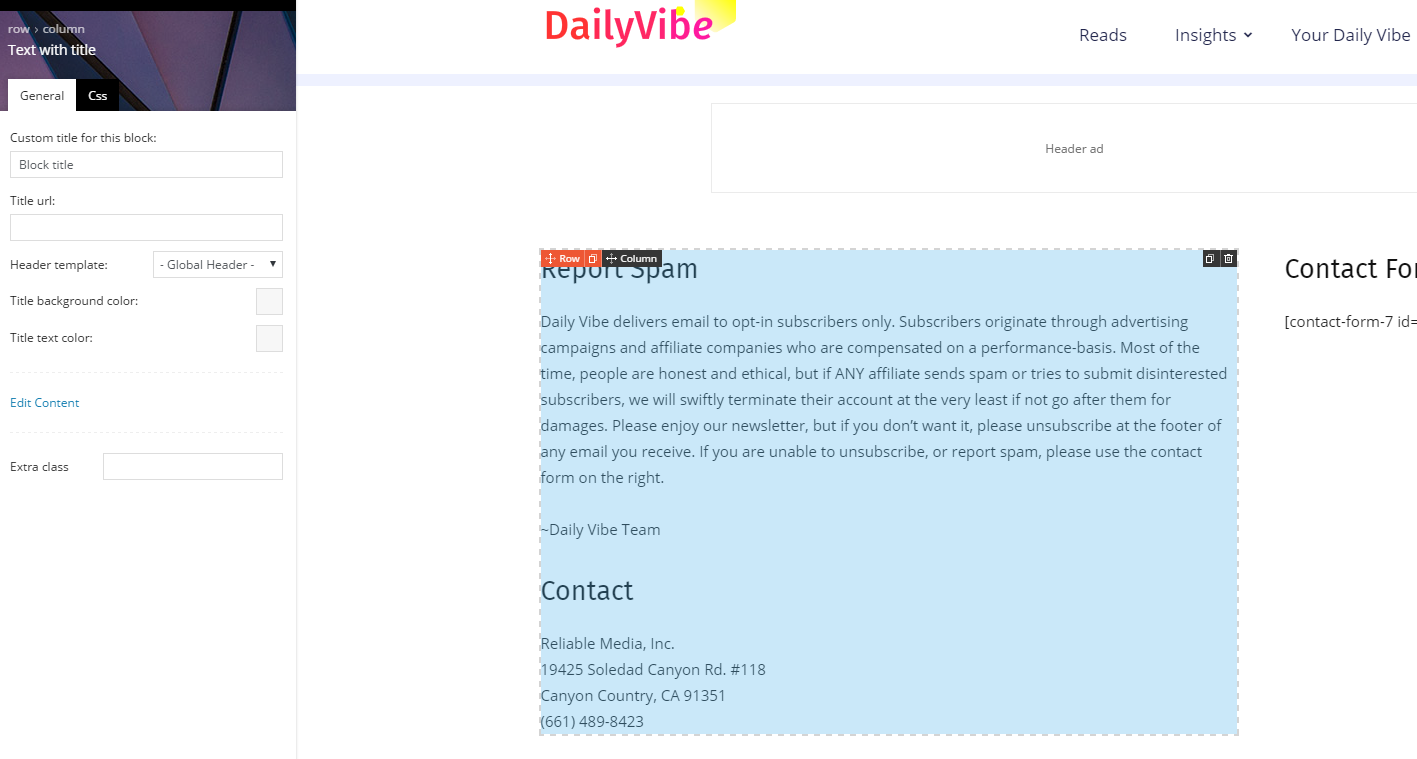
Backend of the page (So I used Text with title to put that text in there): Here
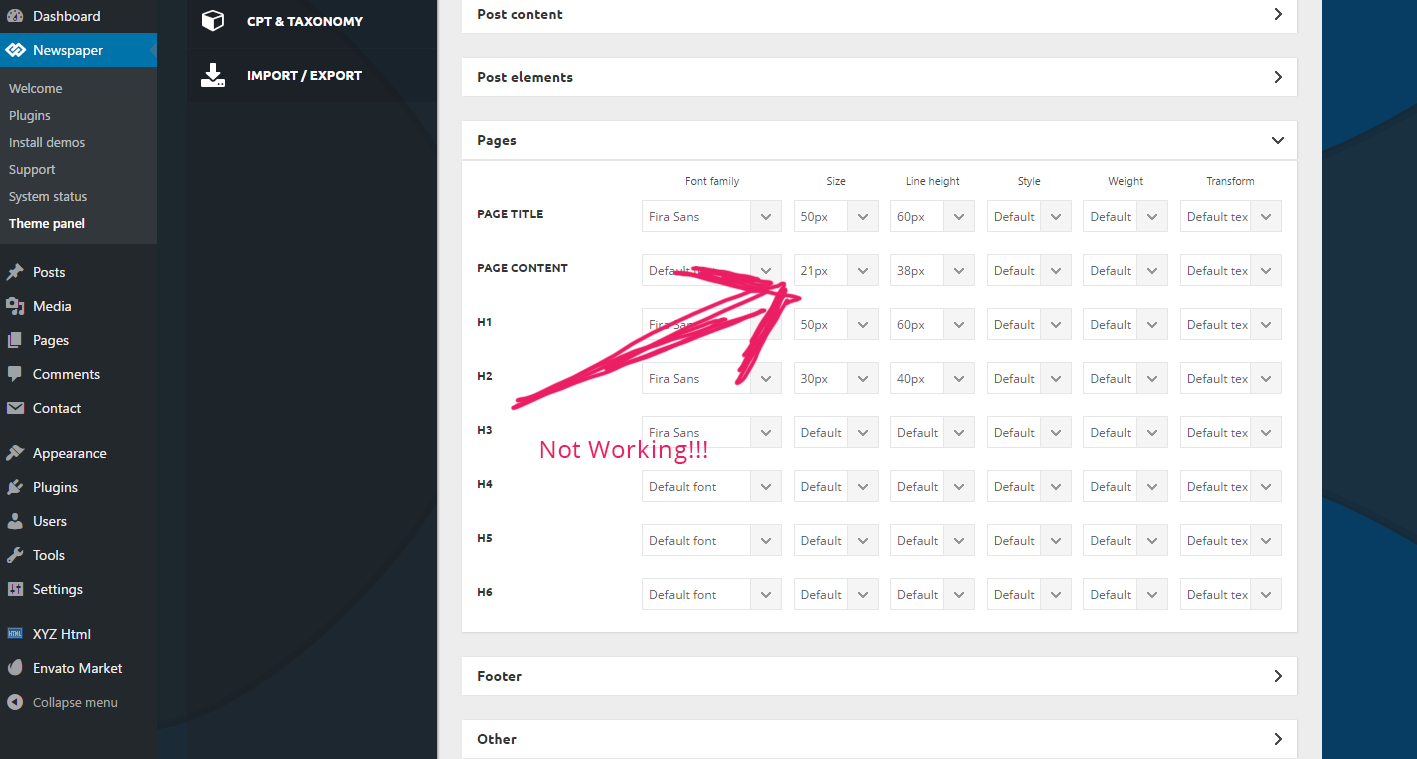
And the Dashboard of the font-size not working: Here
See I used 21px for page content, and it’s not working. Please fix it in the next release!
I am not using html, or some weird stuff, but your text+title block. Not working! On another site I had to manually add css to modify this text size – it’s ok for me, but the clients are angry that they cannot do it with their backend. I had to modify these classes to make it work:
.td-page-content p, .td-post-content p, .wpb_text_column p, .td_block_text_with_title p, .woocommerce #tab-description p, .mce-content-body p, .td-page-content li, .td-post-content li, .wpb_text_column li, .td_block_text_with_title li, .woocommerce #tab-description li, .mce-content-body li {
font-size: 19px!important;
line-height: 1.9em!important;
}
But we need it to work via BACKEND!
pavel@earnware.comI understand maybe you guys didn’t include 1/2 + 1/2 for blocks, but for layouts, please make it available. We need it very much, I have all my clients complaining and nice looking pages are being lost since I cannot split in HALF a row!
 simchris
 Some people seem to get this and only thing I’ve been able to figure out — and I don’t work here — is Envato may be blocking some IPs for abuse, or too many activations vs number of purchases — but don’t quote me on that. I only had this issue once in 5 years and it was due to my local ISP having issues with connections to the backbone; could not reach Amazon either.
The manual way worked in that one instance for me, however.
But TagDiv will follow up, soon, I’m sure.
They likely need to make some kind of “what do do if….” section in the theme docs for activation on this. Usually you can also try to contact Envato tech support via the help links on the ThemeForest website, too!
( again – I don’t work here and don’t speak for TagDiv, but have been using their themes for several years, and longtime Envato/ThemeForest customer, too … )
 loyalty-solutions
Hi,
I just launched a new site and it was working fine. On the homepage there are certain blocks that I have set to only show certain categories, as I added more posts certain categories would become blank even if there are posts assigned to it. if you drill into the category page all the posts are visible. Can you please let me know what I’m doing wrong?
 bobbymc
If I choose to make the background of a block darker (say black for example) how can I change the color of the text only in that block?
Thanks
 Sergey Batalenkov
Good afternoon!
Based on the template, I created a list of events. Each record is a separate event. I need to specify not only the date of the post, but also the second date (the end of the event). For this, I use the Advanced Custom Fields plugin
On the event page, I solved this issue by adding code to the loop-single-1.php file
(<Div class = “td-module-meta-info”>
<? Php echo $ td_mod_single-> get_author ();?>
<? Php echo $ td_mod_single-> get_date (false);?>
<Span style = “font-size: 22px; color: # 9a0000; font-family: Open sans; line-height: 30px; padding-left: 10px;”>
<? Php echo $ value = get_field (“data”);?>
</ Span>)
On the main page I use “Block 4” (td_block_4.php), and one date of the event is displayed – tell me how to get the second date there? <? Php echo $ value = get_field (“data”);?>
 Edward
 As a hint:
On our website we have replaced the standard comments block wpDiscuz plugin (https://wordpress.org/plugins/wpdiscuz/) where you can change a lot of parameters:

 Ernum
Ernum Or there must be done some css? Because I need in all blocks and modules to get that comment number after the title. I can change that but I need just to know what to do, as 1 block as example 🙂
 Szentmaxi
Dear Tagdiv!
1. I would like the article subtitle to be displayed under the title on the category page (and on the main page where articles are in a block), instead of the article-begining. I also want the title and the featured image to stay visible. In which templates can I achieve it? Is there a code for solving it in any templates?
2. At many cases where the beginning of the article is displayed, the „read more” line is ignored. How can I make Newsmag take it into consideration?
3. At the end of the posts the „related articles” and „More from author” buttons are also displayed but I only want the „related articles” to stay.
4. I would like the date to be displayed at the most articles but there are some exceptions at whiches I would like to hide it (if it matters, these exceptions are in one category and it is different from whiches contain the other articles).
5. Is there a way to pre-edit and save an post template for using it several times? We upload many similar posts and the process will be much faster if we would not have to edit the category, the format and the post template all the time.
Thank you for your help in advance.
 poplife
 Hi Catalin, thanks for your reply, but where I can find which Module MX is which block number? like for example Module MX15 what is the block # ?
 Simion C.
 Hi,
Thank you for your appreciation. Blocks can only display posts, pages and custom post types. The blocks have their own filtering and sorting options. They are not meant to display or pick data from shortcodes. The block files can be found in the theme here
– https://www.screencast.com/t/wkSkKtrlivmy
But I cannot say if something like this is possible.
Thanks
Catalin Hello poplife,
There is an option for it in Theme panel->Fonsts section and notice that from there you can change your font style, like this -> https://www.screencast.com/t/fsDrf5rBS according to your block/module used by you.
Thanks for the message!
 mmeida
 Hi, Catalin. Thanks for your answer. I am following exactly the steps indicated in the tutorial that you link:
- Step 1 – Install both the Visual Composer and tagDiv Composer plugins.
- Step 2 – The page has to be recreated using the new page builder. You will have to build a new page and edit it with the tagDiv Composer replicating your original page (made with Visual Composer).
- Step 3 – Save the page. Replace your homepage with the newly created one. You can always revert to the original page if you encounter any problems.
As far as I understand, you have to have both plugins installed, so I don’t understand “Please keep in mind that is not recommended to be used both of builders at the same time”.
But on what I was asking, it seems clear that the blocks offered by TD Composer do not correspond entirely with those of Visual Composer and therefore it is not possible to rebuild all the pages that were created with Visual Composer.
Regards.
-
This reply was modified 9 years by
mmeida.
Bogdan B. Hello,
The search seem to work properly on the forum. Here is a simple test searching for ‘github’
https://forum.tagdiv.com/search/github/
All the posts shown as a result contain the word ‘github’ and there is no post that does not have this word in it’s content but returned as a search result. I say it works properly.
The link text color is grabbed from the theme accent color of the theme. It cannot be changed from the text block settings.
Thank you!