
No search results were found in Documentation!
 editorepgn
Hi. When sharing a post from our site to Twitter using the Share Buttons, the image (or card) does not display on the share. The share will display the post title, links and our @, but no image. We have the Yoast plugin and have the Twitter setting enabled and ‘Add Open Graph meta data’ on Facebook enabled. Facebook shares work properly with the image. All our meta tags, both twitter and og: appear to be correct.
We also have the plugins: WP to Buffer Pro, WP Fastest Cache, Really Simple SSL. We have tried deactivating one at a time, but did not solve the problem. We tried disabling our CDN, and checked our SSL via Qualys SSL Labs. When using the Twitter Validator, we receive the message: ERROR: Fetching the page failed because other errors.
We tried to disable the share buttons from the Theme Panel/Social/Social Share, but the buttons still appear on the post pages. We were going to install another share plugin just to test, but cannot get the Share buttons off the posts.
Any suggestions for other things to check.
website: https://epgn.com
Thank you.
 Antonio Palacios
 Yes, but it still doesn’t work. I tried deactivating all plugins (except the TagDiv ones), reinstalling Cloud Library and Tagdiv Composer and clearing the cache.
It was as of the last update.
Thanks
 Anamaria Anamaria
 Hi,
Please disable the mobile theme plugin, clear all cache, and check the results.
Thank you!
 sebpre0805
 Hello Anamaria,
unfortunately that was also unsuccessful. Nothing is still displayed. When I search the site and look at all the results, everything is there, including all the meta information.
I had already deleted the style and from the beginning nothing is displayed. Have the header search already completely deleted and started again from the beginning. Nothing goes. Cache is cleared and the problem is not only with Firefox but also with Chrome.
Then another question, is it possible to customize the composer (left menu). As you can see, I don’t see everything (see red arrow) and there is no scroll bar.
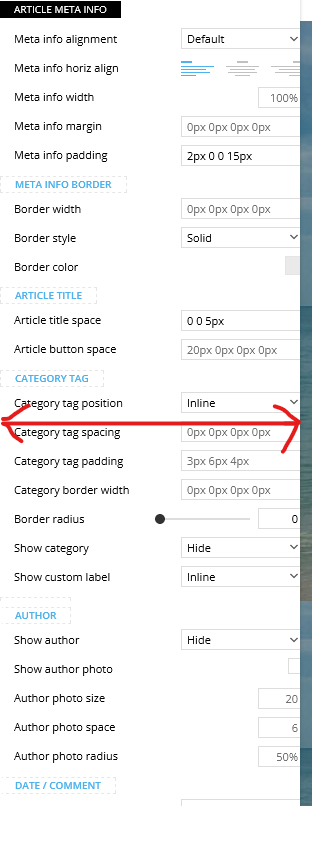
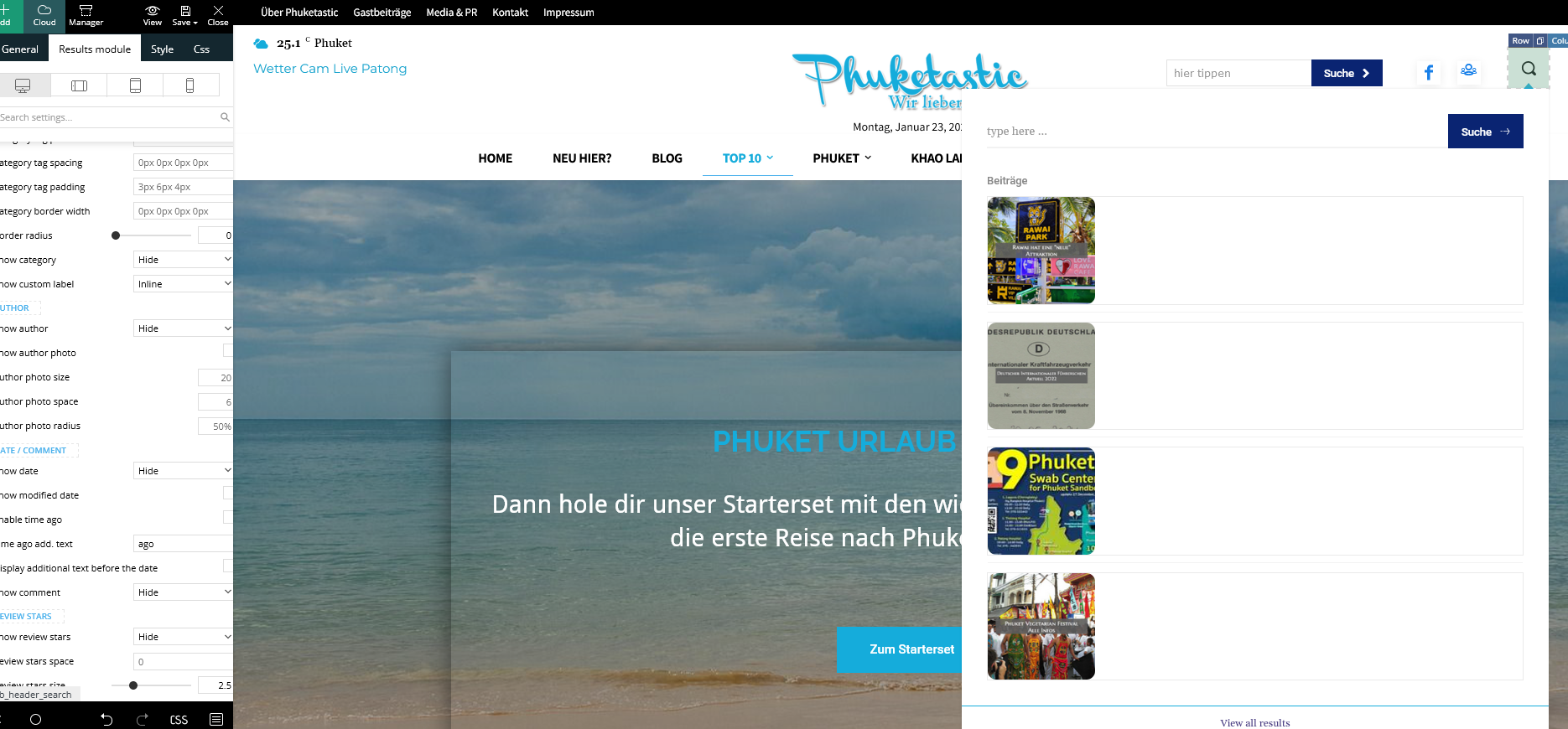
Best Regards
 Bettina
 Hello!
Please check the console and let me know which errors you encounter there.
Make a test and deactivate ALL plugins except tagDiv ones, also if you are using a cache plugin, deactivate it, clear all cache and try again.
Also, you can try to reinstall Cloud Library and the tagdiv Composer plugins.
Thank you!
 bo
bo Hello,
it was changed to :
.td-main-menu-logo img {

position:fixed;

}
Cache cleared but still the same. Can you also verify please?
Thanks
Anamaria Hello,
Please use position: absolute; and clear the cache.
Thank you!
Anamaria Hi,
For Cloudflare we have only this guide https://forum.tagdiv.com/cloudflare-cdn/
There are many optimization guides provided by our users here in the forum, some made by us; you could check some of them
– https://forum.tagdiv.com/cache-plugin-install-and-configure/
– https://forum.tagdiv.com/how-to-make-the-site-faster/
– https://forum.tagdiv.com/topic/high-number-of-ajax-request/
– https://www.infophilic.com/get-almost-100-pagespeed-newspaper-theme/
– https://forum.tagdiv.com/topic/score-100100-pagespeed-with-newspaper-wordpress-theme/
– https://www.andraware.com/wp-rocket-for-newspaper-theme/
– https://spraythemes.com/newspaper-theme/how-to-speed-up-the-newspaper-wordpress-theme-using-wp-rocket/
– https://forum.tagdiv.com/topic/page-speed-guide-for-2023-beginners-and-advanced/
– https://forum.tagdiv.com/topic/newspaper-theme-speedify-your-website/
– https://forum.tagdiv.com/topic/tutorial-chriss-custom-optimizations-for-functions-php-etc/
– https://forum.tagdiv.com/cloudflare-cdn/
– https://forum.tagdiv.com/topic/theme-causing-high-cpu-usage-2/
– https://forum.tagdiv.com/topic/sql-querys-high-cpu/
– https://forum.tagdiv.com/topic/newspaper-theme-slow-to-respond/
– https://premium.wpmudev.org/blog/optimizing-your-wordpress-database-a-complete-guide/
– https://underconstructionpage.com/optimize-wordpress-database/
– https://crunchify.com/better-optimize-wordpress-database-all-in-one-guide/
Also, pagespeed is not covered by support -> https://forum.tagdiv.com/newspaper-theme-support/
Thank you!
Bettina Hello!
Make a test and deactivate ALL plugins except tagDiv ones, also if you are using a cache plugin, deactivate it, clear all cache and try again.
Examine some other potential interfering factors: https://forum.tagdiv.com/general-options-may-interfere-newspaper-theme/
You can change the language from here: https://prnt.sc/6jkJPd_Y5Yu-
Also, you can translate from here: https://prnt.sc/SAq3yAGt2-No
I hope that helps you!
Thank you!
Bettina Hello @arvindk!
I’m sorry to hear about this.
Before every update, you need to deactivate the non-tested plugins with our theme and then update the theme and tagdiv plugins too.
Try to deactivate all the plugins and cache plugins that you use and try to reinstall the plugins again.
It could be from a plugin conflict or settings: https://forum.tagdiv.com/general-options-may-interfere-newspaper-theme/
If the issue is still there, then let us know. We will investigate the issue and let you know what can be done there.
Please contact us via email at contact@tagdiv.com and provide the following:
– admin url and credentials
– cpanel url and credentials
– a link to this topic in order to identify you
Thank you!
Bettina Hello Erekibeon!
Make a test and deactivate ALL plugins except tagDiv ones, also if you are using a cache plugin, deactivate it, clear all cache and try again.
Examine some other potential interfering factors: https://forum.tagdiv.com/general-options-may-interfere-newspaper-theme/
I hope that helps you!
Thank you!
Bettina Hello!
Make a test and deactivate ALL plugins except tagDiv ones, also if you are using a cache plugin, deactivate it, clear all cache and try again.
Examine some other potential interfering factors: https://forum.tagdiv.com/general-options-may-interfere-newspaper-theme/
I hope that helps you!
Thank you!
 drvarun5179
 For me, your homepage reflects two columns. Did you check it in private browsing?
Open the browser, and go incognito. Switch to responsive and refresh. That will show you live results. Also, if you are using Cloudflare, set it to development mode so the cache is not rendered for the testing period.
I am sorry, I have not toyed with mobile theme plugin codes. I did switch to custom mobile pages after deactivating the plugin, but it was disastrous and caused much damage to the search engine results already.
If you are looking to increase the number of posts on the homepage, this can be done by Theme panel> Mobile theme plugin> Grids.
One last thing, you have so many ads on your site. I will suggest not cluttering them together, almost 4 of them appear together covering 30% of the page. Try to set view limits to them.
 discovermh
 wp rocket is used for cache only…
we can use WP Super Cache or WP Fastest Cache but I prefer wp rocket.
Thanks for sharing your guide with us.
If you are familiar with theme customization then just provide me code for the above query so that more articles are visible on the same screen.
currently, only 3 articles are visible in a row and 1 article is on mobile.
after changes, 4 articles on desktop and 2 on mobile will be visible.
Anamaria Hello,
Did you use a plugin to optimize the CSS and Js? If yes, can you please disable those options, purge the cache and check it in the incognito tab?
Thank you!
Anamaria Hi,
Please check those topics
https://www.a2hosting.com/kb/a2-hosting-products/turbo-web-hosting/clearing-the-litespeed-cache#:~:text=On%20the%20leftside%20menu%20of,specific%20portions%20of%20the%20cache.
https://wordpress.org/support/topic/deleting-litespeed-cache/ You need to delete the file created by the Litespeed cache.
Thank you!
Anamaria Hello,
Please edit with tagdiv Composer, select the search and check if what you to displayed is set to show https://i.imgur.com/v6KGyaY.png
If your settings are not saved, please check this topic -> https://forum.tagdiv.com/topic/tagdiv-composer-does-not-save-only-content-of-homepage/ and try the suggestions. Also, please check the cache, and clear/purge all cache.
Thank you!
Anamaria Hello,
Check if there is an object cache applied on the backend. Here is a guide that will help you with this: https://forum.tagdiv.com/general-options-may-interfere-newspaper-theme/. After removing the object cache file, the theme will work as before.
Thank you!
drvarun5179 Can you tell me why autoptimize with wp rocket? I am interested because there are some key functions wp rocket does not provide (memecache).
Also, the second guide is mine. ?
Anamaria Hello,
Please select remove https://i.imgur.com/3ah7Udf.png and upload another image. If your settings are not saved, please check this topic -> https://forum.tagdiv.com/topic/tagdiv-composer-does-not-save-only-content-of-homepage/ and try the suggestions. Also, please check the cache, and clear/purge all cache.
Thank you!
Anamaria Hello,
Please select remove https://i.imgur.com/3ah7Udf.png and upload another image. If your settings are not saved, please check this topic -> https://forum.tagdiv.com/topic/tagdiv-composer-does-not-save-only-content-of-homepage/ and try the suggestions. Also, please check the cache, and clear/purge all cache.
Thank you!
Anamaria Hi,
There are many optimization guides provided by our users here in the forum, some made by us; you could check some of them
– https://forum.tagdiv.com/cache-plugin-install-and-configure/
– https://forum.tagdiv.com/how-to-make-the-site-faster/
– https://forum.tagdiv.com/topic/high-number-of-ajax-request/
– https://www.infophilic.com/get-almost-100-pagespeed-newspaper-theme/
– https://forum.tagdiv.com/topic/score-100100-pagespeed-with-newspaper-wordpress-theme/
– https://www.andraware.com/wp-rocket-for-newspaper-theme/
– https://spraythemes.com/newspaper-theme/how-to-speed-up-the-newspaper-wordpress-theme-using-wp-rocket/
– https://forum.tagdiv.com/topic/page-speed-guide-for-2023-beginners-and-advanced/
– https://forum.tagdiv.com/topic/newspaper-theme-speedify-your-website/
– https://forum.tagdiv.com/topic/tutorial-chriss-custom-optimizations-for-functions-php-etc/
– https://forum.tagdiv.com/cloudflare-cdn/
– https://forum.tagdiv.com/topic/theme-causing-high-cpu-usage-2/
– https://forum.tagdiv.com/topic/sql-querys-high-cpu/
– https://forum.tagdiv.com/topic/newspaper-theme-slow-to-respond/
– https://premium.wpmudev.org/blog/optimizing-your-wordpress-database-a-complete-guide/
– https://underconstructionpage.com/optimize-wordpress-database/
– https://crunchify.com/better-optimize-wordpress-database-all-in-one-guide/
Also, pagespeed is not covered by support -> https://forum.tagdiv.com/newspaper-theme-support/
Thank you!
drvarun5179 Mobile theme or mobile theme plugin?
For mobile theme, you have to make your own customisations.
For mobile theme plugin, this is possible with knowledge of coding.
In my opinion, it is better the mobile theme plugin is left as it is. The plugin has huge speed bonus if combined with a cache plugin and cdn (clodufare for me).
And yes, they did add new feature to mobile theme plugin. The hamburger menu now has dropdown menus finally. ?
drvarun5179 Clear cache , improve rules. Your site is not broken



