
- NewsmagRequirements for Newsmag
- NewsmagHow to update the theme
- NewsmagtagDiv Social Counter tutorial
- NewsmagTop bar templates
- NewsmagAjax view count
 Calin
Calin Hi,
Do you use the responsive version or a mobile page? If it is a mobile page, please edit it with tagDiv Composer, reduce the page size/elements, and also use a cache plugin to delay the ads until the first user interaction. This will provide better results for WCV.
Thank you!
 Simion C.
 Hi,
Such issues are most likely caused by the caching configuration. When using the options mentioned above for the header, the caching must be configured to create separate caches for desktop and mobile. Most caching plugins have a setting for it. Litespeed has this setting https://prnt.sc/Fq7cLtLU-HWS If you use litespeed, please activate that option, clear the cache and the problem should be solved.
Please try it. Or in case you use something different for caching, or you already activated that setting and the problem remains, please send us an email with the website link and admin login and we will take a closer look.
Thank you!
 malmed_wp
 All the tools fail to give a reliable result. The Facebook debugger can display the image without errors, and Yoast also shows the image correctly in its settings. However, when you share the post on a Facebook page, the image may be missing. We try to solve the problem by reposting several times, clearing the cache, waiting, and trying again. It’s exhausting.
The image size is correct, and all attributes are set. It’s still hard to see a clear pattern, but it’s obvious that this issue appears with the Newspaper theme — I’ve seen similar cases on other sites.
The author of that discussion confirms this as well. That’s why I wanted to ask him again whether he found a solution.
Calin Hi,
This issue is related to how WordPress handles permalinks and page slugs, not your theme.
Please follow these steps:
Edit the page titled “The Café”.
Under the page title, click “Edit” next to the permalink and make sure the slug is exactly the-cafe, then update the page. https://i.imgur.com/jgj2Ltj.png
Go to Settings > Permalinks in your dashboard and click “Save Changes” (this refreshes permalink structure, even if you don’t change anything).
Clear your browser cache and any caching plugin or server cache you might be using.
Try viewing the page again.
If it still redirects to /the-cafe-8/, it may be cached in your database. In that case, try creating the page with a new slug (e.g. the-cafe-new) and see if that works.
Let me know how it goes!
Calin Hi,
Yes, for best performance we recomand a premium cache plugin, as you mentioned is the WP Rocket plugin with cloudflare CDN.
For images, the EWWW Image Optimizer can be used to optimize them.
Unfortunately, we can not provide a GPL license for WP Rocket, sorry!
Thank you!
 vet
vethello, thanks for great work.
I have read that you prefer Wp rocket and cloudflare CDN for the best optimization.
It they only enough ?
should I activate another plugin for cache? or images?
Lastly, Can You provide a GPL license for Wp rocket?
Thank you.
 stemalo
 Solved, thank you. Was an issue with cache. Works now!
Calin Hi,
The problem should be resolved – https://i.imgur.com/UKLZRhs.png just make sure that you have no cache applied to the browser.
Thank you!
 Quorum SDL
Hi tagDiv team,
I’m facing a critical issue with the tagDiv Composer when trying to edit the homepage of my website, which uses the Newspaper theme version 12.7.1. The page was built entirely with Composer, but I can no longer open it in the visual editor.
The following error appears:
Error at zones: 6(models) : 5(dom). The model does not match the content. Current state has involved an issue. You could try an UNDO operation (CTRL+Z / CTRL+SHIFT+Z)
The page is displayed correctly on the front end — the problem occurs only when attempting to edit it in Composer.
Here’s what I’ve tried so far:
Cleared browser and site cache;
Deactivated and reactivated the Composer plugin;
Updated all plugins and the theme;
Manually checked and fixed duplicate el_ids and empty zones via the Classic Editor.
Even after cleaning up the code, the Composer still won’t load the homepage.
I’d appreciate help with the following:
What exactly causes this error in the Composer?
Is there a safe way to rebuild or re-sync the DOM model?
Is it possible to recover editing capabilities without recreating the page from scratch?
Thanks in advance for any guidance.
Affected page URL: https://ensaiodesi.com.br/
 regio-online
 Hi Calin,
Thanks for the helpfull insight. But I believe I have solved the proble regarding the database. It has someting to do with the theme but more so with wp Heartbeat API.
In figuring out witch rows that are left are the largest in WP I ran an SQL query:
SELECT meta_key, COUNT(*) AS number_of_rows
FROM wp_postmeta
GROUP BY meta_key
ORDER BY number_of_rows DESC;
This gave met the following list:
post_views_count
64288
rank_math_internal_links_processed
50282
_edit_last
48835
_edit_lock
47508
rank_math_focus_keyword
47228
rank_math_seo_score
38447
tdc_dirty_content
37281
tdc_icon_fonts
37271
post_view_7days_last_day
32308
post_views_count_7_day_last_date
32308
post_views_count_7_day_total
32308
post_views_last_24_hours
32120
post_views_last_48_hours
As you can see there are a lot post_views wich we don’t use. Can this be disabeled through the themepanel also? For now I delete all the rows starting with post_view
But two other elements are just as important _edit_last; and _edit_lock; Edit lock should only be used by wp for a short while preventing for several authors to work on the same post. Those rows should delete itself, but as you can see, there are over 47.000 rows of it. It seems that a wrong or non presint Heartbeat API was responsible for that. So I also delete _edit_last and _edit_lock
Th datbase witch was 3.1GB large with a postmeta of 2.6GB is now a 1.09GB database with 898MB postmeta.
Installed WP Rockect again with preload. Installed and enabled Redis Object cache and am testing the staging sites performance It all seems to work fine after several hours and is ligtning fast again.
Thanks for yur every positive support and patience Calin. Hope I realy tackeld the issue once and for all this time.
 JGL
JGL Dear Calin,
Thank you. We are using Jetpack Boost as the optimise plugin, and wordpress suggest us not to use other cache plugin to avoid any potential conflict.
May I ask if there is anyway other ways to set the fetchpriority attribute to high for the image?
Best regards
 franfar
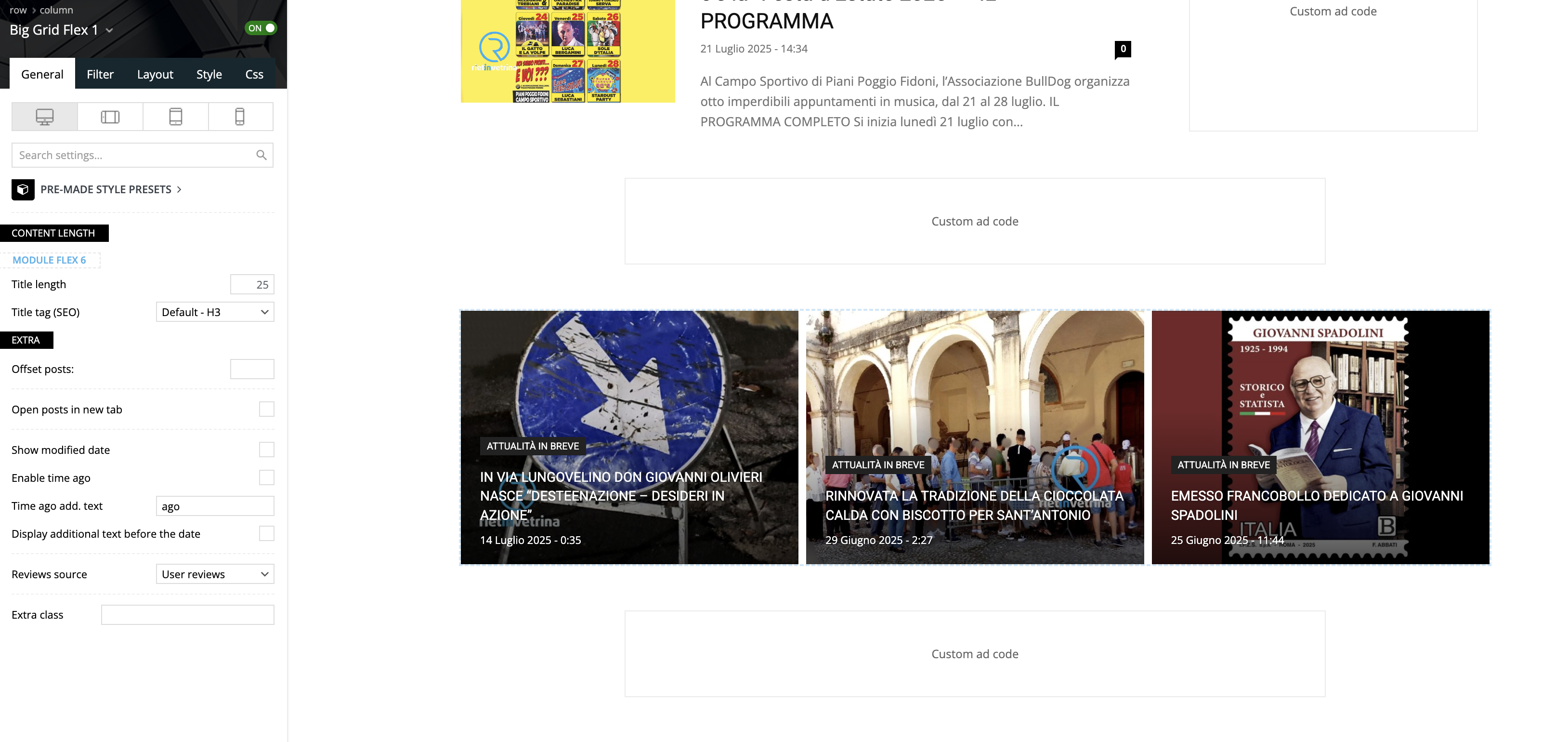
Good morning, using the Big Grid Flex 1 on the homepage of a website we noticed that, on the builder preview it’s all ok, but navigating normally, the third column is not inline with the other 2, but goes on a second row.
Please take a look to these screenshots:
– builder preview
– website view
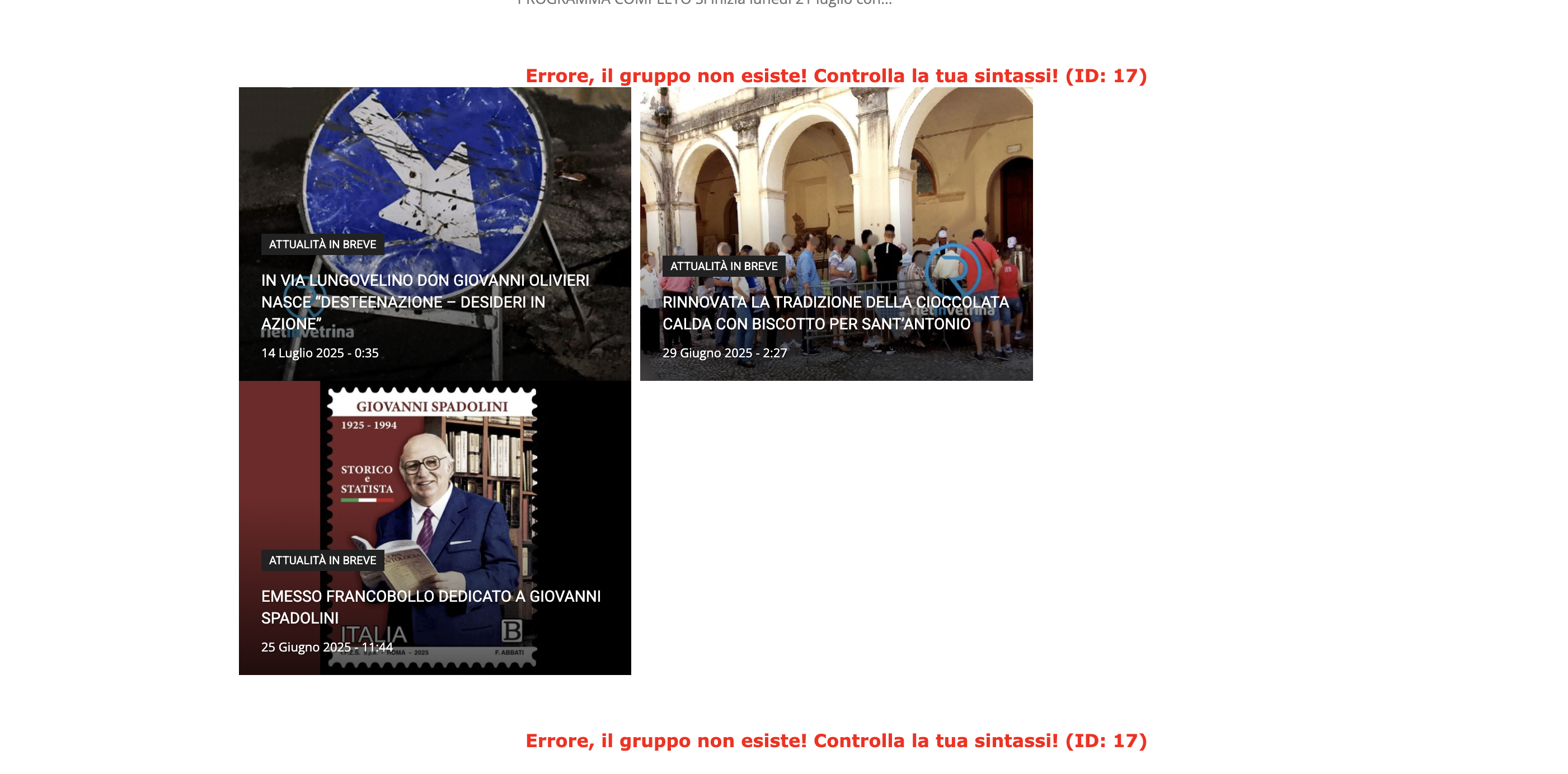
We tested on Safari and Chrome, using 2 different computers and deleting cache.
The website is reachable only by admin.
Can you please help?
Thank you!
Calin Hi,
This cna be done using a cache or an optimise plugin. For example, the WP Rocket plugin can do this.
Thank you!
 ericseabra
Hello, TagDiv Team and Community,
I’m facing a critical issue with managing domain licenses for my Newspaper theme, and I need urgent assistance to resolve it.
Currently, when trying to manage domain license activations and deactivations, the relevant buttons appear unavailable. There’s a clear message indicating that the next management action will only be possible after a future date: “To use a license key on a different domain, you can unassign it from the list anytime after 2025-08-17 15:12:41 UTC + 02:00.”
This time restriction is severely impeding the progress of my migration and development project, and I cannot wait until that date. I need to manage these licenses today. The current situation and necessary actions are as follows:
I have a main website (fonteemfoco.com.br) and a test environment (teste.fonteemfoco.com.br). During the migration and testing process, I created some temporary domains provided by the hosting provider for different development phases. However, due to technical issues or completed testing phases, some of these temporary domains urgently need to be unlinked and a new one activated to continue the work.
I have already cleared the website and browser cache and tried managing the domains in different browsers (Mozilla Firefox, Google Chrome, and Safari), without success.
I believe the time constraint is the only impediment.
I kindly request, but with the utmost urgency, that the TagDiv team release license management for my account immediately, or, alternatively, perform the necessary deactivations/activations and assignments/unassignments remotely.
An email with further details has been sent to contact@tagdiv.com.
I am immensely grateful for your attention and prompt assistance.
Website: fonteemfoco.com.br (Please see the details of my license associated with this domain. All details were sent to the email address contact@tagdiv.com on 2025-07-28 13:02 to identify the specific temporary domains I mentioned.)
Calin Hi,
Most of the cache plugins can create cache on different viewports
Please check in the theme panel > footer and see if the ” Footer delayed load” is enabled, if is, please disable it, and clear all cache.https://i.imgur.com/VjKbznG.png
Thank you!
Calin Hi,
If the problem is resolved after the page is re-saved, then it is related to some cache settings. When the page is re-saved, the cache on that page is cleared.
Thank you!
 giulionicolai
Hello, I’m using the Newspaper theme with the default Gutenberg block editor. In the editor, all H2 and H3 headings appear correctly styled and sized. However, when viewing the live post, those same headings are rendered extremely small—almost unreadable—on all devices and articles.
I haven’t made any CSS customizations or used a child theme. The site is running WP Super Cache, but clearing the cache doesn’t fix the issue. The problem seems to be related to the theme’s default CSS or its compatibility with Gutenberg heading blocks.
How can I restore proper heading sizes on the frontend without switching to tagDiv Composer? Any help would be appreciated!

 Calin
Calin Hi,
You can disable the lazy load option in the theme by going to:
Theme Panel > Template Settings > Image Loading
Here’s a visual reference: https://imgur.com/R4MOOy1
Also, please check if you’re using any cache or image optimization plugins. Many of them include their own lazy loading features. It’s recommended to enable lazy loading from only one source to avoid conflicts.
Thank you!
Calin Hi Aldis,
The best recommendation will be to use the ACF plugin so you can create exactly the CPT you need, including taxonomies and custom fields. Those from our demos can be used as guides on how to set up the files, taxonomies, templates, etc. But for a big website, it will be recommended to be clean and to the point.
The theme will work with 100k, you just need to have enough resources for your website and use some cache for the database and users.
Unfortunately, the theme does not have an option for data import in that kind of page, but I think it can be used an extra plugin for importing data.
Thank you!
 David
DavidEnvironment
Newspaper 12.7.1 (fix claimed in 12.6.9)
WP 6.4.2, PHP 8.x
Permalinks: “/%category%/”
All caching/minification plugins disabled; server cache purged
Issue
On two independent sites, Posts Loop 2 still renders only a handful of posts on the front end—even though the Composer preview shows the full list.
Workaround
Switching to the Flex Loop Builder block surfaces all posts correctly.
Expected
Posts Loop 2 on category templates should output all posts exactly as shown in the preview.
—
Thanks for looking into restoring full loop support!
Calin Hi,
Usually, when this happens, it is used a cache that does not have the option to deliver a separate mobile cache version. Also, sometimes it can be Cloudflare cache, if this is used (the free version does not have a separate cache per viewport).
The simplest way to resolve the problem is to disable the tagDiv Mobile theme plugin, or in case the amp plugin is used to be set to be used only on amp version https://i.imgur.com/mn3AIzp.png also, make sure that the amp redirect is disabled https://i.imgur.com/P5XcUxA.png
Thank you!
 We Radio
Hi,
I’m using the Newspaper theme (latest version) and I’ve encountered a persistent issue:
The native td-icon icons are not displaying anywhere on the site. Instead of icons (like td-icon-facebook, td-icon-search, etc.), I only see empty squares or nothing at all.
Here’s what I’ve already tried:
✅ tagDiv Standard Pack is installed and activated from Theme Panel → Plugins.
✅ Cache has been cleared (using WP Super Cache and hard refresh – Ctrl+Shift+R).
✅ No Font Awesome or external icon kits are interfering.
✅ I checked the source code — there’s no td-icon-font.css or similar icon font being loaded.
✅ Developer Tools show that no font related to td-icon is being requested or loaded at all.
✅ No errors in console related to icons or missing resources.
✅ I also tested adding <i class=”td-icon-facebook”></i> directly in a widget and in post content — still not visible.
Site URL: https://weradio.ro/
I haven’t modified the theme files manually, and all required plugins from the tagDiv panel are activated.
Please advise how to properly restore the td-icon functionality. Is there anything missing from my installation or something else I should check?
Thanks in advance,
Vlad
 ahmedkhaled912
Hi TagDiv Support,
I’m using the latest version of the Newspaper theme (v12) along with the TagDiv Composer plugin. I’m currently encountering a critical issue: whenever I try to edit any page using TagDiv Composer, I get a 404 error.
Here’s what I’ve done so far to troubleshoot:
Updated WordPress, the Newspaper theme, and all plugins to the latest versions
Resaved permalink settings
Cleared all cache (browser, site, CDN)
Deactivated all other plugins to check for conflicts
Verified that the pages exist and are using the correct templates
I also enabled debugging and noticed this warning in the logs:
Function _load_textdomain_just_in_time was called incorrectly. Translation loading for the “td-cloud-library” domain was triggered too early.
(From: /wp-includes/functions.php on line 6121)
This may point to an issue with how the theme or plugin handles translation loading, possibly affecting the TagDiv Composer’s ability to load edit URLs correctly.
Can you please advise:
Is this a known issue in the current version?
Is there a patch or update available to resolve this?
Are there any specific server settings or requirements (e.g., rewrite rules, PHP version) that I should verify?
Looking forward to your help as this is preventing us from editing content on the site.
 568Winmk
 Hi Calin,
I’ve updated the .htaccess file as you suggested and also cleared the cache, but unfortunately, the template issue remains. Whenever I click on “Edit,” it redirects me to the homepage, and I’m completely unable to make any changes.
Could you kindly provide further assistance? Thank you!
Here’s a screenshot for reference:
 emmalabbe
Hi,
We’re currently facing serious performance issues on our website, which uses the Newspaper theme and TagDiv modules. Over the past few weeks, we’ve noticed a significant slowdown specifically related to the loading of TagDiv components.
Our server infrastructure is robust (o2switch – 48GB RAM, NVMe disks, high-performance CPUs), and everything runs smoothly with a clean WordPress installation. However, with the Newspaper setup, we’re seeing 5 to 7 seconds of loading time on both the frontend and the WordPress admin, which is not acceptable—especially for SEO.
To give you more context:
• Production: https://devenirbilingue.com
• Staging: https://new.devenirbilingue.com (fresh WP install + duplicated DB from prod)
We’ve already tried the following:
• Installed Query Monitor: SQL queries are fast (< 0.5s), so it’s not a database bottleneck.
• Tested with caching (W3 Total Cache and WP Super Cache): helps when cached, but uncached pages are still very slow.
• Deactivated all plugins: no improvement.
• Switched to the parent theme and even to default themes: the issue seems to lie deeper in the TagDiv components.
This performance degradation started around June 2025. Before that, everything was running smoothly under the same setup.
We’re happy to provide access to both environments if needed.
Would you be able to help us troubleshoot this issue?
Attached is a screenshot with few query monitor screenshots:

<image 1>
Admin dashboard loading time
<image 2>
Homepage loading time
<image 3>
Another random page. The red part is external queries but all errors on them are .04s so not the issue.
Thank you in advance.
Emma



