
- NewspaperWP Rocket and Newspaper Theme: Optimization Guide
- TutorialsWhat is Ajax preloading?
 simchris
 I don’t work here, but likely need more info than that for admin help.
What are you trying to do, what error are you getting? Did you try disabling any plugins other than the tagdiv page builder? Clear cache? Were you able to make posts in past, now cannot?
 nilasisx
 it’s working for me, tried with different browsers.
Try to clear the cache of the browser, and try again.
 Bettina
 Hello Guido!
The reason why the page flashes is due to the way the browser is handling the loading of a new page. When you return to a page, it will not flash because it has already been loaded and cached.
Thank you!
Bettina Hello!
@SurFM You need to uninstall the Mobile Theme plugin and AMP and use the option 1 or 2 mentioned above. They can be customized better than the mobile theme. Please read all about the mobile theme and its options above.
@scottjengle This situation appears when you are using the mobile theme plugin and the cache plugin that you have does not feature options for a separate mobile theme plugin therefore do not know when to deliver the mobile version and when to deliver the desktop version. You have to change the cache plugin that you are using and use mobile theme or just use the mobile page or the responsive version(option 1 or 2) and deactivate the Mobile theme plugin.
Thank you!
 Anamaria
 Hello,
Please check this guide https://www.hostinger.com/tutorials/504-gateway-timeout
Also, have you checked for a plugin conflict? Please deactivate ALL plugins, including WP Bakery, except tagDiv ones. Also, if you use a child theme or cache plugin, deactivate them, clear all cache, and try again.
Thank you!
 scottjengle
 For the past few weeks, I have been having issues which is not constant. On the desktop at times it reverts to the mobile version, the only way to clear it sometimes is to dump the cache but not always. it is very frustrating
Thank You
newspaper 12
Bettina Hello!
Please make sure you have the latest update of the theme and plugins.
First of all, try to do these steps as quickly as possible so your visitors do not notice the process:
1. disable TagDiv Composer
2. uninstall(delete) TagDiv Composer
3. clear cache (if cache plugin exists)
4. install TagDiv Composer
5. activate TagDiv Composer
6. clear cache (if cache plugin exists)
Thank you!
Anamaria Hi,
Please ensure that there are no conflicts with untested plugins by deactivating all non-tested plugins, including any child themes you are using. Additionally, clear all cache and try again.
Make sure to resave your permalinks.
Check if the following code is missing from your .htaccess file: https://www.screencast.com/t/iN0R93dD3p. This requirement is not displayed in the System status , and add this code: https://i.imgur.com/k44HWD5.png. You may want to ask your hosting provider for assistance with this. For more details, refer to https://forum.tagdiv.com/requirements-for-newspaper/ and https://forum.tagdiv.com/tagdiv-composer-not-working/.
Thank you!
Bettina Hello!
For me, it works well in the desktop viewport.
Please try to delete it and add it again. Save and clear all the cache.
Thank you!
 magnusstrandberg
 Failed to load resource (wp_editor) the server responded with a status of 403 ()
Added <IfModule mod_substitute.c>
SubstituteMaxLineLength 10M
</IfModule>
in htaccess still not working
deactivated cache-plugin and cleared chache, still not working
-
This reply was modified 1 year by
magnusstrandberg.
 helderbsousa77
 Hi, before the upgrade, the login appeared next to the menu and the nresletter form also appeared.
On mine, perhaps because I haven’t cleared the cache yet, it appears like this:
I didn’t change anything after logging in and these items are gone.
How to do it?
https://app.screencast.com/v7Imdy0xihMyd
https://app.screencast.com/c88SXmTHlQfFY
Bettina Hello!
I see the website looks like this: https://app.screencast.com/VpMX4t3uqw0e8
It could be a cache plugin issue if you see only the logo like that. Please deactivate all the cache tools that you use and try again.
Thank you!
Bettina Hello!
Go to the Dashboard -> Settings -> Permalinks and hit the save button.
Make sure you do not have a plugin with any redirection.
You can try to make a test and deactivate ALL plugins except tagDiv ones. Also, if you are using a cache plugin, deactivate it, clear all cache, and try again.
Thank you!
Bettina Hello!
Please ensure you have the latest theme update and check the console while the feature is loading, so there could be an error or something.
First of all, make a test and deactivate ALL plugins except tagDiv ones. Also, if you are using a cache plugin, deactivate it, clear all cache, and try again.
If the problem is still there, then please get in touch with us via email at contact@tagdiv.com and provide the following:
– admin URL and credentials
– cPanel URL and credentials
– a link to this topic to identify you
We’ll check and try to help you as soon as possible!
Thank you!
Bettina Hello!
Sometimes, the issue can be caused by a plugin conflict or a cache issue. That’s why we recommend first deactivating ALL plugins except tagDiv ones; if you are using a cache plugin, deactivate it, clear all cache (also from your browser), and see the results.
Thank you!
Anamaria Hello,
To align them, please display them inline https://i.imgur.com/uOAPhmO.jpeg -> https://i.imgur.com/iBjV3Pb.jpeg
Also, have you checked for a plugin conflict? Please deactivate ALL plugins, including WP Bakery, except tagDiv ones. Also, if you use a child theme or cache plugin, deactivate them, clear all cache, and try again.
Thank you!
Anamaria Hello,
You have the mobile theme plugin activated; please deactivate it and clear the cache.
Also, this plugin Spectra has not been tested with the theme and can cause issues.
Using our theme, you can choose from 3 mobile versions
-> mobile responsive => https://www.screencast.com/t/oJ2ShOp47
-> mobile theme plugin => https://forum.tagdiv.com/the-mobile-theme/
-> mobile page => https://tagdiv.com/newspaper-10-3-7-update-brings-customizable-and-fast-mobile-pages/ The option that you need to use.
Suppose you created the mobile pages with tagDiv Composer. In that case, when you install the Mobile Theme plugin, your pages will be overwritten by the plugin (the mobile theme comes with its templates for page, post, category, etc, so your current templates from the desktop theme will get converted to the mobile theme layout, the page content is made without builders in mobile editor => https://www.screencast.com/t/xbgZG8kH also, the options that are provided to edit the mobile theme version are limited (this keeps the things simple)).
This is a video about Responsive Newspaper Theme, AMP & Mobile Theme, Mobile Pages & Templates -> https://www.youtube.com/watch?v=SpGkOnJeNZY.
So, the mobile responsive is what you see when that you select the viewport on phone => https://www.screencast.com/t/matV17hH, so some settings may apply for each viewport(where is the border blue), and others are not(where the border is black).
The mobile page has the mobile templates from Cloud Library => https://www.screencast.com/t/YCcZ8rL8
The Mobile responsive version of the theme and the mobile page editor can be edit with tagDiv Composer, the mobile theme plugin cannot.
For example, you can have the mobile theme plugin activated and use the mobile page/mobile responsive version for the homepage/pages, but for the categories pages/404 page, you can’t use the mobile page/mobile responsive version if you have the mobile theme plugin activated.
So, if you want to design the pages with tagDiv Composer, you can use the mobile page or mobile responsive version.
Thank you!
Anamaria Hello,
You have the mobile theme plugin activated; please deactivate it and clear the cache.
Using our theme, you can choose from 3 mobile versions
-> mobile responsive => https://www.screencast.com/t/oJ2ShOp47
-> mobile theme plugin => https://forum.tagdiv.com/the-mobile-theme/
-> mobile page => https://tagdiv.com/newspaper-10-3-7-update-brings-customizable-and-fast-mobile-pages/ The option that you need to use.
Suppose you created the mobile pages with tagDiv Composer. In that case, when you install the Mobile Theme plugin, your pages will be overwritten by the plugin (the mobile theme comes with its templates for page, post, category, etc, so your current templates from the desktop theme will get converted to the mobile theme layout, the page content is made without builders in mobile editor => https://www.screencast.com/t/xbgZG8kH also, the options that are provided to edit the mobile theme version are limited (this keeps the things simple)).
This is a video about Responsive Newspaper Theme, AMP & Mobile Theme, Mobile Pages & Templates -> https://www.youtube.com/watch?v=SpGkOnJeNZY.
So, the mobile responsive is what you see when that you select the viewport on phone => https://www.screencast.com/t/matV17hH, so some settings may apply for each viewport(where is the border blue), and others are not(where the border is black).
The mobile page has the mobile templates from Cloud Library => https://www.screencast.com/t/YCcZ8rL8
The Mobile responsive version of the theme and the mobile page editor can be edit with tagDiv Composer, the mobile theme plugin cannot.
For example, you can have the mobile theme plugin activated and use the mobile page/mobile responsive version for the homepage/pages, but for the categories pages/404 page, you can’t use the mobile page/mobile responsive version if you have the mobile theme plugin activated.
So, if you want to design the pages with tagDiv Composer, you can use the mobile page or mobile responsive version.
Thank you!
Bettina Hello!
Make sure your server is strong enough. Check all these requirements for the theme here: https://forum.tagdiv.com/requirements-for-newspaper/
Examine some other potential interfering factors: https://forum.tagdiv.com/general-options-may-interfere-newspaper-theme/
Make a test and deactivate ALL plugins except tagDiv ones. Also, if you are using a cache plugin, deactivate it, clear all cache, and try again.
Thank you!
Bettina Hello!
This white bar seems to be from a cookie plugin. Deactivate it, clear the cache, and check the results.
Thank you!
 IdentidadyFuturo
Hello,
I am using the Responsive theme on fiestascostumbristas.cl, and I am experiencing an issue with the mobile view:
The mobile search and mobile menu do not expand, and they also freeze the site’s display.
Now, I was reading the forum and followed some recommendations, such as deactivating plugins, and I found that LiteSpeed Cache is the problem. Disabling it solves the issue: I’m attaching screenshots.
How can you help me solve the problem?
Thank you.
IdentidadyFuturoHello,
I am using the Responsive theme on fiestascostumbristas.cl, and I am experiencing an issue with the mobile view:
The mobile search and mobile menu do not expand, and they also freeze the site’s display.
Now, I was reading the forum and followed some recommendations, such as deactivating plugins, and I found that LiteSpeed Cache is the problem. Disabling it solves the issue: I’m attaching screenshots.
How can you help me solve the problem?
Thank you.
 Alex harper
 im using right now ngnix helper fast cgi cache
and wp super cache plugin
 Pazan
PazanHello,
I’m experiencing an issue with the Newspaper theme and the tagDiv Composer. When I click on “Edit Content” in the frontend editor, the screen keeps loading indefinitely, and I’m unable to make any changes to the content.
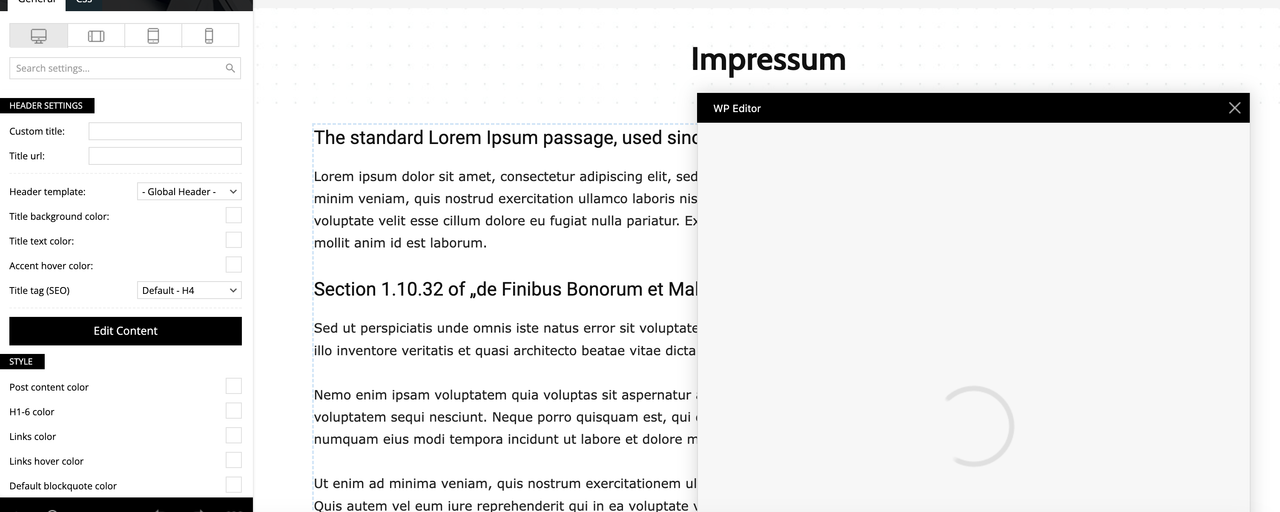
Here is some information about my setup:
Theme: Newspaper (Version 12.6.8)
Page Builder: tagDiv Composer
PHP Version: 8.0.30.4
WordPress Version: (6.7.1)
Memory Limit: 256M (recently increased, confirmed in the system status)
Server: GoDaddy hosting
Steps I’ve Already Taken:
Increased PHP memory limit to 256M in wp-config.php.
Cleared browser and WordPress cache.
Despite these actions, the problem persists. Could you please advise me on how to resolve this issue? I’m unsure if it’s a conflict or a server-related problem.
Thank you in advance for your help!
Best regards,
(Philipp)
 petar777
 Alex, check my website here – eurocom.bg
I did a lot of optimising and I want to say that fast speeds are possible. I have NGINX and have redis and fastcgi also I use WPROCKET. When you optimise things correctly – you get great speeds when pages are cached. However, if you have trouble with noncached pages which was my case – I used Super Speedy Plugins. Without cache pages used to load for 10 seconds, now they load for 1 second without cache, also you can check my search bar – it has incredible speeds with over 500k posts. I will attach a link to the plugins, I left a video review for them and you can see the difference. https://www.superspeedyplugins.com/ (scroll to see my review).
If you want to I can share my wp rocket settings if needed.



