
No search results were found in Documentation!
 Alex
AlexHi,
In your default NP demo, you use WP Rocket to optimise the site.
Can you please provide a guide recommended by TagDiv for Newspaper theme using WP Rocket?
Your guides for free WP Super Cache, Autoptimize etc do not solve issues required to comply with Core Web Vitals.
Therefore, it is misleading to advertise that the theme is CWV ready, but in fact it is not ready, since a premium WP Rocket plugin is used in order to make it ready.
Thank you.
 Tikonenko
 I wanted to inform you that I have identified and resolved the mobile display issue on my website, bioeconomia.info. The root cause was related to the cache configuration.
I hope this information proves helpful in case other users encounter similar issues.
Best regards,
Emiliano.
 Bettina
 Hello Vaclav!
Unfortunately, I can’t see that error.
Make a test and deactivate ALL plugins except tagDiv ones, also if you are using a cache plugin, deactivate it, clear all cache and try again.
Let me know the results!
Thank you!
 Calin
Calin Hello,
I would go with some recommendations. For starters, what I would suggest is to use only cloud templates to be able to disable the tagDiv Standard Pack plugin.
Then, making sure you have the latest version of the theme, try these options – https://i.imgur.com/UGzkI86.png – https://i.imgur.com/JW8nxAX.png and on cloud header you can disable the desktop version on mobile and mobile version on desktop (this can be done for sticky menu too) using tagDiv Composer – https://i.imgur.com/kZYGhB7.jpg – https://i.imgur.com/Gu4JUkT.png using this option will need to have in cache the option to cache the mobile version separate from the desktop.
I hope this will help you!
Calin Hi,
I just checked the website and now I see that the images are displaying – https://i.imgur.com/3oFcqpP.png maybe it was some cache or something like that.
Thank you!
 Anamaria
 Using our theme, you can choose from 3 mobile versions
-> mobile responsive => https://www.screencast.com/t/oJ2ShOp47
-> mobile theme plugin => https://forum.tagdiv.com/the-mobile-theme/
-> mobile page => https://tagdiv.com/newspaper-10-3-7-update-brings-customizable-and-fast-mobile-pages/ The option that you need to use.
Suppose you created the mobile pages with tagDiv Composer. In that case, when you install the Mobile Theme plugin, your pages will be overwritten by the plugin (the mobile theme comes with its templates for page, post, category, etc, so your current templates from the desktop theme will get converted to the mobile theme layout, the page content is made without builders in mobile editor => https://www.screencast.com/t/xbgZG8kH also, the options that are provided to edit the mobile theme version are limited (this keeps the things simple)).
This is a video about Responsive Newspaper Theme, AMP & Mobile Theme, Mobile Pages & Templates -> https://www.youtube.com/watch?v=SpGkOnJeNZY.
So, the mobile responsive is what you see when that you select the viewport on phone => https://www.screencast.com/t/matV17hH, so some settings may apply for each viewport(where is the border blue), and others are not(where the border is black).
The mobile page has the mobile templates from Cloud Library => https://www.screencast.com/t/YCcZ8rL8
The Mobile responsive version of the theme and the mobile page editor can be edit with tagDiv Composer, the mobile theme plugin cannot.
For example, you can have the mobile theme plugin activated and use the mobile page/mobile responsive version for the homepage/pages, but for the categories pages/404 page, you can’t use the mobile page/mobile responsive version if you have the mobile theme plugin activated.
So, if you want to design the pages with tagDiv Composer, you can use the mobile page or mobile responsive version.
No, you do not need a plugin to redirect to the homepage; this will automatically change, but please make sure that you have a cache plugin with the support alos mobile versions.
Thank you!
Anamaria Hello,
There are many optimization guides provided by our users here in the forum, some made by us; you could check some of them
– https://www.infophilic.com/get-almost-100-pagespeed-newspaper-theme/
– https://forum.tagdiv.com/cache-plugin-install-and-configure/
– https://forum.tagdiv.com/how-to-make-the-site-faster/
– https://forum.tagdiv.com/topic/high-number-of-ajax-request/
– https://forum.tagdiv.com/topic/score-100100-pagespeed-with-newspaper-wordpress-theme/
– https://www.andraware.com/wp-rocket-for-newspaper-theme/
– https://forum.tagdiv.com/topic/page-speed-guide-for-2023-beginners-and-advanced/
– https://forum.tagdiv.com/topic/newspaper-theme-speedify-your-website/
– https://forum.tagdiv.com/topic/tutorial-chriss-custom-optimizations-for-functions-php-etc/
– https://forum.tagdiv.com/cloudflare-cdn/
– https://forum.tagdiv.com/topic/theme-causing-high-cpu-usage-2/
– https://forum.tagdiv.com/topic/sql-querys-high-cpu/
– https://forum.tagdiv.com/topic/newspaper-theme-slow-to-respond/
– https://premium.wpmudev.org/blog/optimizing-your-wordpress-database-a-complete-guide/
– https://underconstructionpage.com/optimize-wordpress-database/
– https://crunchify.com/better-optimize-wordpress-database-all-in-one-guide/
Also, pagespeed is not covered by support -> https://forum.tagdiv.com/newspaper-theme-support/
To be able to optimize and to remove CLS and LCP please check these guide => https://developers.google.com/web/tools/lighthouse/ -> https://www.sqlpac.com/en/documents/google-pagespeeds-lighthouse-6-new-features-lcp-cls.html -> https://web.dev/lighthouse-whats-new-6.0/ -> https://web.dev/lcp/ -> https://web.dev/cls/
Thank you!
 SC HOJE News
Estou buscando formas de otimizar o desempenho do meu site, garantindo que ele carregue rapidamente e opere com eficiência. Gostaria de solicitar sua orientação sobre melhores práticas e recomendações específicas para o tema Jornal. Em particular, estou interessado em:
Dicas para otimizar a velocidade de carregamento da página.
Recomendações sobre plugins de cache ou outras ferramentas compatíveis e eficazes com o tema Jornal.
Orientação sobre otimização de imagens e mídia para garantir carregamento rápido sem comprometer a qualidade.
Quaisquer configurações de tema específicas que eu possa ajustar para melhorar o desempenho.
 joeyfatstat
 I truly appreciate your time, I’ve been optimizing my workflow for the last week, so this issue kinda took a backseat as my frustration grew I was scared that my computer might get thrown out my window haha. But I tried both of those and its a “no go” Loads without pictures. I have quic.cloud & litespeed cache working and im still lagging behind in speed. Average 44-60. Im pretty capable over here, I just wish I could optimize this better. Not sure what to do next, I guess I will try the mobile theme option but I sure wish I could design a mobile page as I had it. It was just too slow. What is the usual mode of operation when running a mobile news site? Just be slow? I have even reduced my homepage to just one set of articles displaying, taken off the most my assets, and optimized all my photos. Very disheartening, but the show must go on. Please advise me if possible. Id love to get my score up. My hosting plan should be enough to get me into the 80’s and low nineties, I just cant seem to produce the result. Very sad days lol
 LauraBV
 No – it’s not displaying the error right now because I have cleared the website cache and therefore it displays correctly.
Am I being stupid here?
The website should not revert to a broken, incorrect version on the home page when I create a new blog post.
That is not an error in someone’s browser.
They are not simply viewing a leftover unrefreshed echo.
It is a bug in the website itself – the home page template has zero connection to a new blog post going live.
Below are the two side by side – please explain how this occurs when I publish a new blog post, and how the source of the issue is the users browser?
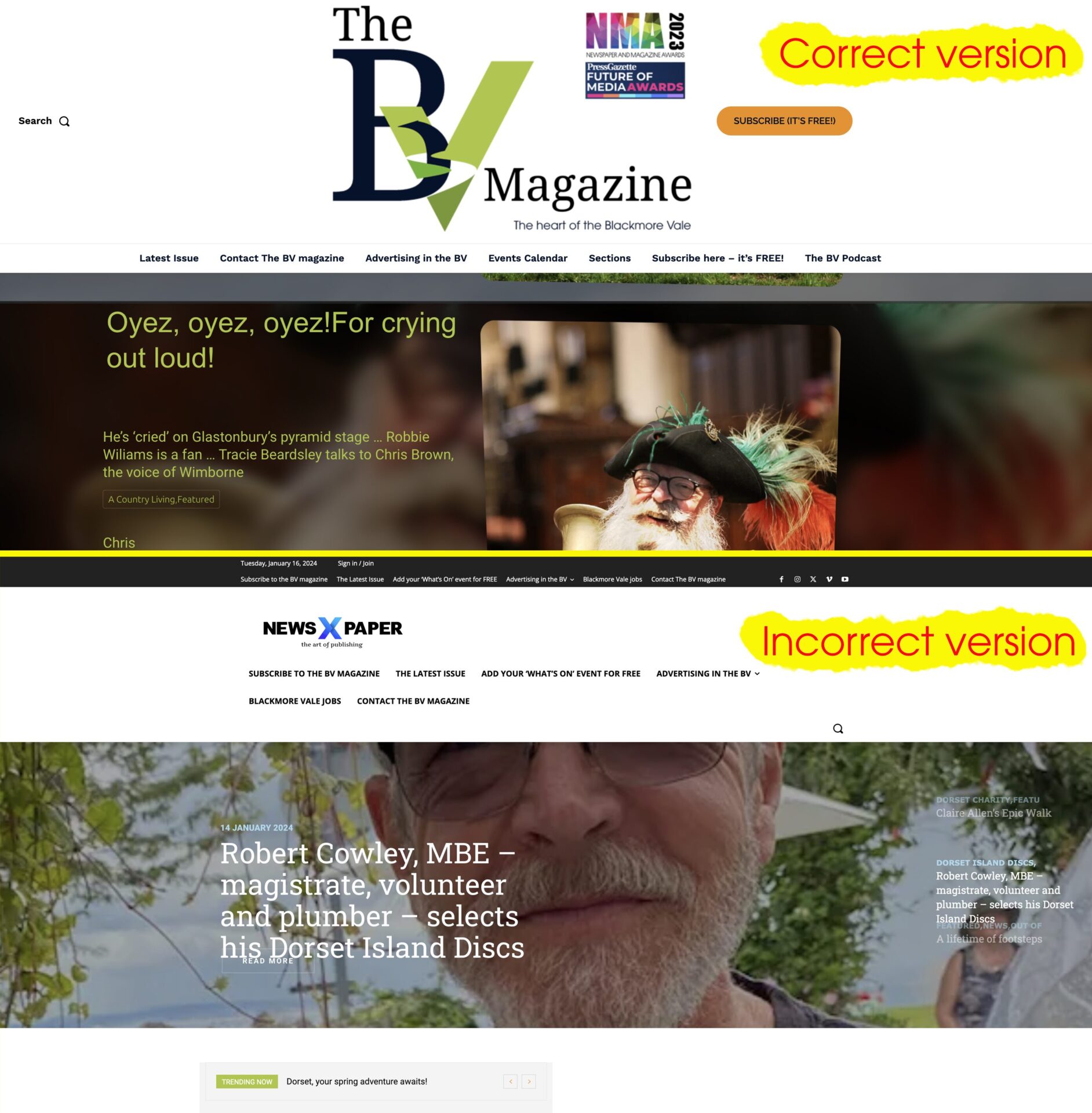
LauraBV I’m sorry, it’s clear one of us is confused – maybe it IS me.
The incorrect Newspaper X version of the home page that appears has nothing to do with any form of the website which I have ever used, nor is it any part of any of the changes made to the site which cause it. Publishing a new blog post should in no way affect the appearance of the header of the home page.
So if I read your reply correctly, are you in fact telling me I need to install an additional 3rd party plugin to force every visitor’s browser cache to refresh every time I make a change to my own website?
My own browser is not the problem – I use Chrome, and it never happens for me. But every time it happens I get notified by one of the thousands of people who do see it. It’s unprofessional, harming my business branding and at this point I either need to know how to make it stop or simply switch away from the tagDiv system.
Bettina Hello!
We have some problems with the Yoast SEO plugin at the moment.
Make a test and deactivate ALL plugins except tagDiv ones, also if you are using a cache plugin, deactivate it, clear all cache and try again.
Let me know the results!
Thank you!
Bettina Hello @aaronwongxm!
Please reset the permalinks by pressing save changes in Dashboard -> Settings -> Permalinks. Make a test and deactivate ALL plugins except tagDiv ones, also if you are using a cache plugin, deactivate it, clear all cache and try again.
Thank you!
Bettina Hello @exmc !
I’ve checked your website, and I can see and access your mobile menu.
Please clear all the cache and try again.
Thank you!
Bettina Hello @chaywood0896!
Please reset the permalinks by pressing save changes in Dashboard -> Settings -> Permalinks.
It could be a plugin conflict. Make a test and deactivate ALL plugins except tagDiv ones, also if you are using a cache plugin, deactivate it, clear all cache and try again.
Thank you!
Anamaria Hi,
@mortgageman What cache plugin do you use? Have you checked the above suggestion?
@ComicsBeat From here, you can check https://i.imgur.com/u3VadcR.png. You need to edit the page in the Gutenberg editor.
Thank you!
Anamaria Hello,
You need to use a plugin to optimize the images. I see that you use WP ROCKET, so please check this guide to set it https://www.infophilic.com/get-almost-100-pagespeed-newspaper-theme/
Also, please check those guides https://forum.tagdiv.com/cache-plugin-install-and-configure/
– https://forum.tagdiv.com/how-to-make-the-site-faster/
– https://forum.tagdiv.com/topic/high-number-of-ajax-request/
– https://forum.tagdiv.com/topic/score-100100-pagespeed-with-newspaper-wordpress-theme/
– https://www.andraware.com/wp-rocket-for-newspaper-theme/
– https://forum.tagdiv.com/topic/page-speed-guide-for-2023-beginners-and-advanced/
– https://forum.tagdiv.com/topic/newspaper-theme-speedify-your-website/
– https://forum.tagdiv.com/topic/tutorial-chriss-custom-optimizations-for-functions-php-etc/
– https://forum.tagdiv.com/cloudflare-cdn/
– https://forum.tagdiv.com/topic/theme-causing-high-cpu-usage-2/
– https://forum.tagdiv.com/topic/sql-querys-high-cpu/
– https://forum.tagdiv.com/topic/newspaper-theme-slow-to-respond/
– https://premium.wpmudev.org/blog/optimizing-your-wordpress-database-a-complete-guide/
– https://underconstructionpage.com/optimize-wordpress-database/
– https://crunchify.com/better-optimize-wordpress-database-all-in-one-guide/
Also, pagespeed is not covered by support -> https://forum.tagdiv.com/newspaper-theme-support/
If you use Wp Rocket, you can try to exclude the following files
/jquery-?[0-9.](.*)(.min|.slim|.slim.min)?.js
/jquery-migrate(.min)?.js
/wp-content/plugins/td-composer/legacy/Newspaper/js/tagdiv_theme.min.js
tdBlocksArray
To be able to optimize and to remove CLS and LCP please check these guide => https://developers.google.com/web/tools/lighthouse/ -> https://www.sqlpac.com/en/documents/google-pagespeeds-lighthouse-6-new-features-lcp-cls.html -> https://web.dev/lighthouse-whats-new-6.0/ -> https://web.dev/lcp/ -> https://web.dev/cls/
Thank you!
Anamaria Hi,
I think you misunderstood; you have a browser cache, not just on the website. Some plugins have this option to clear the cache after a post is published.
Thank you!
Bettina Hello!
Please follow this guide: https://forum.tagdiv.com/the-newsletter-plugin/
Try to use the Raw HTML, and style it via CSS.
Make a test and deactivate ALL plugins except tagDiv ones, also if you are using a cache plugin, deactivate it, clear all cache and try again.
Thank you!
 jtoney
 There are no cache plugins installed
LauraBV Yes, as I said, I know how to clear it, but how do I stop it happening? When posts publish on a schedule, I cannot always be on hand to manually refresh the cache, and most certainly shouldn’t have to.
 cadarmarius
Files like:
https://cryptotami.com/wp-content/plugins/td-composer/legacy/Newspaper/js/tdStickyRow.js?ver=12.6.3
https://cryptotami.com/wp-content/plugins/td-cloud-library/assets/js/tdbSearch.js?ver=6cc04771d778c6f460cf525df52258a3
Shows on GT metrix as 17 seconds, any idea what can be done, speed cache was enabled.
Anamaria Hi,
I have checked using Firefox, but for me, this is displayed well https://i.imgur.com/d366KG8.jpg. Please clear the cache of the browser.
Thank you!
Anamaria Hi @Trify,
Have you checked for a plugin conflict? Please deactivate ALL plugins except tagDiv ones; also, if you are using a child theme or cache plugin, deactivate them, clear all cache, and try again.
Thank you!
Anamaria Hello,
In most cases, this problem occurs because you have the latest version of WordPress with an older version of the theme.
Please use the last version of WordPress 6.4.2 with the last theme version Newspaper 12.6.3 (if you have a theme version older, then tagDiv Composer does not work) and check to see if the problem persists.
If you need to make an update, before please make a full backup to all files and the database, in case something goes wrong. => https://forum.tagdiv.com/how-to-update-the-theme-2/
Here you can find information about the changes that have occurred in each update over time https://tagdiv.com/newspaper/
I recommend that you update the theme manually https://forum.tagdiv.com/how-to-update-the-theme-2/ via FTP/cPanel/File Manager, also if possible disable extra plugins during the theme update to avoid any problems that may arise and make sure that you have activated the tagDiv Standard pack plugin to keep the website’s look. You can try to update the theme on a staging website.
After you update the theme, you need to update the theme plugins too.
In the worst cases, the settings in the theme panel may be lost (there have been isolated cases), in these cases, after the theme plugins that were previously used are activated, you will have to use a backup for the theme panel -> https://forum.tagdiv.com/import-export-theme-settings/
Also, make sure that all the settings are like in our requirements, please follow the guide carefully: https://forum.tagdiv.com/requirements-for-newspaper/
and please increase all requirements that are lower, and follow all steps.
Also, if the problem persists please check if you do not have a plugin conflict, please deactivate ALL plugins except tagDiv plugins, also if you are using a child theme or cache plugin, deactivate them, clear all cache (also from your browser) and try again.
Let me know the results!
Thank you!



