- NewspaperCloudflare (CDN)
- NewspaperWP Rocket and Newspaper Theme: Optimization Guide
- NewspaperUsing the Theme Translations with WPML
- NewspaperRequirements for Newspaper
- NewspaperHow to Make the Site Faster
 Calin
Calin Hi,
Please let me know the settings you’ve made for amp version, because right no I can not see any amp version on your website.
Please make sure that you clear all cache an purge the CDN after you made some changes for the amp settings.
Thank you for your understanding!
Calin Hi,
You can use the theme with more cache plugins, but for the moment we have tested it only with WP Super Cache , also for cloudflare we have a guide here -> https://forum.tagdiv.com/cloudflare-cdn/
Thank you!
 celhil
 Hi Calin,
yesterday I’ve tested some things. But (I think) the solution was, that we had enabled the brotli compression on our cloudflare-cdn. But facebook cannot interpret that! Now we are using only gzip.
But, its curious: Why did it ever work before (with brotli)?
Best regards
Andre
 Simion C.
 Hi,
I have checked the website, at the moment it looks like this https://prnt.sc/udekjz
I see that some images are not displayed, I see you are loading them from a CDN, for example the logo image https://856769.smushcdn.com/1950651/wp-content/uploads/2018/04/NATURA-logo-300×92.png Also the images inside the post seem to have the same issue, the CDN you are using does not load them.
I would suggest to check/disable the image CDN, there may be an issue with it.
Regarding the demo installation, if there is a problem, the first think to check are the theme requirements https://tagdiv.com/newspaper-theme-requirements/ (they are the same for Newsmag). Increase the parameters mentioned in the guide if needed, then try installing the demo again.
Thank you!
 aassi
aassiHi,
So, yes: before contacting you I disabled all plugins (using the Health Check & Troubleshooting plugin). I installed (and uninstalled) the suggested Cache plugin. Disable all cache plugins, CDN and cache in my hosting provider. I rebuilt the menu.
Nothing stopped my mobile hamburger menu to reload the page as I click on it, and not simply open it and wait until something is clicked.
When clicked, the hamburger menu opens and starts a search (just like a product search in Woocommerce). https://prnt.sc/udan0r
Thanks for your (great) support.
ps: BTW, is there a way to change the layout of the “searching” box? (That’s something that I’d like to do later on when get to the Woocommerce setup.)
Simion C. Hi,
That could happen, the mobile theme is sensitive to caching. Did this happen only after enabling the CDN? If you clear the CDN cache does it solve the issue? https://support.stackpath.com/hc/en-us/articles/360001134763-How-To-Purge-files-from-the-StackPath-CDN
Maybe something like this would work but I can’t say for sure https://support.stackpath.com/hc/en-us/articles/360036571212-CDN-Settings-Dynamic-caching-by-header
Are you using a caching plugin besides the CDN?
Thank you!
 itechguides
I recently activated StackPath CDN. Unfortunately, when it went live,it seem to have broken the mobile theme. The mobile version now displays on desktops. I have disabled the mobile plugin temporarily.
Calin Hi,
For the problem with icons, is look that these are block by CORS policy -> https://i.imgur.com/Hot3f5l.png , you can fix this by follow the steeps from this article -> https://crunchify.com/how-to-fix-access-control-allow-origin-issue-for-your-https-enabled-wordpress-site-and-maxcdn/
Hope this will help!
Thank you!
 Vlad S
 Hello !
For this issue please take a look at this topic: https://crunchify.com/how-to-fix-access-control-allow-origin-issue-for-your-https-enabled-wordpress-site-and-maxcdn/
Thank you !
 Sukhwant98
I want to create a page with a Tagdiv composer but the plugin not loading. So what should I do now

 yudi budiman
Hi all..
based on adsense There are two amp auto ads codes that must be entered, such as :
1. <script async custom-element=”amp-auto-ads”
src=”https://cdn.ampproject.org/v0/amp-auto-ads-0.1.js”>
</script>
the first code must be included between <head> and </head> tag.
2. <amp-auto-ads type=”adsense”
data-ad-client=”ca-pub-xxxx”>
</amp-auto-ads>
the second code must be included between <body>…</body> tag..
my question is : Which of the two codes above should be included in the theme panel – amp ads.?
thank you in advance
 juniorjlk
 resolved, were problems with the CDN cache
but the errors ajax in the console continue
Calin Hi,
In order to display the code you need to set “echo” like this -> https://i.imgur.com/uRrFcdn.png -> https://i.imgur.com/J33aNVB.png
after that it should work properly.
Thank you!
 fabioweb90
Hello! i know this is a strange question but my client is asking me why with zoom 33% i have issue on layout
https://ibb.co/CbcDnQK
posts should be always in 2 columns like 50% zoom https://ibb.co/xj4mdVy
Can we fix this?
Regards
 johans
Hello,
I have installed and activated Font Awesome 4 Menus.
I entered “<i class=”fas fa-dog”></i> Hundguiden” in label section of one menu item. Nothing is displayed, only the ones from the demo. I have tried several icons from https://fontawesome.com/icons?d=gallery&m=free
In WordPress settings -> Font Awesome,
I have tried both “Load Font Awesome 4 From” “Local plugin folder (default)” and “Official Font Awesome CDN (Font Awesome CDN powered by MaxCDN)”
I am using WordPress 5.4.2
What am I doing wrong?
 inqusitive-stha
Is it possible to repeat an ad after n paragraph on a post in newspaper theme?
Also, for the mobile theme, where can I place this line
<script async custom-element="amp-ad" src="https://cdn.ampproject.org/v0/amp-ad-0.1.js"></script>
to insert code in <head> </head> tags for Mobile+AMP
I have tried by pasting it on analytics/js code but I am not sure if it is working for amp, because the ads are not showing on mobile and amp pages.
inqusitive-stha Hey Calin,
I am literally getting pissed off because of the way you guys giving support.
I have benefitted 0% from you guys support everything is on my own. What kind of theme do you develop? Does not support Disqus plugin, says its working fine on our site. And for this case, you are saying I am using the same image for desktop and mobile. Seriously???
If you had inspected those two items you could have known it. Go again and check it.
The logo on the desktop is loading from https://cdn.noobietech.com/wp-content/uploads/2020/07/noobietech_white_background_logo_544x180.png
and the logo on mobile is loading from https://cdn.noobietech.com/wp-content/uploads/2020/07/Noobitech-Mobile-Logo-Transparent-280×96-1.png
I have already got fed up with you guys. At least try to check the issue from your site, I don’t know if there are hundreds of questions on the line, I don’t know if you guys get paid more if you comment on more question I don’t know. Just try to be helpful. Give at least 80% from your side. I am pushing this much hard just trying to fix everything, and you guys comment even without looking at the issue. 🙁
Calin Hi,
As I can see the logo on mobile is the same as the one from desktop, the problem that I see is that is take 1s until this is set to the right place. This problem it can be caused by some untested plugins or cdn, is like the style for these elements are loading only after the full page is load.
As You can see on our live website the mobile logo is display normal -> https://demo.tagdiv.com/newspaper_local_news/
Let me know the results!
Thank you!
 geraldinetay27
 Hi Calin,
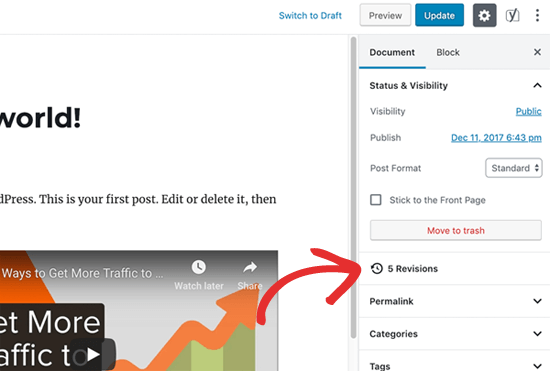
Yes I understand. However, there should be this post revision on the psot page itself no?
How do I enable this setting?
https://cdn4.wpbeginner.com/wp-content/uploads/2019/06/gutenberg-revisions.png
inqusitive-sthaHello support team,
My website is https://www.noobietech.com . My site score is very poor on GTMetrix. Any suggestions on how can I improve it?
I am using the wp-rocket cache plugin and CloudFront CDN at the moment.
Currently, my .htaccess looks like:
`
# BEGIN WP Rocket v3.6.2.1
# Use UTF-8 encoding for anything served text/plain or text/html
AddDefaultCharset UTF-8
# Force UTF-8 for a number of file formats
<IfModule mod_mime.c>
AddCharset UTF-8 .atom .css .js .json .rss .vtt .xml
</IfModule>
# FileETag None is not enough for every server.
<IfModule mod_headers.c>
Header unset ETag
</IfModule>
# Since we’re sending far-future expires, we don’t need ETags for static content.
# developer.yahoo.com/performance/rules.html#etags
FileETag None
# Send CORS headers if browsers request them; enabled by default for images.
<IfModule mod_setenvif.c>
<IfModule mod_headers.c>
# mod_headers, y u no match by Content-Type?!
<FilesMatch “\.(cur|gif|png|jpe?g|svgz?|ico|webp)$”>
SetEnvIf Origin “:” IS_CORS
Header set Access-Control-Allow-Origin “*” env=IS_CORS
</FilesMatch>
</IfModule>
</IfModule>
# Allow access to web fonts from all domains.
<FilesMatch “\.(eot|otf|tt[cf]|woff2?)$”>
<IfModule mod_headers.c>
Header set Access-Control-Allow-Origin “*”
</IfModule>
</FilesMatch>
<IfModule mod_alias.c>
<FilesMatch “\.(html|htm|rtf|rtx|txt|xsd|xsl|xml)$”>
<IfModule mod_headers.c>
Header set X-Powered-By “WP Rocket/3.6.2.1”
Header unset Pragma
Header append Cache-Control “public”
Header unset Last-Modified
</IfModule>
</FilesMatch>
<FilesMatch “\.(css|htc|js|asf|asx|wax|wmv|wmx|avi|bmp|class|divx|doc|docx|eot|exe|gif|gz|gzip|ico|jpg|jpeg|jpe|json|mdb|mid|midi|mov|qt|mp3|m4a|mp4|m4v|mpeg|mpg|mpe|mpp|otf|odb|odc|odf|odg|odp|ods|odt|ogg|pdf|png|pot|pps|ppt|pptx|ra|ram|svg|svgz|swf|tar|tif|tiff|ttf|ttc|wav|wma|wri|xla|xls|xlsx|xlt|xlw|zip)$”>
<IfModule mod_headers.c>
Header unset Pragma
Header append Cache-Control “public”
</IfModule>
</FilesMatch>
</IfModule>
# Expires headers (for better cache control)
<IfModule mod_expires.c>
ExpiresActive on
ExpiresDefault “access plus 1 month”
# cache.appcache needs re-requests in FF 3.6 (thanks Remy ~Introducing HTML5)
ExpiresByType text/cache-manifest “access plus 0 seconds”
# Your document html
ExpiresByType text/html “access plus 0 seconds”
# Data
ExpiresByType text/xml “access plus 0 seconds”
ExpiresByType application/xml “access plus 0 seconds”
ExpiresByType application/json “access plus 0 seconds”
# Feed
ExpiresByType application/rss+xml “access plus 1 hour”
ExpiresByType application/atom+xml “access plus 1 hour”
# Favicon (cannot be renamed)
ExpiresByType image/x-icon “access plus 1 week”
# Media: images, video, audio
ExpiresByType image/gif “access plus 4 months”
ExpiresByType image/png “access plus 4 months”
ExpiresByType image/jpeg “access plus 4 months”
ExpiresByType image/webp “access plus 4 months”
ExpiresByType video/ogg “access plus 1 month”
ExpiresByType audio/ogg “access plus 1 month”
ExpiresByType video/mp4 “access plus 1 month”
ExpiresByType video/webm “access plus 1 month”
# HTC files (css3pie)
ExpiresByType text/x-component “access plus 1 month”
# Webfonts
ExpiresByType font/ttf “access plus 4 months”
ExpiresByType font/otf “access plus 4 months”
ExpiresByType font/woff “access plus 4 months”
ExpiresByType font/woff2 “access plus 4 months”
ExpiresByType image/svg+xml “access plus 1 month”
ExpiresByType application/vnd.ms-fontobject “access plus 1 month”
# CSS and JavaScript
ExpiresByType text/css “access plus 1 year”
ExpiresByType application/javascript “access plus 1 year”
</IfModule>
# Gzip compression
<IfModule mod_deflate.c>
# Active compression
SetOutputFilter DEFLATE
# Force deflate for mangled headers
<IfModule mod_setenvif.c>
<IfModule mod_headers.c>
SetEnvIfNoCase ^(Accept-EncodXng|X-cept-Encoding|X{15}|~{15}|-{15})$ ^((gzip|deflate)\s*,?\s*)+|[X~-]{4,13}$ HAVE_Accept-Encoding
RequestHeader append Accept-Encoding “gzip,deflate” env=HAVE_Accept-Encoding
# Don’t compress images and other uncompressible content
SetEnvIfNoCase Request_URI \
\.(?:gif|jpe?g|png|rar|zip|exe|flv|mov|wma|mp3|avi|swf|mp?g|mp4|webm|webp|pdf)$ no-gzip dont-vary
</IfModule>
</IfModule>
# Compress all output labeled with one of the following MIME-types
<IfModule mod_filter.c>
AddOutputFilterByType DEFLATE application/atom+xml \
application/javascript \
application/json \
application/rss+xml \
application/vnd.ms-fontobject \
application/x-font-ttf \
application/xhtml+xml \
application/xml \
font/opentype \
image/svg+xml \
image/x-icon \
text/css \
text/html \
text/plain \
text/x-component \
text/xml
</IfModule>
<IfModule mod_headers.c>
Header append Vary: Accept-Encoding
</IfModule>
</IfModule>
# END WP Rocket
# BEGIN YOAST REDIRECTS
<IfModule mod_rewrite.c>
RewriteEngine On
Redirect 301 “/how-to-install-laravel-6-on-windows” “/how-to-install-laravel-on-windows”
Redirect 301 “/top-10-best-free-web-hosting” “/best-free-web-hosting-sites”
Redirect 410 “/tdb_templates/review-template-4-gaming”
</IfModule>
# END YOAST REDIRECTS
<FilesMatch “.(eot|otf|ttf|woff|woff2)”>
Header set Access-Control-Allow-Origin “*”
</FilesMatch>
#BEGIN GZIP COMPRESSION
<IfModule mod_deflate.c>
<filesMatch “\.(js|css|html|php)$”>
SetOutputFilter DEFLATE
</filesMatch>
</IfModule>
#END GZIP COMPRESSION
# BEGIN WordPress
# The directives (lines) between <code>BEGIN WordPressandEND WordPress` are
# dynamically generated, and should only be modified via WordPress filters.
# Any changes to the directives between these markers will be overwritten.
<IfModule mod_rewrite.c>
RewriteEngine On
RewriteBase /
RewriteRule ^index\.php$ – [L]
RewriteCond %{REQUEST_FILENAME} !-f
RewriteCond %{REQUEST_FILENAME} !-d
RewriteRule . /index.php [L]
</IfModule>
# END WordPress
# php — BEGIN cPanel-generated handler, do not edit
# Set the “ea-php73” package as the default “PHP” programming language.
<IfModule mime_module>
AddHandler application/x-httpd-ea-php73 .php .php7 .phtml
</IfModule>
# php — END cPanel-generated handler, do not edit
# Start CloudFlare:noobietech.com rewrite. Do not Edit
RewriteEngine On
RewriteCond %{HTTP_HOST} ^noobietech.com
RewriteRule ^(.*)$ https://www.%{HTTP_HOST}/$1 [R=301,L]
# End CloudFlare rewrite
`
and functions.php of child theme (I have added some stuff from the internet to make it faster.)
`
// Load Essential Fonts Awesome
add_filter( ‘noobietech_fontawesome_essentials’,’noobietech_fontawesome_essentials’ );
function noobietech_fontawesome_essentials()
{
return true;
}
// Removing Emojis
add_action( ‘init’, ‘noobietech_disable_wp_emojicons’ );
function noobietech_disable_wp_emojicons()
{
// all actions related to emojis
remove_action( ‘admin_print_styles’, ‘print_emoji_styles’ );
remove_action( ‘wp_head’, ‘print_emoji_detection_script’, 7 );
remove_action( ‘admin_print_scripts’, ‘print_emoji_detection_script’ );
remove_action( ‘wp_print_styles’, ‘print_emoji_styles’ );
remove_filter( ‘wp_mail’, ‘wp_staticize_emoji_for_email’ );
remove_filter( ‘the_content_feed’, ‘wp_staticize_emoji’ );
remove_filter( ‘comment_text_rss’, ‘wp_staticize_emoji’ );
}
// Remove WP embed script
function noobietech_stop_loading_wp_embed() {
if (!is_admin()) {
wp_deregister_script(‘wp-embed’);
}
}
add_action(‘init’, ‘noobietech_stop_loading_wp_embed’);
// Preload Newspaper fonts for responsive theme (main theme)
function dns_prefetch_responsive() {
echo “<link href=’https://www.noobietech.com/wp-content/themes/Newspaper/images/icons/newspaper.woff?17′ rel=’preload’ as=’font’ type=’font/woff’ crossorigin>”;
}
add_action( ‘wp_head’, ‘dns_prefetch_responsive’, 0 );
`
Calin Hi,
That flesh/slide of background color is not from theme, usually is from some plugins, or it can be from rocket loader.
Please set the rocket loader to off like in our guide ->https://tagdiv.com/how-to-set-up-cloudflare-cdn/
Please clear all cache after you change the settings.
Thank you !
inqusitive-sthaI don’t know if it is appropriate or not to ask for this question. But, I am little bit confused why only the fonts are blocked while all images are also loading from the cloudfront. Is there anything you guys could suggest on this? If it is something I should consider calling aws instead let me know. I am asking this here at first, because only fonts are blocked at the moment. My site: https://www.noobietech.com
 marcelo.berwanger
Hello,
We have a CDN running and the images are not stored on our server. For this reason it displays the following WARNING, how can we solve it?
[20-Jul-2020 08:59:44] WARNING: [pool DOMAIN.com.br] child 44607 said into stderr: “NOTICE: PHP message: PHP Warning: getimagesize(https://CDN.site/2019/10/Logo_SCD_Prancheta-1.png): failed to open stream: operation failed in /home2/DOMAIN.com.br/httpdocs/wp-content/plugins/td-cloud-library/shortcodes/header/tdb_header_logo.php on line 792”
Thanks,
 Mike770
 Hi Calin,
when i add the analytics tracking code in the json format (in the field you mentioned),should i only add the json code or shall i add also the script contanier?
to be clear: this code should be added too?
<script async custom-element="amp-analytics" src="https://cdn.ampproject.org/v0/amp-analytics-0.1.js"></script>

<amp-analytics type="gtag" data-credentials="include">

<script type="application/json">
inqusitive-stha @FietsersbondHZ i noticed that too. There is no improvement at all. I too realized its all about just cdn and hosting package.
-
This reply was modified 6 years by
inqusitive-stha.