
- NewspaperCloudflare (CDN)
- NewspaperWP Rocket and Newspaper Theme: Optimization Guide
- NewspaperUsing the Theme Translations with WPML
- NewspaperRequirements for Newspaper
- NewspaperHow to Make the Site Faster
 cyberlab
 Good afternoon
What could be the reason that your module created webp and it was uploaded to R2
but it was not used for the main webp image on the news page?
Here is the news https://novusnews.eu/tech/sony-patents-soft-pause-solve-online-gaming-dilemma/
and there is an image https://cdn.novusnews.eu/wp-content/uploads/2026/02/sony.jpg.webp
but the code uses sony.jpg
https://gtmetrix.com/reports/novusnews.eu/AbvAoZeM/
 Calin
Calin Hi,
The theme uses admin-ajax to handle the request to the database. Now each block from a page will make it’s on requets, so what you can do is to reduce the number of blocks on your pages.
What you should do is to use a good cache plugin, and I see that you already use CDN/Cloudflare.
Another option that can help is the flex blocks the cache option https://forum.tagdiv.com/use-flex-blocks-cache-option/. This option will cache those block requests and deliver them as long as the cache is set (is recommended that the cache expiration time to be longer if you create only a few articles per day).
Another solution is to reduce the number of ajax usage on the website, as those are the ones that will make requests to load more posts.
So ajax features like ajax pagination – https://i.imgur.com/EfKi0za.png – https://i.imgur.com/sMeot5s.png – https://i.imgur.com/vrJq3BC.png
The ajax menus – https://i.imgur.com/n0K9hCN.png
Also, the header live search makes requests when it is used – https://i.imgur.com/1ZvDwZx.png This can be deactivated when using a cloud header template. We added an option specially for it, as it can cause increased load on large websites.
The mega-menu pagination – https://i.imgur.com/T8kYzu4.png This can be deactivated when using cloud header templates, an option for this was also added for the same reasons mostly.
You can disable the ajax view count from here -> https://i.imgur.com/BIwbscU.png
Thank you!
Calin Hi,
You can get the menu page from Blockchain from here – https://cdn.tagdiv.com/wp-content/uploads/2026/02/Mega-Mneu-Page.txt
Thank you!
Calin Hi,
Please try logging in because when you are logged in, usually the cache is not used. When you are in incognito and not logged in, it’s possible to get some cache.
Another test that can be done is using only the theme plugins and see if the problem persists. Also, do you use CDN/Cloudflare?
Right now, the cache appears to be applied on the site at https://i.imgur.com/SMQoXjg.png, and if you have a LiteSpeed server, certain server options may be interfering.
Also, do you use the cache option from the flex block element? https://forum.tagdiv.com/use-flex-blocks-cache-option/
Calin Hi,
What you can do is to use a good cache plugin and a CDN : How to Make the Site Faster
– optimize the images, use a plugin like https://wordpress.org/plugins/ewww-image-optimizer/ and enable the webp format and from the theme, use this option – https://i.imgur.com/6qMAN1H.png
– also, if you are using the WP Rocket, you can check our guide with this plugin https://forum.tagdiv.com/wp-rocket-and-newspaper-theme-optimization-guide/
– in case you are using the option to disable the desktop zone on mobile and the mobile zone on desktop – https://i.imgur.com/TT2slI3.png https://i.imgur.com/jWPKhXS.png
 gpeter
 Hi there,
I followed all the settings exactly as you suggested, but on the homepage I can still only reach around 59–60 points because of FCP and LCP. I’m not necessarily aiming for 100, but it would be great to get into the 70–80 range.
Site: https://ajovokezdete.hu/
I configured WP Rocket based on your guide:
https://forum.tagdiv.com/wp-rocket-and-newspaper-theme-optimization-guide/
I’m also using Bunny CDN, mostly WebP images, and I’ve disabled unnecessary plugin assets with Asset CleanUp Pro.
On the first (top) section of the homepage I’m using Modules Builder:
https://forum.tagdiv.com/modules-builder-newspaper-theme/
My questions:
In Flex Block Builder, is it recommended to enable “Cache block results”?
Under Filter → “Content preloading”, should this be set to “preload all” or “no preloading”?
And in general, what else would you recommend to improve the performance metrics and overall speed? I’ve tried quite a few things already without much success.
Thank you in advance for your help!
 icedge
 Why WordPress + Newspaper creates ~27 image sizes
Two things are happening at once:
1️⃣ WordPress core creates image sizes
By default WordPress generates:
thumbnail
medium
medium_large
large
plus retina variants (2x)
2️⃣ Newspaper theme (tagDiv) adds many custom sizes
Newspaper is optimized for:
blocks
sliders
modules
mobile / tablet / desktop
retina (2x)
So it registers 20+ custom image sizes, which is why every upload explodes into ~27 files.
👉 This is normal behavior for Newspaper — not a bug.
What image sizes does Newspaper REALLY use?
In practice, Newspaper mostly uses these core groups:
✅ Commonly used sizes
td_696x0 → main article featured image
td_1068x0 → full-width layouts
td_300x220 → small blocks
td_534x462 → medium blocks
td_80x60 → widgets / lists
Retina (2x) versions of the above
⚠️ Many other sizes are edge cases (rare modules, legacy layouts, demos).
Option 1 (Recommended): Reduce image sizes SAFELY ✅
Step A: Disable unused sizes via code
Add this to functions.php (or a custom plugin):
add_filter(‘intermediate_image_sizes_advanced’, function ($sizes) {
$allowed = [
‘thumbnail’,
‘medium’,
‘large’,
‘td_696x0’,
‘td_300x220’,
‘td_534x462’
];
foreach ($sizes as $key => $value) {
if (!in_array($key, $allowed)) {
unset($sizes[$key]);
}
}
return $sizes;
});
📌 This:
Keeps only important Newspaper sizes
Stops WordPress from generating the rest
Option 2: Disable Retina Images (Huge win 🚀)
Newspaper creates 2x images by default.
Turn them off:
Newspaper → Theme Panel → General Settings → Retina Display
➡️ Disable Retina Images
💡 This alone can cut image generation almost in half.
Option 3: Use a plugin (Easiest, no code)
Install Disable Media Sizes or Perfmatters.
Then:
Disable unused WordPress sizes
Leave Newspaper core sizes enabled
⚠️ Don’t blindly disable everything — Newspaper needs some sizes to avoid layout breaks.
Option 4: Regenerate after cleanup (IMPORTANT)
After changing sizes:
Install Regenerate Thumbnails
Regenerate
Delete old unused thumbnails (plugin or server cleanup)
❌ What NOT to do
Don’t disable all td_* sizes
Don’t edit Newspaper core files
Don’t rely only on CDN offloading (it hides the problem but doesn’t fix disk usage)
Best setup for Newspaper (my recommendation)
✅ Disable Retina
✅ Keep 6–8 essential sizes only
✅ Use Bunny / CDN for delivery
✅ Use WebP/AVIF
This keeps:
Layout intact
Disk usage low
CDN fast
Calin I understand. Please use the code from here https://cdn.tagdiv.com/wp-content/uploads/2026/01/tdb_state_category.zip you need to unzip the file and replace the file from the path wp-content/plugins/td-cloud-library/state/category/tdb_state_category.php
Before this, make sure you have a full backup.
 Cipher Comp
Hosting Server: LiteSpeed
Cache Plugin: LiteSpeed Cache
Theme: Newspaper by tagdiv
CDN: Cloudflare
WordPress: 6.9
PHP: 8.3
I have imported the “Newspaper Publication Pro” demo on my website. After clearing the cache, everything works well. However, after 24 to 36 hours, Ajax paginations such as “Load More” and “Next-Prev” cease working properly. The loader icon is spinning round and round. Here’s the video link.
I’ve included some screenshots of cache plugin settings in the links below. Please look into this.
https://ibb.co/BVQRPnsc
https://ibb.co/nMMWvPBJ
https://ibb.co/Gf1VGcZ5
https://ibb.co/KjP6L9MV
https://ibb.co/DH0GHFWh
https://ibb.co/N6Gvxmvn
https://ibb.co/xqY4qNGc
https://ibb.co/3yJ8Qk0d
Calin Hi,
I’m sorry it’s taking so long. Unfortunately, without direct access to the site, it is more difficult for us to identify the exact cause of the issue. However, it does appear that the problem is related to a plugin.
I recommend following the standard troubleshooting process: temporarily deactivate all plugins except those required by the theme, and then check whether the issue persists. If the issue persists, it indicates external interference, such as a CDN or Cloudflare.
If the issue does not persist, reactivate the plugins one at a time, checking after each activation. When the issue reappears, you will have identified the plugin responsible.
Thank you for your understanding.
Calin Hi,
When the logged-in and logged-out versions are not the same, this is usually due to caching. Please make sure that all cache is cleared.
If you are using Cloudflare or another CDN, be sure to purge the cache there as well.
Calin Hi,
You can get the “Course Fields” and Post Type “Courses” for acf from here https://cdn.tagdiv.com/wp-content/uploads/2026/01/coachingPRO.zip. Unzip the file and import the JSON file, and all fields from ACF will be added.
Thank you!
Calin Hi djony620,
There will be a need to make the improvements for the list provided on the Pagespeed test.
Also, for speed, if you are using the WP Super Cache plugin, make sure that you also use the Autoptimize plugin and CDN . There are also other cache plugins that can be used to do both caching and optimizing the site, so there is no need to have 2 plugins. For example, one of the best is WP Rocket, but you can also use free plugins like WP Optimizer, Litespeed.
Hi MarcyGaboma, unfortunately, I do not understand the problem you are facing. Could you please provide some more details and maybe some screenshots?
 da zuoshou
 This LCP issue has been bothering me for a month. I’ve tried CDN, image compression, caching, and so on, but the problem is still here. I’m speechless!A solution has finally been found, as shown in the image below: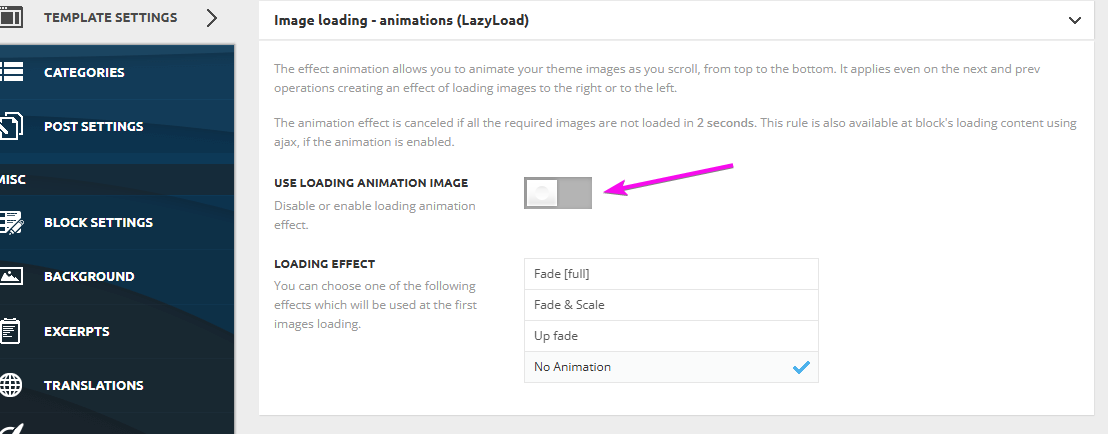
-
This reply was modified 8 months by
da zuoshou.
Calin Hi nearview,
There is a fix for this, but I do not know why it has not been added in the theme update, but I will provide it here for you https://cdn.tagdiv.com/wp-content/uploads/2026/01/tdb_state_category.zip you need to unzip the file and replace the file from the path wp-content/plugins/td-cloud-library/state/category/tdb_state_category.php
First, I will suggest using a staging to do the test and not directly on the main site. Also, make sure you have a backup before doing any changes.
Calin Hi,
If you have the latest version and you face a critical error when using the search, it will be need to replace the current theme plugin tagDiv Composer with the one from here – https://cdn.tagdiv.com/wp-content/uploads/2025/11/td-composerfix.zip
Thank you!
Calin Hi,
1. I believe there has been a misunderstanding regarding the cloud templates.
In the General tab, you will find the standard cloud templates for a blog. These include templates for the header, footer, single post, category, tag, author, date, 404, attachment, and search pages.
The template that can be used for a single doctor is available under the Single Article cloud templates (see: https://i.imgur.com/xNZUSoK.png). However, the template you are trying to use is a Custom Post Type (CPT) template. CPT templates cannot be applied to regular single posts; they can only be used for their respective CPTs. Additionally, this CPT template is not part of the cloud templates—it was provided in my previous reply—and, as mentioned, it works only for CPTs, not for standard posts or articles.
If you want your regular posts to have a layout similar to the CPT layout, you will need to recreate it manually using the Theme Builder in tagDiv Composer. If custom fields are required, you can use the ACF plugin to achieve this.
To copy and paste the CPT template I provided, please edit a single under the Custom post type – https://i.imgur.com/ZvgMAhV.png hover over the 3 dots and click on “edit” https://imgur.com/NlMnH9L. After that, replace the code with the one from here https://cdn.tagdiv.com/wp-content/uploads/2026/01/Custom-Post-Type-CPT-Doctors-PRO.txt
2. As mentioned above, there is a misunderstanding. I believe this comes from trying to combine multiple prebuilt templates without fully understanding how the theme works. It seems there may be some confusion about core concepts such as what a post is, what a CPT (Custom Post Type) is, and the difference between categories and taxonomies, including how they are configured and how they are meant to function.
The section you are referring to (https://i.imgur.com/UrNPZOE.png) is displaying the Doctors CPT, and its layout is provided by the Doctors PRO Plugin. This plugin can be installed from Newspaper > Plugins > Dedicated Plugins for Prebuilt Websites (https://i.imgur.com/6eVC20P.png). Once the plugin is installed, you can use Flex Block X to select and display that module (https://i.imgur.com/nZpalQh.png). However, since the plugin creates the module using predefined code, we recommend creating your own custom module using the Module Builder, and then displaying it via the Flex Block Builder.
By doing this, you gain full control over the module’s layout and settings. For example, if you want to add an “Age” field, you can create a custom field using a plugin such as ACF, and then display it in your custom module using the Custom Field element.
Thank you!
Calin Hi,
If you have the latest version and you face a critical error when using the search, it will be need to replace the current theme plugin tagDiv Composer with the one from here – https://cdn.tagdiv.com/wp-content/uploads/2025/11/td-composerfix.zip
Thank you!
Calin Hi,
To resolve the search problem, it will be need to replace the current theme plugin tagDiv Composer with the one from here – https://cdn.tagdiv.com/wp-content/uploads/2025/11/td-composerfix.zip
Thank you!
Calin Hi depatech,
If you have the latest version and you face a critical error when using the search, it will be need to replace the current theme plugin tagDiv Composer with the one from here – https://cdn.tagdiv.com/wp-content/uploads/2025/11/td-composerfix.zip
Thank you!
Calin Hi,
To resolve the search problem, it will be need to replace the current theme plugin tagDiv Composer with the one from here – https://cdn.tagdiv.com/wp-content/uploads/2025/11/td-composerfix.zip
Thank you!
Calin Hi,
The search problem, it will be need to replace the current theme plugin tagDiv Composer with the one from here – https://cdn.tagdiv.com/wp-content/uploads/2025/11/td-composerfix.zip
Thank you!
Calin Hi,
This was a problem with the Revolution Slider and it can be resolved using the latest Revolution Slider version. You can get it from here – https://cdn.tagdiv.com/wp-content/uploads/2025/12/revslider.zip
Thank you!
Calin Hi,
A website can go down due to issues with the web host, high traffic spikes, cyberattacks, problems with themes or plugins, or errors in code.
To prevent future downtime, choose a reliable host, use a content delivery network (CDN), keep software updated, have regular backups, and monitor security.
How to keep a website from going down
9 Things to Do if Your WordPress Site Keeps Going Down
Thank you!
Calin Hi jobothanow now simchris explained a bit about what you need to do if you want to migrate; what would be the order and what needs to be done.
What I want to say in addition is that it is possible that the speed problem is also related to the host you are using, the cache plugin and the settings in the theme. As simchris said, the first thing to consider would be to migrate to a much better host, which provides the necessary resources for your site. Step 2 is to check what exactly on the site is loading slowly, to solve that part. Step 3 a very good cache plugin and CDN.
If the above does not work then the last step would be to migrate to another theme, but when you do this you must take into account that everything this theme offers may not be offered by the new theme, plus if you have a demo installed everything that comes with it will no longer be able to be used with another theme, as a result you will have to make certain edits to layouts, menus … after migrating to another theme.



