
- NewspaperCloudflare (CDN)
- NewspaperWP Rocket and Newspaper Theme: Optimization Guide
- NewsmagUsing the theme translations together with WPML
- NewspaperUsing the Theme Translations with WPML
- NewsmagCustom Post Type Support
- NewsmagRequirements for Newsmag
- TutorialsWhat is Ajax preloading?
- NewspaperRequirements for Newspaper
- NewspaperHow to Make the Site Faster
 Vlad S
 Hello !
Indeed there is an issue and we have fixed it. All you have to do is to remove and re-install the tagDiv Cloud Library and everything will be fixed. Also the plugin can be downloaded from here: http://cdn.tagdiv.com/wp-content/uploads/2019/11/td-cloud-library.zip
Thank you for your understanding !
 gaviny
 Hi Calin
Clearing out the cache and CDN has resolved the issues I was experiencing. I’ll set up WPSC again and my CDN and then test again.
Thanks
Vlad S Hello !
Indeed there is an issue and we have fixed it. All you have to do is to remove and re-install the tagDiv Cloud Library and everything will be fixed. Also the plugin can be downloaded from here: http://cdn.tagdiv.com/wp-content/uploads/2019/11/td-cloud-library.zip
Thank you for your understanding !
Vlad S Hello !
Indeed there is an issue and we have fixed it. All you have to do is to remove and re-install the tagDiv Cloud Library and everything will be fixed. Also the plugin can be downloaded from here: http://cdn.tagdiv.com/wp-content/uploads/2019/11/td-cloud-library.zip
Thank you for your understanding !
gavinySince we went live we are having issues with AMP pages appearing on the desktop and desktop pages appearing on the mobile. However, the issue isn’t consistent, some times a page appears as it should but then the next time we access it, it is wrong (i.e. amp when it should be desktop or vice versa).
We have cleared the CDN and disabled it. We have cleared WP Super-Cache and disabled it and we have cleared the cache in the browsers we use. We have also tried to make sure our AMP, Mobile Theme and WP Super-Cache settings are set as advised in the documentation. However, our WP Super-Cache settings screen is a little different to that in the documentation.
 Alina S
Hello, Community!
We know you all want to make your website faster :), we want that for you, too. Newspaper theme 10 brings you a new way to build a faster WordPress website. For the first time in WordPress, you have the freedom to choose how much code the theme is loading and optimize your website’s performance straight from the beginning.
To give you this functionality, we’ve introduced a new plugin called the Standard Pack (available to you for free.) When you update to Newspaper 10, you must activate this plugin, or your website will display the shortcodes on the frontend. We cannot make the plugin automatically activate for you, so you’ll need to go to WordPress Admin area > Newspaper Theme > Plugins and enable the Standard Pack plugin.
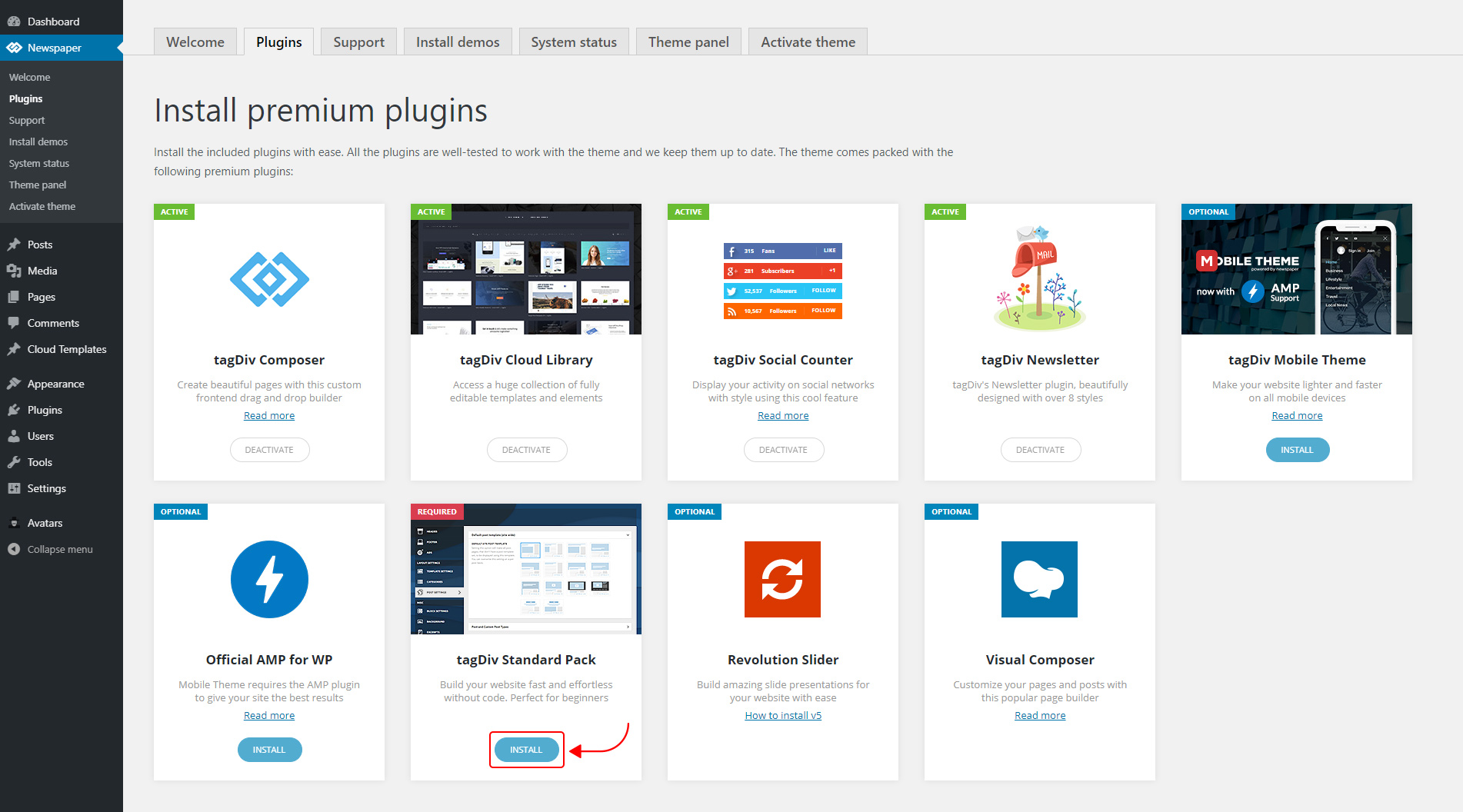
The new Standard Pack Plugin has two functions:
– it brings all the functionality you love in the previous versions
– allows you to separate things when you want to build everything customized and go for website’ performance.
The complete list of templates influenced by the Standard Pack plugin:
In the theme panel:
15 Headers
8 Category templates
10 Big Grids
19 Modules for blocks
14 Single post styles
14 Footer templates
In the tagDiv Composer:
25 Blocks
12 Big Grids
10 Big Grid Full
1 Big Grid Slide
Extra
All the demos that are not marked as PRO Demos.
You can find more details on how to use the Standard Pack Plugin in the dedicated article. When your website has no more dependencies on the Standard Pack plugin, you can deactivate it to increase the page loading time and performance.
If you need the previous version, you can download it from here (Newspaper v9.8).
I hope you’ll enjoy this update!
Thank you!
 Calin
Calin Hello,
From what I can see now the problem is gone -> http://prntscr.com/psnhjl please make sure that you set the CDN as in our guide from here .
Also I saw that you have set and image that do not longer exist -> http://prntscr.com/psnil6
Thank you!
Calin Hello,
Just make sure that you’ve cleared all cache and if you are using CDN please purge the cdn cache.
If there is still a problem, you can send us an email at contact@tagdiv.com and provide admin login, as well as cPanel or FTP if possible. We will take a look. Include a link to this topic in the email.
Thank you!
 simker2
Hi, i just purchased to full version of your theme, but it does not work on phones. This is what it looks like (look at the snaps). Could you please help me fix this iisue so the theme opens on smart devices too. Thank you.
https://scontent.fsof5-1.fna.fbcdn.net/v/t1.15752-9/s2048x2048/72606580_3069499849731954_1135661452678397952_n.png?_nc_cat=109&_nc_oc=AQkLd_PREH68bAdk-2o8RQPowdUCeNZk_m6PdJHYZFPpy_fiMES8g1JlPrzKbaNLOKw&_nc_ht=scontent.fsof5-1.fna&oh=97e0d1b36e1a866cead3eeffe8e426a6&oe=5E197CC1
https://scontent.fsof5-1.fna.fbcdn.net/v/t1.15752-9/s2048x2048/74267226_2435276756793815_3354314572788924416_n.png?_nc_cat=100&_nc_oc=AQk81lib1lMz01bGzrbpkRHHHR1Uh_voFkbBEzP26o63qOFhIxDhqBsY2yMxsE3yfv4&_nc_ht=scontent.fsof5-1.fna&oh=955f29b4d930cf7dc58baf8026200fcd&oe=5E633103
Calin Hi,
The CDN can help you if it set correctly.
So what you mean that is taking a lot of time until you connect to backend, make sure that you are using a good host and if there are still some problems, you can send us an email at contact@tagdiv.com and provide admin login, as well as cPanel or FTP if possible. We will take a look. Include a link to this topic in the email.
Thank you!
 lbaddhan
 Thanks Caline – we don’t use a CDN but will this help with performance?
We have configured our site correctly however when running ests and monitoring them, the time it takes for the pages to load can be over 8-10 seconds – occurring in the back end of the site.
Calin Hi,
Please make sure that all the settings are like in our requirements, please follow the guide carefully
– https://forum.tagdiv.com/requirements-for-newspaper/
and please increase all requirements that are lower, and follow all steps and make sure that you set the cloudflare as in our guide from here -> https://forum.tagdiv.com/cloudflare-cdn/
Thank you!
Calin Hi,
Please make sure that you check this option in amp settings -> http://prntscr.com/pnd0re
Also please make a test and use only the WP Super Cache, if you really need to use the Cloudflare, just make sure to set it as in our documentation -> https://forum.tagdiv.com/cloudflare-cdn/
Thank you!
Calin Hello,
Please make sure that you do not have a plugin conflict, please deactivate ALL non theme plugins, also if you are using child theme or cache plugin, deactivate them, clear all cache and try again.
Also please make sure that all the settings are like in our requirements, please follow the guide carefully
– https://forum.tagdiv.com/requirements-for-newspaper/
and please increase all requirements that are lower, and follow all steps and make sure that you set the cloudflare as in our guide from here -> https://forum.tagdiv.com/cloudflare-cdn/
Thank you!
Calin Hi,
That flesh/slide of background color is not from mobile theme, usually is from some plugins, or it can be from rocket loader.
Please set the rocket loader to off like in our guide ->https://tagdiv.com/how-to-set-up-cloudflare-cdn/
If you are using the the rocket loader, please set it on off like in our guide ->https://tagdiv.com/how-to-set-up-cloudflare-cdn/
If the is still a problem, please deactivate all non theme plugins and try again.
Thank you
 Yahtzee_Wikilord
Hi
I found that Newspaper Theme always loads the uncompressed featured image, even when it doesn’t show on the page.
It also bypasses my Shortpixel CDN and I’d like to turn off this functionality.
Best Regards
 BlakeForm
Hello WordPressors,
I need some help with HTML, can somebody help me out?
I wanna change some colors of the elements of my Mailchimp sign-up form, but i dont know how. I can only see a color for background (lightly pink now) in my code below, but when i change the hex code nothing changes. I wanna change the background, font size/color, the color of the subsribe button and the text of the subsribe button. If somebody can add the HTML for the elements for me, i can change the codes myself. I hope somebody can help me out. Thank you so much!
This is my HTML form:
<!-- Begin Mailchimp Signup Form -->

<link href="//cdn-images.mailchimp.com/embedcode/classic-10_7.css" rel="stylesheet" type="text/css">

<style type="text/css">

	#mc_embed_signup{background:#fff; clear:left; font:14px Helvetica,Arial,sans-serif; }

	/* Add your own Mailchimp form style overrides in your site stylesheet or in this style block.

	   We recommend moving this block and the preceding CSS link to the HEAD of your HTML file. */

</style>

<div id="mc_embed_signup">

<form action="https://disneyplusser.us4.list-manage.com/subscribe/post?u=0029732750189a4e07f8d0e39&id=ed31552436" method="post" id="mc-embedded-subscribe-form" name="mc-embedded-subscribe-form" class="validate" target="_blank" novalidate>

    <div id="mc_embed_signup_scroll">

			<h6>Vul hieronder je beste emailadres in, dan sturen wij je tweewekelijks een email met het laatste nieuws en releases van Disney Plus!</h6>

<div class="mc-field-group">

	<label for="mce-EMAIL">Emailadres: </label>

	<input type="email" value="" name="EMAIL" class="required email" id="mce-EMAIL">

</div>

	<div id="mce-responses" class="clear">

		<div class="response" id="mce-error-response" style="display:none"></div>

		<div class="response" id="mce-success-response" style="display:none"></div>

	</div>    <!-- real people should not fill this in and expect good things - do not remove this or risk form bot signups-->

    <div style="position: absolute; left: -5000px;" aria-hidden="true"><input type="text" name="b_0029732750189a4e07f8d0e39_ed31552436" tabindex="-1" value=""></div>

    <div class="clear"><input type="submit" value="Meld mij aan!" name="Meld mij aan" id="mc-embedded-subscribe" class="button"></div>

    </div>

</form>

</div>

<script type='text/javascript' src='//s3.amazonaws.com/downloads.mailchimp.com/js/mc-validate.js'></script><script type='text/javascript'>(function($) {window.fnames = new Array(); window.ftypes = new Array();fnames[0]='EMAIL';ftypes[0]='email'; /*

 * Translated default messages for the $ validation plugin.

 * Locale: NL

 */

$.extend($.validator.messages, {

        required: "Dit is een verplicht veld.",

        remote: "Controleer dit veld.",

        email: "Vul hier een geldig e-mailadres in.",

        url: "Vul hier een geldige URL in.",

        date: "Vul hier een geldige datum in.",

        dateISO: "Vul hier een geldige datum in (ISO-formaat).",

        number: "Vul hier een geldig getal in.",

        digits: "Vul hier alleen getallen in.",

        creditcard: "Vul hier een geldig creditcardnummer in.",

        equalTo: "Vul hier dezelfde waarde in.",

        accept: "Vul hier een waarde in met een geldige extensie.",

        maxlength: $.validator.format("Vul hier maximaal {0} tekens in."),

        minlength: $.validator.format("Vul hier minimaal {0} tekens in."),

        rangelength: $.validator.format("Vul hier een waarde in van minimaal {0} en maximaal {1} tekens."),

        range: $.validator.format("Vul hier een waarde in van minimaal {0} en maximaal {1}."),

        max: $.validator.format("Vul hier een waarde in kleiner dan of gelijk aan {0}."),

        min: $.validator.format("Vul hier een waarde in groter dan of gelijk aan {0}.")

});}(jQuery));var $mcj = jQuery.noConflict(true);</script>

<!--End mc_embed_signup-->
 Leander
 It’s not only on mobile, I’m getting the ‘newspaper’ logo on all screen sizes when I scroll. Where can I change this logo?
You can’t see it on the site right now, because I changed the menu bar to the previous one while I wait for your reply 🙂
Thanks!
Calin Hi,
I’ve just checked the theme files and I can not find anywhere this link for bootstrap -> https://maxcdn.bootstrapcdn.com/bootstrap/4.3.1/js/bootstrap.min.js maybe this is coming from a plugin that you are using, please make sure that you do not have a plugin conflict, deactivate all non theme files; If the problem persist, please provide me some more details and screenshots with this problem.
Thank you!
 bettingspin
Hi, we were looking to remove render blocking JJS and we found this -> https://maxcdn.bootstrapcdn.com/bootstrap/4.3.1/js/bootstrap.min.js
We spoke with maxcdn and they said to contact you as you might be using it in the theme. Can you confirm this is the case? It causes quite a lot of problems on google speed so what can be done to reduce the impact?
Thanks
Vlad S Hello !
The page seems to be blocking the robots.txt. After a quick google search i’ve found this about the robots.txt: https://www.keycdn.com/support/sitemap-contains-urls-which-are-blocked-by-robots-txt
Thank you !
Calin Hello,
Is look that you have a problem with Access-Control-Allow-Origin (CORS origin)
-> http://prntscr.com/pfux8b you can fix this by follow the steeps from this article -> https://crunchify.com/how-to-fix-access-control-allow-origin-issue-for-your-https-enabled-wordpress-site-and-maxcdn/
Also please make sure that you do not have a plugin conflict, please deactivate ALL plugins except tagDiv Composer, also if you are using child theme or cache plugin, deactivate them, clear all cache and try again.
Hope this will help!
Thank you!
LeanderHi,
We are using the td-reviews metadata on our website.
By default, it seems to only display ratings, summary and a score.
However, we would like to expand this and add a price to it as well.
Eventually, we also would like to get some extra buttons under the review summary.
This additional data would be inputted by Advanced Custom Fields.
Where can I update the code of this table so I can get display the content of the custom fields?
Many thanks in advance!
 Calin
Calin Hello,
Is look that you have a problem with Access-Control-Allow-Origin (CORS origin)
-> http://prntscr.com/penw74 you can fix this by follow the steeps from this article -> https://crunchify.com/how-to-fix-access-control-allow-origin-issue-for-your-https-enabled-wordpress-site-and-maxcdn/
Hope this will help!
Thank you!
 Capitanescu
Buna ziua. In primul rand vreau sa va felicit pentru tema Newspaper 9.. inca nu am lucrat in ea. Am cumparat-o ieri..dar la prima vedere pare senzationala si cred ca o sa imi fie drag sa lucrez in ea.
Inainte de a pune intrebarile, vreau sa va spun ca sunt la primul meu site si tocmai de aceea as avea nevoie de putin ajutor in acest sens.
Referitor la tema. Eu am cumparat-o ieri si am o serie de intrebari:
1) Ati recomandat instalarea pluginului Wp Super cache. Imi puteti pune va rog la dispozitie un tutorial care sa explice cum trebuie sa configurezi setarile acestui plugin? Ce tutorial credeti dumneavoastra ca mi-ar fi mai util? Pe net sunt cateva, dar unii explica intr-un fel, altii in alt fel..asadar un tutorial bun despre setarile acestui plugin astfel incat pagina sa mearga bine, mi-ar fi de mare ajutor.
2) In setarile Wp Super Cache avea sectiunea CDN.. intrebare: este nevoie sa instalez vreun plugin de CDN si daca da, care ar fi denumirea aceluia?
3) Nu am gasit urmatoarea linie de cod: define( ‘WP_MEMORY_LIMIT’, ‘256M’ ); din fisierul wp-config.php pentru a seta la 256M..
4) La partea de Wp debug am facut urmatoarea modificare in child theme: define(‘WP_DEBUG’, true); –> define(‘WP_DEBUG’, false); Este ok?
Astept un raspuns. Va multumesc!


