
No search results were found in Documentation!
 Anamaria
 Hello,
Unfortunately, you can’t achieve that using standard templates, but you can use Single Post Template from Cloud Library and you can design it with tagDiv Composer https://www.youtube.com/watch?v=6m8-EebnfM0 -> https://www.youtube.com/watch?v=I1R3j1QYod0 or using custom code css.
Hope this helps you!
Thank you!
 Photoboy
Composer does not work, can’t click on elements, and I get this message;
Errors at columns elements: 18(models) : 16(dom). The model does not match the content Current state has involved an issue. You could try an UNDO operation (CTRL+Z / CTRL+SHIFT+Z)
https://www.dropbox.com/s/wyxaius71nfh2xt/Screenshot%202021-05-06%20at%2013.18.17.png?dl=0
I have these plugins all active:
Advanced Custom Fields
Akismet Anti-Spam
AMP
bunny.net
Contact Form 7
Cookie Notice & Compliance for GDPR / CCPA
Featured Images in RSS for Mailchimp & More
Insert Headers and Footers
MC4WP: Mailchimp for WordPress
Rank Math SEO
roll call (custom plugin)
Site Kit by Google
Smush Pro
TagDiv Cloud Library
tagDiv Composer 2.8
tagDiv Mobile Theme
tagDiv Social Counter
tagDiv Standard Pack
Thrive Leads
Thrive Product Manager
UpdraftPlus – Backup/Restore
Velvet Blues Update URLs
WP File Manager
WP Rocket
WPMU DEV Dashboard
Yoast Duplicate Post
Anamaria Hello, @willlevith,
Our developers created a fix for this issue here https://www.screencast.com/t/Y8bZNbYnyYC in this path => wp-content/plugins/td-cloud-library/includes/tdb_functions.php
Normally it shouldn’t be a problem, I made a notification for this to be verified, and if this happens to you it may be a more special situation and please give more details and screenshots to be able to recreate this problem.
Thank you!
 Bettina
 Hello!
@webjump Please send an email at contact@tagdiv.com and provide wp-admin, so we can investigate your issue. Also paste a link to this topic so we can easily identify you.
Let us know and we will gladly assist you.
@dadfi You can not edit a default template with TagDiv Composer plugin.
Check the differences between cloud and default template here:
– https://forum.tagdiv.com/design-post-pages-using-cloud-library-templates/
– https://forum.tagdiv.com/design-post-pages-using-default-templates/
Thank you!
 Ruthy Chiang
 I’m sure that all the requirements are met, and I’ve deactivated ALL plugins except tagDiv ones and tried again,but nothing fixed. I still cannot edit page templates with tagDiv Composer. I still cannot use tagDiv Cloud Library.
Now everything is in hurry but I still cannot edit page templates well.
Now I wanna rate you one star on EnvatoMarket for this theme.
 debabratah51
suddenly I am getting this below mentioned when I am trying to import from cloud library. why this is happening? I want to know the reason. This is really wasting of time. Please let me know the reason and please try to resolve the issue. It’s paid theme. I have purchased and I have a serial key. Please help me to solve that .
Here is the issue
Invalid reply from server endpoint.
Anamaria Hello,
The problem is caused if you use WP Bakery for posts, unfortunately, we recommend using WP Bakery only for pages and not for posts => https://forum.tagdiv.com/how-to-use-visual-composer/
Also, if you use the WPBakery for pages, we strongly recommend using only one of those plugins with our theme (WP Bakery or tagDiv Cloud Library, but not both).
Please deactivated the WP Bakery and see if the problem persists.
Thank you for your understanding!
Anamaria Hello,
The problem is caused if you use WP Bakery for posts, unfortunately, we recommend using WP Bakery only for pages and not for posts => https://forum.tagdiv.com/how-to-use-visual-composer/
Also, if you use the WPBakery for pages, we strongly recommend using only one of those plugins with our theme (WP Bakery or tagDiv Cloud Library, but not both).
Please deactivated the WP Bakery and see if the problem persists.
Thank you for your understanding!
 therealhoomans
I’m unable to access the Pre-designed Templates – tagDiv Cloud Library.
The plugin is activated. I go to the menu and click add new but templates don’t load. I get this error:
“Invalid reply from server endpoint.”
 byothe
Hello,
When my article is laoding, there is a “Sing in form” that shows up for a very short time at the top of my page… It appears after I used a template from Cloud Library for my posts.
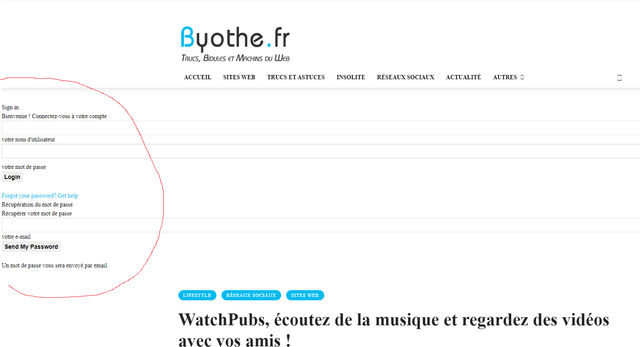
Is it possible to remove that ? It’s very quick but annoying… And I don’t need this form that doenst appears on the loaded page.
Anamaria Hello,
Unfortunately, you can’t have the same template for pages, like the post.
tagDiv Composer is a page and cloud builder, it can be used only for pages and cloud templates, therefore you can use it on a single post template from tagDiv cloud library to adjust the layout, but not to write the post content, for this, you need to use the WordPress editor.
You can find more tutorials on our channel on youtube =>https://www.youtube.com/user/tagdiv which can help you to design.
Thank you!
Anamaria Hello,
Please do these steps
1. disable tagDiv Composer and tagDiv Cloud Library
2. uninstall tagDiv Composer and tagDiv Cloud Library
3. clear cache (if cache plugin exists)
4. re-install tagDiv Composer and tagDiv Cloud Library again from Newspaper plugins => https://www.screencast.com/t/WLy01lbc
5. activate tagDiv Composer and tagDiv Cloud Library
6. clear cache (if cache plugin exists)
Let me know the results!
Thank you!
 tangierads
Pre-designed Templates – tagDiv Cloud Library
problem: Invalid reply from server endpoint
byotheHello
I have created a single template for my posts… but I don’t understant what should I do to use it for all my posts ?
I cant find the equivalent of this :
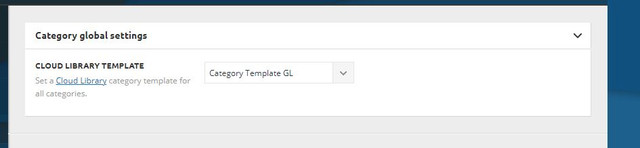
for posts…
Bettina Hello!
You can also duplicate the existing template and for assigning another template go to Newspaper -> Theme panel -> Categories -> Select a category you want and there you can find the setting “Category cloud library template” and choose the template from that dropdown for each category.
Thank you!
byothe And another weird thing is that TagDiv composer doesn’t work anymore… while it was working fine yesterday… I cannot add new elements anymore…
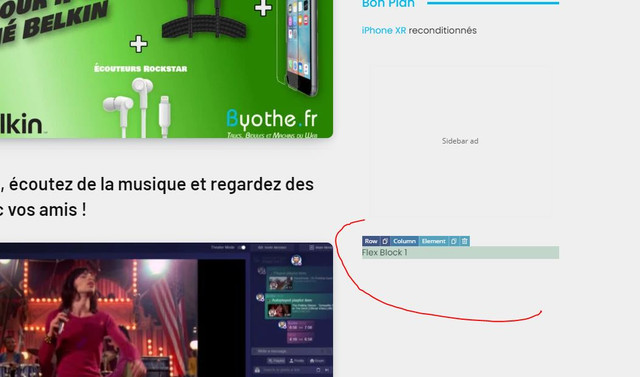
All this was working yesterday since I made some changes on my homepage… I even downloaded a new footer from the cloud library
And this error appears when I try to do something
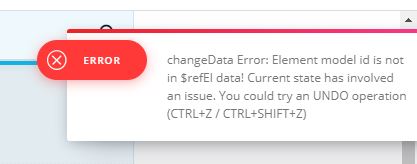
 Bettina
 Hello!
1. When I visit your website I don’t see the title there. Please delete your cache and try again.
2. You can also duplicate the existing template and for assigning another template go to Newspaper -> Theme panel -> Categories -> Select a category you want and there you can find the setting “Category cloud library template” and choose the template from that dropdown for each category.
3. Check also in Dashboard -> Settings -> Discussion if you have the settings with comments enabled.
Thank you!
 djliamcontact
Hey, I just bought the Newspaper theme and I have I can’t use it.
I download it but after I do the “Fast Start Your Website” part its not allowing me to download the plugins & update them.
Its write:
“tagDiv Composer
Failed
tagDiv Cloud Library
Failed
tagDiv Social Counter
Failed
An error occurred and we could not finish the process.
Please manually update the plugins.
Anamaria Hello,
Please make sure you have the same header set on the article pages if you have a Header Template imported from Cloud Library, you can check which header is set, from Manager(Website Manager) -> Header => https://www.screencast.com/t/nKX3ff3zjr
If this is not what you mean, then please provide more information, screenshots and your website link in order to help you efficiently.
Thank you!
 comms
comms I am unable to disable the mobile view template for pages imported from Cloud Library. Only for regular created pages.
I already assigned a mobile page for the homepage, works great, footer & header showing off properly.
However, assigning the same footer & header for a single post/category template doesn’t apply.
I have looked over the videos.
If you can assist more, we can talk on the phone, I’m local.
Thanks!
-
This reply was modified 5 years by
comms.
byotheHello
I am trying to install templates for different pages on my site but it get stuck on “installing”
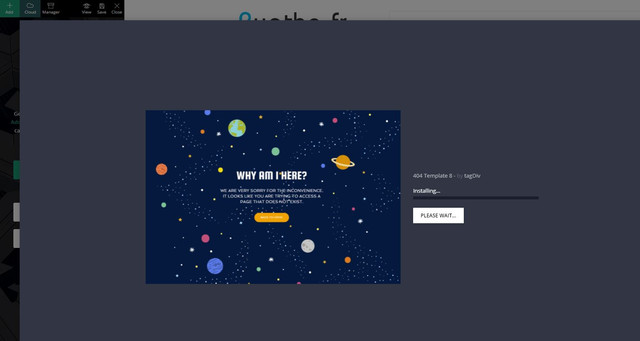
Just before doing that I had no problem to import a new footer template…
Anamaria Hello,
So, if I understood correctly, you to add a caption for the featured image you would add you added the title element, right?
if so, then yes, that item will be on all posts, to add a caption for the featured image, it must be added when you choose that image, like this => https://www.screencast.com/t/6e3XdnGs -> https://www.screencast.com/t/IxnAxfrHPuEX
tagDiv Composer is a page and cloud builder, it can be used only for pages and cloud templates, therefore you can use it on a single post template from tagDiv cloud library to adjust the layout, but not to write the post content, for this, you need to use the WordPress editor, you can only change the style/layout, this is a video about single post template => https://www.youtube.com/watch?v=6m8-EebnfM0
For fonts, you can check what family fonts apply on the post using the option from sidebar tool for each element => https://www.screencast.com/t/XLqSdtPv or from Manager(Website Manager) -> Fonts => https://www.screencast.com/t/zyhMF5hU -> https://www.youtube.com/watch?v=rbkYVyj1__Q
You can find more tutorials on our channel on youtube =>https://www.youtube.com/user/tagdiv which can help you to redesign.
A solution for sending a screenshot is this:
Download, capture, send: https://www.techsmith.com/jing-tool.html
After making the screenshot, you will have a link, paste it here.
Hope this helps you!
Thank you!
Anamaria Hello,
If you have set a footer from Cloud Library like this => https://www.screencast.com/t/urnrnLjPo, then please set on “No template” and the settings will appear => https://www.screencast.com/t/CND5ik5adeL
If this is not what you mean, please provide some screenshots.
Thank you!
 Vlad S
 Hello !
Last reply via e-mail is this:
Make sure that you do not have a plugin conflict, please deactivate ALL plugins except tagDiv plugins, also if you are using child theme or cache plugin, deactivate them, clear all cache and try again.
This tdb_action=tdb_ajax is related to the infinite loading functionality, the ?tdb_action=tdb_ajax can be found in wp-content/plugins/td-cloud-library/includes/tdb_ajax.php
If the problem persists, please make a full backup to your website and please provide wp-admin login and cPanel to connect and check this problem.
Thank you !
 shtv
shtvNewspaper version: 10.4
WordPress version: 5.7.1
PHP-Version: 7.4
Browser: Chrome (latest)
Installed plugins:
– tagDiv Cloud Library
– tagDiv Composer
– tagDiv Social Counter
– tagDiv Standard Pack
Hello,
When adding a new element via Composer the element is added, but not usable. When trying to delete the element, we encounter multiple errors, see https://imgur.com/a/IU09YPf
We tried to deactivate all unnecessary plugins, but the error still occurs.
Any help is highly appreciated.

