
No search results were found in Documentation!
 dynamicspotlight
Good day and thank you for your time. I purchased a copy of the tagDiv Newspaper theme (version 12.6.6). I am having issues installing some of the prebuilt themes. The issue I have is with the ‘tagDiv Cloud Library’ plugin. When installed I get an error of ‘ERR_TOO_MANY_REDIRECTS’. I have deleted my cookies, as the error suggested. I have also tried the website on different browsers, with the same error.
When I go to ‘Newspaper system status’, the result is green across the board. The specs for the installation as are follows:
PHP version 8.2.18
post_max_size: 516M
max_execution_time: 300
max_input_vars_5000
SUHOSIN installed: false
mbstring: available
GD Library: available
WP MEMory Limits: 256 MB
To my understanding, this is the correct specs for this theme.
I have installed your theme on several different projects (with different purchased licenses) and this is the first for me, for issues.
I will wait to hear from you on this matter.
 Bettina
 Hello!
Yes. You can choose to install or not other demo or some sections from the Cloud Library that can help you. The listings should be created in the ACF plugin. Check these guides for more information:
– https://forum.tagdiv.com/filters-sorting-taxonomies/
– https://forum.tagdiv.com/introduction-cpt-acf-newspaper-theme/
– https://forum.tagdiv.com/custom-post-type-support/
– https://forum.tagdiv.com/create-frontend-submission-form/
Thank you!
Bettina Hello!
Yes. We recommend to use cloud/PRO templates in order to have the possibility to edit them with the TagDiv Composer which contains a lot of functions and features, please check our tutorial here: https://forum.tagdiv.com/tagdiv-composer-tutorial/
More documentation about the cloud templates is here:
– https://forum.tagdiv.com/cloud-library-templates/
– https://forum.tagdiv.com/design-post-pages-using-cloud-library-templates/
– https://forum.tagdiv.com/cloud-library-category-templates/
Thank you!
Bettina Hello!
This issue has been discussed already here, please check: https://forum.tagdiv.com/topic/thumbnails-6/
We recommend to use cloud/PRO templates in order to have the possibility to edit them with the TagDiv Composer which contains a lot of functions and features, please check our tutorial here: https://forum.tagdiv.com/tagdiv-composer-tutorial/
More documentation about the cloud templates is here:
– https://forum.tagdiv.com/cloud-library-templates/
– https://forum.tagdiv.com/design-post-pages-using-cloud-library-templates/
– https://forum.tagdiv.com/cloud-library-category-templates/
Thank you!
 blessdigitalmkt
Acabei de comprar o tema newspaper 12 no site https://themeforest.net/, porém eu não estou encontrando onde coloco a licença pra poder usar o cloud library. Eu preciso adicionar e não consigo habilitar a licença. Achei que apenas fazendo o download e instalando ja iria licenciar.
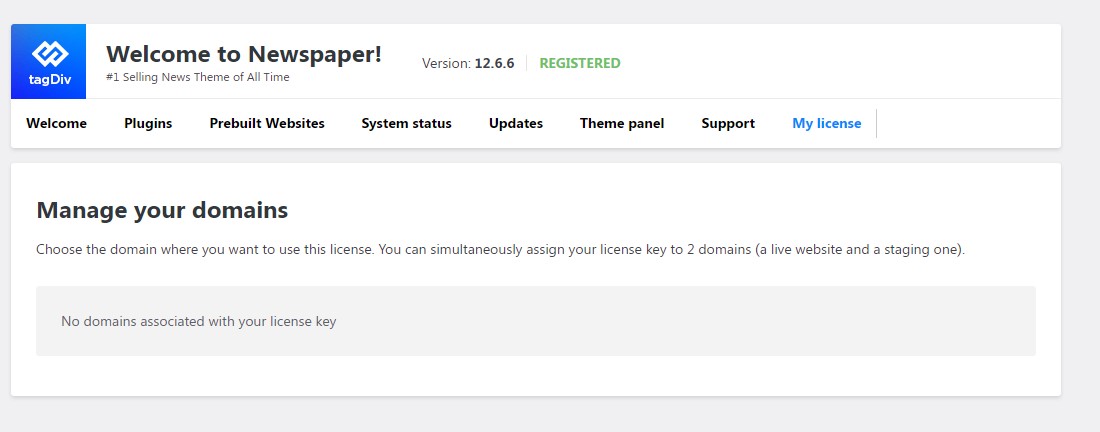
 Anamaria
 Hello,
Please activate the tagdiv Cloud Library plugin and tagdiv Standard Pack plugin.
Thank you!
Anamaria Hello,
Please disable the mobile theme and amp plugins.
Using our theme, you can choose from 3 mobile versions
-> mobile responsive => https://www.screencast.com/t/oJ2ShOp47
-> mobile theme plugin => https://forum.tagdiv.com/the-mobile-theme/
-> mobile page => https://tagdiv.com/newspaper-10-3-7-update-brings-customizable-and-fast-mobile-pages/ The option that you need to use.
Suppose you created the mobile pages with tagDiv Composer. In that case, when you install the Mobile Theme plugin, your pages will be overwritten by the plugin (the mobile theme comes with its templates for page, post, category, etc, so your current templates from the desktop theme will get converted to the mobile theme layout, the page content is made without builders in mobile editor => https://www.screencast.com/t/xbgZG8kH also, the options that are provided to edit the mobile theme version are limited (this keeps the things simple)).
This is a video about Responsive Newspaper Theme, AMP & Mobile Theme, Mobile Pages & Templates -> https://www.youtube.com/watch?v=SpGkOnJeNZY.
So, the mobile responsive is what you see when that you select the viewport on phone => https://www.screencast.com/t/matV17hH, so some settings may apply for each viewport(where is the border blue), and others are not(where the border is black).
The mobile page has the mobile templates from Cloud Library => https://www.screencast.com/t/YCcZ8rL8
The Mobile responsive version of the theme and the mobile page editor can be edit with tagDiv Composer, the mobile theme plugin cannot.
For example, you can have the mobile theme plugin activated and use the mobile page/mobile responsive version for the homepage/pages, but for the categories pages/404 page, you can’t use the mobile page/mobile responsive version if you have the mobile theme plugin activated.
So, if you want to design the pages with tagDiv Composer, you can use the mobile page or mobile responsive version.
Thank you!
 Thomas
Hello
I really like the header of this new demo https://demo.tagdiv.com/newspaper_free_news_pro
I don’t understand how to achieve to have 2 rows.
So I want to import it and modify it with my infos and colors.
But when I go in the Pre-designed Templates – Cloud Library, I only find all the homepage Homepage – Free News template.
If I import it, I am afraid that it will rease all my template site.
It is correct?
If so how I can achieve to importe ONLY the header of this demo without destroy mine?
Regards
Anamaria Hello,
The cloud templates are now in the cloud library.
Thank you!
Anamaria Hello,
Please provide more details about what is not available to you. Do you have the cloud library plugin activated? Did you check the cloud templates -> https://cloud.tagdiv.com/#/load/All? You can also create what template and design you want with cloud templates and tagdiv Composer.
Thank you!
 nexttvc
https://demo.tagdiv.com/newspaper_free_news_pro/
I cannot find this template in Cloud Library; how do I use this template?
 Viju
Viju The sticky sidebar is not working
SMART SIDEBAR is ON
I don’t use Cloud Library Templates
Also following method not working…
https://pastebin.com/81iQqr30
 Sythax
Good morning,
I created a colored background (red) for my category and it works. I tried to do the same thing for the Single Post Template which depends on this category but the backround remains the general backround of the site (blue).
Backround of my category template : https://ibb.co/Z1bX2TC
Backround of my single post template : https://ibb.co/8mJpr1W
In Theme Panel/Categories, I put my custom template in the CATEGORY CLOUD LIBRARY TEMPLATE and POST CLOUD LIBRARY TEMPLATE options : https://ibb.co/nzJ2jfW
Do you have a solution ?
Loic
 Michael Mensah
Hello, please i have been getting some issues on my website. I just realized it’s from the td-cloud library and td-composer. These two plugins keeps giving me redirections to my website (tunebeatz.com). Kindly help me fix this issue. Thank you!
Anamaria Hello,
That element is on this path td-cloud-library/shortcodes/common/tdb_breadcrumbs.php I hope this will help you.
Have a great day!
Anamaria Hi,
Please install and activate the tagdiv cloud library plugin.
Thank you!
 damonsomu
 Hi Anamaria,
I know about the custom ad placements via Composer/Cloud library. It’s not about the posts. My query is regarding adding more custom ad spots in theme panel via API/child theme. Hope you got my point. You may refer to this support trail for what I’m asking for.
Anamaria Hi,
You can set the ads in Single Post Template from tagDiv Cloud Library and you can set top ad, 3 inline ads set after x paragraphs, and bottom ad; please check this article -> https://forum.tagdiv.com/article-ads/ and video https://www.youtube.com/watch?v=biTpVVlr8j8
Thank you!
Bettina Hello!
Unfortunately, some elements are just for presentation purposes, and they do not come when you install the demo. The header is not a cloud one, so I recommend you import a new cloud header from the Cloud Library or use the Gossip PRO demo.
Thank you!
 Calin
Calin Hi Setrey,
Normally if you are using standard templates, then the theme will automatically set a H1 on logo if there is no element for page title in the page/template, if there is a page title, then the H1 will be on it and not on logo.
Also, if there are using cloud templates then the H1 can be removed using the theme builder, tagDiv Composer.
Now in case that you want to edit the files, then I will recommend using a child theme and the files that should be edited are:
– wp-content/plugins/td-standard-pack/Newspaper/parts/header/logo-h1.php (replace the h1 with anther html tag like p/div/span …) – https://i.imgur.com/VTXpfNM.png
– wp-content/plugins/td-standard-pack/Newspaper/parts/header/logo-text.php (if you are using text logo) – https://i.imgur.com/9dGOsJI.png
Now for mobile theme if is used then it can be edited from here – wp-content/plugins/td-composer/mobile/parts/logo.php unfortunately this will not work in a child theme.
I hope this will help!
Thank you!
Bettina Hello!
I recommend you to use cloud templates, so you can use other blocks with many settings for the images from modules. Also, you need to have the same sizes for your images when you upload them.
We recommend to use cloud/PRO templates in order to have the possibility to edit them with the TagDiv Composer which contains a lot of functions and features, please check our tutorial here: https://forum.tagdiv.com/tagdiv-composer-tutorial/
More documentation about the cloud templates is here:
– https://forum.tagdiv.com/cloud-library-templates/
– https://forum.tagdiv.com/design-post-pages-using-cloud-library-templates/
– https://forum.tagdiv.com/cloud-library-category-templates/
Thank you!
Anamaria Hello,
Please make sure that you have installed the tagdiv Composer and tagdiv Cloud Library, and check here -> https://i.imgur.com/ErjOvmd.png
Thank you!
 nhphuoc
 I have been using the Newspaper theme until now, but after updating to the latest version of the theme and WordPress, I encountered this error. Yesterday, I activated the tagDiv plugins network-wide (my website is a multisite), and after one day, I noticed that only the tagDiv Cloud Library plugin was deactivated. Therefore, I think there is an issue with the theme and plugins. Please help me fix this error.
nhphuocHello, After updating Newspaper to 12.6.5, necessary plugins to display the homepage such as tagDiv Composer, tagDiv Cloud Library, tagDiv Newsletter, tagDiv Mobile Theme, tagDiv Standard Pack, … automatically deactivate a few hours after I activated them. I have tried many ways to fix this error such as reinstalling the plugin, deactivating other plugins to check conflicts but the situation has not changed, my website cannot display content. Please help me to fix this error. Thank you very much.
Bettina Hello!
You can install any demo without content. If you install the demo with content, then, of course, it will replace all your content and design as well. If you install a demo without content, then it will replace the previous design.
You can return the previous design only if you have a backup.
You can import only some sections or templates of your current-designed pages from those demos. The template’s manager is in Cloud Templates. You can preview the demos here: https://demo.tagdiv.com/select_demo/newspaper-prebuilt-websites/.
There are the header and footer recreated from the default PRO demo. So, you can use them, and they are cloud templates that look similar to the default ones.
If you do not like any demo style, then you can create a page from scratch by installing a blank page and customizing it in the tagdiv composer. Please check out this video about how to create a website from scratch: https://www.youtube.com/watch?v=SoGQ0d5kIBg
Please check the differences between cloud vs default templates from our guides:
– https://forum.tagdiv.com/design-post-pages-using-cloud-library-templates/
– https://forum.tagdiv.com/design-post-pages-using-default-templates/
We recommend to use cloud/PRO templates in order to have the possibility to edit them with the TagDiv Composer which contains a lot of functions and features, please check our tutorial here: https://forum.tagdiv.com/tagdiv-composer-tutorial/
More documentation about the cloud templates is here:
– https://forum.tagdiv.com/cloud-library-templates/
– https://forum.tagdiv.com/design-post-pages-using-cloud-library-templates/
– https://forum.tagdiv.com/cloud-library-category-templates/
You shouldn’t install a page template if you like the one you have.
Yes. You can manually customize any cloud template with the tagdiv composer.
We have some settings for the rows and different stretch sizes: https://www.screencast.com/t/bsbB5P97A
Make sure that this setting is disabled as here: https://app.screencast.com/FOwnXv63emAOR
Thank you!



