
- NewsmagRequirements for Newsmag
 Bettina
 Hello Jeremy!
Did you upload any logo in your theme panel settings?
We recommend using cloud/PRO templates in order to have the possibility to edit them with the TagDiv Composer, which contains a lot of functions and features, Please check our tutorial here: https://forum.tagdiv.com/tagdiv-composer-tutorial/
More documentation about the cloud templates is here:
– https://forum.tagdiv.com/cloud-library-templates/
– https://forum.tagdiv.com/design-post-pages-using-cloud-library-templates/
– https://forum.tagdiv.com/cloud-library-category-templates/
Thank you!
Bettina Hello @meri!
I suggest you to use a cloud template, so you can easily achieve what you need(same as in homepage).
More documentation about the cloud templates is here:
– https://forum.tagdiv.com/cloud-library-templates/
– https://forum.tagdiv.com/design-post-pages-using-cloud-library-templates/
– https://forum.tagdiv.com/cloud-library-category-templates/
Thank you!
 Anamaria
 Hi,
Please click on the button to check for updates.
My recommendation is that before updating the theme to make a full backup for the database and current website, disbale the extra plugins during the update process, after that update the theme manually – https://forum.tagdiv.com/how-to-update-the-theme-2/ (after the theme update, make sure that the needed plugins are installed, like tagDiv Composer, maybe tagDiv Standard Pack and tagDiv Cloud Library).
In the worst cases, the settings in the theme panel may be lost (there have been isolated cases), in these cases, after the theme plugins that were previously used are activated, you will have to use a backup for the theme panel -> https://forum.tagdiv.com/import-export-theme-settings/
Thank you!
 odnaminytaadm
 Hi
1. rollback doesn’t help
2. restoring from a backup does not help (theme+ td-composer+td-standard-pack+td-cloud-library)
3. Some Parameters in the database?
 Calin
Calin Hello,
Indeed, if you are using a standard template, then you need to use the theme panel settings and those from the wordpress editor for Quote , but in case you are using a single post template from cloud, then you’ll need to edit it using the tagDiv Composer and set on it the style and size you need – https://i.imgur.com/WA7XMKF.jpg
Thank you!
Calin Hello,
Usually this kind of problems appears when after the theme update one of the theme plugins that were previously enabled now is no longer. To resolve the problem you’ll need to go to Newspaper > Plugins and install from there the plugins that you had previously (most of the time is related to tagDiv Composer, tagDiv Cloud Library and tagDiv Standard Pack).
In case that there are still some p problem please let me know! Also, if possible to provide some screenshots or a link where to check those problems.
Thank you!
 nerevargio@gmail.com
in cloud library there are some sections that have inner rows into columns, but I cannot make built new by myself?
I have prebuild theme that made in whole one row, and now I want separate one inner row by two columns, and one column separate one more time for icons, like this
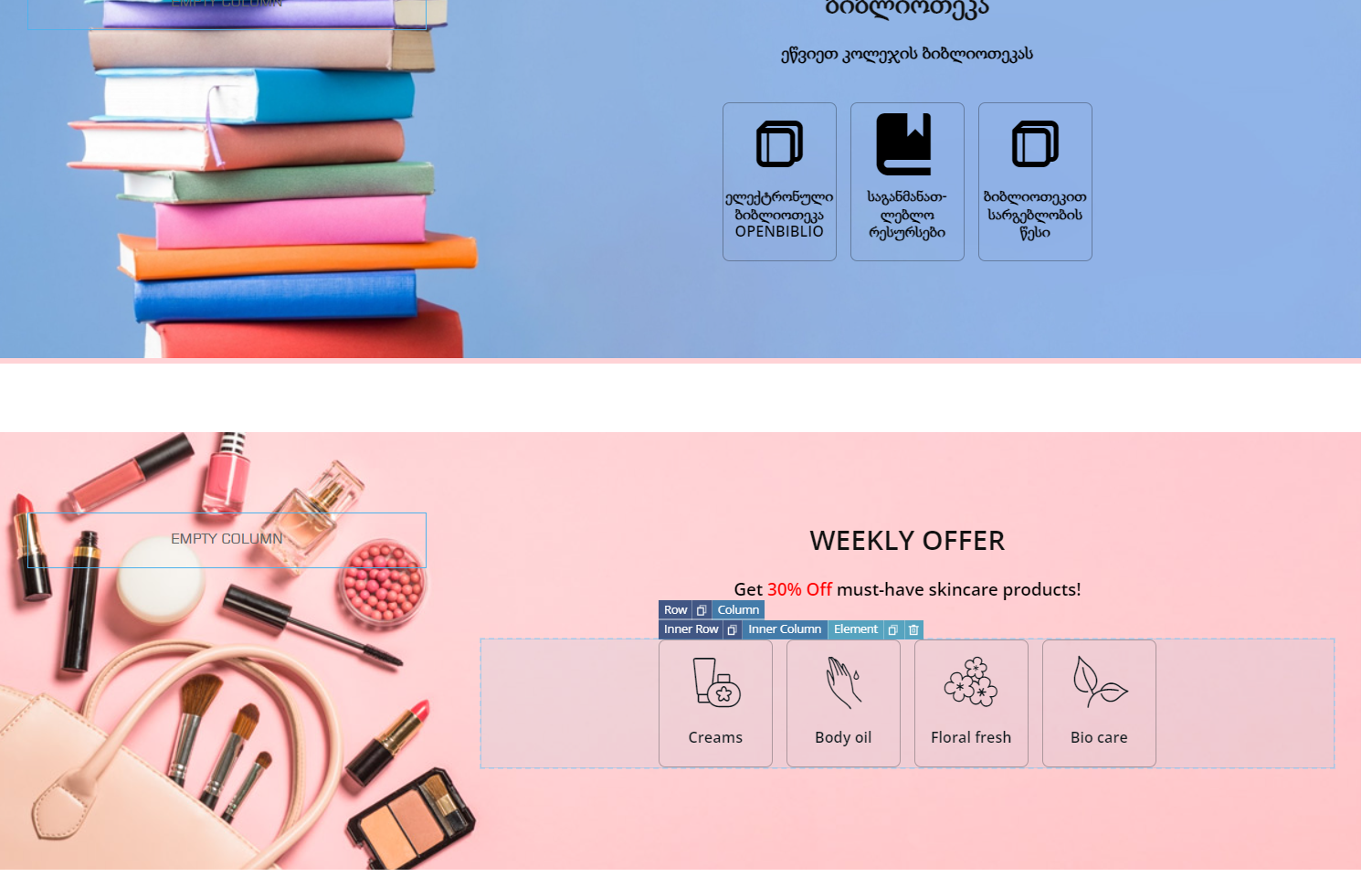
Bettina Hello Axel!
You can change that easily by using cloud templates and not default templates.
We recommend using cloud/PRO templates in order to have the possibility to edit them with the TagDiv Composer, which contains a lot of functions and features, Please check our tutorial here: https://forum.tagdiv.com/tagdiv-composer-tutorial/
More documentation about the cloud templates is here:
– https://forum.tagdiv.com/cloud-library-templates/
– https://forum.tagdiv.com/design-post-pages-using-cloud-library-templates/
– https://forum.tagdiv.com/cloud-library-category-templates/
Thank you!
Anamaria Hello,
Yes, you can import the template from tagdiv Cloud Library in the section shop -> https://i.imgur.com/Vb7BenC.png. Please make sure that you have tagdiv shop activated.
Thank you!
Anamaria Hi,
For a standard template is not implemented, please use a cloud template https://forum.tagdiv.com/design-post-pages-using-cloud-library-templates/
Thank you!
Anamaria Hello,
Please activate the tagdiv cloud library and clear the cache.
Thank you!
 fishinfool
Hello
I finally kind of figured out how the taxonomy for the directories works, but I am running into an issue naming/renaming/editing the name of the template that determines the slug.
I tried both a Tagdiv prebuilt taxonomy and a custom post type (both from the cloud library. They work fine, but I cant change the name.
I even tried the renaming option at the top of the TagDiv composer:
cpt Blank – Custom Post Type EDIT TITLE
CREATE MOBILE TEMPLATE
When I click Edit the window, a pop up appears where I can rename it, but I get this message:
Invalid template type! Please make sure your are editing a supported template type title.
This happens whether I select edit title or create for both the custom taxonomy and the custom post type.
Below are links to the site that show the url based on the template. I would like to change them to align with the site- it looks a little weird to have a fishing site with a doctors pro 3 slug/url.
I am not a coder or programmer, so I am hoping there is a way to do this without editing code.
Hoping you can provide guidance.
Current Urls:
https://theledger.whatchacatchin.com/tdb_templates/custom-taxonomy-doctors-pro-3/
https://theledger.whatchacatchin.com/tdb_templates/blank-custom-post-type/
preferred urls:
https://theledger.whatchacatchin.com/boatandguidedirectory
https://theledger.whatchacatchin.com/fishingreportdirectory
 Sudhin
 Hi
THis is the error I’m getting while enabling the cloud library plugin. WHen I disable it, the website works fine.
With just the 2 plugins of tagdiv, the same error happens.
When I disable the cloud library plugin, the website works fine without crashing.
Bettina Hello @atleemcfellin !
You can edit the homepage with the TagDiv Composer; click on those elements and check the settings on the left side of the editor.
Check the flex block settings from here: https://forum.tagdiv.com/flex-block-settings-guide/
More documentation about the cloud templates is here:
– https://forum.tagdiv.com/cloud-library-templates/
– https://forum.tagdiv.com/design-post-pages-using-cloud-library-templates/
– https://forum.tagdiv.com/cloud-library-category-templates/
I hope that helps you!
Thank you!
Bettina Hello!
Take a look here in this video for example where I build 6 columns: https://www.screencast.com/t/mZ2c5XamTFN2
In the flex block 1, there are some settings: https://prnt.sc/5Vr1zzKv4UYk
Also, you can install a section from the Cloud Library with an already done layout: https://prnt.sc/D3lGREu3iFwh -> https://prnt.sc/VTH4RpmnuGsw
Thank you!
Anamaria Hi,
My recommendation is that before updating the theme to make a full backup for the database and current website, disbale the extra plugins during the update process, after that update the theme manually – https://forum.tagdiv.com/how-to-update-the-theme-2/ (after the theme update, make sure that the needed plugins are installed, like tagDiv Composer, maybe tagDiv Standard Pack and tagDiv Cloud Library).
In the worst cases, the settings in the theme panel may be lost (there have been isolated cases), in these cases, after the theme plugins that were previously used are activated, you will have to use a backup for the theme panel -> https://forum.tagdiv.com/import-export-theme-settings/
Thank you!
SudhinHi
As mentioned before, the Cloud Library plugin makes some error on my website. When I disable the plugin, the website works fine.
Is it possible to send me a previous version of the plugin to check if it will solve the problem or not?
Bettina Hello @abreham !
That is a different block with one post. You can import that homepage/sections from the Cloud Library: https://prnt.sc/i-teraBQ2Lxs -> https://prnt.sc/Fv11m0N5mRPt
Thank you!
Bettina Hello Julien!
Check our documentation from here:
– https://forum.tagdiv.com/introduction-cpt-acf-newspaper-theme/
– https://forum.tagdiv.com/create-frontend-submission-form/
More documentation about the cloud templates is here:
– https://forum.tagdiv.com/cloud-library-templates/
– https://forum.tagdiv.com/design-post-pages-using-cloud-library-templates/
– https://forum.tagdiv.com/cloud-library-category-templates/
I hope that helps you!
Thank you!
 ISAAC LAMA
When I selected the cloud library option and choose one of the templates, I hit insert and it never inserted.
Anamaria Hello,
You can customize it with tagdiv Composer -> https://i.imgur.com/crYgJPb.png -> https://forum.tagdiv.com/design-post-pages-using-cloud-library-templates/
Thank you!
Anamaria Hi,
Using our theme, you can choose from 3 mobile versions
-> mobile responsive => https://www.screencast.com/t/oJ2ShOp47
-> mobile theme plugin => https://forum.tagdiv.com/the-mobile-theme/
-> mobile page => https://tagdiv.com/newspaper-10-3-7-update-brings-customizable-and-fast-mobile-pages/
Suppose you created the mobile pages with tagDiv Composer. In that case, when you install the Mobile Theme plugin, your pages will be overwritten by the plugin (the mobile theme comes with its templates for page, post, category, etc so your current templates from the desktop theme will get converted to the mobile theme layout, the page content is made without builders in mobile editor => https://www.screencast.com/t/xbgZG8kH also, the options that are provided to edit the mobile theme version are limited (this keeps the things simple)).
This is a video about Responsive Newspaper Theme, AMP & Mobile Theme, Mobile Pages & Templates -> https://www.youtube.com/watch?v=SpGkOnJeNZY
So, the mobile responsive is what you see then that you select the viewport on phone => https://www.screencast.com/t/matV17hH, so some settings may apply for each viewport(where is the border blue), and others are not(where the border is black).
The mobile page has the mobile templates from Cloud Library => https://www.screencast.com/t/YCcZ8rL8
Mobile responsive version of the theme and the mobile page editor can be edited with tagDiv Composer, the mobile theme plugin not.
For example, you can have the mobile theme plugin activated and use the mobile page/mobile responsive version for the homepage/pages, but for the categories pages/404 page you can’t use the mobile page/mobile responsive version if you have the mobile theme plugin activated.
So, if you want to design the pages with tagDiv Composer, you can use the mobile page or mobile responsive version.
Thank you!
Anamaria Hello,
Using our theme, you can choose from 3 mobile versions
-> mobile responsive => https://www.screencast.com/t/oJ2ShOp47
-> mobile theme plugin => https://forum.tagdiv.com/the-mobile-theme/
-> mobile page => https://tagdiv.com/newspaper-10-3-7-update-brings-customizable-and-fast-mobile-pages/
Suppose you created the mobile pages with tagDiv Composer. In that case, when you install the Mobile Theme plugin, your pages will be overwritten by the plugin (the mobile theme comes with its templates for page, post, category, etc so your current templates from the desktop theme will get converted to the mobile theme layout, the page content is made without builders in mobile editor => https://www.screencast.com/t/xbgZG8kH also, the options that are provided to edit the mobile theme version are limited (this keeps the things simple)).
This is a video about Responsive Newspaper Theme, AMP & Mobile Theme, Mobile Pages & Templates -> https://www.youtube.com/watch?v=SpGkOnJeNZY
So, the mobile responsive is what you see then that you select the viewport on phone => https://www.screencast.com/t/matV17hH, so some settings may apply for each viewport(where is the border blue), and others are not(where the border is black).
The mobile page has the mobile templates from Cloud Library => https://www.screencast.com/t/YCcZ8rL8
Mobile responsive version of the theme and the mobile page editor can be edited with tagDiv Composer, the mobile theme plugin not.
For example, you can have the mobile theme plugin activated and use the mobile page/mobile responsive version for the homepage/pages, but for the categories pages/404 page you can’t use the mobile page/mobile responsive version if you have the mobile theme plugin activated.
So, if you want to design the pages with tagDiv Composer, you can use the mobile page or mobile responsive version.
Thank you!
Anamaria Anamaria Hello,
You can find all the templates in cloud templates https://i.imgur.com/2eswgaa.jpg -> https://forum.tagdiv.com/cloud-library-templates/
Thank you!



