- NewsmagRequirements for Newsmag
- NewsmagtagDiv Social Counter tutorial
 ngotuannghia
Dear Admin,
I very happy with your theme.
Currently, we are doing migrate to tagDiv Cloud Library to make website faster.
We are following this guide: https://tagdiv.com/newspaper-theme-update-standard-pack-or-tagdiv-cloud-templates/
But we still have confusions when removing dependencies.
As guide notice: ” Almost every template from the theme panel already exists in the tagDiv Cloud Library. …”
But I cannot find any same name block in tagdiv Cloud Library
Example:
Current Header: https://i.ibb.co/W63g421/current-header.png
Current Theme import: https://i.ibb.co/j5npD5w/current-import-theme.png
Tagdiv Cloud Template search: https://i.ibb.co/QfWS2yc/Header-tag-Div-Cloud-templates.png
Please kindly guide me or let me know document which help me migrate to Cloud Library smoothly from Standart Pack plugin
Thanks
 syed2023
The webpage at https://g-technews.com/wp-admin/post.php?post_id=313&td_action=tdc&tdbTemplateType=footer&prev_url=https%3A%2F%2Fg-technews.com%2Fwp-admin%2Fadmin.php%3Fpage%3Dtdb_cloud_templates might be temporarily down or it may have moved permanently to a new web address.
ERR_HTTP2_PROTOCOL_ERROR
The theme is not editing with the plugin tagdiv composer. We encounter same error while editing header footer and whole theme
 Anamaria
 Hi,
Various factors can influence page speed, including server response time, network latency, image optimization, caching, and more. While the PHP version itself may not directly affect page speed, it can impact the web application’s performance, which in turn can affect page speed. For example, newer versions of PHP often have performance improvements that can speed up the execution of code and reduce server response times. There are many optimization guides provided by our users here in the forum, some made by us; you could check some of them
– https://forum.tagdiv.com/cache-plugin-install-and-configure/
– https://forum.tagdiv.com/how-to-make-the-site-faster/
– https://forum.tagdiv.com/topic/high-number-of-ajax-request/
– https://www.infophilic.com/get-almost-100-pagespeed-newspaper-theme/
– https://forum.tagdiv.com/topic/score-100100-pagespeed-with-newspaper-wordpress-theme/
– https://www.andraware.com/wp-rocket-for-newspaper-theme/
– https://spraythemes.com/newspaper-theme/how-to-speed-up-the-newspaper-wordpress-theme-using-wp-rocket/
– https://forum.tagdiv.com/topic/page-speed-guide-for-2023-beginners-and-advanced/
– https://forum.tagdiv.com/topic/newspaper-theme-speedify-your-website/
– https://forum.tagdiv.com/topic/tutorial-chriss-custom-optimizations-for-functions-php-etc/
– https://forum.tagdiv.com/cloudflare-cdn/
– https://forum.tagdiv.com/topic/theme-causing-high-cpu-usage-2/
– https://forum.tagdiv.com/topic/sql-querys-high-cpu/
– https://forum.tagdiv.com/topic/newspaper-theme-slow-to-respond/
– https://premium.wpmudev.org/blog/optimizing-your-wordpress-database-a-complete-guide/
– https://underconstructionpage.com/optimize-wordpress-database/
– https://crunchify.com/better-optimize-wordpress-database-all-in-one-guide/
If you use Wp Rocket, you can try to exclude the following files
/jquery-?[0-9.](.*)(.min|.slim|.slim.min)?.js
/jquery-migrate(.min)?.js
/wp-content/plugins/td-composer/legacy/Newspaper/js/tagdiv_theme.min.js
tdBlocksArray
Thank you!
 imtk
imtkHi, I would like to know what to edit so I can add +1 to post reading time shortcode.
I assume it’s in plugins/td-cloud-library/shortcodes/single/tdb_single_reading_time.php but cannot find what. Right now if a post is short, it will display the reading time as 0 minutes which does not make sense to me and I feel a simple solution would be to add +1 to the counter.
Thanks.
 Rhonda
 It is a tagdiv cloud theme.
RhondaCould you tell me please, who to change the heading of the cloud page template from “Login/Register” to another title such as “Subscribe”?
I looked on the page using the text editor and searched for “login” but nothing came up.
https://treasurecoastvoice.com/wp-content/uploads/2023/03/Screenshot-2023-03-22-at-11.22.08-AM.png
 marvinschaap
Hello,
We currently have several news websites running on the Newspaper platform. However, whenever we want to update the theme, the ‘tagDiv Composer’ and ‘tagDiv Cloud Library’ plugins are automatically deactivated after this update. As a result, we experience problems with the websites because we have to check every website after such an update.
We are currently working on several new websites for which we want to use this theme. To make a good choice, we think it is important to know whether we can somehow circumvent this, and to ensure that the plugins remain active after an update.
Can you help me with this?
 Bettina
 Hello Daniel!
If you added the ad code in the TagDiv Composer, then the mobile layout will override the cloud template and display its layout. So, the ads won’t work in the mobile viewport.
If you use an extra plugin, then there could be a plugin conflict between them.
Thank you!
Anamaria Hello Ken,
You can edit the Single Post Template as you want with tagdiv Composer -> https://forum.tagdiv.com/design-post-pages-using-cloud-library-templates/
Thank you!
Anamaria Hi,
The standard template come from plugin tagdiv Standard Pack plugin; this plugin is deprecated, which is why I recommend that you use cloud templates, for all templates. Those are easier to edit, you can do your own design, or you can choose one to import https://forum.tagdiv.com/header-manager/ -> https://cloud.tagdiv.com/#/load/Headers
More documentation about the cloud templates is here:
– https://forum.tagdiv.com/cloud-library-templates/
– https://forum.tagdiv.com/design-post-pages-using-cloud-library-templates/
– https://forum.tagdiv.com/cloud-library-category-templates/
Thank you!
 jvphobic
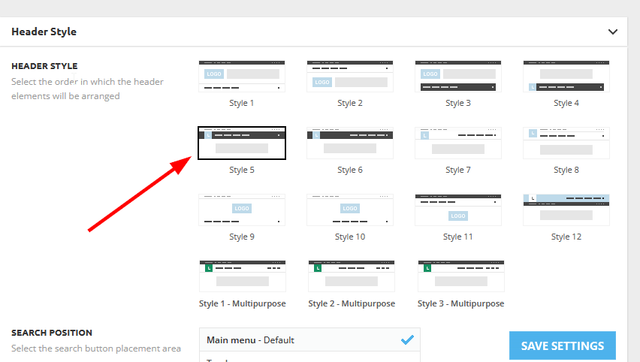
No matter what I do, I can NOT get the Header Style option to show up in the Theme Panel. I just want to pick Sytle 10 like I have on a test site. But no matter what I enable or disable I can’t get that option to show up on my main site.
I have “No template” set for the Cloud Library Template on the test site. But when I select that on the full site, NOTHING changes.
How do I get the header styles to show up??!?!?! I have been working at this for hours.
 mcdv01
 Hi Anamaria,
I only need the cloud template for the header.
Do you expect this to happen for the fonts?
I have no other plugins active. Only Newspaper Theme, Tagdiv composer, tagDiv Standard Pack, tagDiv Cloud Library
However, when I go to Newspaper -> Theme Panel -> Theme Fonts -> Google Font Styles and enabled the BOLD 600 and 700 it fixed the FONTS issue on the single page
Do you think this is ok and will not have complications?
 Fashionloving
Hi, brand new site with nothing on it, on siteground, server cache off, no other plugins on site.
When I install the latest version 12.3, it errors when installing the plugins.
tagDiv Composer : Ajax error
tagDiv Cloud Library: Ajax error
An error occurred and we could not finish the process. Please manually update the plugins.
And if I manually do it, then it works, but license doesn’t activate to install demo’s, it just hangs. Any ideas?
Rhonda I started a new page and added the shortcode using a new cloud template with the shortcode in a widget. Now I am trying to figure out how to change the heading from “Login/Register” to “Subscribe”
https://treasurecoastvoice.com/wp-content/uploads/2023/03/Screenshot-2023-03-22-at-11.22.08-AM.png
 ezioboy
If only cloud templates are entered, it stops at loading and does not open.
I can’t even press close X
how do i solve this problem
Anamaria Hello Marco,
I recommend to you use cloud templates, for all templates.
Also, related to the font, do you have an extra plugin installed?
Thank you!
 pixelenvy
Image modal not working.
When you click an image, the modal does not work correctly
https://snipboard.io/QYUMcW.jpg
Load templates in wp-admin not working
https://snipboard.io/s46NlM.jpg
Server Object Cache Not Working
Hmm ok so I seeing a lot of autoloaded data for the site, it is over the max limit of 1MB or 800kb – this can result in 502s on the site This will need to be reduced following these steps: https://wpengine.com/support/database-optimization-best-practices/#Autoloaded_Data
These are the top 20 largest autoloaded rows:
+———————-+————————————–+
| LENGTH(option_value) | option_name |
+———————-+————————————–+
| 1053678 | td_011_settings |
| 773215 | td_011 |
| 22490 | rewrite_rules |
| 13769 | autoptimize_css_defer_inline |
| 9785 | bookly_cloud_products |
| 9272 | wp_user_roles |
| 7383 | wpseo_titles |
| 6541 | cron |
| 5691 | wpseo_taxonomy_meta |
| 5243 | tribe_events_calendar_options |
| 4645 | wpseo |
| 3411 | wpseo_local |
| 3338 | Newspaper_demo_history |
| 3182 | wpseo-premium-redirects-export-plain |
| 2332 | genesis-settings |
| 2232 | dprv_html_tags |
| 2042 | fs_accounts |
| 1782 | wpe_cache_config |
| 1645 | wpil_2_ignore_words |
| 1588 | td_011_remote_cache |
+———————-+————————————–+
Total autoloaded data (in bytes):
mysql> SELECT SUM(LENGTH(option_value)) FROM wp_options WHERE autoload = ‘yes’;
1961371
We want that total to be under 800k or so for good performance.
This is ~1161371 bytes larger than 800k… Not ideal.
 guillaumewarckol
 same issue for me too.
The chrome console indicates :
> error when calling the url : MY_WEBSITE/wp-json/td-cloud-library/td_cloud_proxy?uuid=eb507454-15c7-c059-38a9-29815f4fde03
with this error message : “Failed to contact the templates API server”
> {“error”:[{“type”:”Proxy ERROR”,”message”:”Failed to contact the templates API server.”,”debug_data”:{“errors”:{“http_request_failed”:[“cURL error 28: Operation timed out after 14000 milliseconds with 95700 bytes received”]},”error_data”:[]}}]}
FYI : my WP_MEMORY_LIMIT config is set to 512M.
 Shubham Patel
 No, I don’t using standard pack plugin, I’m using only cloud templates.
mcdv01Hi.
1. I am using Cloud Template for Header – using the WEEK PRO template
2. I created my home page using TAGDIV composer -No Cloud template
3. For the other template – single, page, etc I don’t use any cloud template. I just use the default or Standard Pack.
The problem is why the FONT on HOME PAGE looking different from my SINGLE PAGE
The Theme generally uses WORK SANS and PT SERIF but the HOME PAGE and SINGLE PAGE look differently.
Can you let me know where the problem is?
The site is still under maintenance mode so pages are not accessible to public.
https://dailyjournal.com.au/
I have enabled 2 page showing the difference
1. https://dailyjournal.com.au/checking-fonts/ The Correct font look
2. https://dailyjournal.com.au/2023/01/19/blackberry-lemonade-margaritas/ incorrect font look.
A. Notice the text on the header
B. Notice the sidebar heading texts.
C. Note that the SIDEBAR content is identical. A simple custom widget.
D. You can inspect the HTML and CSS used – they are identical setting which uses WORK SANS or PT SERIF
Thanks,
Marco
 jsn@folkebladet.info
Hi 😉
I’m basically happy about the standard post template
BUT – I would like to be able to edit with the TagDiv Composer in order to adjust it just a little bit.
That, however, is not possible unless the template is found through Cloud Library – and I can not find the identical standard template in Cloud Library.
Am I missing something somewhere?
Thanks,
Jesper…
Anamaria Hi,
The problem is caused by WP BAKERY plugin; please disable it. Usually, this problem can appear when you are using the WPBakery if you have this plugin enables, then please disable it and try again. There may be a conflict between WPBakery and the tagDiv cloud library.
We have long recommended to shift from WPBakery to tagDiv Composer because WPBakery is an old builder plugin => https://i.imgur.com/O4CA0y0.png -> https://i.imgur.com/bFnzNtQ.png -> https://i.imgur.com/mv8AhFU.png -> https://i.imgur.com/IMyLYiY.png
Thank you!
Shubham Patel I’m using cloud templates only.
Anamaria Hi,
Your prebuilt website is an older prebuilt, made with standard templates.
Now, because that is a standard template that can’t be edited only in the theme files if you change them, but you need to do it every time after the update.
Also, we recommend using cloud templates, which have more options and can be customized with tagdiv Composer.
Thank you!
Bettina Hello!
This means the optimization of your site. For this, you need to check your issues on your entire site and layout.
Documentation here:
– https://kinsta.com/blog/clickable-elements-too-close-together/
– https://microwork.dev/fix-content-wider-than-screen-error/
– https://dev.to/vinodsys/google-search-console-text-too-small-to-read-error-bb0
We recommend using cloud/PRO templates in order to have the possibility to edit them with the TagDiv Composer, which contains a lot of functions and features, Please check our tutorial here: https://forum.tagdiv.com/tagdiv-composer-tutorial/
More documentation about the cloud templates is here:
– https://forum.tagdiv.com/cloud-library-templates/
– https://forum.tagdiv.com/design-post-pages-using-cloud-library-templates/
– https://forum.tagdiv.com/cloud-library-category-templates/
Thank you!