
- NewsmagRequirements for Newsmag
- NewsmagtagDiv Social Counter tutorial
 Bettina
 Hello Chris!
You can set a 404 template from Cloud templates.
More documentation about the cloud templates is here:
– https://forum.tagdiv.com/cloud-library-templates/
– https://forum.tagdiv.com/design-post-pages-using-cloud-library-templates/
– https://forum.tagdiv.com/cloud-library-category-templates/
Thank you!
Bettina Hello!
If the templates are not appearing there, then it means that you are using default templates.
Execute these steps and check why the cloud templates are not working: https://forum.tagdiv.com/topic/cloud-library-not-working-6/
We recommend using cloud/PRO templates in order to have the possibility to edit them with the TagDiv Composer, which contains a lot of functions and features, Please check our tutorial here: https://forum.tagdiv.com/tagdiv-composer-tutorial/
More documentation about the cloud templates is here:
– https://forum.tagdiv.com/cloud-library-templates/
– https://forum.tagdiv.com/design-post-pages-using-cloud-library-templates/
– https://forum.tagdiv.com/cloud-library-category-templates/
Thank you!
 mcdv01
 The console log when adding New cloud template is
Cannot read properties of undefined (reading \’length\’)
My System Status is
PHP Version
8.1.2-1ubuntu2.11
WP Memory Limit
256 MB
PHP Execution Time
86400
PHP Max Input Vars
2000
THEME VERSION is 12.3
mcdv01Hi,
As of writing this – Nothing loads on the Cloud Library
I have:
1. Site hosted on AWS – not loading tagDiv Cloud Library
2. Site hosted on my local computer – not loading tagDiv Cloud Library
3. Site hosted on another internal server – not loading tagDiv Cloud Library
When I go to Newspaper -> My License – It says No domains associated with your license key
Error in the Dev tools console
Object
error
:
Array(1)
0
:
debug_data
:
error_data
:
[]
errors
:
{http_request_failed: Array(1)}
[[Prototype]]
:
Object
message
:
“Failed to contact the templates API server.”
type
:
“Proxy ERROR”
[[Prototype]]
:
Object
length
:
1
[[Prototype]]
:
Array(0)
[[Prototype]]
:
Object
It was loading this morning until now.
Can anyone check on this?
 myshanai
My client website is running a licensed Newspaper theme. And now they want to have a new look with new style, but without changing anything on the current setup.
So i am thinking of creating a staging website just to test out new pre-built template from tagdiv cloud library and create a new design. Then later apply the choosen setting manually on the live website.
I understand that a licensed can be use for live website and staging. Can the license/key be used on the staging/test site while the live site is still running? If yes, then how to do that?
Thanks
 Anamaria
 Hello,
Please check this video -> https://www.screencast.com/t/1OjhFvX5
Also, please note the WP Bakery plugin is in conflict with tagDiv Composer, and tagDiv Cloud Library.
Thank you!
 bobwei
 Hi Bettina,
Maybe the problem is with template cloud, because there are many bugs on it, I had already installed several headers and footers, but its not apear on cloud templates pages. And there a bug with install any template, I need to use command tab + enter to make it complete install, other way, it stocked on install screen.
bobwei at firt place, I added several post single templates, its apear inside the post edit page, but not apear on Cloud templates, I cant edit anything.
https://drive.google.com/file/d/1vDOLh5Wtba3ZmzO5VUC2Dh8RejdJMbMr/view?usp=share_link
 diriras
Hello,
I had to change my VPS server so i thought to upgrade my php version from 7.4 to 8.1 also. After doing that i have a lot of errors both in my backend and frontend
2023-03-28 01:58:00.916978 [NOTICE] [1065] [172.70.243.46:63118:HTTP2-1#sportlive.gr] [STDERR] PHP Warning: Undefined array key 0 in /home/sportlive.gr/public_html/wp-content/plugins/td-cloud-library/includes/tdb_module.php on line 357
2023-03-28 01:58:00.917018 [NOTICE] [1065] [172.70.243.46:63118:HTTP2-1#sportlive.gr] [STDERR] PHP Warning: Trying to access array offset on value of type bool in /home/sportlive.gr/public_html/wp-content/plugins/td-cloud-library/includes/tdb_module.php on line 486
2023-03-28 01:58:01.021848 [NOTICE] [1065] [172.70.243.46:63118:HTTP2-1#sportlive.gr] [STDERR] PHP Warning: Undefined variable $data in /home/sportlive.gr/public_html/wp-content/plugins/featured-image-from-url/includes/attachment.php on line 316
2023-03-28 01:58:01.021869 [NOTICE] [1065] [172.70.243.46:63118:HTTP2-1#sportlive.gr] [STDERR] PHP Warning: Trying to access array offset on value of type null in /home/sportlive.gr/public_html/wp-content/plugins/featured-image-from-url/includes/attachment.php on line 316
2023-03-28 01:58:11.345318 [NOTICE] [1060] [172.70.242.109:35842:HTTP2-3#sportlive.gr] [STDERR] PHP Warning: Undefined array key 0 in /home/sportlive.gr/public_html/wp-content/plugins/td-cloud-library/includes/tdb_module.php on line 357
2023-03-28 01:58:11.345338 [NOTICE] [1060] [172.70.242.109:35842:HTTP2-3#sportlive.gr] [STDERR] PHP Warning: Trying to access array offset on value of type bool in /home/sportlive.gr/public_html/wp-content/plugins/td-cloud-library/includes/tdb_module.php on line 486
2023-03-28 01:58:11.349510 [NOTICE] [1060] [172.70.242.109:35842:HTTP2-3#sportlive.gr] [STDERR] PHP Warning: Undefined array key 0 in /home/sportlive.gr/public_html/wp-content/plugins/td-cloud-library/includes/tdb_module.php on line 357
2023-03-28 01:58:11.349522 [NOTICE] [1060] [172.70.242.109:35842:HTTP2-3#sportlive.gr] [STDERR] PHP Warning: Trying to access array offset on value of type bool in /home/sportlive.gr/public_html/wp-content/plugins/td-cloud-library/includes/tdb_module.php on line 486
2023-03-28 01:58:17.557406 [NOTICE] [1067] [172.70.242.157:39290:HTTP2-1#sportlive.gr] [STDERR] PHP Warning: Undefined array key 0 in /home/sportlive.gr/public_html/wp-content/plugins/td-cloud-library/includes/tdb_module.php on line 357
2023-03-28 01:58:17.557439 [NOTICE] [1067] [172.70.242.157:39290:HTTP2-1#sportlive.gr] [STDERR] PHP Warning: Trying to access array offset on value of type bool in /home/sportlive.gr/public_html/wp-content/plugins/td-cloud-library/includes/tdb_module.php on line 486
2023-03-28 01:58:18.363461 [NOTICE] [1067] [172.70.243.61:27082:HTTP2-1#sportlive.gr] [STDERR] PHP Warning: Undefined array key 0 in /home/sportlive.gr/public_html/wp-content/plugins/td-cloud-library/includes/tdb_module.php on line 357
2023-03-28 01:58:18.363492 [NOTICE] [1067] [172.70.243.61:27082:HTTP2-1#sportlive.gr] [STDERR] PHP Warning: Trying to access array offset on value of type bool in /home/sportlive.gr/public_html/wp-content/plugins/td-cloud-library/includes/tdb_module.php on line 486
2023-03-28 01:58:18.363837 [NOTICE] [1067] [172.70.243.61:27082:HTTP2-1#sportlive.gr] [STDERR] PHP Warning: Undefined array key 0 in /home/sportlive.gr/public_html/wp-content/plugins/td-cloud-library/includes/tdb_module.php on line 357
2023-03-28 01:58:18.363854 [NOTICE] [1067] [172.70.243.61:27082:HTTP2-1#sportlive.gr] [STDERR] PHP Warning: Trying to access array offset on value of type bool in /home/sportlive.gr/public_html/wp-content/plugins/td-cloud-library/includes/tdb_module.php on line 486
2023-03-28 01:58:18.364188 [NOTICE] [1067] [172.70.243.61:27082:HTTP2-1#sportlive.gr] [STDERR] PHP Warning: Undefined array key 0 in /home/sportlive.gr/public_html/wp-content/plugins/td-cloud-library/includes/tdb_module.php on line 357
2023-03-28 01:58:18.364203 [NOTICE] [1067] [172.70.243.61:27082:HTTP2-1#sportlive.gr] [STDERR] PHP Warning: Trying to access array offset on value of type bool in /home/sportlive.gr/public_html/wp-content/plugins/td-cloud-library/includes/tdb_module.php on line 486
2023-03-28 01:58:18.467499 [NOTICE] [1067] [172.70.243.61:27082:HTTP2-1#sportlive.gr] [STDERR] PHP Warning: Undefined variable $data in /home/sportlive.gr/public_html/wp-content/plugins/featured-image-from-url/includes/attachment.php on line 316
2023-03-28 01:58:18.467533 [NOTICE] [1067] [172.70.243.61:27082:HTTP2-1#sportlive.gr] [STDERR] PHP Warning: Trying to access array offset on value of type null in /home/sportlive.gr/public_html/wp-content/plugins/featured-image-from-url/includes/attachment.php on line 316
2023-03-28 01:58:18.467595 [NOTICE] [1067] [172.70.243.61:27082:HTTP2-1#sportlive.gr] [STDERR] PHP Warning: Undefined variable $data in /home/sportlive.gr/public_html/wp-content/plugins/featured-image-from-url/includes/attachment.php on line 316
2023-03-28 01:58:18.467604 [NOTICE] [1067] [172.70.243.61:27082:HTTP2-1#sportlive.gr] [STDERR] PHP Warning: Trying to access array offset on value of type null in /home/sportlive.gr/public_html/wp-content/plugins/featured-image-from-url/includes/attachment.php on line 316
2023-03-28 01:58:18.467638 [NOTICE] [1067] [172.70.243.61:27082:HTTP2-1#sportlive.gr] [STDERR] PHP Warning: Undefined variable $data in /home/sportlive.gr/public_html/wp-content/plugins/featured-image-from-url/includes/attachment.php on line 316
2023-03-28 01:58:18.467645 [NOTICE] [1067] [172.70.243.61:27082:HTTP2-1#sportlive.gr] [STDERR] PHP Warning: Trying to access array offset on value of type null in /home/sportlive.gr/public_html/wp-content/plugins/featured-image-from-url/includes/attachment.php on line 316
2023-03-28 01:58:23.586287 [NOTICE] [1062] [172.70.243.94:53690:HTTP2-1#sportlive.gr] [STDERR] PHP Warning: Undefined array key 0 in /home/sportlive.gr/public_html/wp-content/plugins/td-cloud-library/includes/tdb_module.php on line 357
2023-03-28 01:58:23.586325 [NOTICE] [1062] [172.70.243.94:53690:HTTP2-1#sportlive.gr] [STDERR] PHP Warning: Trying to access array offset on value of type bool in /home/sportlive.gr/public_html/wp-content/plugins/td-cloud-library/includes/tdb_module.php on line 486
2023-03-28 01:59:14.967458 [NOTICE] [1061] [172.70.243.52:18046:HTTP2-3#sportlive.gr] [STDERR] PHP Warning: Undefined array key 0 in /home/sportlive.gr/public_html/wp-content/plugins/td-cloud-library/includes/tdb_module.php on line 357
2023-03-28 01:59:14.967486 [NOTICE] [1061] [172.70.243.52:18046:HTTP2-3#sportlive.gr] [STDERR] PHP Warning: Trying to access array offset on value of type bool in /home/sportlive.gr/public_html/wp-content/plugins/td-cloud-library/includes/tdb_module.php on line 486
2023-03-28 01:59:18.156127 [NOTICE] [1063] [172.70.242.108:16306:HTTP2-1#sportlive.gr] [STDERR] PHP Warning: Undefined variable $data in /home/sportlive.gr/public_html/wp-content/plugins/featured-image-from-url/includes/attachment.php on line 316
2023-03-28 01:59:18.156143 [NOTICE] [1063] [172.70.242.108:16306:HTTP2-1#sportlive.gr] [STDERR] PHP Warning: Trying to access array offset on value of type null in /home/sportlive.gr/public_html/wp-content/plugins/featured-image-from-url/includes/attachment.php on line 316
2023-03-28 01:59:19.154430 [NOTICE] [1062] [172.70.242.228:12192:HTTP2-1#sportlive.gr] [STDERR] PHP Warning: Undefined variable $data in /home/sportlive.gr/public_html/wp-content/plugins/featured-image-from-url/includes/attachment.php on line 316
2023-03-28 01:59:19.154448 [NOTICE] [1062] [172.70.242.228:12192:HTTP2-1#sportlive.gr] [STDERR] PHP Warning: Trying to access array offset on value of type null in /home/sportlive.gr/public_html/wp-content/plugins/featured-image-from-url/includes/attachment.php on line 316
2023-03-28 01:59:54.454820 [NOTICE] [1061] [172.70.242.38:55912:HTTP2-3#sportlive.gr] [STDERR] PHP Warning: Undefined array key 0 in /home/sportlive.gr/public_html/wp-content/plugins/td-composer/legacy/common/wp_booster/td_module.php on line 391
2023-03-28 01:59:54.454879 [NOTICE] [1061] [172.70.242.38:55912:HTTP2-3#sportlive.gr] [STDERR] PHP Warning: Trying to access array offset on value of type bool in /home/sportlive.gr/public_html/wp-content/plugins/td-composer/legacy/common/wp_booster/td_module.php on line 572
2023-03-28 01:59:54.661073 [NOTICE] [1061] [172.70.242.38:55912:HTTP2-3#sportlive.gr] [STDERR] PHP Warning: Undefined array key 0 in /home/sportlive.gr/public_html/wp-content/plugins/td-composer/legacy/common/wp_booster/td_module.php on line 391
2023-03-28 01:59:54.661142 [NOTICE] [1061] [172.70.242.38:55912:HTTP2-3#sportlive.gr] [STDERR] PHP Warning: Trying to access array offset on value of type bool in /home/sportlive.gr/public_html/wp-content/plugins/td-composer/legacy/common/wp_booster/td_module.php on line 572
2023-03-28 02:00:16.775834 [NOTICE] [1068] [172.70.242.58:41026:HTTP2-1#sportlive.gr] [STDERR] PHP Warning: Undefined variable $data in /home/sportlive.gr/public_html/wp-content/plugins/featured-image-from-url/includes/attachment.php on line 316
2023-03-28 02:00:16.775866 [NOTICE] [1068] [172.70.242.58:41026:HTTP2-1#sportlive.gr] [STDERR] PHP Warning: Trying to access array offset on value of type null in /home/sportlive.gr/public_html/wp-content/plugins/featured-image-from-url/includes/attachment.php on line 316
2023-03-28 02:00:19.873368 [NOTICE] [1062] [172.70.242.38:55920:HTTP2-5#sportlive.gr] [STDERR] PHP Warning: Undefined variable $data in /home/sportlive.gr/public_html/wp-content/plugins/featured-image-from-url/includes/attachment.php on line 316
2023-03-28 02:00:19.873390 [NOTICE] [1062] [172.70.242.38:55920:HTTP2-5#sportlive.gr] [STDERR] PHP Warning: Trying to access array offset on value of type null in /home/sportlive.gr/public_html/wp-content/plugins/featured-image-from-url/includes/attachment.php on line 316
Bettina Hello @igor88 !
All the cloud templates can be found in Cloud templates: https://prnt.sc/82sYSLPHnsl-
Edit them from here: https://prnt.sc/ryvmEOIefy-F
Thank you!
Bettina Hello!
If you use a cloud template, all the settings should be found in the TagDiv Composer.
But the image size should be as the same as your real image if you choose full size to display.
Thank you!
Bettina Hello @Igor88 !
You can customize all the cloud templates/PRO with the TagDiv Composer. Please provide more information about what you need to achieve and what is the issue there.
Thank you!
Anamaria Hi,
I recommend you use a Single Post Template from tagDiv Cloud Library, and you can design it with tagDiv Composer.
To display the related articles or more from the author, you can use Flex Block and filter it https://www.screencast.com/t/SEmxo13Fo2X -> https://i.imgur.com/YIg3nPP.png
Thank you!
Anamaria Hello,
I recommend you use a Single Post Template from tagDiv Cloud Library, and you can design it with tagDiv Composer.
To display the related articles or more from the author, you can use Flex Block and filter it https://www.screencast.com/t/SEmxo13Fo2X -> https://i.imgur.com/YIg3nPP.png
if you want to keep those templates the only way to remove the “more from author” tab is to use a custom CSS like this one:
.single .td-related-right{

display: none;

}
Set the code in Theme Panel ->Custom code -> Custom CSS
I hope this helps you!
Thank you!
Anamaria Hi,
This will not affect your page speed. Did you check for a plugin conflict?
There are a lot of factors which can make your site slow. Make sure you use only some templates and fewer functionalities and options.
Some factors which you need to take into account are:
External factors: server speed, if you are using CDN or not, the external resources loaded by your website like ads, fonts, tracking scripts like Facebook Pixel, Google Analytics, Twitter analytics, Hotjar and so on.
Internal factors: the number of elements on the page, image size, image formats, if you are using mobile optimized layouts, console errors, if you are using the Standard Pack plugin or not, if you are using the PRO demo or a standard one.
There are many optimization guides provided by our users here in the forum, some made by us; you could check some of them
– https://forum.tagdiv.com/cache-plugin-install-and-configure/
– https://forum.tagdiv.com/how-to-make-the-site-faster/
– https://forum.tagdiv.com/topic/high-number-of-ajax-request/
– https://www.infophilic.com/get-almost-100-pagespeed-newspaper-theme/
– https://forum.tagdiv.com/topic/score-100100-pagespeed-with-newspaper-wordpress-theme/
– https://www.andraware.com/wp-rocket-for-newspaper-theme/
– https://spraythemes.com/newspaper-theme/how-to-speed-up-the-newspaper-wordpress-theme-using-wp-rocket/
– https://forum.tagdiv.com/topic/page-speed-guide-for-2023-beginners-and-advanced/
– https://forum.tagdiv.com/topic/newspaper-theme-speedify-your-website/
– https://forum.tagdiv.com/topic/tutorial-chriss-custom-optimizations-for-functions-php-etc/
– https://forum.tagdiv.com/cloudflare-cdn/
– https://forum.tagdiv.com/topic/theme-causing-high-cpu-usage-2/
– https://forum.tagdiv.com/topic/sql-querys-high-cpu/
– https://forum.tagdiv.com/topic/newspaper-theme-slow-to-respond/
– https://premium.wpmudev.org/blog/optimizing-your-wordpress-database-a-complete-guide/
– https://underconstructionpage.com/optimize-wordpress-database/
– https://crunchify.com/better-optimize-wordpress-database-all-in-one-guide/
Also, pagespeed is not covered by support -> https://forum.tagdiv.com/newspaper-theme-support/
If you use Wp Rocket, you can try to exclude the following files
/jquery-?[0-9.](.*)(.min|.slim|.slim.min)?.js
/jquery-migrate(.min)?.js
/wp-content/plugins/td-composer/legacy/Newspaper/js/tagdiv_theme.min.js
tdBlocksArray
Thank you!
Anamaria Hi,
This is are guides on how to import a template -> https://forum.tagdiv.com/cloud-library-templates/ -> https://forum.tagdiv.com/how-use-tagdiv-cloud-library-templates/ -> https://forum.tagdiv.com/tagdiv-cloud-library-plugin/
Thank you!
Anamaria Hello,
Maybe you have a header template from Cloud Library, you can edit the logo and header with tagDiv Composer => https://www.screencast.com/t/zuhG8uGZe, select the header and you can remove the logo image/text and add a new logo => https://www.screencast.com/t/WSquHPNqT https://www.youtube.com/watch?v=HXQQygkCCJo https://forum.tagdiv.com/add-logo-newspaper/
Please provide more details with screenshots to be able to help you.
Please note that support is Monday -> Friday -> 8:00 AM – 5:00 PM
Thank you!
 herbal
I imported the cloud single template, and I saw the template files with a green global icon display on the right. However, I don’t see an option to install the cloud template in WordPress. Also, I already have the TagDiv Cloud Library plugin installed in WordPress
 ngotuannghia
Dear Admin,
Currently day, I am working to migrate cloud template from standard pack plugin.
But i face many issue and crazy.
At this time, I cannot change color any item. I checked the console log and see many error

What should i do?
Thanks
ngotuannghiaDear Admin,
I am sorry for bother you.
I got a error when delete cloud template and I cannot delete it.
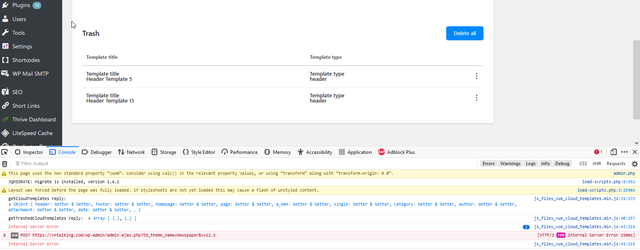
Please kindly help me.
I want to empty trash because I think it maybe affect speed site
 Hamid Fekhart
 Bonjour,
Je crois que vous n’avez pas compris ma question.je ne parle pas de la pub (je n’en suis pas encore là !), mais de Google Analytics. Je vous prie de relire mon message que voici :
J’ai un souci avec Google Analytics. Je reçois la notification suivante : “la propriété Hamid Fekhart n’enregistre aucun appel”. J’ai déjà inséré le bout de code de Google Analytics dans les trois espaces de ANALYTICS/JS CODES dans le theme panel (HEADER SCRIPT CODE, AFTER BODY SCRIPT CODE et FOOTER SCRIPT CODE). Je vous prie de noter que dans les débuts, ça a marché et que je recevais les statistiques de Google Analytics. Après, ça a cessé de marcher. J’ai supprimé le bout de code et je l’ai réinstallé, mais toujours en vain. Notez que mon site est un site d’actualités. Je poste quelque 5 à 6 articles par jour (est-ce de là le souci ?). Fin du message.
L’autre problème que j’ai rencontré, c’est avec les pages. J’ai téléchargé des templates cloud différentes pour quatre pages (à propos, politique de confidentialité, contact et mentions légales) pour que je puisse créer à chacune une template mobile. Mais dès que je porte une modification sur une page, les autres pages – à part la page contact – subissent la modification, ce qui n’est pas, à mon sens, normal. J’ai pensé à créer d’abord les pages sur l’interface de WordPress, mais, dans ce cas, il ne sera pas possible de créer des templates mobile. Est-ce un beug ? En tout cas, ça en a bien l’air.
Merci infiniment.
 nickmde
Hey everyone,
Hope you’re doing great.
There are some sections from the Real Estate Pro demo I’d like to use in my website. Why aren’t any elements from that demo inside of TagDiv’s cloud?
Tried recreating some of the header/hero sections myself but they’re not coming out the same.
 ginestrawatson
 It only appears when I have tagDiv Cloud Library plugin activated. Maybe it’s trying to pull a style from somewhere?
Another thing, it happens when I try to insert “Post Loop” into the page/templates
-
This reply was modified 3 years by
ginestrawatson.
Bettina Hello!
In the cloud templates, you can add the ads when you edit the post with TagDiv Composer in the element called ” Single Post Content ” in the tab ADS. Documentation here: https://forum.tagdiv.com/article-ads/
Or you can use the element called “Ad box” from TagDiv Composer, and there you need to add the ads: https://forum.tagdiv.com/ads-adsense-overview/
Yes, you need a SEO plugin. We recommend using the Yoast SEO plugin: https://yoast.com/show-x-in-search-results/
Thank you!
Bettina Hello @ngotuannghia!
You should look up headers and see which ones you like; you can also build it from scratch if necessary. There you won’t find a default style number. They have names from the demos. Please check out this video about how to create a website from scratch: https://www.youtube.com/watch?v=SoGQ0d5kIBg
We recommend using cloud/PRO templates in order to have the possibility to edit them with the TagDiv Composer, which contains a lot of functions and features, Please check our tutorial here: https://forum.tagdiv.com/tagdiv-composer-tutorial/
More documentation about the cloud templates is here:
– https://forum.tagdiv.com/cloud-library-templates/
– https://forum.tagdiv.com/design-post-pages-using-cloud-library-templates/
– https://forum.tagdiv.com/cloud-library-category-templates/
Thank you!

