
- TutorialstagDiv Social Counter Tutorial
 sirms
sirmsDisqus and theme breaks the workflow causing more issues when some plugins is enabled, however, it is not a root cause.
I let the Disqus plugin developer know about the conflict. I would like to use this plugin in the future with cloud templates.
Hopefully a this can be added in the next update of the theme.
 Anamaria
 Hello,
Only the administrator and editor can do changes with tagDiv Composer and can save it.
The other users can open it, but the changes made are not saved.
We will try in the future to implement the option to hide cloud templates for the rest of the users who do not have access to edit.
Thank you for your understanding!
 Bettina
 Hello!
1. When I visit your website I don’t see the title there. Please delete your cache and try again.
2. You can also duplicate the existing template and for assigning another template go to Newspaper -> Theme panel -> Categories -> Select a category you want and there you can find the setting “Category cloud library template” and choose the template from that dropdown for each category.
3. Check also in Dashboard -> Settings -> Discussion if you have the settings with comments enabled.
Thank you!
Bettina Hello!
Please make sure you have a cloud/PRO template for that single post/category template in order to assign your mobile page.
Thank you!
 edestudio
When I login with an author user, the cloud templates element appears active in the wordpress backend menu and you should not be able to access this. How this element is removed.
 djliamcontact
Hey, I just bought the Newspaper theme and I have I can’t use it.
I download it but after I do the “Fast Start Your Website” part its not allowing me to download the plugins & update them.
Its write:
“tagDiv Composer
Failed
tagDiv Cloud Library
Failed
tagDiv Social Counter
Failed
An error occurred and we could not finish the process.
Please manually update the plugins.
 madamcza
 Hi Anamaria,
I do not have this option in the menu Theme Panel -> Mobile. I do not use mobile theme or AMP. I just use mobile layouts from cloud templates.
Should I then just include the code as always in Theme Panel->Custom Code?
Anamaria Hello,
Please make sure you have the same header set on the article pages if you have a Header Template imported from Cloud Library, you can check which header is set, from Manager(Website Manager) -> Header => https://www.screencast.com/t/nKX3ff3zjr
If this is not what you mean, then please provide more information, screenshots and your website link in order to help you efficiently.
Thank you!
 comms
comms I am unable to disable the mobile view template for pages imported from Cloud Library. Only for regular created pages.
I already assigned a mobile page for the homepage, works great, footer & header showing off properly.
However, assigning the same footer & header for a single post/category template doesn’t apply.
I have looked over the videos.
If you can assist more, we can talk on the phone, I’m local.
Thanks!
-
This reply was modified 5 years by
comms.
 Pukacza
 I have met the requirement of all settings.
http://prntscr.com/127r85q
I checked it once again. And I can reproduce error every time I just enter the “Edit Post” in wordpress.
Whenever I done that I’m receiving alerts like below:
Error Details

=============

An error of type E_ERROR was caused in line 2934 of the file /home/546626.cloudwaysapps.com/muxfghuehd/public_html/wp-content/plugins/td-composer/legacy/common/wp_booster/td_util.php. Error message: Out of memory (allocated 35651584) (tried to allocate 40960 bytes)
And CPU usage is 100% till I restart the server.
If you need any more logs I can gather it.
 [Wed Apr 28 03:19:22.148983 2021] [proxy_fcgi:error] [pid 24049:tid 140277716739840] [client 95.91.76.7:21398] AH01071: Got error 'PHP message: PHP Warning: Attempt to read property "slug" on null in /home/546626.cloudwaysapps.com/muxfghuehd/public_..............ock.php on line 202PHP message: PHP Warning: Attempt to read property "ID" on null in /home/546626.cloudwaysapps.com/muxfghuehd/public_html/wp-content/plugins/td-composer/includes/tdc_composer_block.php on line 202PHP message: PHP Warning: Attempt

[Wed Apr 28 03:19:22.369949 2021] [proxy_fcgi:error] [pid 24049:tid 140277716739840] [client 95.91.76.7:21398] AH01071: Got error 's/tdc_composer_block.php on line 202PHP message: PHP Warning: Attempt to read property "ID" on null in /home/546626.cl..............cy/common/wp_booster/td_block.php on line 1554PHP message: PHP Warning: Attempt to read property "ID" on null in /home/546626.cloudwaysapps.com/muxfghuehd/public_html/wp-content/plugins/td-composer/legacy/common/wp_booster/td_block.php on line 1554'
 byothe
Hello
I am trying to install templates for different pages on my site but it get stuck on “installing”
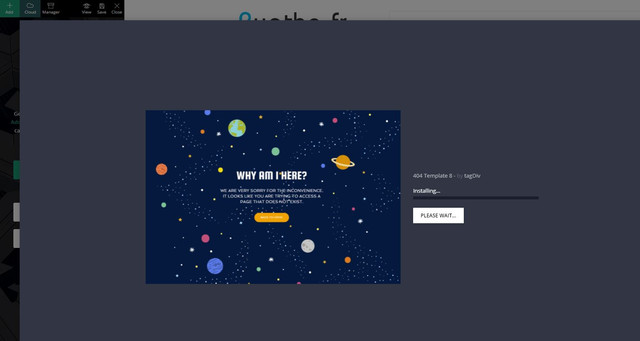
Just before doing that I had no problem to import a new footer template…
Anamaria Hello,
So, if I understood correctly, you to add a caption for the featured image you would add you added the title element, right?
if so, then yes, that item will be on all posts, to add a caption for the featured image, it must be added when you choose that image, like this => https://www.screencast.com/t/6e3XdnGs -> https://www.screencast.com/t/IxnAxfrHPuEX
tagDiv Composer is a page and cloud builder, it can be used only for pages and cloud templates, therefore you can use it on a single post template from tagDiv cloud library to adjust the layout, but not to write the post content, for this, you need to use the WordPress editor, you can only change the style/layout, this is a video about single post template => https://www.youtube.com/watch?v=6m8-EebnfM0
For fonts, you can check what family fonts apply on the post using the option from sidebar tool for each element => https://www.screencast.com/t/XLqSdtPv or from Manager(Website Manager) -> Fonts => https://www.screencast.com/t/zyhMF5hU -> https://www.youtube.com/watch?v=rbkYVyj1__Q
You can find more tutorials on our channel on youtube =>https://www.youtube.com/user/tagdiv which can help you to redesign.
A solution for sending a screenshot is this:
Download, capture, send: https://www.techsmith.com/jing-tool.html
After making the screenshot, you will have a link, paste it here.
Hope this helps you!
Thank you!
Anamaria Hello,
If you have set a footer from Cloud Library like this => https://www.screencast.com/t/urnrnLjPo, then please set on “No template” and the settings will appear => https://www.screencast.com/t/CND5ik5adeL
If this is not what you mean, please provide some screenshots.
Thank you!
 Vlad S
 Hello !
Last reply via e-mail is this:
Make sure that you do not have a plugin conflict, please deactivate ALL plugins except tagDiv plugins, also if you are using child theme or cache plugin, deactivate them, clear all cache and try again.
This tdb_action=tdb_ajax is related to the infinite loading functionality, the ?tdb_action=tdb_ajax can be found in wp-content/plugins/td-cloud-library/includes/tdb_ajax.php
If the problem persists, please make a full backup to your website and please provide wp-admin login and cPanel to connect and check this problem.
Thank you !
 shtv
shtvNewspaper version: 10.4
WordPress version: 5.7.1
PHP-Version: 7.4
Browser: Chrome (latest)
Installed plugins:
– tagDiv Cloud Library
– tagDiv Composer
– tagDiv Social Counter
– tagDiv Standard Pack
Hello,
When adding a new element via Composer the element is added, but not usable. When trying to delete the element, we encounter multiple errors, see https://imgur.com/a/IU09YPf
We tried to deactivate all unnecessary plugins, but the error still occurs.
Any help is highly appreciated.
commsHi
> I have imported a single post template via the Cloud Library (Single Post Template – Magazine PRO). Edited the template for the desktop version, all good.
> Imported a header and a footer template and designed them to my liking (Header Magazine Pro Mobile & Footer Magazine Pro Mobile). These are only for the mobile view.
Now, I created a mobile version page of Single Post Template – Magazine PRO using the TagDiv Composer, assigned the two mobile header & footer templates but they are not showing.
If I would be able to edit the Single Post Template – Magazine PRO using the Gutenberg editor and disable the mobile theme settings I believe it would work, as it works for regular pages.
https://i.imgur.com/PFpL5vE.png
How can I disable the mobile theme for a desktop cloud library template?
Please advise.
Thank you
sirms No, it works with cloud templets too.
HTML BLOCK and Javascript for the comments counter.
Creat an account and set up manually.
 globus125
 I did but it still not shown.
What i am referring to is when I go to Header in the Theme panel I do see Cloud LIbrary, than Header Style, Top Bar, Main Menu, Logo and so on.
In the Footer I do only see the Cloud Library Template than empty. There used to be as well some sort of Style and sub footer and so on.
thank you
Pukacza Also I receive alert from WordPress
Since WordPress 5.2 there is a built-in feature that detects when a plugin or theme causes a fatal error on your site, and notifies you with this automated email.
In this case, WordPress caught an error with one of your plugins, tagDiv Composer.
Error Details
=============
An error of type E_ERROR was caused in line 2937 of the file /home/546626.cloudwaysapps.com/muxfghuehd/public_html/wp-content/plugins/td-composer/legacy/common/wp_booster/td_util.php. Error message: Out of memory (allocated 12582912) (tried to allocate 40960 bytes)
Bettina Hello!
Please make sure that your changes from theme panel are saved.
If you use a cloud/PRO template, then please check when you edit with TagDiv Composer if there is set up another font in the elements.
Please note that if another font is set up in the elements, then your changes from theme panel will be overwritten by the element’s settings.
Thank you!
PukaczaHi,
I see lots of errors with theme in Apache error log:
 [Mon Apr 26 00:18:13.914739 2021] [proxy_fcgi:error] [pid 20394:tid 139993376810752] [client 144.76.60.198:54860] AH01071: Got error 'PHP message: PHP Warning: Undefined variable $prev_class in /home/546626.cloudwaysapps.com/muxfghuehd/public_html/w..............d-cloud-library/state/date/tdb_state_date.php on line 120PHP message: PHP Warning: Undefined variable $next_class in /home/546626.cloudwaysapps.com/muxfghuehd/public_html/wp-content/plugins/td-cloud-library/state/date/tdb_state_date.php on line 121'

[Mon Apr 26 00:18:37.844803 2021] [proxy_fcgi:error] [pid 20394:tid 139993334847232] [client 207.46.13.87:54888] AH01071: Got error 'PHP message: PHP Warning: Attempt to read property "slug" on null in /home/546626.cloudwaysapps.com/muxfghuehd/publi..............block.php on line 202PHP message: PHP Warning: Attempt to read property "ID" on null in /home/546626.cloudwaysapps.com/muxfghuehd/public_html/wp-content/plugins/td-composer/includes/tdc_composer_block.php on line 202PHP message: PHP Warning: Attemp

[Mon Apr 26 00:18:38.072243 2021] [proxy_fcgi:error] [pid 20394:tid 139993334847232] [client 207.46.13.87:54888] AH01071: Got error 's/tdc_composer_block.php on line 202PHP message: PHP Warning: Attempt to read property "ID" on null in /home/546626...............cy/common/wp_booster/td_block.php on line 1554PHP message: PHP Warning: Attempt to read property "ID" on null in /home/546626.cloudwaysapps.com/muxfghuehd/public_html/wp-content/plugins/td-composer/legacy/common/wp_booster/td_block.php on line 1554'

[Mon Apr 26 00:18:44.843007 2021] [proxy_fcgi:error] [pid 20394:tid 139993460737792] [client 40.77.167.107:54888] AH01071: Got error 'PHP message: PHP Warning: Attempt to read property "slug" on null in /home/546626.cloudwaysapps.com/muxfghuehd/publ.............._block.php on line 202PHP message: PHP Warning: Attempt to read property "ID" on null in /home/546626.cloudwaysapps.com/muxfghuehd/public_html/wp-content/plugins/td-composer/includes/tdc_composer_block.php on line 202PHP message: PHP Warning: Attem

[Mon Apr 26 00:18:45.068332 2021] [proxy_fcgi:error] [pid 20394:tid 139993460737792] [client 40.77.167.107:54888] AH01071: Got error 's/tdc_composer_block.php on line 202PHP message: PHP Warning: Attempt to read property "ID" on null in /home/546626..............cy/common/wp_booster/td_block.php on line 1554PHP message: PHP Warning: Attempt to read property "ID" on null in /home/546626.cloudwaysapps.com/muxfghuehd/public_html/wp-content/plugins/td-composer/legacy/common/wp_booster/td_block.php on line 1554'

[Mon Apr 26 00:18:47.924295 2021] [proxy_fcgi:error] [pid 20394:tid 139993410381568] [client 40.77.167.74:54888] AH01071: Got error 'PHP message: PHP Warning: Attempt to read property "slug" on null in /home/546626.cloudwaysapps.com/muxfghuehd/publi..............block.php on line 202PHP message: PHP Warning: Attempt to read property "ID" on null in /home/546626.cloudwaysapps.com/muxfghuehd/public_html/wp-content/plugins/td-composer/includes/tdc_composer_block.php on line 202PHP message: PHP Warning: Attemp

[Mon Apr 26 00:18:48.143685 2021] [proxy_fcgi:error] [pid 20394:tid 139993410381568] [client 40.77.167.74:54888] AH01071: Got error 's/tdc_composer_block.php on line 202PHP message: PHP Warning: Attempt to read property "ID" on null in /home/546626...............cy/common/wp_booster/td_block.php on line 1554PHP message: PHP Warning: Attempt to read property "ID" on null in /home/546626.cloudwaysapps.com/muxfghuehd/public_html/wp-content/plugins/td-composer/legacy/common/wp_booster/td_block.php on line 1554'
Could help me in investigation?
Thank you,
Michal
Bettina Hello!
1. You should use the element called “Ad box” from TagDiv Composer on your mobile page and there you need to add the ads. You need just drag & drop the element in that place.
2. Yes, you can, but you need to have another template assigned to that category. Note that a category template will have the same design as for all categories, so, you just need to assign another template with another structure, in your case ads for your chosen categories.
3. Because you use a cloud template, then the settings from theme panel are overwritten by the settings from Composer. So, open a post then “Edit with TagDiv Composer”. You need to add the element called “Single Post Comments” in order to have that.
4. If you want the same posts to appear there on top, then you should write the IDs of the posts in the element’s settings(Filter -> Post ID filter). If you don’t mean this, then please provide a screenshot with an example of what you need to achieve?
5. Check in the element’s settings if you have some offset and let the field empty.
Hope that helps you!
Thank you!
Bettina Hello!
Do not use both page builders on the same time.
For the moment, the only solution is to shift from WPBakery to Composer.
So, I gladly recommend you to shift from WPBakery to Composer, because WPBakery is an old builder plugin.
Please check our guide to know how to shift from WPBakery to Composer: https://forum.tagdiv.com/visual-composer-tagdiv-composer-transition/
If you will use a cloud template, then you can edit the template and find in Composer an element called ” Team Member ” and some settings for that. For more information about TagDiv Composer plugin, check our documentation here: https://forum.tagdiv.com/tagdiv-composer-tutorial/
Unfortunately, there is no such element(https://test.circulaireconsumptiegoederen.nl/doe-mee-test/) in TagDiv Composer to be able to build exactly the same feature.
You can not edit a default template/CPT with TagDiv Composer plugin.
Check the differences here:
– https://forum.tagdiv.com/design-post-pages-using-cloud-library-templates/
– https://forum.tagdiv.com/design-post-pages-using-default-templates/
If you want to try CPT, then you can take a look here:
https://forum.tagdiv.com/custom-post-type-support/
Hope that helps you!
Thank you!
Anamaria Hello,
If you want to use a standard post template, you can check this topic: https://forum.tagdiv.com/topic/acf-into-cloud-template/ that can help you.
Thank you!
 PRIKAZNA
 Sorry, we’ve copied the same link by mistake. This is the screenshot of the plugins:
https://prnt.sc/125841p
As you can see from the screenshot provided, no much of plugins we are using, no Cloudflare, no caching plugins. Plus as we’ve mentioned, we’ve deactivated all plugins except tagDiv ones and yet the problem occurs. We can provide you dashboard access (of course in private message) so you can take a look and introspect in more details.
Thanks!

