beatle72298
 Obviously. But there is no guide on how to migrate theme settings beyond the Export/Import option in the theme panel. Some database table ended up losing it’s juju due to issues with the theme license not being able to deactivate/reactivate.
What ended up working was manually copying the body contents of the cloud templates (when opened in Classic or Block editor) from staging to live, since staging was our backup.
 Calin
Calin Hi,
The only suggestion I can offer at this point is to disable the cloud template for the search page and check if that resolves the issue – https://i.imgur.com/dnKpRep.png
If the problem persists, I’m afraid you may need a developer to assist you further, as this would likely require a custom solution.
Thank you!
Calin Hi,
If you have cloud template, then you need to use tagDiv Composer to edit the pages and single post template, select the elements you want to remove and press the delete key or use the right click to delete it – https://i.imgur.com/uKQPwpK.jpeg – https://i.imgur.com/vU6uyV3.jpeg
The above blocks can be get from tagDiv Composer accessing the cloud – https://i.imgur.com/IPanEzG.jpeg or if you prefer the full page then you can import it from here – https://i.imgur.com/s1Nx3cC.png – https://i.imgur.com/FqPrGqn.jpeg
Thank you!
Calin Hi Sam,
Yes, the vulnerabilities have been fixed. However, the bot can still make requests and potentially overload the server. While using Wordfence provides some protection, combining it with Cloudflare and properly configured WAF rules (https://prnt.sc/j97NJi77d5RO) is more effective. These rules will prevent bots from reaching the server in the first place.
Thank you!
Calin Hi,
Tagdiv Composer can be used on pages and cloud templates only, for articles you need to use the Gutenberg editor.
The error is most often caused by a shortcode that’s not compatible with our theme or a conflict with another plugin. As a result, after editing and saving the page or Cloud Template with tagDiv Composer, you might encounter this error the next time you try to edit it.
If the issue occurs on a specific page or Cloud Template only you ca use a revision on that one to resolve the problem, or it can be on the header or footer then will be the same problem on all pages and templates, try temporarily changing the header and footer template to see if the problem persists. You can usually resolve it by restoring a previous version using the page/template revision .
Thank you!
 ExpertDesigns
 I’m using the Cloud Post template, so I think that’s why the option to remove the “Recent Comments” section isn’t showing in the Widgets section.
Here is a screenshot of the Widgets section:
https://snipboard.io/63mKMi.jpg
I’m also unable to edit all my posts with the Composer and remove the “Recent Comments” section manually. Please let me know a smarter way to do this.
-
This reply was modified 1 year by
ExpertDesigns.
Calin Hello,
The error is most often caused by a shortcode that’s not compatible with our theme or a conflict with another plugin. As a result, after editing and saving the page or Cloud Template with tagDiv Composer, you might encounter this error the next time you try to edit it.
If the issue occurs on a specific page or Cloud Template only you ca use a revision on that one to resolve the problem, or it can be on the header or footer then will be the same problem on all pages and templates, try temporarily changing the header and footer template to see if the problem persists. You can usually resolve it by restoring a previous version using the page/template revision .
Thank you!
Calin Hi,
Please keep Wordfence and Cloudflare enabled, as they help protect your website from potential attackers.
I checked the site using three different mobile devices and didn’t encounter the redirect issue. Could you let me know if it only happens on the homepage, or does it occur randomly across the site?
Thank you!
Calin Hi,
Ok, first I have a question, for your articles you used a standard template or a cloud template?
1. If is a standard template, then the sidebar widget is no longer apply because: no longer exists, or the widget sidebar no longer has the elements to it, in this situation you need to go to appearance > widgets and add back the widgets from inactive widgets to newspaper default sidebar (I believe this is the one that has been used).
2. If it was a single post template from cloud, then you just need to assign it as global and the problem will be resolved – https://forum.tagdiv.com/single-post-shortcodes/
Thank you!
Calin Hi,
Despite us fixing it at the time, attackers may try to exploit it, even if it’s useless to try. Are you perhaps using the Wordfence security plugin? It has an option that can be used to block specific requests – https://prnt.sc/1V-dHi7xTQXk Maybe similar plugins have such an option as well, in case you are using a different plugin. Or are you using cloudflare perhaps? If you do, you could block it there – https://prnt.sc/j97NJi77d5RO This kind of attack doesn’t usually last long, the requests should stop after some time.
Thank you!
 imkimc
 Unfortunately, Thrive Comments automatically replaces the standard WordPress comments section. There are no other options for inserting their comments section via short code.
Since Newspaper is not using the default WordPress comments section, and there appears to be no way to make your theme use standard WordPress comments, Thrive Comments is incompatible with your theme.
By the way – It also removed the “Single Post Date” from rendering on the front end for all Cloud Templates…
 RENATO
The theme is showing all the errors. I uninstalled the theme, installed it, uninstalled plugins, installed it. I did everything I could do. It didn’t work.
I read here on the forum that more people are having problems. These errors are the theme’s programmers. The girl on the forum, Anamaria, admitted on May 2nd in response to a post, she said that the problem is the theme itself. From what I’ve seen, they haven’t fixed it yet. I need to fix this. I’m starting to build a website. I can’t customize the site. It gives an error in WordPress, a critical error. Because of this wonderful theme. Not to mention, I need to solve these problems…. low. Notice: The _load_textdomain_just_in_time function was called incorrectly. Translation loading for the td-cloud-library domain was triggered too early. This is usually an indicator that some code in the plugin or theme is running too early. Translations should be loaded on the init action or later. Read Debug WordPress for more information. (This message was added in version 6.7.0.) in /home4/rena6570/public_html/wp-includes/functions.php on line 6121
Warning: Cannot modify header information – headers already sent by (output started at /home4/rena6570/public_html/wp-includes/functions.php:6121) in /home4/rena6570/public_html/wp-includes/functions.php on line 7168
Warning: Cannot modify header information – headers already sent by (output started at /home4/rena6570/public_html/wp-includes/functions.php:6121) in /home4/rena6570/public_html/wp-includes/functions.php on line 7144
Warning: Cannot modify header information – headers already sent by (output started at /home4/rena6570/public_html/wp-includes/functions.php:6121) in /home4/rena6570/public_html/wp-admin/admin-header.php on line 14
RENATOThe theme is showing all the errors. I uninstalled the theme, installed it, uninstalled plugins, installed it. I did everything I could do. It didn’t work.
I read here on the forum that more people are having problems. These errors are the theme’s programmers. The girl on the forum, Anamaria, admitted on May 2nd in response to a post, she said that the problem is the theme itself. From what I’ve seen, they haven’t fixed it yet. I need to fix this. I’m starting to build a website. I can’t customize the site. It gives an error in WordPress, a critical error. Because of this wonderful theme. Not to mention, I need to solve these problems…. low. Notice: The _load_textdomain_just_in_time function was called incorrectly. Translation loading for the td-cloud-library domain was triggered too early. This is usually an indicator that some code in the plugin or theme is running too early. Translations should be loaded on the init action or later. Read Debug WordPress for more information. (This message was added in version 6.7.0.) in /home4/rena6570/public_html/wp-includes/functions.php on line 6121
Warning: Cannot modify header information – headers already sent by (output started at /home4/rena6570/public_html/wp-includes/functions.php:6121) in /home4/rena6570/public_html/wp-includes/functions.php on line 7168
Warning: Cannot modify header information – headers already sent by (output started at /home4/rena6570/public_html/wp-includes/functions.php:6121) in /home4/rena6570/public_html/wp-includes/functions.php on line 7144
Warning: Cannot modify header information – headers already sent by (output started at /home4/rena6570/public_html/wp-includes/functions.php:6121) in /home4/rena6570/public_html/wp-admin/admin-header.php on line 14
 Kymyax
 I’ve tried Wordfence and Cloudflare but no malaware was found but i still have this problem only in the mobile version. Other suggestion?
Thank you
 santiagocalaforra
 Hi Calin,
Thanks again for your reply!
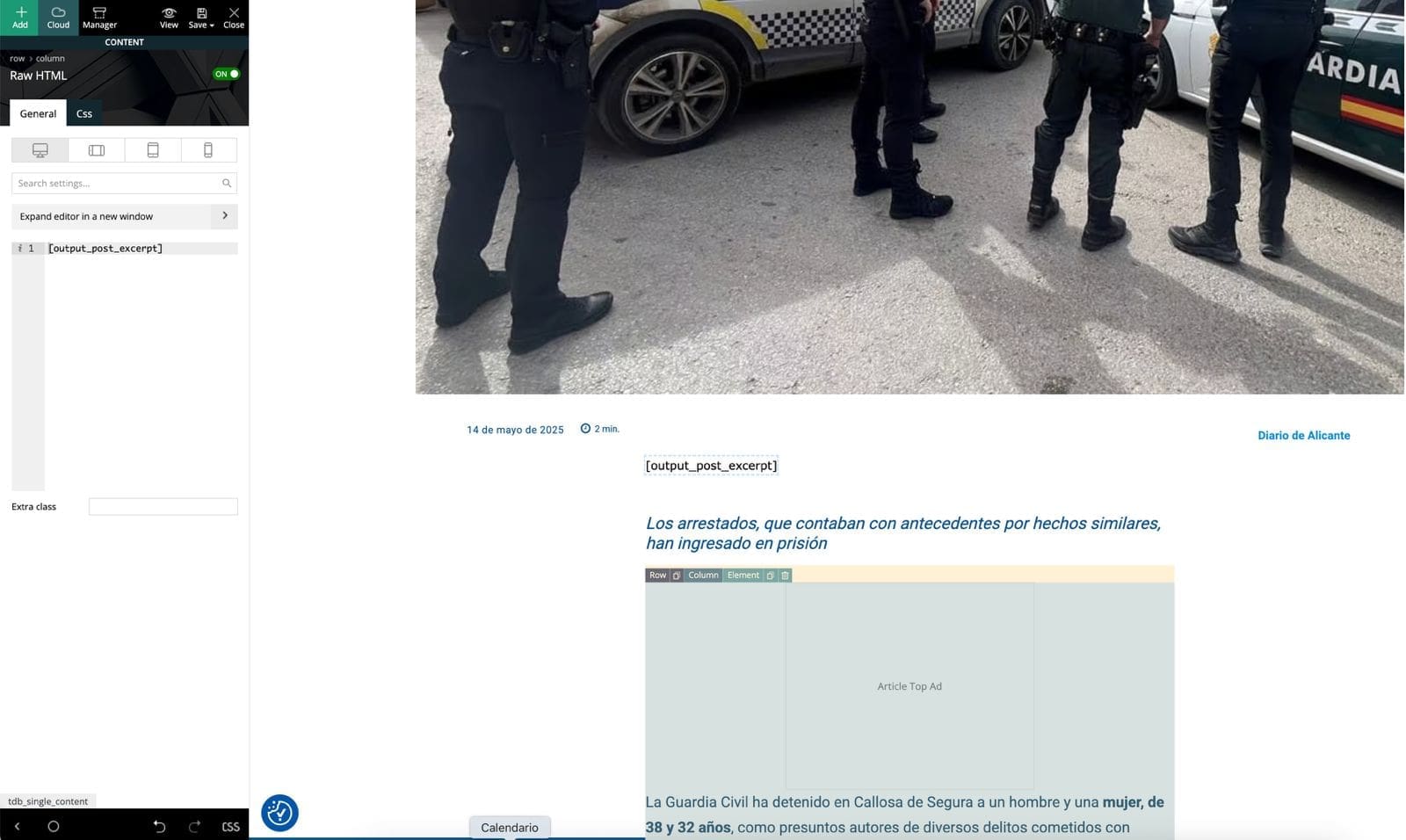
I tried using the method you shared from StackExchange — I added this line to my child theme’s functions.php:
php
Copiar
Editar
add_shortcode( ‘output_post_excerpt’, ‘get_the_excerpt’ );
Then I edited my Single Post Cloud Template in tagDiv Composer, added a Text block, and inserted [output_post_excerpt].
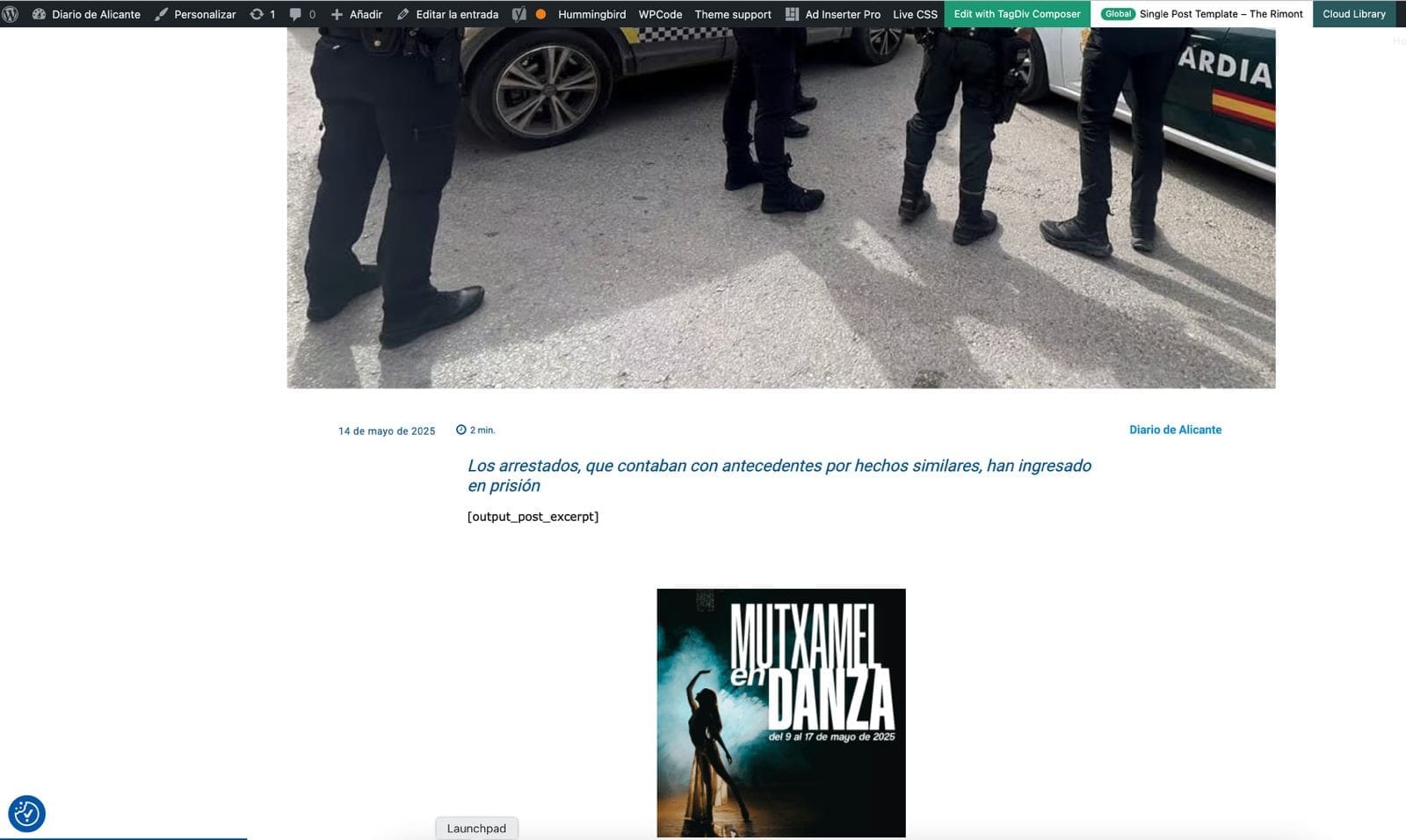
Unfortunately, the shortcode doesn’t render anything on the frontend. It just leaves a blank space where the excerpt should be. I’ve cleared all cache and reloaded everything, but still no result.
Is it possible that tagDiv Composer blocks don’t render shortcodes like this, or do I need a different type of block?
Any ideas or workaround would be greatly appreciated.
https://diariodealicante.net/wp-content/uploads/2025/05/editor.jpeg
https://diariodealicante.net/wp-content/uploads/2025/05/single.jpeg
Thanks!
 olebm
olebmDear Support Team,
we are currently experiencing an issue with the Newspaper 12 theme (latest version) in a WordPress Multisite environment. On any post or page where the paywall is active, the burger menu also displays the paywall overlay. This is incorrect behavior — the navigation menu should remain accessible and unaffected by the paywall restriction, allowing users to browse the site structure even if the article content is restricted.
This issue is particularly noticeable on mobile devices and occurs consistently on all pages with active paywall protection. It seems that the paywall overlay wraps the entire page content, including the mobile navigation menu.
We are using the following setup:
• WordPress Multisite with separate instances per blog
• Theme: Newspaper 12
• Page Builder: tagDiv Composer (for all pages)
• Post Editor: Gutenberg (for all articles)
Relevant Plugins in use:
• tagDiv Cloud Library
• tagDiv Composer
• WooCommerce
• WooCommerce Memberships
• WooCommerce Subscriptions
• and others


Calin Hi santiagocalaforra,
I think that you want to add the excerpt inside the post, if is so, then you need to use a shortcode as I mentioned above since this element doesn’t exit in our builder:
“Indeed, for cloud template it’s a little more complicate, but this can help:
– https://wordpress.stackexchange.com/questions/336420/retrieving-post-excerpt-as-a-shortcode
I just tested and is working – https://i.imgur.com/qz1Zi42.png – https://i.imgur.com/7StOLec.png – https://i.imgur.com/Gtb8EdI.png”
Thank you!
Calin Hi,
If you are using a single post template then post possible that the Thrive Comments to need to be adjusted or in case that can be set with a code or shortcode, then it can be maybe more easy done.
What I can recommend is to set for the posts the post style default from in the theme panel and see if the Thrive Comments is starting to work (is possible that using standard template for articles to work and only with cloud template to be this situation).
Thank you!
santiagocalaforra Hello, when I conigure a single template in cloud templates I fins easily the option “single post subtitle”. How Can I write some like a “single pots excerpt”?
Thanks
Calin Hi,
I’m not sure, but it is possible that your website to be infected, because the mobile version should be different from the one from your screenshot, that one seem to be a different website or it can also be an ad popup and has been touched/clicked and that one to open that website.
What I’m recommending is to use Wordfence plugin and also Cloudflare.
Thank you!
Calin Hi,
If you are using a cloud header then you can adjust it with tagDiv Composer and you can achieve that type of menu – https://i.imgur.com/TU7vWn9.png
I hope this will help you!
Calin Hi,
This error can appear from more situations, we made a guide for most of the frequent -> https://forum.tagdiv.com/tagdiv-composer-not-working/
Also if is only on one specific page, then please use the revisions https://www.wpbeginner.com/beginners-guide/complete-guide-to-wordpress-post-revisions/ because it is possible that the problem to be from the last changed from that page/ cloud template.
If the problem persists, please take a full backup and provide a temporary wp-admin access.
Thank you!
Calin Hi,
Unfortunately the link provide is not working for me – https://i.imgur.com/x3VCDYV.png but normally you should be able using tagDiv Composer and cloud template to achieve almost any layout, if you want you can check some of our demos – https://demo.tagdiv.com/select_demo/newspaper-prebuilt-websites/?demo-type=pro
Thank you!
 afratus
 I identified two elements that seem to be having issues on the single post cloud template that I’m currently using:
1. Sidebar: https://ibb.co/P3X8QGY https://ibb.co/Ts8WRDx
2. Load More: https://ibb.co/6QBZSGp https://ibb.co/Kj63CbTD
Can I send the email? Thanks!
Calin Hi,
Based on your screenshot, some of the theme plugins appear to be disabled. Please go to Newspaper > Plugins and make sure that tagDiv Composer, tagDiv Cloud Library, and any other theme plugins you were using are installed and activated. This should resolve the issue.
Thank you!