Paradoxer
There seems to be content on my website below the footer/sub-footer that I don’t want to be there. I can’t see it on a desktop, but it appears like this on mobile:

I’ve tried disabling the footer and sub-footer, as well as trying various different templates, but I still see this content on mobile, underneath where the footer should be. I can’t see where this is coming from in the tagdiv composer, and there is nothing in the footer widget areas.
It seems to be a column which is trying to show popular posts and categories on the website.
 ktchicago
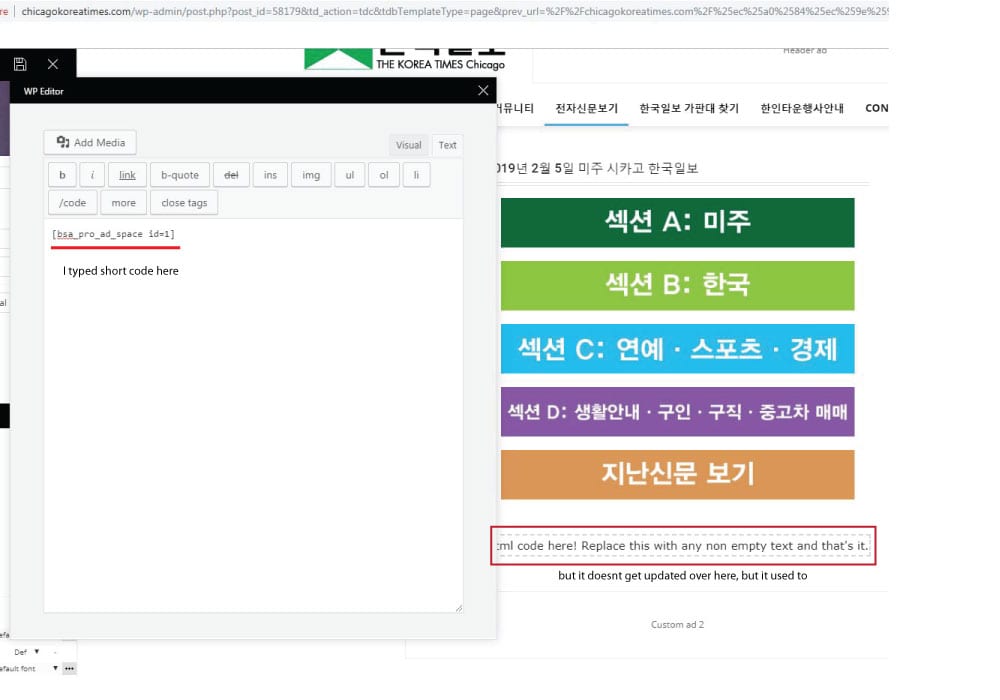
 the short code worked when I edit the page with WP bakery, but the error message appears when I tried to edit the page with TD composer after editing page with wp bakery.
It used to work fine, but the contents I wrote on column text box doesnt get updated as I write on it. I tried it again after disabling all plugins I installed recently, but it still was same :/
http://chicagokoreatimes.com/wp-content/uploads/2019/02/columntext1.jpg
 willkar
Hello. I was working on my theme and then, the tag div composer stopped working. I men, i can open it, but the save function stays in an infinite loop. And it won’t move from there. And if i try to close it and open again, the message “The current content page hasn’t been created by TagDiv Composer!” appear. Please help me.
Thanks in advance
 ptcn
ptcn Hi,
The shortcodes file actually shows the categories of tagdiv composer Categories Page. The categories created in the Cloud Library are not listed here or the basic design is not stored here. http://prntscr.com/mgl1pd
And, there is tag div Category Page Shortcodes
->http://prntscr.com/mglapg
My question, where are those stored?
->http://prntscr.com/mglbtk
 pete@e-production.net
 Upon reinstalling Cloud Library I get this error when I try to use it. I was starting to like the results of my layouts but these roadblocks are killing me — and my wife who’s business is ready to kill me.
Fatal error: Out of memory (allocated 184811520) (tried to allocate 147775 bytes) in /hermes/bosnaweb16a/b1871/nf.greatcompanions/public_html/newsite/wp-content/plugins/td-composer/includes/tdc_main.php on line 609
pete@e-production.net After uninstalling the calendar plugin, it continues to appear on my homepage design screen (not on tagDiv Composer). I only began to show up when I installed tagDiv cloud library, which I have also uninstalled for this screen shot. Where does this text reside that I can find it and remove it?
https://drive.google.com/file/d/1gkIUUpF2MTLsrXm5trB62aoFEafk-0CW/view?usp=sharing
Paradoxer Hello Calin,
The confusion I have with that documentation is that I never had any kind of Visual Composer plugin until now. the only ones I have ever had are the ones that came with the installation files for Newspaper, which were “js_composer” and “td_composer.” I’m not sure if I’m supposed to install both, or just td_composer.
 Simion C.
 The classy demo uses a cloud template for the posts, you can change it to a different template if you want to.
With the introduction of the cloud library plugin, now post templates and many other templates can be created with the tagDiv composer
– https://forum.tagdiv.com/tagdiv-cloud-library-plugin/
There are templates designed by us which can be imported
– https://affiliate.tagdiv.com/#/load/All
Also there are blank templates which can be used to create a template from scratch. Using cloud templates is not mandatory, the default post templates are still available.
You can install the demo with no content, this way only the theme panel settings will be imported. This demo has an additional stylesheet but it is minimal indeed
– http://prntscr.com/mghck5
Most of it’s design is made in the composer directly with the available settings. Flex blocks were used mostly and these have a great deal of options and settings. We tried to keep the design similar to the erotic demo but there were some changes.
The class td-erotic is no more, it is now td-classy. This was one of the reasons the erotic demo has been modified.
You can remove the body class if it remained in the theme pane, it has no purpose anymore. Unless you used it in custom CSS code.
If you need help with anything else let me know.
 Catalin
 Hi,
Please notice that in the latest theme update, we have update the Visual Composer which come bundled with the theme’s packet as you can see here -> https://www.screencast.com/t/SHn7Og8u7c
Thanks.
 Prateek
Hi, team tagDiv.
I want to know about two things here.
1) I created a page with TD composer using Flexbox-1 to create a lates posts section but I couldn’t find any option to add numbered pagination.
2) Once I am done, how can I save this template? The changes made through the theme panel can be saved from the export option. But, how a template created from TD composer can be saved?
Great day 🙂
Simion C. Hi,
Use a cloud post template, design it the way you want with the tagDiv composer
– https://forum.tagdiv.com/tagdiv-cloud-library-plugin/
Here you can see cloud post templates designed by us, you can preview and even edit them
– https://affiliate.tagdiv.com/#/load/Single
Each one can be imported and used, or you can create your own by using the blank template.
Thanks
 great1212
I have used an image in my shop which I made using the TD Composer. The problem is that the image is not showing properly in mobile devices. What size should I used for the image to look correctly in all devices including the mobile devices???
 Calin
Calin Hi,
Please check our documentation for How to update Visual Composer plugin -> https://forum.tagdiv.com/how-to-update-visual-composer-plugin/
Yes there is a problem, the new WordPress version is now base on Gutenberg and the latest arterioles can be edit only using the Gutenberg editor, but after you make the settings for it you can change back to classic editor.
Thank you for your understanding!
 Odufroehliche
 Hi Catalin,
thanks for your feedback. I’ve downloaded the whole packet already. As soon WordPress 5.03 is installed – what part of the theme-packet should be updated first to avoid problems? Newsmag-theme? Or visual composer first? Or doesn’t matter?
And what about Revolution Slider? Is it necessary at all for correct functioning of the theme or can I delete/ignore it?
Best
Petra
 pbc
pbc Hi, I’ve been able to add this field, following the documentation Here
I was able to add my custom block to the TagDiv Composer, and it displays the field content on the authors’ page correctly. But I have this error:

Here’s the code I pasted inside td_block_creative.php
<?php

class td_block_creative extends td_block {

    function render( $atts, $content = null ) {
        parent::render( $atts ); // sets the live atts, $this->atts, $this->block_uid, $this->td_query (it runs the query)

        global $tdb_state_author;
       // $author_description_data = $tdb_state_author->description->__invoke( $atts );
        $author_loop_data = $tdb_state_author->loop->__invoke( $atts );

        $buffy = ''; //output buffer

        // when no data - return empty on frontend
        if ( empty($author_loop_data['author_id'])) {
            return $buffy;
        }

        $buffy .= '<div class="' . $this->get_block_classes() . '" ' . $this->get_block_html_atts() . '>';

            //get the block css
            $buffy .= $this->get_block_css();

            //get the js for this block
            $buffy .= $this->get_block_js();

            $buffy .= '<div class="tdb-author-descr">' . get_field('additionalinfo', 'user_'. $author_loop_data['author_id'] ) . '</div>';

            $buffy .= '</div>';

        $buffy .= '</div>';

        return $buffy;
    }

}
Files: td-creative-plugin.php and style.css I left without changes. Please help me to fix this error.
Thanks
-
This reply was modified 7 years by
pbc.
Calin Hi,
I think That you are referring to header style, I is so then all you need to do is to edit the homepage with tagdiv Composer and set the header template -> https://www.screencast.com/t/rFa861obzEsX
Hope this will help you!
Thanks.
Catalin Hi,
Please notice that we do not recommend using both plugins at the same time, sorry! Might appear some issues in the theme. Use only TD Composer, clear all the caches and check the results. If you need more assistance, in this case, you should provide your website URL and some useful screenshots with the problem so I can identify it closer.
Thanks for your understanding!
Calin Hi,
Unfortunately for the moment the homepage from mobile theme is can’t be edit, also the page need to be make without builders/composers, sorry.
Here is our documentation for mobile theme -> https://forum.tagdiv.com/the-mobile-theme/
Thank you for your understanding!
Simion C. Hi,
Not all post templates can be edited with the composer. The default post templates cannot be edited
– https://forum.tagdiv.com/post-templates-2/
Cloud post templates or any cloud templates can be edited
– https://forum.tagdiv.com/tagdiv-cloud-library-plugin/
The post must first use a cloud post template before you can edit the template.
Here you can preview and even edit the available cloud templates for posts
– https://affiliate.tagdiv.com/#/load/Single
You can import any of them, use them as they are or make modifications, or create new ones with the blank template – http://prntscr.com/mgbga0
Please let me know if you have more questions.
Thanks
Simion C. Hi,
Shouldn’t be a problem deleting elements in a page, and adding new ones. So for example an element can be deleted by clicking the delete icon – http://prntscr.com/mgba8u
or by dragging it to the right corner – http://prntscr.com/mgbam6
Then you can add new elements, by dragging and dropping them from the left composer sidebar in the desired location
– http://prntscr.com/mgbb3y
Here is a composer guide – https://forum.tagdiv.com/tagdiv-composer-tutorial/
And a block settings guide – https://forum.tagdiv.com/block-settings-guide/
If I misunderstand the problem, or you have more questions, please let me know.
Thanks
Calin Hi,
That depend on headers, if those are form blocks you can set the color with tagDiv Composer -> https://www.screencast.com/t/qayFrkSuT or form widgets -> https://www.screencast.com/t/ixTy2vnarYH also you can use custom css.
Thank you for your understanding!
Calin Hi,
If you want you con use tagDiv Composer or build the page with WordPress editor -> https://www.screencast.com/t/JcVnwIfWidvp, those are the only way to achieve that.
Thank you for your understanding!
Simion C. Hi,
You mean the post sharing? – http://prntscr.com/mgagsw this will appear only in the post pages. One way of removing it for specific posts would be to use some CSS.
For example by using the unique post ID, and remove the top sharing
– http://prntscr.com/mgahg7
Or bottom sharing – http://prntscr.com/mgahw4
These are the codes used in the example
.postid-1003 .td-post-sharing-top {

display: none;

}

.postid-1003 .td-post-sharing-bottom {

display: none;

}
Or use cloud post templates, you can design these with the composer
– https://forum.tagdiv.com/tagdiv-cloud-library-plugin/
Here you can preview and even edit the cloud post templates designed by us
– https://affiliate.tagdiv.com/#/load/Single
It can be seen that the sharing is an element in this post templates, so you can use a template that contains the sharing element, and another one that doesn’t. Apply them to the posts as needed.
Thanks
great1212ParadoxerI just purchased the Newspaper theme and I’m trying to build a basic homepage using the “Pagebuilder + latest articles + pagination” template. According to this guide, I should be seeing extra options for “Homepage Latest Articles” and “Homepage Loop Filter” which will let me customize the latest posts element, however I am not seeing them. I do not see an option to “Enable Visual Composer,” either.
Both the provided “tagDiv Composer” and “WPBakery Page Builder” plugins are installed and activated.