
- TutorialsFrom WPBakery to tagDiv Composer
- TutorialsDefault Block Settings Guide
- TutorialsOffset Feature
- TutorialstagDiv Social Counter Tutorial
- TutorialsHow to Update the WPBakery Page Builder plugin
 Monokromdesign
Hi, how do I add a rss-feed to a page in TagDiv Composer?
 Jean-Paul
 Hi Calin,
Thank you for getting back to me. In response to your post:
I have met the requirements.
I don’t have the Apache activated on my server, so it does not appear under the php.ini on ‘System Status’
With regards to Sonria Dental, you are not addressing the issue I raised. I will explain:
Firstly, the size of the image should not matter as you can scale the size you want to show it at. The image is not that big either.
But, I am not concerned about the sizing of it. This is an easy fix.
MY CONCERN
***********
My concern is the padding around the images I upload!
Let’s Take Sonria Dental: The space between the top of the image and the Block above it is almost the same dimension of the height of the image itself! It’s massive, both above the image and below the image! In TagDiv composer, simply hover over the Sonria Dental image and you can see the padding of the space above and below the image that I can’t take away!
I tried to change this with the padding and margin settings in Css, but to no avail. The space is nothing to do with the image, so it has nothing to do with the size of the image.
OTHER PROBLEM
*************
Can you also explain to me how I delete an empty column? I have many empty columns on the page, none of which I can delete because I can not see an option to do it.
Thanks.
 McDohl
 Hello calin
Before I add that code for block 18, the tagdiv composer is work just fine, when I add it, I can’t access tagdiv composer anymore http://www.screencast.com/t/sNKNE1u1o
When I remove that code from block 18 file, the tagdiv composer back to normal again.
I want to add this code http://www.screencast.com/t/pmWcAIXu without getting any error on tagdiv composer, I don’t know what’s wrong with that code, the result is perfect on block 18 http://www.screencast.com/t/5Ta26Pjoy, but tagdiv composer is cannot be using again.
I am using localhost before I made any change on my website to avoid any error.
Thank you for your response. 🙂
 Calin
Calin Hi,
Please increase the wp_memory_limit and the tagDiv Composer will work just fine.
https://www.screencast.com/t/HwsGvfpzK
https://forum.tagdiv.com/requirements-for-newspaper/
Thank you.
Calin Hi,
1. For ad row in categories please set “>” before each subcategory
https://www.screencast.com/t/2OvC8so0IP
https://www.screencast.com/t/brOm1GtRWq
2. You can not set there the view count and Facebook like, but you can hide the comments, just click on the flex, click on the Layout https://www.screencast.com/t/gwNlEZ8q -> https://www.screencast.com/t/dnHdZXdfd9X
Meta Info on Modules and Blocks -> https://forum.tagdiv.com/meta-info-modules-blocks/
3. You can hide the comment but not show the Facebook like
Global settings -> https://forum.tagdiv.com/general-settings/
4. You can activate the like button from panel, but if you want to have a share count and like button count you can use a plugin like this: Shared Counts -> https://wordpress.org/plugins/shared-counts/
https://www.screencast.com/t/BUdp8ZXo
If you refer to comments please read Enable/disable comments -> https://forum.tagdiv.com/enabledisable-comments/
5. Just open the page with tagdiv Composer click on the ticker and set the navigation to manual https://www.screencast.com/t/mrrIGgebEnu
6. Please use tagDiv Cloud Library -> https://forum.tagdiv.com/tagdiv-cloud-library-plugin/
Here is an affiliate link were you can test what you can do with cloud librarian and td composer :
https://affiliate.tagdiv.com/#/load/Pages
Hope this will help you.
Thank you.
 pavel@earnware.com
If there’s a blank tagdiv composer editor, then this is what it caused in my case: 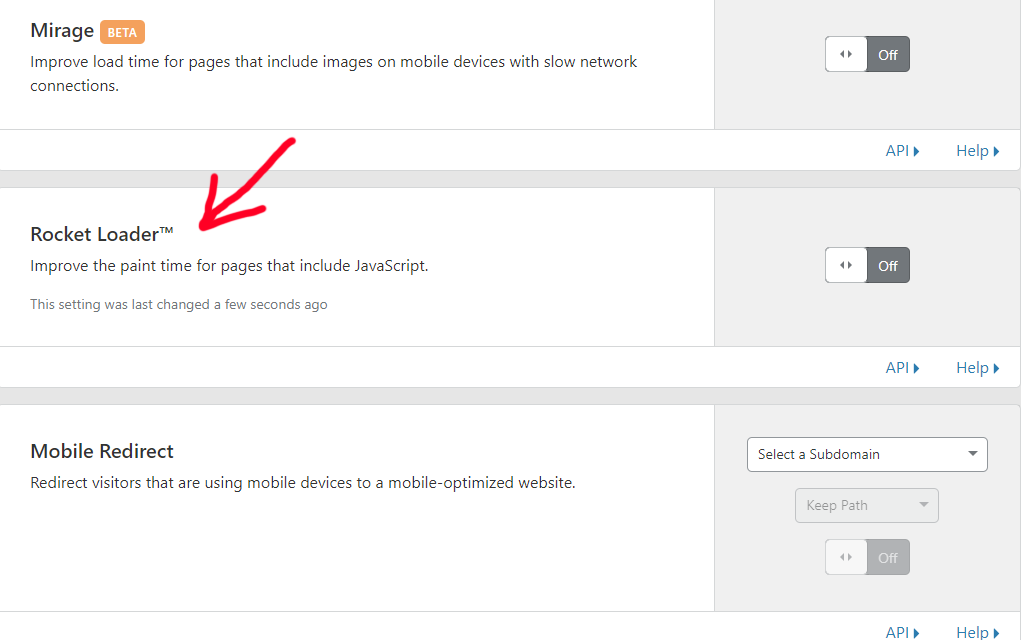 – this is a setting in cloudflare – in the speed tab. If it’s ON, tagdiv composer editor is blank in the last 9.1 release. Hopefully you will include this in your bug list and fix!
pavel@earnware.com Hey, @rvt @Catalin – so if there’s a blank tagdiv composer editor, then this is what it caused in my case: – this is a setting in cloudflare – in the speed tab. If it’s on, tagdiv composer editor is blank.
I hope this helps and you will include a fix for it @Catalin.
-
This reply was modified 7 years by
pavel@earnware.com.
-
This reply was modified 7 years by
Calin Hi,
In order to edit the layout/style/css on big grid flex you need to use tagDiv Composer
https://www.screencast.com/t/NgQLlsgI
click on the block, change from general to style and change the modules fonts, or you can use a pre-made style https://www.screencast.com/t/jurpyPDuxrkp
Thank you.
 Catalin
 Hello Alicegreentree,
Did you have tried to add that shortcode inside a Column Text using the TD Composer? Provide more details about what kind of settings did you made with Contact Form. This plugin has been fully tested with the theme and should works as expected.
Thanks for the message!
Calin Hi,
This is the template for page ( https://forum.tagdiv.com/page-templates-2/ ), and the rest of it is the layout that you can make with tagDiv Composer.
Here you have some documentation about tagDiv Composer tutorial -> https://forum.tagdiv.com/tagdiv-composer-tutorial/
Unfortunately, you can’t make blank pages and after that set om them the layout, the page need to be build individual.
Thank you.
Catalin Hello AG3,
Please notice that we do not recommend to use both plugins in the same way because might appears some conflicts between the page builders, sorry! Try to disable the Visual Composer and leave to active only the TD Composer, clear all the caches and check the results.
Thanks for your understanding!
Calin Hi,
Please be notice that your theme is made for desktops ( not for small screens ).
In order to reduce some space from visual Composer, you need to edit some files, but this is not recommended.
And some space appear because is set the html elements on them, like in this example.
https://www.screencast.com/t/BAlNqVO0Hgm
https://www.screencast.com/t/NY3JYrNCMvVw
https://www.screencast.com/t/J7jFt5nw3o29
Sorry for the inconvenience.
Thank you for your understanding.
McDohl Hello
Thanks, I success to have custom ads on default loop, archive, tag and category after 3 posts. this will be great if we can place custom ads on block for various customization in tagdiv composer.
I do some experiment to place custom ads on block 18. I put this code:
//insert adsense

$adcounter++;

if ($adcounter == 2 or $adcounter == 4 or $adcounter == 6){

$buffy .= do_shortcode('[td_block_ad_box spot_id="custom_ad_2"]');

}
On this file http://www.screencast.com/t/pmWcAIXu the custom ads show up on the block 18 after 2, 4 and 6 from posts lists http://www.screencast.com/t/wsT6hLeT. Also see live result is perfect http://www.screencast.com/t/5Ta26Pjoy. But the code is still not perfect, it’s because I can’t access tagdiv composer anymore hahaha http://www.screencast.com/t/sNKNE1u1o
It would be better if someone volunteered to help me to make this code works on the block 18 file. If this code is working, we can put custom ads in another block file. 🙂
 imkimc
 I applied the changes, and now when I go into tagdiv composer I get the white screen… I’m going to go back and check but I’m pretty sure there were no typos…
 ML
ML Because I try to create a new layout for a new template page (not post). After importing and customizing a template, everything is OK except I can only use it for a post (not a page).
But I read that “With the tagDiv composer you can build pages…” so I don’t understand how to build a page layout with tagdiv composer for PAGE (not post) …. sorry for not understanding 🙂
Thanks a lot
 AG3
AG3 Catalin thank you for quick response. Within the “News” page I have clicked the light blue “TAGDIV COMPOSER” button appearing to the right of the darker blue WPBakery “Classic Mode” button, but when I do so the page attempts to load and nothing appears. I have provided screenshot of the page appearing blank and also the console output showing a javascript error: https://snag.gy/zd86gr.jpg
Any ideas as to how to resolve this issue? Again, installed only demo content and otherwise normal.
Thanks,
AG3
 ikeber
Can you please help me with this error. It occurs when I try to use TDcomposer:
Errors happened during tdcIframeData.init() -> bindViewsModelsWrappers()!
Regards!
Igor
ML Alright it makes sense now. And how would you advice to build this layout as easy as possible ? Through Cloud template or through the tag composer ?
Thanks a lot,
Calin Hi,
Please be notice the child theme support included in our themes is intended for developers to modify core parts of the theme, without modifying the actual theme.
To edit the footer from child you can not use wpbakery , or td composer, you need to use program language like php
Thank you for your understanding.
-
This reply was modified 8 years by
 Calin.
 convivimos
 I follow step by step all the configuration, clean my wordpress of plugins in disuse, the plugin tagDiv composer does not work correctly, the theme is updated in the latest version. Can I send you a screen print?
-
This reply was modified 8 years by
convivimos.
Calin Hi,
Yes, that is possible , just click on share and copy the embed channel ( https://www.screencast.com/t/v9MAFEkWJk ), after that go in post and past it, update/publish
https://www.screencast.com/t/xfcX8zgOSqf
https://www.screencast.com/t/xfcX8zgOSqf
In page with tagDiv Composer
https://www.screencast.com/t/SYrfvsQOb0Q
https://www.screencast.com/t/BeMfUbn9qqz
Thank you.
Catalin Hello AG3,
Notice that the color of block header can be changed from TD Composer when you edit the page with TD Composer, like this -> https://www.screencast.com/t/2FEtXUCuy
Thanks.
 wmcoettc
In general, we are very disappointed with the large amount of space that is wasted on the screen, both in the published web and in the making of the web in the Visual Composer Theme panel.
Does anyone know any way to solve the 3 problems ?.
– reduce the space between lines and between paragraphs.
– in the making of the traditional web
– Visual composer
Thanks for your interest.
Calin Hi,
Have you check the theme system status is configured as mentioned in the requirements guide. Please follow the guide carefully
– https://forum.tagdiv.com/requirements-for-newspaper/
Also if you don’t have the last version of theme please make update the theme ->
https://forum.tagdiv.com/how-to-update-the-theme-2/ ( and plugins TD Composer and TD Cloud Library )
Let us know the results.
Thank you.
Calin Hi,
Please add this custom css in Newspaper >Theme panel>Custom code>Custom css
.td-main-page-wrap {

    padding-top: 0px;

}
tagDiv Composer tutorial -> https://forum.tagdiv.com/tagdiv-composer-tutorial/
Thank you.

