
- TutorialsFrom WPBakery to tagDiv Composer
- TutorialsDefault Block Settings Guide
- TutorialsOffset Feature
- TutorialstagDiv Social Counter Tutorial
- TutorialsHow to Update the WPBakery Page Builder plugin
 22p
22pHi and merry christmas!
I need update my theme from 8.2 to 8.5.1 and i ask an advice to avoid big problem.
I have a:
–> master theme (this is 8.2 and i need to update to 8.5.1)
–> child theme (this have many custom code)
Can i do these 2 step:
1) update the plugin with new release (example: Visual Composer).
2) Overwrite the theme folder with the 8.5.1 release.
Really thanks.
 horuscyclicdaemon
 I probably face to the same problem: The wordpress dashboard and some part of the theme panel stay on loading or not loading, or looks like the menu (see my post https://forum.tagdiv.com/topic/problems-3/) or this one is also similar: https://forum.tagdiv.com/topic/plugin-issue/.
It helps a bit to get back to the wordpress dashboard if you block (via SFTP) plugin td-composer (for a while), but I do hope Support Team shall come with some quick and effective solution…
Martin
 33ParkMedia
We can not get TagDiv Composer to load at all with the Newspaper Theme. We have tested it by disabling all plugins except that one and it still doesn’t load. When we switched to a default wordpress theme, it loaded right away with all plugins active. This happens on 8.5 and 8.5.1 versions of the theme, as well as wordpress versions 4.8.4 and 4.9.1.
horuscyclicdaemonEven yesterday morning everything was OK.
Then yesterday evening everything went wrong.
Last plugin update has been done for regenerate-thumbnails.
The only possibility to screen my web page http://www.okultura.cz/WordPress/ was to disable td-composer plugin directory.
I have installed the latest version of Newpaper theme as well as plugins and upload them all in WordPress directories via SFTP.
It did not help at all.
Nothing works now.
Any idea?
Martin
 praveen
Hello. I have purchased the Newspaper theme and now I didn’t got Visual Composer license key. How do I activate the Visual Composer?
 Benji
BenjiHi,
I cant edit my pages, the circle keeps rotating and never stops.
What do I do please?
 Mariano Jonte
Using the tagdiv composer … I try to place a TITLE but there are no options to place it in left, right, fonts, etc … help please.
 Mladen Gradev
Hello,
I think it’s great that you want to create your own page builder, especially if it is lighter and faster than Visual Composer. Here I want to share my opinion about tagDiv Composer and give you some feedback, if it is OK.
I think that you have a lot of work to do until you reach the level of Visual composer. I my opinion your backend editor is not so user friendly and here are few examples:
01. Native theme elements are visualized great, but others, like “Widget Sidebar”, are poorly visible. You can make the height of this element bigger, because now it is something like 20 px and it is difficult to grab & edit.
02. Rows, Columns and other main elements are hard to understand and edit. In VC is a lot better – bigger and clear editor elements and controls.
03. Text block element is not working for me, when I hit “edit content” text editor pops up with loading circle element, which never load. There is a hidden error in an iframe:
“Warning: require_once(/home/***/public_html/files/plugins/td-composer/includes/wpeditor.phpwp-load.php): failed to open stream: No such file or directory in /home/***/public_html/files/plugins/td-composer/includes/wpeditor.php on line 13”
“Fatal error: require_once(): Failed opening required ‘/home/***/public_html/files/plugins/td-composer/includes/wpeditor.phpwp-load.php’ (include_path=’.:/usr/local/php7.0/lib/php’) in /home/***/public_html/files/plugins/td-composer/includes/wpeditor.php on line 13”
04. Text written in Cyrillic is visualized as symbols and take a lot of space in WP content editor. Example of such text: JTNDaDIlM0UlRDAlOTQlRDAlQkUlRDAlQjElRDAlQjAlRDAlQjIlRDElOEYlRDAlQkQlRDAlQjUlMjAlRDAlQkQlRDAlQjAlMjAlRDAlQjglRDAlQkQlRDElODQlRDAlQkUlRDElODAlRDAlQkMlRDAlQjAlRDElODYlRDAlQjglRDElOEYlMjAlRDAlQjIlMjAlRDAlQTYlRDAlQjAlRDElODAlRDAlQjUlRDAlQjIlRDAlQkUuJUQwJTk4JUQwJUJEJUQxJTg0JUQwJUJFJTNDJTJGaDIlM0UlMEElM0NwJTNFJUQwJTlFJUQxJTgyJTIwJUQxJTgyJUQxJTgzJUQwJUJBJTIwJUQwJUJDJUQwJUJFJUQwJUI2JUQwJUI1JUQxJTgyJUQwJUI1JTIwJUQwJUI0JUQwJUIwJTIwJUQwJUI0JUQwJUJFJUQwJUIxJUQwJUIwJUQwJUIyJUQwJUI4JUQxJTgyJUQwJUI1JTIwJUQwJUI4JUQwJUJEJUQxJTg0JUQwJUJFJUQxJTgwJUQwJUJDJUQwJUIwJUQxJTg2JUQwJUI4JUQxJThGJTIwJUQwJUJBJUQxJThBJUQwJUJDJTIwJUQxJTgxJUQwJUIwJUQwJUI5JUQxJTgyJUQwJUIwJTIwJUQwJUE2JUQwJUIwJUQxJTgwJUQwJUI1JUQwJUIyJUQwJUJFLiVEMCU5OCVEMCVCRCVEMSU4NCVEMCVCRS4lMjAlRDAlOUElRDAlQkUlRDAlQjMlRDAlQjAlRDElODIlRDAlQkUlMjAlRDAlQkQlRDAlQjAlRDElODIlRDAlQjglRDElODElRDAlQkQlRDAlQjUlRDElODIlRDAlQjUlMjAlRDAlQkQlRDElOEYlRDAlQkElRDAlQkUlRDAlQjklMjAlRDAlQkUlRDElODIlMjAlRDAlQjElRDElODMlRDElODIlRDAlQkUlRDAlQkQlRDAlQjglRDElODIlRDAlQjUlMjAlRDAlQkYlRDAlQkUtJUQwJUI0JUQwJUJFJUQwJUJCJUQxJTgzJTJDJTIwJUQxJTg5JUQwJUI1JTIwJUQwJUIxJUQxJThBJUQwJUI0JUQwJUI1JUQxJTgyJUQwJUI1JTIwJUQwJUJGJUQxJTgwJUQwJUI1JUQwJUJGJUQxJTgwJUQwJUIwJUQxJTgyJUQwJUI1JUQwJUJEJTJGJUQwJUIwJTIwJUQwJUJBJUQxJThBJUQwJUJDJTIwJUQxJTg0JUQwJUJFJUQxJTgwJUQwJUJDJUQwJUIwJTIwJUQwJUI3JUQwJUIwJTIwJUQwJUJGJUQwJUJFJUQwJUJGJUQxJThBJUQwJUJCJUQwJUIyJUQwJUIwJUQwJUJEJUQwJUI1JTIwJUQwJUJEJUQwJUIwJTIwJUQwJUI4JUQwJUJEJUQxJTg0JUQwJUJFJUQxJTgwJUQwJUJDJUQwJUIwJUQxJTg2JUQwJUI4JUQxJThGLiUyMCVEMCU5RiVEMCVCRSVEMCVCRiVEMSU4QSVEMCVCQiVEMCVCRCVEMCVCNSVEMSU4MiVEMCVCNSUyMCVEMCVCRiVEMCVCRSVEMCVCQiVEMCVCNSVEMSU4MiVEMCVCMCVEMSU4MiVEMCVCMCUyMCVEMCVCOCUyMCVEMCVCOCVEMCVCNyVEMCVCRiVEMSU4MCVEMCVCMCVEMSU4MiVEMCVCNSVEMSU4MiVEMCVCNSUyMCVEMSU4NCVEMCVCRSVEMSU4MCVEMCVCQyVEMCVCMCVEMSU4MiVEMCVCMCUyQyUyMCVEMCVCRCVEMCVCOCVEMCVCNSUyMCVEMSU4OSVEMCVCNSUyMCVEMCVCRiVEMCVCRSVEMCVCQiVEMSU4MyVEMSU4NyVEMCVCOCVEMCVCQyUyMCVEMCVCMiVEMCVCMCVEMSU4OCVEMCVCNSVEMSU4MiVEMCVCRSUyMCVEMCVCNyVEMCVCMCVEMCVCRiVEMCVCOCVEMSU4MiVEMCVCMiVEMCVCMCVEMCVCRCVEMCVCNSUyMCVEMCVCOCUyMCVEMSU4OSVEMCVCNSUyMCVEMSU4MCVEMCVCNSVEMCVCMCVEMCVCMyVEMCVCOCVEMSU4MCVEMCVCMCVEMCVCQyVEMCVCNSUyMCVEMCVCMiUyMCVEMSU4MyVEMCVCRiVEMCVCRSVEMCVCQyVEMCVCNSVEMCVCRCVEMCVCMCVEMSU4MiVEMCVCOCVEMSU4RiUyMCVEMSU4MSVEMSU4MCVEMCVCRSVEMCVCQS4lM0MlMkZwJTNF
05. Why you don’t have 1/2 + 1/2 columns in build-in elements? It is confusing.
Other than that everything is working great with latest theme and plugins updates 🙂
p.s. I can not understand why this topic is not viewing correctly?!
 CologneMusic
 Hello i got a problem with the TD Composer. I only got this Message:
Errors happened during tdcIframeData.init() -> bindViewsModelsWrappers()!
What can i do?
 Syams
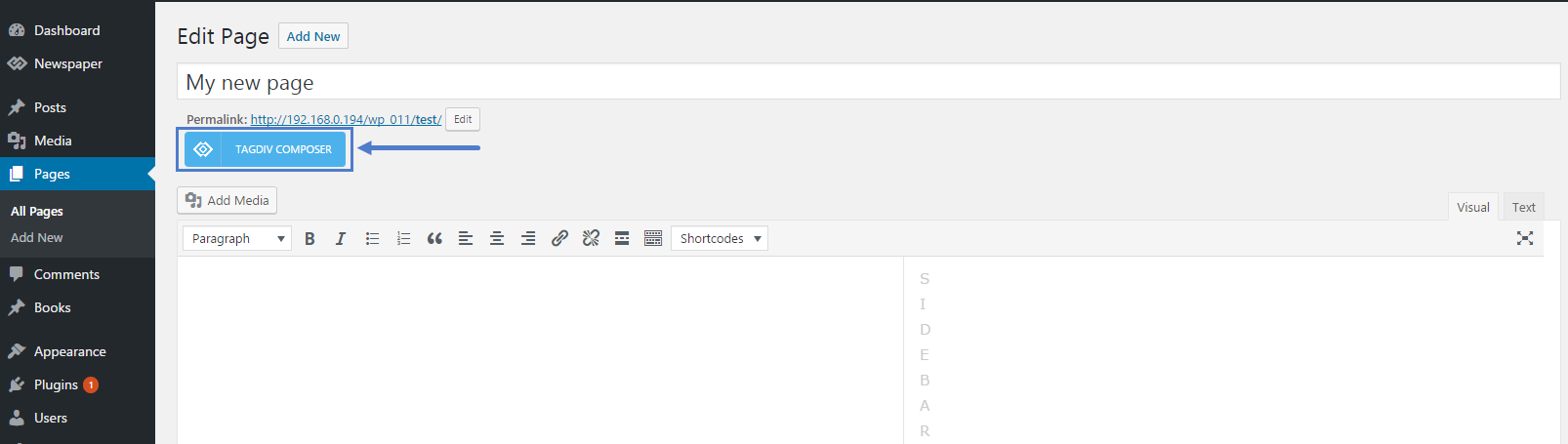
SyamsI want to use Tagdiv Composer on my post article, but I cant see this button. Please help me, how to use this lightweight plugin for post.
 Simion C.
 Hi,
Maybe there would be a different solution to this. You could simply create a redirect of for the parent category page URL, to a page that you can build in the composer and filter the way you like with blocks and grids that have these options
– http://www.wpbeginner.com/beginners-guide/beginners-guide-to-creating-redirects-in-wordpress/
This could be a solution if you want to have this level of control on particular category pages.
Thanks
 Bogdan B.
 Hello Xana,
This happens in the latest version of WP when using visual composer on posts. Please do not use visual composer on posts as this was never tested. Please only use it on pages as mentioned here: https://forum.tagdiv.com/how-to-use-visual-composer/
Thank you!
Bogdan B. Hello,
With the new multi-purpose elements, you can achieve that. You can create a landing page using the blank page template and create a blog page with the news elements from the td composer. Please check this short video presentation:
It creates an about me page but you get the general idea. You can use woocommerce elements within the page to make it a shop page and style is with the new elements available.
Thanks.
 meuseguroauto
 Bogdan, tks for the quick return.
I did what you told me. I deactivated plugins and only kept tagdiv composer + multo-purpose. I selected the desired header, however, there is no button to save. The problem persists.
I sent email to contact@tagdiv.com.
Thank you
Simion C. Hi,
From previous similar cases, this issue happened when Visual composer was used to place a single image element on a page, while tagDiv composer was active.
The composers have different functionality for single image elements.
If you are going to use Visual composer as the builder, deactivate the tagDiv composer from the plugins section.
Please correct me if that is not the case, and also provide more details about the element you use, the configuration and what is happening.
Thanks
Bogdan B. Hello,
It seems there is a css issue with the map iframe inside a raw html element.
Please use this code in the theme panel-> custom css box:
.tdc-theme-Newspaper .vc_raw_html iframe {
pointer-events: none;
}
Now you can access the raw html element in the composer.
Thank you!
Bogdan B. Hello,
Please disable all other plugins except the tagdiv composer and the multi-purpose plugin and clear all caching. try to re-save permalinks and set the header style again in the theme panel and press the save button.
Let us know if you still have trouble
If you do, contact us on our email address at contact@tagdiv.com and provide a link to your site and wp-admin (login information and admin rights) so we can login and investigate. Please also include a link to this conversation.
Thank you!
Simion C. Hi,
It seems there are problems indeed, the composer looks broken. Please check the theme system status parameters
– https://forum.tagdiv.com/system-status-parameters-guide/
Ask you hosting to make modifications if needed. Try in a different browser as a test to see if the same broken layout is displayed.
Ultimately please send us an email at contact@tagdiv.com and provide admin login information, we will investigate.
Also paste a link to this topic in the email.
Thanks
Bogdan B. Hi,
Please try to disable all plugins except the td composer and clear cache. Then test again.
Thank you!
Simion C. Hi,
It is possible to update the latest theme version. This is a theme update guide
– https://forum.tagdiv.com/how-to-update-the-theme-2/
The most recommended method would be by FTP, make a backup just to be safe. Make sure to update the theme plugins as well.
Note that in version 8 the tagDiv composer was introduced
– https://forum.tagdiv.com/tagdiv-composer-tutorial/
This page builder will be automatically installed and activated when the theme is updated. If your pages contain Visual composer specific elements (not provided by theme) it could create issues. There could be problems if you used Visual composer on posts as well. You could deactivate it temporarily.
Thanks
 MrOrsh
 Glad the issue could at least be reproduced. I haven´t found out why it happens. However I have found out exactly _when_ it happens. The conditions needs to be as follows:
- Must be using tag-div-composer.
- Must place an image in either a Column text, Text with Title or Raw Html without any additional text or other images.
As soon as I add any other element with the picture (paragraph text, other image etc.) the issue completely dissapear. Adding a caption to the picture also makes the issue go away.
I have now added captions to every image to solve the problem temporarely.
This however brings out another question. I realise I could just as well be using the Single Image element to simply add the picture. I have asked this previously but haven´t been able to figure out how to use the Single Image element and have an image keep it´s proportions _without_ adding a square-box-border around the whole image. Making it look extremely weird and with way to much padding on mobile units.
See this picture for reference: https://imgur.com/a/jkBLZ
The bottom image (1) is added using the Single Image element. Image Size is set to Contain. This adds a box of padding around the picture when it shrinks. The image shrinks correctly, but I can´t see any reason why it has to have so much padding on top and bottom.
The top image (2) is added through the normal editor using the Text With Title element. Here the picture scales perfect, without adding any additional borders.
 Freddy Meynard
Hi guys, two quick questions:
1. I am trying to implement featured images for our categories, as a “fallback” option, in case the author does not include an image with their articles. We have been able to assign the fallback images using “Category Featured Images – Extended” plugin, and while it works on category pages, but your theme is not able to retrieve the featured images on pages that have been built using TD Composer’s BLOCKS when they have the < | > pagination feature ON, while ajax retrieves the article and the next set of posts, it will NOT pull the category image if article is on a second or third page.
Can you help me implement this feature while using your TD Composer Blocks?
2. How do i add the td-post-category tag to block 11 inside the featured image, like it is in block 3, as opposed to next to the content below the title…what file do i need to modify so i can use block 3 and still have the td-post-category inside the td-module-thumb?
 mbrodersen
 Thanks for you guidance – it was a rookie move on my part. It was a plugin that was causing that initial WP Editor issue. However, I have new problems.
I have disabled all plugins except for the tagDiv theme plugins. I completely removed the Newspaper theme and re-installed the Newspaper 8.5.1 update theme. The issues I am experiencing are below:
1. The left column editor in the tagDiv Composer appears to have a styling/display issue: http://take.ms/RF2ba
Actually, when I first installed Newspaper 8.0 – the left column had some spacing issues. It appeared to be cut-off a bit. But now it is worse in 8.5. The Layout dropdowns are missing and when I try to change I get invalid row change detected errors (as seen in the link example above).
2. When I updated to 8.5, I activated the tagDiv Multi-Purpose plugin. In the tutorial I see all kinds of new elements. I don’t see these in my Composer.
I need a lot of help!
 giri
giriWhen I want to edit the particular column but the cursor selects the whole page row and column settings.
Here is the screenshot of row and column settings
http://prntscr.com/hqkhep
 Catalin
 Helo paulfogg,
Please notice that if you want to update the Visual Composer, you should download the latest theme version from Theme Forest and check the results. If you do not remember your Envato Account, you should contact them and tell the problem because they should be able to recover the password, sorry!
Hope this helps!
Thanks for your understanding!
