
 Walther
 Hello again,
I have run some more tests. I have deactivated all my plugins except Visual Composer and then reactivated all my plugins in a different order. To my surprise, all plugins are running now and everything seems to work fine, including the moble menu.
Can the order in which you reactivate plugins after an update indeed matter?
This is a mystery to me.
BR, Walther
 azaadi
hi, i wanted to change the width and height of block 1 thumbnail which is 324X235 pixels
to 350×250 how can i do this?
thanks
danyal
 punza
punza Hello Chris, I do not know about the coding stuff..How to remove them and that..Whenever Visual Composer is active..The site get troubled…So not under attacks..
 Bogdan B.
 Hello Walther,
I cannot recreate the issue on my end. I have checked your site and it seems your images are getting a margin that does not come from the theme. I suspect plugins: http://screencast.com/t/Es1O8NIbrEtb
Please disable all plugins except visual composer, clear cache and reset cdn files if you use it. Please also check any custom code or image optimization tools. Disable rocket loader and photon as they are known to cause issues with our theme.
Let us know how it goes.
Thank you!
 Catalin
 Hello Mantis,
The back end of Visual Composer can be found in the panel, when you create/edit your own page, like this -> http://screencast.com/t/ZUpqOKjUuNC You should insert that code there, clear all your caches and check the results.
Thanks for your understanding!
 Mantis
 Ok I see, this is the Shortcode Mapper in Visual Composer settings !
But when I do this, ALL my blocks in my homepage becomes dark ! And I want just the block 14 to be like this…
Mantis Thanks for your help!
But I’m not sure where I have to put this code:
[vc_row full_width="stretch_row" el_class="td-homepage-full-row" css=".vc_custom_1477652713189{background-color: #7a7a7a !important;}"][vc_column][td_block_14 sort=”random_posts” limit=”3″][/vc_column][/vc_row]
What is the back end editor in visual composer ??
Bogdan B. Hello,
Contact form 7 is a tested and approved plugin. Please test with only visual composer and contact form 7 active. Then see if the issue is still there. Right now I cannot see it and I cannot recreate it on my side.
Deactivate all plugins except VC and contact form, clear cache and reset cdn files.
Let us know if you still have this issue.
Thank you!
Catalin Hello Mantis,
Please notice that this type of element over you are referring to is just a simple Block 14 which is limited to display only 3 posts and which are placed into a full width row with the stretch rule. You can try the following code and place it in Back End editor in Visual Composer. The code should be found here -> http://pastebin.com/4fRP24YV Then you add this code you should use a bit of CSS for better results. Try the code below and place it in Theme panel -> Custom CSS area.
#td-outer-wrap{

overflow:hidden;

}
Hope this helps!
Thanks for the message!
Bogdan B. Hi,
I cannot recreate the error on my end so there is something affecting the layout on your side. Please disable all plugins except visual composer, clear cache and reset cdn files if you use it. Also check any custom code. Switch to the main theme if you have a child theme.
Let us know if you still have trouble with it.
Thank you!
 morajau
Hi, I can’t figure out why the sidebar i’m using in a page isn’t appearing where it should. I’m using “standard template” model and the page is divided by visual composer in 2/3 + 1/3.
Backend: https://drive.google.com/file/d/0BxSJV9bj_vR5eDFMbEMwTjcwelE/view?usp=sharing
Actual page: http://www.isorciverdi.eu/nuovosito/asd/
As you can see the sidebar content goes below instead of staying on the right, probably I’m doing something stupid but I can’t figure out what.
Thanks
Catalin Hello dennisjpitocco,
I guess that you want to have the same sidebar for both pages -> on the homepage and for single post page, right? I have inspected your website and I saw that the sidebar for your homepage is manually created element by element. So, if you want to have the Default Sidebar active inside your homepage, please notice that you should remove the actual sidebar and use the Widgetized Sidebar, element from Visual Composer and select from there the Default Sidebar, like this -> http://screencast.com/t/kut08TOzJn
For more information about how you can use the Visual Composer, please consult the documentation here -> https://forum.tagdiv.com/how-to-use-visual-composer/
Hope this helps!
Thanks for your understanding!
Catalin Hello ravester,
I have checked your website and I did not saw any problem with your mobile theme. It seems that the mobile theme is working fine on your website, right? -> http://screencast.com/t/3Pmwig75j I have checked your source page and I noticed that you are suing W3 Total Cache as caching plugin. Please notice that this type of plugin is not tested with our theme and it could be possible as this plugin to create some unknown issues in theme. If your problem will recur, please try to disable all the active plugins, leave just Visual Composer to active, clear all your caches and install only the plugins that come bundled with the theme and rule out any conflicting plugins.
Thanks for your understanding!
Bogdan B. Hello,
The elements you are pointing to are the page title and the breadcrumbs. The breadcrumbs can be removed from the theme panel here: http://screencast.com/t/yGYWZD59
The page title can be removed by changing the page template.
There are 3 page templates you can choose from: http://screencast.com/t/BkEWT6jj72
The default page tremplate will show the title if visual composer is not used on the page. If you use visual composer on the page the default template will not show the page title at all.
The page builder + latest articles + pagination will not show the page title at all
The page builder + page title will always show the page title.
Thank you!
Catalin Hello weezyworld,
If you want to change the color and background color for the image gallery heading from Visual Composer, please try the code below and place it in Theme panel->Custom CSS area.
The code is ->
.wpb_gallery .wpb_gallery_heading{

background-color:red;

color:green;

}
The result you should see here -> http://screencast.com/t/xF6GJGlFNG
Thanks for your understanding!
Bogdan B. Hello,
Both plugins (revolution slider and visual composer) are bundled free of charge with our theme so you do not have to buy them. Updates are provided by us, not the plugin author or wordpress. You can ignore the update messages you see in your dashboard and install the updates we release along with the theme. This should help: https://forum.tagdiv.com/how-to-update-visual-composer-plugin/
Visual composer is a required plugin as our theme elements depend on it so they can display properly.
Revolution slider is not required as our theme can function properly without it.
Unfortuantly we cannot offer you guidance on how to use revolution slider as it;s a very complex plugin. You should check the official site and documentation for the plugin. There are also many youtube tutorials on how to use it.
The demo sliders we provide bundled can be found in the main theme archive adn can be imported again at any tome. Please use this guide: https://forum.tagdiv.com/import-revolution-sliders-on-demos/
Thank you!
Bogdan B. Hello,
This is a very common issue caused by a javascript error. This error could come from multiple sources but the most common one is plugin conflicts.
Please disable all plugins except visual composer, clear cache and reset cdn files. Also check for any customization or js minification as they can also break the theme js.
Thank you!
Bogdan B. Hello,
Please check the block settings and make sure you have the proper sorting option in place.
Also check your cache as changes on your site are affected by the cache we only recommend wp super cache and these settings: https://forum.tagdiv.com/cache-plugin-install-and-configure/ if you use a cdn: https://forum.tagdiv.com/cloudflare-cdn/
If the problem is still there, please to disable all plugins except visual composer, clear cache and reset cdn files. Then test again.
Thank you!
 simchris
 Make sure you update Visual Composer plugin also!
 tecmoc
 Hi Catalin, thanks for your answer,
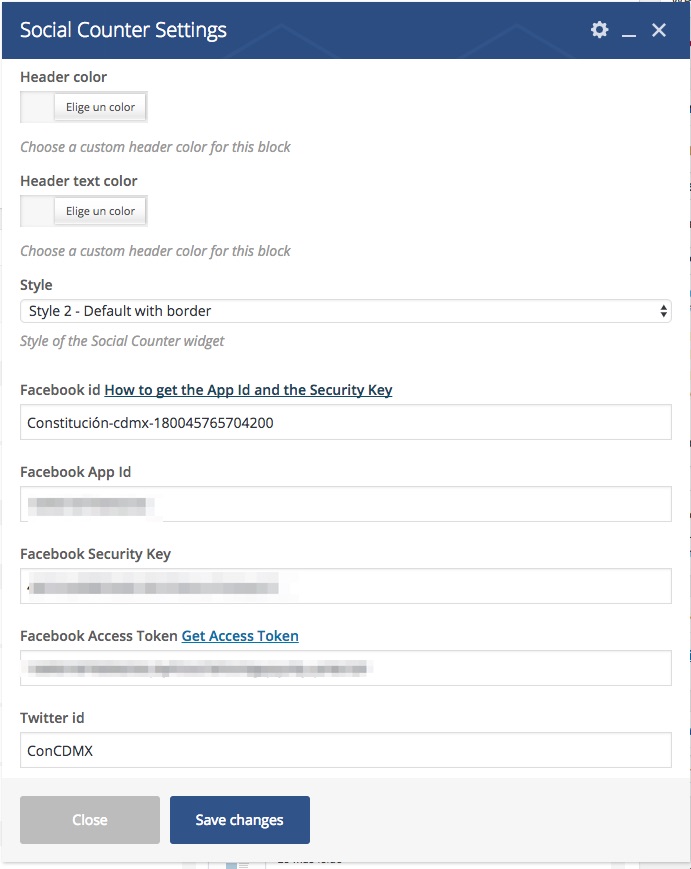
I followed up what you told me and update the theme and the plugins, just like you told me, but Social Counter still doesn´t work with the facebook app. Do you have any idea?, What it could be happening?, Could you please help me? I send you an image of Social Counter inside the Visual Composer page.
Bogdan B. Hello,
Please disable both wp rocket and rocket loader as they are known to cause issues with our theme. the recommenced cache and cdn settings are these ones: https://forum.tagdiv.com/cache-plugin-install-and-configure/
https://forum.tagdiv.com/cloudflare-cdn/
If the issue is still there please disable all plugins except visual composer, clear cache and reset cdn files.
We have no reports of such issues until now so i think it’s a simple plugin conflict.
Also if you have any custom code added to the theme panel or customization done to the theme files, please also remove them to see if they do not affect the functionality of the theme. if you have a child theme, test the main theme also.
Thank you!
Bogdan B. Hello,
The column layout is added in visual composer: https://forum.tagdiv.com/how-to-use-visual-composer/
You will have to play around in visual composer to learn how to use it and how to add content to your pages. Once you figure out the basics, you can start adding a row and split it into 1, 2 or 3 sections as the link above mentions. Then you can add elements in each section. Once you add an element you will have a bunch of settings for each one. Here is a guide on how to use them: https://forum.tagdiv.com/block-settings-guide/
If you require more information, take a look through our documentation and our youtube page.
This brief guide will show the basics of Visual Composer: https://www.youtube.com/watch?v=rgWqozuqmJk&list=PL6CsDkMaejhrfEuAth6JVYLPmFwFzNFwY&index=2
I hope this helps.
Thank you!
Bogdan B. Hello,
That does not seem to be an error. It is maybe a plugin you have installed that will hide the wordpress dashboard when writing a post. An error is when a functionality breaks, not when an unknown functionality shows up and works properly as i see there. please disable all plugins except visual composer, clear cache and reset cdn files. Then test again. That is an intended functionality, not an error.
Thank you!
Bogdan B. Well, our theme blocks and modules were designed to show posts only, not custom content. If you want to add custom content, you can use the visual composer elements that allow you to add images, videos or other elements on your site if you do not want posts.
Thank you!
Catalin Hello neoprofit,
I have inspected your website and I saw that you have some unknown js errors to your console and also, I noticed that you are using a lot of untested plugins which can influence the good working of the theme. Please try to disable all the active plugins, leave just Visual Composer to active, clear all your caches and install only the plugins that come bundled with the theme and rule out any conflicting plugins.
Thanks for your understanding!
