Catalin
 Hello abistock,
Unfortunately, I cannot access your website because is required to have the password, as you can see here -> http://screencast.com/t/84Q50cGq Also, please ensure that this kind of issue is not generated by some untested plugins. Please try to disable all the active plugins, leave just Visual Composer to active, clear all cache and install only the plugins that come bundled with our theme and rule out the conflicting plugins. Also, please ensure that you have the latest version of the theme and plugins (e.g Visual Composer in special).
After this advice, if your problem is still there, please give me the access for your website so I can inspect it closer and also so I will be able to provide a more accurate response.
Thank you for the message!
 simchris
 Can be due to various factors:
a) bad pllugin installed
b) CDN issue if loading from CDN, using Jetpack etc.
c) lazy load image option – try disabling
To debug a plugin; turn off everything except Visual Composer.
 joris1944
Hello,
I’m trying to get rid of Visual Composer on the posts that don’t need it. After looking through the code I’ve noticed that both VC’s js and css files should be loaded only when VC content is present. While this works perfectly fine with js, css is loaded on every page. Digging further I’ve also found that /includes/wp_booster/td_wp_booster_functions.php seem to have VC’s css file loading hardcoded. Is that some kind of workaround for a bug in VC/Newspaper? Is there a way to get rid of unneeded css file?
Thanks!
 salimnazer
Visual composer on my theme is acting weird. It was not showing up until i deactivated and activated the plugin again. Even then, i dont see no access to use the editor in visual mode.
Visual Edtior screenshot
please check the word count @ bottom left and what appears in visual editor.
 willysawa
I understand one can not increase the width of the theme.
Can you please give the required fraction to use in the custom column using the visual composer assuming i want
First column It should be using the left over space
Second column 162px
Third column 301px
 eddiz
eddizHi;
I bought your theme and using only 2 add-ons: WPBakery Visual Composer and tagDiv Social Counter but there are thousands of spam mails queeing for sending from my site, so its a terrible thing for me. Can you help me?
There are 20 other websites running on my server, they don’t have any problem like this.
 benj0612
Hi,
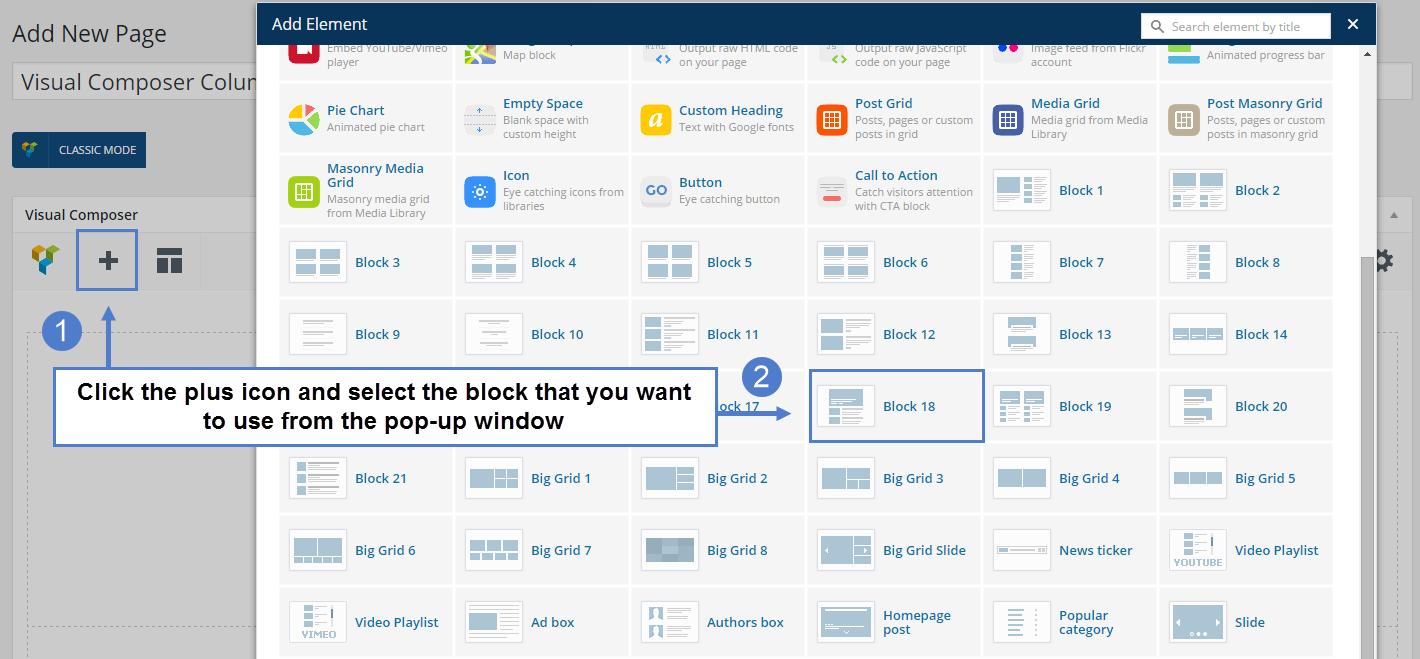
I’ve noticed that when I go into Page/visual composer, and click on add (plus “+”), I don’t have icone news to grid etc. : http://www.screencast.com/t/Z7G5rFEVd I wrote “?” to show you.
It’s very useful in your theme documentation : https://forum.tagdiv.com/wp-content/uploads/2015/06/visual-composer-new_03.png .
Why ? I tried on IE, Firefox and Chrome and it’s the same thing.
Thank you very much.
Benj’
 tripledm
Hello,
I’ve added a slider via Visual Composer to the home page but cannot seem to remove margin/padding on it.
It’s got a 2/3 column but then adds in margin.
Thank you in advance.
 Satsuki
 But you can do those changes in the visual composer. So why it shouldn’t be recommended?
Can you at least tell me where I can change the sizes?
-
This reply was modified 10 years by
Satsuki.
 puirseal
I am trying to install visual composer for the latest newspaper theme.
I am getting
The plugin does not have a valid header.
Downloading install package from http://caledonianmercury.com/wp-content/themes/Newspaper/includes/plugins/js_composer.zip…
Download failed. Service Temporarily Unavailable
Anyone had the same issue?
 Bogdan B.
 Hi,
1) It will not be difficult to replicate the design of that particular site as it’s very similar to our themes.
You can pick a similar header style from the theme panel. Here is a list of headers you can use:
https://forum.tagdiv.com/newsmag-header-styles/
Then you can change the menu color to red: http://screencast.com/t/SsHD68vpVc
The content layout can easily be replicated with our content blocks you can use in visual composer. Here is a tutorial on how to use it: https://forum.tagdiv.com/newsmag-how-to-use-visual-composer/
The sidebars can also be replicated in visual composer.
Unfortunately the left widget cannot be done as our theme has no such option, but you can maybe find a plugin for it.
2)The best way to learn how to set up the bbpress forums is by reading their official guide here: https://codex.bbpress.org/step-by-step-guide-to-setting-up-a-bbpress-forum/
3)For seo optimization we recommend the seo yoast plugin. They also have a comprehensive guide on how to set it up: https://yoast.com/wordpress-seo/
https://yoast.com/adding-a-description-to-your-categories/
Hope this helps.
Thank you!
 manojkhatri
 Hi, I have deactivated all plugins except visual composer but the header style 9 still doesn’t render properly on mobile. Please check http://staging.completewellbeing.com
Catalin Hello nomadhermit,
If you want to add the widget to the bottom of individual posts, you have to use the Widgetised Sidebar and place it with do_shortcode method where you want in the posts. First of all, you have to create the code with the desired widget from your Visual Composer editor, like this -> http://screencast.com/t/maoAeYKaIFo -> http://screencast.com/t/pXvfBOVQgU (example for td_demo_category_widget) and then, this snippet of the code <?php echo do_shortcode('[vc_widget_sidebar sidebar_id="td-td_demo_category"]'); ?> you have to place in the post template used by you in the bottom of the page, like this -> http://screencast.com/t/kXiU748n (this is just an example for post template 1). Also, please notice that you can set your widgets from Widgets area section, like this -> http://screencast.com/t/LoSeuujRP0
Hope this helps!
Thanks.
 Andrei L.
 Hi
6,7. Please provide your site url so I can inspect this closer and get back to you with a more accurate answer.
9. You can use one of theme’s ad-spots to display the ad on top of the page. First insert the html ad’s code in one of custom ad-spots from theme panel > ads then use do_shortcode() function to display a banner ad on top of the page. Just edit the file corresponding with the header style used and add this code like here: http://screencast.com/t/itasx4W4T – http://screencast.com/t/FSgnXBREg3
<?php echo do_shortcode('[td_block_ad_box spot_id="custom_ad_1"]'); ?>
I’ve used custom ad 1 for this example but you can use any custom ad, just adapt the shortcode. For example if you use custom ad 5 the shortcode will be: td_block_ad_box spot_id=”custom_ad_5″
To insert the banner ad below big grid you can use the ad-box block from visual composer like here: http://screencast.com/t/trJzEe9Ufr – http://screencast.com/t/veASTnq2d
Thanks!
Bogdan B. Hi,
We have no reports of such an error, but you could try to disable all plugins except visual composer, clear cache and reset cdn files. You might also check the post settings in the theme panel to see if the option is active: Please provide a link to your site so we can inspect this issue if you still have issues after you disable plugins.
Thank you!
Catalin Hello @lineaprimero and @pedropapito,
Please try to disable all the active plugins, leave just Visual Composer to active, clear all cache and install only the plugins that come bundled with our theme and rule out the conflicting plugins. I suspect this issue come from untested plugins which can interfere with the new latest updated and which could cause some js errors in the theme and get these issues.
Hope this helps and let us know how it goes!
Thank you for the message!
Bogdan B. Hi,
Visual composer comes free bundled with our theme so you do not have to pay anything.
That is a custom grid for the post grid element you built. You do not have to build a custom grid. That grid can be applied to the post grid element from it’s settings but it will not work as you expect it to. Simply edit the page itself and split the row in visual composer in 3 sections like so: http://screencast.com/t/K9avz099Yxsp
Please follow this guide to understand visual composer better: https://forum.tagdiv.com/how-to-use-visual-composer/
Thank you!
Andrei L. Hi
This usually happens because of lazy load animation which’s script conflicts with one of your installed plugins. Try to deactivate all plugins except Visual Composer, clear all caches then test again. If the problem persist deactivate the lazy load animation from theme panel > template settings: http://screencast.com/t/GdPWoldS5 then test again.
Let me know how it goes.
Thanks!
Bogdan B. Hi,
This issue is most likely caused by plugins.please disable all plugins except visual composer, clear cache and reset cdn files.
Let us know how it goes.
Thank you!
Bogdan B. Hi,
Please try to disable all plugins except visual composer, clear cache and reset cdn files if you use it. Then check the system status parameters by following this guide: https://forum.tagdiv.com/system-status-parameters-guide/
Let us know if the problem is still there afterwards.
Thank you!
 svsanchez
 Hello Bogdan, thanks a lot for your reply. I followed your instructions to create my 3 ads with Visual Composer (see: http://content.screencast.com/users/svsanchez/folders/Default/media/27806244-1532-4580-9eaf-cd54891465c4/link-ads2.jpg), but I’m stuck:
1. The preview doesn’t work (is the Visual Composer activated when we buy NewsPaper 6 or do we have to pay extra for it?)
2. I clicked the publish button but now I don’t know how to place that grid in my entries pages?
Thanks for your help.
Bogdan B. Hi,
The excerpts can be controlled by words or by letters. First check that option here and make sure it;s the one you want: http://screencast.com/t/85S7f4ebSp
Then make sure you modify the correct module for the block you want.
Afterwards please clear your cache as all theme settings are affected by cache.
If it still does not work, you can check your memory allocation by following this guide: https://forum.tagdiv.com/system-status-parameters-guide/
If it still does not work you can try it without plugins to see if there is no conflicting plugin that interferes. Please disable all plugins except visual composer, clear cache and rest cdn files if you use it.
Thank you!
Catalin Hello danimian,
Unfortunately, our theme does not have such an option to change the Slider from Visual Composer and we do not recommend to decrease the width of this because you can damage the layout of this element. If is not what you mean, please provide more details about your desired changes so I will be able to provide a more accurate response. Also, you can provide me some useful screenshot for a good understanding.
Thank you for the message!
Bogdan B. Hi,
I’m not sure exactly what you mean. There are 2 ways of creating sidebars in our theme. The first one is from the widgets section: http://screencast.com/t/ghCvqsz0 – https://forum.tagdiv.com/sidebars-tutorial/
(A sidebar created here can be called in visual composer through a widgetised sidebar: http://screencast.com/t/Ddgd6dD6fq7)
Or the other way, directly in visual composer, as you show in the screenshot, but this way you cannot use it in other places except the page it was created for.
If this is not what you mean, please provide more details so I can better understand how to help.
Thank you!
Bogdan B. Hi,
The easiest way to do it is through visual composer. You can split the rows in 3 and add content on 3 columns like so: http://screencast.com/t/14FYUibZQ and add products using the visual composer elements.
Thank you!