the-website-builder
 Ironically, I have the same question today, and I found this post while searching the forums for an answer.
In addition to the questions above, can you tell me if is possible to just hide the sign-in/login/register options completely from the hamburger menu in mobile mode? I’m using a third-party membership plugin and I dont want to show the users this sign-up or login prompt from the mobile menu. Note: I answered this part of my question here: https://forum.tagdiv.com/topic/how-to-remove-sign-in-from-the-top-of-the-mobile-menu/
I’d also like to know how do I edit the mobile-menu for the social media icons that show-up within the mobile hamburger menu on the Crypto Pro Template, please? I cant click them and edit them from the TagDiv Composer, and all the links to Twitter/Facebook/etc are still just “#”. EDIT: I found this part in the forums, so this piece of my question is solved: https://forum.tagdiv.com/topic/how-can-i-edit-these-icons-on-mobile/
Unfortunately, after I tried both of the solutions that I noted here (in the links above), neither of these changes got rid of the mobile sign-up/login option, nor did my social media icons/links change. I have the Crypto Pro Template Demo installed. Help with this would be appreciate. Thanks!
FINAL EDIT: Okay, I figured out both my issues. The links above DO work, however, in order for me to TURN-OFF the sign-in from the HEADER section, I had to repeatedly hit save…like over and over without refreshing to make it “stick”. What i realized was I was turning off the Header => Sign-in/Join and clicking “Save”….if I refreshed my page, the setting was set back to “ON” again… Drove me crazy. I finally decided to just keep clicking “SAVE”, SAVE, SAVE, SAVE and then finally refreshed and the setting remained off. I’m on a very vanilla installation of WordPress 6.3.1 and on a good web host with PHP 8+ installed, I dont think its my site or server or caching causing this issue. I can even repeat this issue by trying to toggle this setting ON *or* OFF, and if I only click save once…the setting never sticks.
Regarding the social media icons, same issue…just need to hit the SAVE button like 10 times in a row before refreshing or leaving the page.
Not sure if this is only an issue on my side…but maybe this will help someone else in the future who finds my post here.
-
This reply was modified 3 years by
the-website-builder.
 avianews
 Hi!
Have the same issue with malware injected code. https://i.imgur.com/4q70kCv.png
The code stores in td_live_css_local_storage. It refers to TD composer plugin.
I deleted the code. But what was the source of issue?
How I can protect the site?
As due to this code the user with admin rights was created several times on wordpress.
 Tech Lifestyle
 No, we don’t have double elements in TagDIV composer. For the first time I notice this bug yesterday. Before was clean.
– We Deactivate, then activate third party plugins
– Update Theme to 12.5.1
– Update WP
– Update THP plugins
Result: duplicated content is still on page in bottom, after page content and before footer.
On all single page situation is same
To be precisely, all within element “Single Post Content” is duplicated
 Bettina
 Hello!
If you edit a template with the TagDiv Composer, please check if you have double elements added to the design of your website and delete one.
Thank you!
 rafael-l
 Yes I’m using this gallery, thank you.
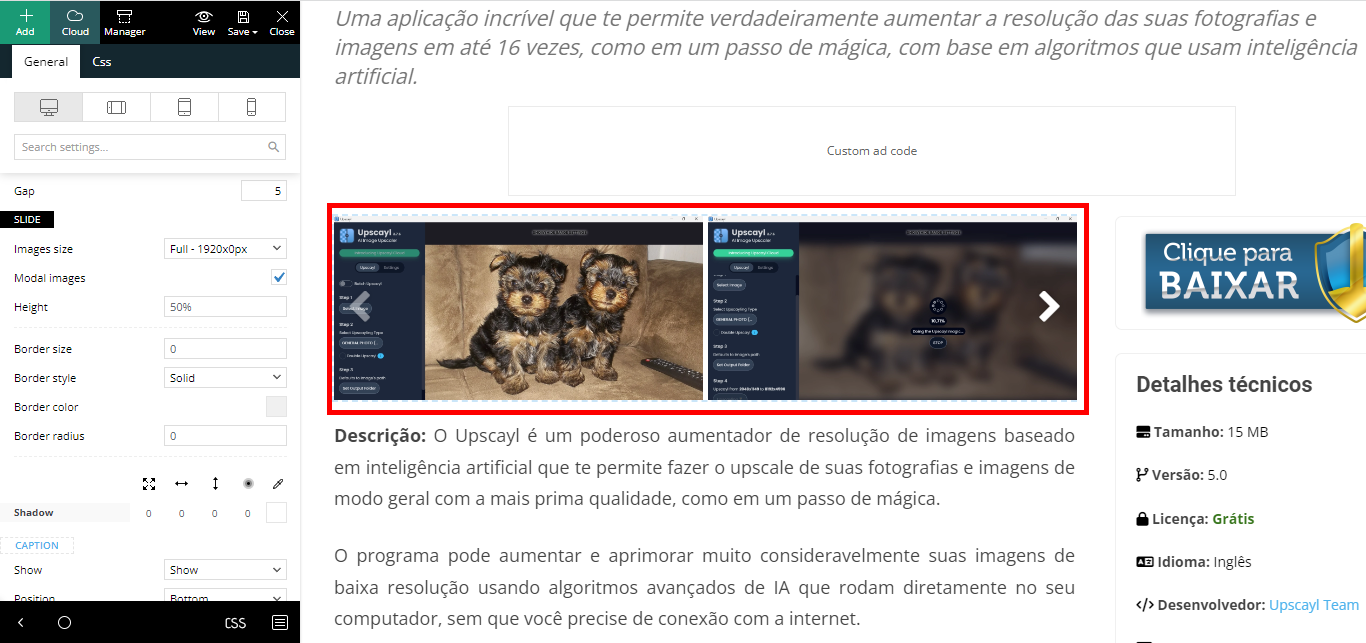
The gallery is not working in a optimized way. Like I sayed I will need to customize so it takes small version of the images (those that WordPress generate thumbnail, average and big), but when the user clicks on the image, it open’s the full image.
https://www.baixesoft.com/wp-content/uploads/2023/09/Gallery.png
tagDiv Composer do not offer the options I need.
Please, acess the link https://www.baixesoft.com/download/upscayl
use the gallery and you will see.
I just need to know where to go, I will customize the necessary code there. Thank’s
Bettina Hello @Santoshbwri22 !
A responsive version of your website looks similar to the desktop version. TagDiv Composer is used to edit the page. Click on the mobile viewport: https://www.screencast.com/t/XDQJedlggSB. There, you can see your mobile version and edit the elements. You can delete the element or hide it from the CSS tab: https://prnt.sc/kd2uaCdgRW5B
Thank you!
Bettina Hello!
We have 3 options for mobile versions that you can use:
1. Responsive version: A responsive version of your website looks similar to the desktop version. TagDiv Composer is used to edit the page.Click on the mobile viewport: https://www.screencast.com/t/XDQJedlggSB. There, you can see your mobile version and edit or adjust the elements to look better.
2. Mobile pages: https://tagdiv.com/newspaper-10-3-7-update-brings-customizable-and-fast-mobile-pages
3. Mobile theme plugin: The Mobile Theme is a performance-optimized theme included in the main Newspaper theme that only loads on mobile devices. It comes with its own templates and designs for pages, posts, categories, etc., so your current templates from the desktop theme will get converted to the mobile theme layout. Please see https://forum.tagdiv.com/the-mobile-theme/ and https://forum.tagdiv.com/mobile-theme-introduction/ for more information.
A full explanation is here: https://www.youtube.com/watch?v=SpGkOnJeNZY
If you need to use the mobile version 1 or 2, then you need to uninstall the Mobile Theme plugin and AMP.
Unfortunately, AMP is not working with the cloud templates because the AMP’s layout is not fully customized.
The AMP version works best with default templates and not cloud templates. That’s why we integrated it with the Mobile theme plugin.
The feedback from our clients about AMP was negative and it is not used anymore, that’s why we didn’t add more customization options.
Thank you so much for understanding!
Bettina Hello @nuggsog !
Your website can’t be reached. You should customize the homepage with the TagDiv Composer.
More documentation about the cloud templates is here:
– https://forum.tagdiv.com/cloud-library-templates/
– https://forum.tagdiv.com/design-post-pages-using-cloud-library-templates/
– https://forum.tagdiv.com/cloud-library-category-templates/
We have 3 options for mobile versions that you can use:
1. Responsive version: A responsive version of your website looks similar to the desktop version. TagDiv Composer is used to edit the page.Click on the mobile viewport: https://www.screencast.com/t/XDQJedlggSB. There, you can see your mobile version and edit or adjust the elements to look better.
2. Mobile pages: https://tagdiv.com/newspaper-10-3-7-update-brings-customizable-and-fast-mobile-pages
3. Mobile theme plugin: The Mobile Theme is a performance-optimized theme included in the main Newspaper theme that only loads on mobile devices. It comes with its own templates and designs for pages, posts, categories, etc., so your current templates from the desktop theme will get converted to the mobile theme layout. Please see https://forum.tagdiv.com/the-mobile-theme/ and https://forum.tagdiv.com/mobile-theme-introduction/ for more information.
A full explanation is here: https://www.youtube.com/watch?v=SpGkOnJeNZY
If you need to use the mobile version 1 or 2, then you need to uninstall the Mobile Theme plugin and AMP.
Thank you!
Bettina Hello Anurag Srivastava!
1. Edit an article with the tagdiv Composer, and there you can find all the settings for the text: https://prnt.sc/_14aOoDzEECt -> https://prnt.sc/ynfT5G_Zk7k2
2. Edit the homepage with the tagdiv Composer, click on those blocks and change the filters: https://forum.tagdiv.com/flex-block-settings-guide/
3. You can drag and drop the elements where you like in the page. Also, you can copy and paste the element after another: right-click on the element: https://prnt.sc/di9HxFxYhxDp -> right-click on the other element and choose paste after.
More documentation about the cloud templates is here:
– https://forum.tagdiv.com/cloud-library-templates/
– https://forum.tagdiv.com/design-post-pages-using-cloud-library-templates/
– https://forum.tagdiv.com/cloud-library-category-templates/
Thank you!
 aitoolsjournal
 But How can I increase the number of reviews from 1 to more. I am using Newspaper theme with APP listing template. For every CPT page type, which is App Listing in this case, i need more than one users to be able to submit reviews. When i open the edit TagDiv Composer, it shows more than one review as a part of template for app listing but i can not publish more than one review for each app. https://imgur.com/vOUVTEF
Here is a link to my site, please take a look and let know how can i change that: AIToolsJournal
 EDtimes1234
 Hello Bettina and Tag Div Team,
Please help – I am not getting reply from your team and there is a serious issue on your RAG DIV COMPOSER plugin which has broken our website.
Your team member has also accepted this – I have provided him with all access but still this is unsolved – please help – we have taken and paid for support
 fizig3
Too Lazy Load ,Widget open and theme is stuck, Tag div composer not open
Site links broken posts open different links. and no support from them
Bettina Hello @sjgold !
Edit the homepage with the TagDiv Composer and click on the Website Manager: https://prnt.sc/499k23cYDl6K
Thank you!
Bettina Hello @sjgold !
We recommend you to use a static page for your homepage and choose the one you use from that dropdown, so you can customize it with the TagDiv Composer.
Please note that you can not display both posts and CPTs in a tagdiv block, only posts or only CPTs. The code you applied only affects the standard WordPress loops while our loops work differently.
Thank you!
 ivanbangbus
 Hi Bettina 🙂 Thanks
I know it is possible pages here: Dashboard -> Pages (via tagdiv composer)
As you can see in the image, I mean the fields that if I try to select it doesn’t let me select them.
Thanks
Bettina Hello @mohamadazliaidi !
Make sure that the new page is customizable with the TagDiv Composer, check the header template you use from the Website Manager, save, clear all the cache and view the results.
Thank you!
Bettina Hello!
Please edit the pages with the tagdiv Composer, click on those blocks, and check the filters that are used there: https://forum.tagdiv.com/flex-block-settings-guide/
Also, check if you use any offset (https://forum.tagdiv.com/offset-feature/) or this feature: https://forum.tagdiv.com/unique-articles/.
Make sure that every post has been assigned a category.
Thank you!
Bettina Hello @poldino!
If your demo has extra code, then this code can be in a custom CSS block when you edit the page with the TagDiv Composer, in the live CSS box, or in the theme panel under Custom Code.
If this is not what you mean, then please provide more information about your issue or what you need to achieve exactly.
A solution for sending a screenshot/video is this:
Download, capture, and send: https://www.techsmith.com/jing-tool.html
After making the screenshot, you will have a link; paste it here.
Thank you!
 luke-tt
 Hi Bettina,
no, this does not work. If I exclude
/jquery-?[0-9.](.*) (.min|.slim|.slim.min)?.js

/jquery-migrate(.min)?.js

/wp-content/plugins/td-composer/legacy/Newsmag/js/tagdiv_theme.min.js

tdBlocksArray
the whole submenu doesn’t work.
Now I deleted the exclusions and it’s like before, I will give you two examples what I mean:
https://www.eronite.com/beziehung-promiskuitive-frau/
=> the menu is not sticky, no “back-to-top” button is shown and the magnifying glass for search is not clickable, no submenu (missing arrows)
https://www.eronite.com/rubber-latex-lack-leder-fetisch/
=> All it’s fine
I am wondering because on some posts it works, on other posts it doesn’t.
Thank you and best regards,
Luke
luke-tt Hi,
I think it’s better to use
/wp-content/plugins/td-composer/legacy/Newsmag/js/tagdiv_theme.min.js
because
/wp-content/plugins/td-composer/legacy/Newspaper/js/tagdiv_theme.min.js doesn’t exist in my folder.
I will check this.
Thank you and best regards,
Luke
Bettina Hello @ivanbangbus !
You can edit it with the TagDiv Composer the page which can be found in the Dashboard -> Pages.
Please note that there are only some settings for it, so you can’t change the fields.
Thank you!
 Alex
AlexHi,
Unless I’m doing something wrong, there seems to be another bug.
1. In theme panel put this Ad code in both, Sidebar and Custom 1. Screenshot

2. Edit page with tagdiv composer and add first Ad Box element and chose Sidebar and second Ad Box element and chose Custom 1. Screenshot
3. Save and open this page in mobile size screen – Sidebar is stretched all way across, while Custom Ad 1 is 300 wide as expected. Screenshot
Thanks.
Bettina Hello @elly!
You can not customize the mobile theme layout in the tagdiv Composer, only the cloud templates.
Thank you!
Bettina Hello Megan!
This issue has been already discussed here: https://forum.tagdiv.com/topic/403-error-on-tagdiv-composer-when-trying-to-use-wp-editor-wpedito-php/
Thank you!
Bettina Hello @rickyrt !
This is not AMP, but the mobile theme which has the same layout.
We have 3 options for mobile versions that you can use:
1. Responsive version: A responsive version of your website looks similar to the desktop version. TagDiv Composer is used to edit the page.Click on the mobile viewport: https://www.screencast.com/t/XDQJedlggSB. There, you can see your mobile version and edit or adjust the elements to look better.
2. Mobile pages: https://tagdiv.com/newspaper-10-3-7-update-brings-customizable-and-fast-mobile-pages
3. Mobile theme plugin: The Mobile Theme is a performance-optimized theme included in the main Newspaper theme that only loads on mobile devices. It comes with its own templates and designs for pages, posts, categories, etc., so your current templates from the desktop theme will get converted to the mobile theme layout. Please see https://forum.tagdiv.com/the-mobile-theme/ and https://forum.tagdiv.com/mobile-theme-introduction/ for more information.
A full explanation is here: https://www.youtube.com/watch?v=SpGkOnJeNZY
If you need to use the mobile version 1 or 2, then you need to uninstall the Mobile Theme plugin and AMP.
Thank you!