
- TutorialsFrom WPBakery to tagDiv Composer
- TutorialsDefault Block Settings Guide
- TutorialsOffset Feature
- TutorialstagDiv Social Counter Tutorial
- TutorialsHow to Update the WPBakery Page Builder plugin
 Bettina
 Hello!
Please make sure you have the latest update of the theme (version 11) and the plugins up to date. After that, reinstall the composer and the social counter plugin.
Also, check if you have set up the page in the theme panel -> social networks.
If the problem is still there, then we need to see what happened there.
Please make a full backup, send an email at contact@tagdiv.com and provide wp-admin, so we can investigate this issue. Also, paste a link to this topic so we can easily identify you. Let us know and we will gladly assist you.
Thank you!
 Vlad S
 Hello!
You will have to first start looking for a plugin conflict. please deactivate ALL plugins except tagDiv ones, also if you are using child theme or cache plugin, deactivate them, clear all cache and try again.
Also you can try and remove and re-install the tagDiv Composer plugin and please send us a link to your website in order to take a look.
Let us know the results.
Thank you !
 Calin
Calin Hi SocietyN, our theme has a responsive version, and the mobile plugin and page are only suggestion to have better performance or a different content, so using our theme you can choose between three options for mobile:
1. Responsive version, this is by default when you install the theme and you do not use mobile page or mobile theme plugin.
2. Mobile page/template this allows you to create with tagDiv Composer and cloud a different layout and set different elements for mobile and iPad/tablet and it will overwrite the responsive version.
3. Mobile theme plugin, this is a light theme version for mobile that will overwrite the mobile page and responsive version if enabled.
So when you have a mobile page/template this will be used instead of a responsive version, but if you also have the mobile theme enabled, this one will override both of them.
How to combine them? Yes, this can be possible, for example the mobile page/template will apply only on that page or cloud template that is assigned. But what to do if you want to use a mobile theme plugin too? If you use mobile theme, in Gutenberg editor it is an option to disable the mobile theme in current post/page, if you use the option, then it will be use the mobile page/template (if is assigned) or the responsive version.
So in your case you can disable the mobile theme on the homepage -> https://i.imgur.com/NX57q4t.png or if you do not want it at all, disable the plugin or use it only for amp -> https://i.imgur.com/Grlz5Ee.png.
Here is also a video that explains all those -> https://www.youtube.com/watch?v=SpGkOnJeNZY
Hope this will help you!
 setteseitennis
 Hi Calin,
thank you for your precious help. With the background color (second link) set, it works now. As for the mobile menu on desktop, that’s the only button available in the tag div composer for a hamburger menu, which I’ve seen on almost all the websites around.
Many thanks,
Edo
Vlad S Hello!
You will have to first start looking for a plugin conflict. please deactivate ALL plugins except tagDiv ones, also if you are using child theme or cache plugin, deactivate them, clear all cache and try again.
Also you can try and remove and re-install the tagDiv Composer plugin and please send us a link to your website in order to take a look.
Let us know the results.
Thank you !
Calin Hi,
First, I want to make sure that I was able to inform you of all info about the mobile versions that our theme can have.
1. Responsive version, this is by default when you install the theme and you do not use mobile page or mobile theme plugin.
2. Mobile page/template this allows you to create with tagDiv Composer and cloud a different layout and set different elements for mobile and iPad/tablet and it will overwrite the responsive version.
Also if you deleted the mobile page, please make sure that you first un-unsigned from your homepage, if you didn’t do it, make a new mobile page, then just select no mobile page, after that you can delete the new mobile page.
3. Mobile theme plugin, this is a light theme version for mobile that will overwrite the mobile page and responsive version if enabled.
So when you have a mobile page/template this will be used instead of a responsive version, but if you also have the mobile theme enabled, this one will override both of them.
How to combine them? Yes, this can be possible, for example the mobile page/template will apply only on that page or cloud template that is assigned. But what to do if you want to use a mobile theme plugin too? If you use mobile theme, in Gutenberg editor it is an option to disable the mobile theme in current post/page, if you use the option, then it will be use the mobile page/template (if is assigned) or the responsive version.
So in your case you can disable the mobile theme on the homepage -> https://i.imgur.com/NX57q4t.png or if you do not want it at all, disable the plugin or use it only for amp -> https://i.imgur.com/Grlz5Ee.png.
Here is also a video that explains all those -> https://www.youtube.com/watch?v=SpGkOnJeNZY
Hope this will help you!
Thank you!
 alan3wang
Hi Team,
I am trying to edit my homepage with Tagdiv Composer (I recently changed my URL), however, the interface is stuck on the loading screen – can you please help advise on a resolution?
https://paste.pics/D8T8L
Also, can you please help point out where the “Trending Now” toggle can be turned on?
https://paste.pics/D8T9N
Thanks
Vlad S Hello!
Please note that Newspaper Theme and Cloud library templates have been built using tagDiv Composer. Using any other page builder on this templates will create conflicts. Unfortunately elementor is an untested plugin therefore this issue cannot be covered by the support team.
Thank you!
 antonio flora
I’m trying to display an image in the mobile header, different from the other pages but when I insert the link in the visual composer custom after the save it removes it.
 fulrich101
I have some issues with the mobile site.
see feds.dk
1) The mobile site is showing up in the PC browser.
2) I then clear the chache to fix the problem.
3) Then the PC site is showing up on the mobile device.
4) I then edit the mobile site (mobile site –> edit mobile page with tagDiv Composer and then resave it.
5) The mobile site then shows up in my PC browser.
How do I fix this so the PC browser site shows up in the PC browser and the Mobile Site shows up on the mobile device?
 kodeer
 I can share some test resule.
in php7.4, site works fine with some warning
Warning: A non-numeric value encountered in /home/***/webapps/***/wp-content/plugins/td-composer/legacy/Newspaper/includes/shortcodes/td_flex_block_4.php on line 443
Warning: A non-numeric value encountered in /home/***/webapps/***/wp-content/plugins/td-composer/legacy/Newspaper/includes/shortcodes/td_flex_block_4.php on line 470
then in php8.0, it totaly crash.
Fatal error: Uncaught TypeError: Unsupported operand types: string / float in /home/***/webapps/***/wp-content/plugins/td-composer/legacy/Newspaper/includes/shortcodes/td_flex_block_4.php:443 Stack trace: #0 /home/***/webapps/***/wp-content/plugins/td-composer/legacy/common/wp_booster/td_css_res_compiler.php(208): td_flex_block_4::cssMedia() #1 /home/***/webapps/***/wp-content/plugins/td-composer/legacy/Newspaper/includes/shortcodes/td_flex_block_4.php(1831): td_css_res_compiler->load_settings() #2 /home/***/webapps/***/wp-content/plugins/td-composer/legacy/common/wp_booster/td_block.php(1501): td_flex_block_4->get_custom_css() #3 /home/***/webapps/***/wp-content/plugins/td-composer/legacy/Newspaper/includes/shortcodes/td_flex_block_4.php(1857): td_block->get_block_css() #4 /home/***/webapps/***/wp-content/plugins/td-composer/legacy/common/wp_booster/td_global_blocks.php(27): td_flex_block_4->render() #5 /home/***/webapps/***/wp-includes/shortcodes.php(343): td_global_blocks::proxy_function() #6 [internal function]: do_shortcode_tag() #7 /home/***/webapps/***/wp-includes/shortcodes.php(218): preg_replace_callback() #8 /home/***/webapps/***/wp-content/plugins/td-composer/includes/tdc_composer_block.php(273): do_shortcode() #9 /home/***/webapps/***/wp-content/plugins/td-composer/includes/shortcodes/vc_column.php(283): tdc_composer_block->do_shortcode() #10 /home/***/webapps/***/wp-content/plugins/td-composer/legacy/common/wp_booster/td_global_blocks.php(27): vc_column->render() #11 /home/***/webapps/***/wp-includes/shortcodes.php(343): td_global_blocks::proxy_function() #12 [internal function]: do_shortcode_tag() #13 /home/***/webapps/***/wp-includes/shortcodes.php(218): preg_replace_callback() #14 /home/***/webapps/***/wp-content/plugins/td-composer/includes/tdc_composer_block.php(273): do_shortcode() #15 /home/***/webapps/***/wp-content/plugins/td-composer/includes/shortcodes/vc_row.php(1098): tdc_composer_block->do_shortcode() #16 /home/***/webapps/***/wp-content/plugins/td-composer/legacy/common/wp_booster/td_global_blocks.php(27): vc_row->render() #17 /home/***/webapps/***/wp-includes/shortcodes.php(343): td_global_blocks::proxy_function() #18 [internal function]: do_shortcode_tag() #19 /home/***/webapps/***/wp-includes/shortcodes.php(218): preg_replace_callback() #20 /home/***/webapps/***/wp-content/plugins/td-composer/includes/tdc_composer_block.php(273): do_shortcode() #21 /home/***/webapps/***/wp-content/plugins/td-composer/includes/shortcodes/tdc_zone.php(591): tdc_composer_block->do_shortcode() #22 /home/***/webapps/***/wp-content/plugins/td-composer/legacy/common/wp_booster/td_global_blocks.php(27): tdc_zone->render() #23 /home/***/webapps/***/wp-includes/shortcodes.php(343): td_global_blocks::proxy_function() #24 [internal function]: do_shortcode_tag() #25 /home/***/webapps/***/wp-includes/shortcodes.php(218): preg_replace_callback() #26 /home/***/webapps/***/wp-includes/class-wp-hook.php(292): do_shortcode() #27 /home/***/webapps/***/wp-includes/plugin.php(212): WP_Hook->apply_filters() #28 /home/***/webapps/***/wp-includes/post-template.php(253): apply_filters() #29 /home/***/webapps/***/wp-content/plugins/td-standard-pack/Newspaper/page.php(51): the_content() #30 /home/***/webapps/***/wp-includes/template-loader.php(106): include('...') #31 /home/***/webapps/***/wp-blog-header.php(19): require_once('...') #32 /home/***/webapps/***/index.php(17): require('...') #33 {main} thrown in /home/***/webapps/***/wp-content/plugins/td-composer/legacy/Newspaper/includes/shortcodes/td_flex_block_4.php on line 443

There has been a critical error on this website.
 diriras
Hello,
I have a sports portal based on newspaper theme and it is wonderful. I also have 3-4 sites for my clients
I have found a good VPS deal and wanted to migrate all of my plesk websites to another Hosting provider.
My old has 6 CPU 8BG RAM and the new one has 8 CPU 16GB RAM.
So i used plesk migration tool and i moved all of my sites to the new VPS Host.
I have checked them all and they are working as they should expect https://sportlive.gr which is my sports portal domain.
This site is live for over 1 year now and it has thousands of post and pics, and the DB is almost 3GB!
I had a Veeeery Slow performance on the new Host and even timeouts sometimes. So changed NS records back to the old host provider and started troubleshooting the website to the new provider with a new domain name https://exclusiveweb.gr
If you check the two domains https://sportlive.gr and https://exclusiveweb.gr you will see the speed difference in the two portals. for some reason that has to do definitely with the newspaper database settings, the DB CPU performance keeps getting 100% every time a surf https://exclusiveweb.gr or it stays 0% and takes 15 seconds to open a new post!!
I want to point out that the https://exclusiveweb.gr is a CLONE of https://sportlive.gr with the same settings plugins etc etc!!!
I tried EVERYRHING in the new VPS host.
1. downgrade to an older version and then upgrading to the newspaper 11 again.
2. Disabled ALL other plugins except tagdiv
3. Delete all the past posts and pics and kept only 1 week old.
4. Optimise clean the Database!
Nothings worked , no speed at all, expect if i disable tag div plugins , then https://exclusiveweb.gr is working much faster as it should.
I even tried to create the portal from scratch and it was going well , no speed issues from a clean DB’s but when i tried to import the all posts and the images from the old portal with WordPress import tool it took forever and I had a lot of timeouts and i could not finish the migration with this tactic because the website in total is almost 45GB now!
I do not know what else to do , I am pretty sure that some tagdiv composer is causing the problem but i cannot troubleshoot it and i need your help.
Kind regards,
Michael
 dannyscar
 i had it on PHP7.4.
it did a fatal error complaining some composer needed to be >=7.3
set PHP to 7.3
deleted & re-installed the theme (wp-admin was unaffected)
 formedia
 Ok now I have tagDiv composer plugin showing on the wordpress plugins page, but I have [td] markup that is displaying on the homepage and the theme style I previously had is completely gone.
 RichBrun
Is there a way to edit or use Tagdiv Composer when adding Posts the same way it can be used when adding pages?
formediaI purchased a website that is hosted on bluehost and uses Newspaper theme and tagDiv Composer plugins. Recently the admin became unusable (500 error). Bluehost support disabled the tagDiv composer plugin which made the admin usable but the website now looks terrible (td markup being displayed).
I updated the newspaper theme and plugins, now it says the tagDiv composer plugin is enabled in the newspaper admin, but it is not visible on the wordpress plugins page. Please help!
 techydaemonofficial
Once I have created a mobile page for my website by going to tagDiv composer and then selecting “Create Mobile Page”. Although Newspaper has a beautiful light mobile theme for amp, since I have created that mobile page from tagDiv composer, whenever I load my website on Mobile – sometimes it loads in default amp mobile theme and sometimes in that mobile page created from tagDiv composer. I have already deleted the mobile page which I had created before. Please tell me how to stop that mobile page from loading in mobile, because I want only the default amp theme of the Newspaper to load.
 Dibbes
I see a load of api calls from the core code. Can you explain the course and how to fix this?
GET https://www.googleapis.com/youtube/v3/videos
?id=Xq6I7_lHppg
&part=id,contentDetails,snippet,player
&key=
403 Forbidden
td_remote_http::get_url_wordpress()
wp-content/plugins/td-composer/legacy/common/wp_booster/td_remote_http.php:202
td_remote_http::get_page_via_channel()
wp-content/plugins/td-composer/legacy/common/wp_booster/td_remote_http.php:157
td_remote_http::get_page()
wp-content/plugins/td-composer/legacy/common/wp_booster/td_remote_http.php:86
td_remote_video::youtube_api_get_videos_info()
wp-content/plugins/td-composer/legacy/common/wp_booster/td_remote_video.php:158
td_remote_video::api_get_videos_info()
wp-content/plugins/td-composer/legacy/common/wp_booster/td_remote_video.php:44
td_video_support::get_video_duration()
wp-content/plugins/td-composer/legacy/common/wp_booster/td_video_support.php:501
td_module->get_video_duration()
wp-content/plugins/td-composer/legacy/common/wp_booster/td_module.php:751
tdb_module_mm->render()
wp-content/plugins/td-cloud-library/modules/tdb_module_mm.php:83
tdb_header_mega_menu->inner()
wp-content/plugins/td-cloud-library/shortcodes/header/tdb_header_mega_menu.php:1654
tdb_header_mega_menu->render()
wp-content/plugins/td-cloud-library/shortcodes/header/tdb_header_mega_menu.php:1632
tdb_menu->hook_wp_nav_menu_objects()
wp-content/plugins/td-cloud-library/includes/tdb_menu.php:180
apply_filters(‘wp_nav_menu_objects’)
wp-includes/plugin.php:212
wp_nav_menu()
wp-includes/nav-menu-template.php:226
tdb_header_menu->inner()
wp-content/plugins/td-cloud-library/shortcodes/header/tdb_header_menu.php:1402
tdb_header_menu->render()
wp-content/plugins/td-cloud-library/shortcodes/header/tdb_header_menu.php:1263
td_global_blocks::proxy_function()
wp-content/plugins/td-composer/legacy/common/wp_booster/td_global_blocks.php:27
do_shortcode_tag()
wp-includes/shortcodes.php:343
preg_replace_callback()
wp-includes/shortcodes.php:343
do_shortcode()
wp-includes/shortcodes.php:218
tdc_composer_block->do_shortcode()
wp-content/plugins/td-composer/includes/tdc_composer_block.php:273
vc_column->render()
wp-content/plugins/td-composer/includes/shortcodes/vc_column.php:283
td_global_blocks::proxy_function()
wp-content/plugins/td-composer/legacy/common/wp_booster/td_global_blocks.php:27
do_shortcode_tag()
wp-includes/shortcodes.php:343
preg_replace_callback()
wp-includes/shortcodes.php:343
do_shortcode()
wp-includes/shortcodes.php:218
tdc_composer_block->do_shortcode()
wp-content/plugins/td-composer/includes/tdc_composer_block.php:273
vc_row->render()
wp-content/plugins/td-composer/includes/shortcodes/vc_row.php:1098
td_global_blocks::proxy_function()
wp-content/plugins/td-composer/legacy/common/wp_booster/td_global_blocks.php:27
do_shortcode_tag()
wp-includes/shortcodes.php:343
preg_replace_callback()
wp-includes/shortcodes.php:343
do_shortcode()
wp-includes/shortcodes.php:218
tdc_composer_block->do_shortcode()
wp-content/plugins/td-composer/includes/tdc_composer_block.php:273
tdc_zone->render()
wp-content/plugins/td-composer/includes/shortcodes/tdc_zone.php:591
td_global_blocks::proxy_function()
wp-content/plugins/td-composer/legacy/common/wp_booster/td_global_blocks.php:27
do_shortcode_tag()
wp-includes/shortcodes.php:343
preg_replace_callback()
wp-includes/shortcodes.php:343
do_shortcode()
wp-includes/shortcodes.php:218
{closure}()
wp-content/plugins/td-composer/td-composer.php:250
do_action(‘tdc_header’)
wp-includes/plugin.php:484
load_template(‘wp-content/themes/Newspaper/header.php’)
wp-includes/template.php:730
locate_template()
wp-includes/template.php:676
get_header()
wp-includes/general-template.php:48
 Kaino
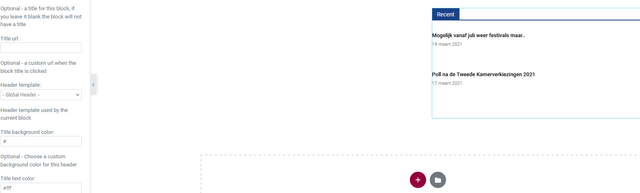
KainoOn a page in the elementor editor I’ve put a block which works fine, not showing the images in the editor but shows them live however the block header background and text color take the global color set in the theme or elementor.
So when I change the colors in the editor it shows but live it’s always the global colors.
I,ve check this on 3 different browsers, mobile, incognito browsers ofc with empty cache but the colors don’t change on the front end while when I change the color of a block header on the homepage made with tagDiv composer they will show up up after saving.
Could you investigate this?

Vlad S Hello!
That you can do using tagDiv Composer as you can see here: https://www.youtube.com/watch?v=fa7GenCHcBU&t=10s You can choose from multiple ROW layouts on your templates, Also you can use the ROW Stretch in order to get more width: https://www.screencast.com/t/5terlRwAj
Thank you!
Vlad S Hello!
You can achieve that by going into Theme Panel – Theme fonts: https://www.screencast.com/t/PSb88VWk , Please note that If you are using a Cloud library template that can be done via tagDiv Composer as you can see an example here: https://www.screencast.com/t/a7xKD0RE
Thank you!
 Anamaria
 Hello,
To remove the sign in from mobile please go in Theme Panel -> Header -> Sign in/ Join and disable the option => https://www.screencast.com/t/bRsMhYYu7V8 after that you can remove the sign-in from the header with tagDiv Composer => https://www.screencast.com/t/Y5j6ArY8Ug , select the element and with right-click you can delete it => https://www.screencast.com/t/GshM3Q3nwDv
Thank you!
 Terje
Terje Case closed: Found that the page of course needed editing with TagDiv Composer.
Anamaria Hello,
If you have a Single Post Template from Cloud Library, then you need to edit the post with tagDiv Composer => https://www.screencast.com/t/jHatJGC1qRf, select the Single Post Views => https://www.screencast.com/t/NhUGCRfI and with right-click, you can delete it.
If you have a standard template, then you can disable the post views from Theme Panel -> Post Settings -> Post and Custom Post Types => https://www.screencast.com/t/LAv90B5eZ (please make sure you have tagDiv Standard Pack activate for standard template)
Thank you!
Calin Hi giriraj and Andrea_Menghini, it seems that I miss understand the problem, I was thinking that you are referring to an old bug between Composer and Yoast when adding blocks.
Now I understand what the problem is and indeed it seems that some of elements are not update correctly and only after the post is publish or updated, from my test this is the normal results and after publish I got this -> https://i.imgur.com/Lvkxkkp.png
→ https://i.imgur.com/YvNLlLi.png
I announce a developer about this satiation and he said that this will be checked and fixed as soon as possible, also if there are other elements that are not working correctly, will help a lot to improve the theme if you can let us know them and provide details and screenshots.
Thank you for your understanding and sorry for this inconvenience!



