- TutorialsFrom WPBakery to tagDiv Composer
- TutorialsDefault Block Settings Guide
- TutorialsOffset Feature
- TutorialstagDiv Social Counter Tutorial
- TutorialsHow to Update the WPBakery Page Builder plugin
 katsar0v
Hello,
I made some pagespeed benchmarks on our website today and saw that the amp version of an article loads fonts we do not use, like “plugins/td-composer/mobile/images/icons/mobile-theme.woff” or “/themes/Newspaper/images/icons/newspaper.woff”. On top of that we would like to improve rendering by settings @font-face with font-display: swap, which we did successfully on the non-amp version.
I would like to know, how can we remove “plugins/td-composer/mobile/images/icons/mobile-theme.woff” and “/themes/Newspaper/images/icons/newspaper.woff” from the amp code? Also I would like to add custom @font-face definitions with “font-display: swap” on the amp version, is this possible?
Greetings,
Kristiyan
 krisleehall
https://magainstitute.com/category/podcast/
We have 5 additional articles posted since the ones showing up on this page, but they are not populating. I have gone thru tagDiv Composer with a fine tooth comb on that page and they should all be showing up.
 xcrisx
Hi it turns out that I used the div composer tag to create a custom mobile page along with its header and footer but I can’t find a way to show it on my home page, how can I achieve this?
 jvfrance10
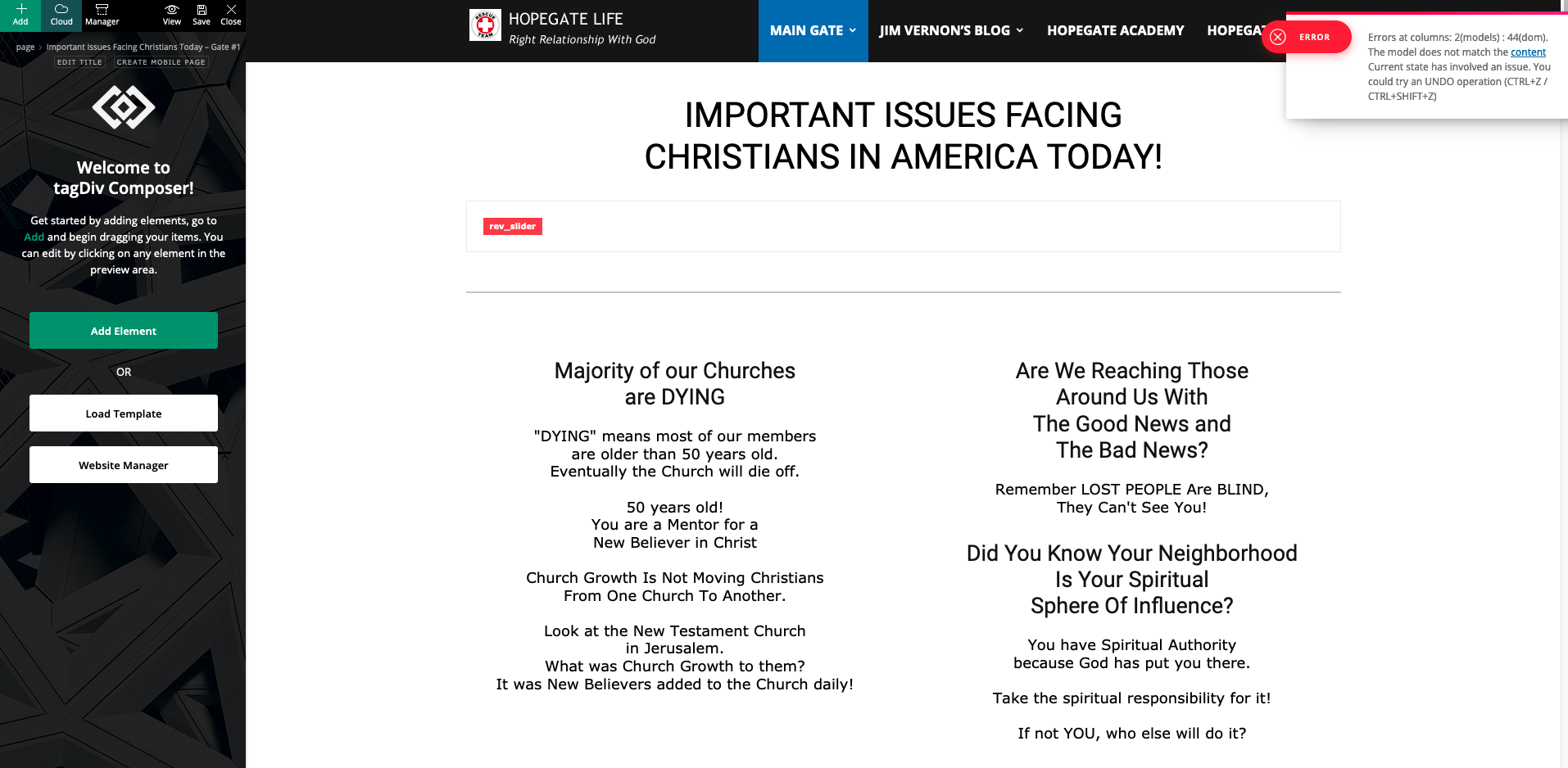
When Opening Page get following Error message:
Errors at columns: 2(models) : 44(dom). The model does not match the content Current state has involved an issue. You could try an UNDO operation (CTRL+Z / CTRL+SHIFT+Z)
Error occured after WordPress Updated to 5.7.2
My Newspaper Theme is Version 10.4
Screenshot of Tagdiv Composer Error:
https://hopegate-error-screenshots.s3.amazonaws.com/screenshot-tagdiv-wp572-error.png
Thank you for your prompt assistance,
Jim Vernon
 Anamaria
 Hello,
On the Single Post Template on Cloud Library, the sidebar can be customized per post only if you make a new single post template (as you said, this is different from a sidebar made with widgets). Now I’m not 100% sure that using a shortcode will work, but normally with our theme you can use shortcodes but placing them using tagDiv Composer (you need to set the shortcode with the theme builder in column text or text with title in the place where you want to display).
You can try and let me know about your results.
Thank you!
Anamaria Hello,
Unfortunately, the only solution is to comment on these lines from this path to hide the views posts from the backend => wp-content/plugins/td-composer/legacy/common/wp_booster/td_page_views.php =>https://www.screencast.com/t/RDOIGXOjwA -> https://www.screencast.com/t/eKEtkTKJK
Thank you for your understanding!
Anamaria Hello,
This is the way that our theme builder is working. Using tagDiv Composer you can build pages and cloud templates and this is done on the front-end where you will see exactly how the website looks when you add elements, but in the back-end, those pages and cloud templates are builder using shortcodes. That is why when you open a page in a WordPress editor it is displayed only shortcodes.
So, if you want to copy the shortcodes for the header, then edit only the template header, copy the code and add it in a blank header template and after assign it on the pages where you want => https://we.tl/t-GnmtCu0pPT
Hope this helps you!
Thank you!
 brael
brael Hey Vlad, thanks for getting back to me.
I actually just stumbled upon this as it displays something different in the tagdiv composer compared to the live mobile test environment.
I have used Block 15 with Padding x10 on each side, although it seems to just right right left/right sides.
When I view this on tagdiv composer – mobile option, the content aligns stacked (yuk haha)… but when I view on my live test environment on my actual mobile… the content is displayed in two beautiful columns.
I’m going through my customcss but I can’t see anything, nor have I added custom class to the element.
Anamaria Hello,
Unfortunately, seems the problem is from the browsers used, it looks like the “like” button for Facebook is now supported only in the Chrome browser, the new implementation from other browsers is made to prevent Facebook share “like”
https://support.mozilla.org/en-US/kb/third-party-cookies-firefox-tracking-protection
https://www.the-parallax.com/apple-safari-intelligent-tracking-prevention-facebook-share-like/
If you have a Pro Prebuilt Website installed, you can disable the button with tagDiv Composer => https://www.screencast.com/t/JKhbawk3Hg ->https://www.screencast.com/t/ON5zB4scE
Thank you!
Anamaria Hello,
Our theme provides a child theme, but the files that can be set in it must be set individually (usually these changes in child theme are made by developers), according to our documentation child theme can be used for files from tagDiv Standard Pack and files from tagDiv Composer => https://forum.tagdiv.com/the-child-theme-support-tutorial/
You can find the folder of the child theme in this path => Newspaper-tf\code\Newspaper-child
Thank you!
Anamaria Hello,
Please tell me what prebuilt website you have installed, a Pro or a Standard Prebuilt website.
Also, if you have a Standard prebuilt website, then the settings from Theme Panel -> Template Settings -> Force full width should be applied without any problem.
But if you have a Pro Prebuilt Website, then you need to edit with tagDiv Composer => https://www.screencast.com/t/XFkhhj0ygShh, select the row => https://www.screencast.com/t/JRhDa1VcY and in the tab called “General” is an option to stretch the row => https://www.screencast.com/t/S79xys6MDsS
Hope this helps you!
Thank you!
 Rovshan
Hi
First of all thanks for creating such kind of a great theme. It’s really amazing. I have encountered two problems while customizing the theme:
1. I have added categories and pages to my main menu and customized the menu colors. Menu colors are being shown in pages as I have customized (Red) but whenever I go to any category page main menu colors are getting back to their default colors (Blue in this case). I tried to fix it from Tagdiv Composer on the Category template, but everything looks fine there. Here are the images regarding the problem:
https://drive.google.com/file/d/1CZHdEQOZXXGmFv456HNX1xzddSMjSRKW/view?usp=sharing
https://drive.google.com/file/d/1244r4vXuxGTYgRpOu5gVlW3Og89hn5w9/view?usp=sharing
2. I use Flex Block 3 on the Home page and headers have been set to Global Header in Tagdiv Composer. But sometimes headers on different blocks (all are Flex Block 3) are shown in a different ways despite the settings are the same. I changed them to Block Header 1 – Default, but it doesn’t help. Here are the images regarding the problem:
https://drive.google.com/file/d/1urGJ4xZFGdB62i2RO4C0d6-fhqwr4C8H/view?usp=sharing
https://drive.google.com/file/d/1gVJlTaOlhHp7xf1tNstmLZgTKVzeNJs7/view?usp=sharing
Could you please help me with these?
Thanks in advance!
 domien
hi, we are using the tagdiv composer for our pages, and some of our pages have images with affiliate links, which we would like no nofollow.
screenshot: https://ibb.co/8KscBcK
source: https://photographycourse.net/composition-photography-course/
please let us know how to do it. thanks!
Domien
 elvisfrog
 I am familiar with the tutorial you show, but then if you try to edit that PAGE after setting it with a specific header, with WordPress editor you get all the TD Composer code in the blocks.
Anamaria Hello,
Please provide the link to your website where you set the widgets.
Also, if you add them with tagDiv Composer, then you need to edit with tagDiv Compose, and set the style of the title block.
Also, make sure you set the style for Title from Theme Panel -> Theme Fonts -> Modules and Blocks General => https://www.screencast.com/t/S5dVYlsPj5vb
Thank you!
Anamaria Hello,
If you referring to this image => https://www.screencast.com/t/z5B8KHpg, to know is an ad, to delete it use tagDiv Composer, select the element and with right-click, you can remove it https://we.tl/t-f0egWXQNAF
Also, you can check our channel https://www.youtube.com/user/tagdiv that can help you to design.
Thank you!
 Bettina
 Hello!
There are 3 options to use:
1. Responsive version: A responsive version of your website is looking similar like on desktop, edit the page with TagDiv Composer, click on the mobile viewport: https://www.screencast.com/t/XDQJedlggSB ; there you can see your mobile version and you can edit the elements there.
2. Mobile pages: https://tagdiv.com/newspaper-10-3-7-update-brings-customizable-and-fast-mobile-pages/
3. Mobile theme plugin: https://forum.tagdiv.com/the-mobile-theme/
A full explanation you can find here: https://www.youtube.com/watch?v=SpGkOnJeNZY
If you want a responsive version for your mobile version, then you should uninstall the Mobile Theme plugin which has its own templates and your responsive version will appear automatically.
Thank you!
 bzeegers
Hi,
I updated our website to a newer version of the TagDiv composer sometime ago, but after the header was broken, I reverted to an older version. But after the composer stopped working recently, I unfortunately had to update and the problem I had occurred again. I addressed this issue before and it was not solved. So here is my question again:
I have set up all the header settings in the theme panel (h1-h6) with custom font sizes, however these settings are not being used after the update. For example: whenever I place a title block or a widget block on a page, it should use the default font size settings I have set up in the theme panel. An H3 and H4 block title should be 28px large. That’s not the case however. If I check the header in the browser inspector, I can see that it is overwritten by CSS as 17px. I have never added this to the theme panel or as a custom code, so I have no how this could happen. Also, I can not make manual changes to widget titles, for example. So changing all the header sizes manually is not an option!
 Neuhaus
Hello,
for a few weeks now I have an issue when editing pages. I can’t edit text blocks and content blocks. It’s just endlessly loading:
https://pasteboard.co/K5W5Iq6.png
https://pasteboard.co/K5W5Szv.png
Now I can’t even save pages anymore which is a huge problem. According to our plugin QueryMonitor the following 3 queries are also causing slow pageload. 2 of them are related to Newspaper:
https://pasteboard.co/K5W7JyL.png
I disabled all other plugins but the issue is still there so I think it’s related to the composer and cloud library.
Please help!
 Vlad S
 Hello!
Please send us a screenshot of your System Status Tab and make sure that all the requirements are met as you can see here: https://forum.tagdiv.com/requirements-for-newspaper/ ; You will have to first start looking for a plugin conflict. please deactivate ALL plugins except tagDiv ones, also if you are using child theme or cache plugin, deactivate them, clear all cache and try again.
Also you can try and remove and re-install the tagDiv Composer plugin and please send us a link to your website in order to take a look.
Let us know the results.
Thank you !
 Scholars
 Yes its working fine now, is there usually a lag time on the mobile version after updating on the tagdiv composer? I tried a few times and it seems like there is a lag time.
Anamaria Hello,
That’s weird because the settings made with tagDiv Composer should apply. Please do a test using only tagDiv plugins on a staging website, because there is a possibility, to be a plugin conflict, also if you are using a cache plugin, deactivate it, clear all cache(also from your browser) and try again. See if the problem persists.
Thank you!
Bettina Hello!
First of all, try to do these steps as quickly as possible, so your visitors do not notice the process:
1. disable TagDiv Composer
2. uninstall(delete) TagDiv Composer
3. clear cache (if cache plugin exists)
4. install TagDiv Composer
5. activate TagDiv Composer
6. clear cache (if cache plugin exists)
If this problem is not solved after that, then we need to take a look and see what happened there.
Please contact us via email at contact@tagdiv.com and provide the following:
– admin url and credentials
– a link to this topic in order to identify you
Our team will take a look!
Thank you!
Anamaria Hello,
You can use tagDiv Composer, for posts, if you use a Single Post Template from Cloud Library, but if you have a standard template from Theme Panel, then you can’t use it.
Also, for Custom Post Type you can’t use tagDiv Composer.
Thank you for your understanding!
Bettina Hello!
It seems you have installed Mobile theme plugin. If you created the mobile pages with TagDiv Composer, then when you install Mobile Theme plugin, your pages will be overwritten by the plugin.
The Mobile Theme is a performance optimized theme included in the Newspaper main theme and it loads only for mobile devices. It comes with its own templates (that default style) for page, post, category, etc so your current templates from the desktop theme will get converted to the mobile theme layout. For more details, please take a look here: https://forum.tagdiv.com/the-mobile-theme/
Better deactivate the plugin and see the results.
If you want to use a mobile page, then you need to assign it to your homepage in order to be displayed. For more information about this mobile version please take a look in this article: https://tagdiv.com/newspaper-10-3-7-update-brings-customizable-and-fast-mobile-pages/
Thank you!