
- NewsmagtagDiv Composer Tutorial
- NewsmagHow to use the Visual Composer plugin
- NewsmagHow to update a plugin
- NewsmagWhat’s included in Newsmag theme package
- NewsmagRequirements for Newsmag
- NewsmagInstall via WordPress
- NewsmagInstall via FTP
- NewsmagBlock settings tutorial
- NewsmagtagDiv Social Counter tutorial
- NewsmagHow to update the WPBakery plugin
- NewsmagPage Menu
- NewsmagCustom ad spots
- NewsmagSmart sidebar
- NewsmagVideo playlist
- NewsmagPage templates
- NewsmagHomepage – How to build and set it
 Bettina
 Hello Sanjay!
You have Mobile Theme plugin active for mobile, so every page build with TagDiv Composer won’t display in mobile version.
What you can do is to edit the page normally and deactivate the Mobile Theme for that page like this: https://www.screencast.com/t/pEAxJxhRc
Thank you!
Bettina Hello!
You can set a featured image and delete the element by editing the post template with TagDiv Composer.
The placeholder image can be changed from Theme Panel –> Blocks settings as you can see in this screenshot: https://prnt.sc/y49ix5
Thank you!
 Gatso
GatsoHi there,
Could you please teach me that how can I create a category page by TagDiv composer? I mean that not using category template.
Thank you
Bettina Hello!
Please check on your mobile viewport the page with TagDiv Composer. Click on that element and you should see a setting like that: https://www.screencast.com/t/558JfCF2
Make sure you have excerpts: show.
Hope that helps you!
Thank you!
 blogdeforeo
 Anyone know what to do ? I’ve read the number 5 in this article https://forum.tagdiv.com/tagdiv-composer-not-working/ and I’ve deactivated all plugins + I create a blank test page, but it’s still not working.
Cheers
Nicolas
Bettina Hello!
If you use a cloud/PRO template, then you should add the ads when you edit the post with TagDiv Composer in the element called ” Single Post Content ” in the tab ADS.
For a default template you should add the ads in theme panel.
If you set up correctly, and the problem is still there, then the issue can be from a plugin conflict, that’s why, please deactivate ALL plugins except tagDiv ones, also if you are using child theme or cache plugin, deactivate them, clear all cache(also from your browser) and try again.
If this problem is not solved after that, then we need to take a look and see what happened there.
Please contact us via email at contact@tagdiv.com and provide the following:
– admin url and credentials
– a link to this topic in order to identify you
Our team will take a look!
Thank you!
 madamcza
 Hi,
i got feedback from person in charge of lazy load plugin:
“So it looks like that script is getting loaded from this file:
wp-content/plugins/td-composer/legacy/Newspaper/js/tagdiv_theme.min.js
It seems like that file is loading the YouTube iFrame API, which is then loading that widget script.
Is there any options that you have in your theme or that composer plugin to turn off the loading of the iFrame API/scripts?”
Please kindly confirm whether we have any configuration option for that and if not how I can block it in other way? I do not want to impact page speed with forced download of those YT scripts. Makes much more sense to have it on demand when a person actually presses the start button (and then the lazy load plugin will connect to YT).
Bettina Hello!
In order to have the same dimensions, please be sure you use a cloud/PRO template as on desktop, so you can edit the pages with TagDiv Composer: https://forum.tagdiv.com/tagdiv-composer-tutorial/
Thank you!
Bettina Hi!
You can modify the page with TagDiv Composer and for flex blocks and posts loops you will have a setting in Layout tab of the element: Show author, Show date, Show comment.
On posts you can delete the element also using TagDiv Composer. Please note that you need to access your post of your website and then edit with the plugin by clicking the green button from above.
Thank you!
 Anamaria
 Hello,
Unfortunately, you can’t have the same template for pages, like the post.
tagDiv Composer is a page and cloud builder, it can be used only for pages and cloud templates, therefore you can use it on a single post template from tagDiv cloud library to adjust the layout, but not to write the post content, for this, you need to use the WordPress editor.
You can find more tutorials on our channel on youtube =>https://www.youtube.com/user/tagdiv which can help you to design.
Thank you!
Anamaria Hello,
Please do these steps
1. disable tagDiv Composer and tagDiv Cloud Library
2. uninstall tagDiv Composer and tagDiv Cloud Library
3. clear cache (if cache plugin exists)
4. re-install tagDiv Composer and tagDiv Cloud Library again from Newspaper plugins => https://www.screencast.com/t/WLy01lbc
5. activate tagDiv Composer and tagDiv Cloud Library
6. clear cache (if cache plugin exists)
Let me know the results!
Thank you!
Bettina Hello!
First of all, try to do these steps as quickly as possible, so your visitors do not notice the process:
1. disable TagDiv Composer
2. uninstall(delete) TagDiv Composer
3. clear cache (if cache plugin exists)
4. install TagDiv Composer
5. activate TagDiv Composer
6. clear cache (if cache plugin exists)
Also, make sure your WordPress and plugins are up to date(specially Standard Pack installed and active if you use default templates).
Sometimes, the issue can be from a plugin conflict, that’s why, please deactivate ALL plugins except tagDiv ones, also if you are using a cache plugin, deactivate it, clear all cache(also from your browser) and try again.
If this problem is not solved after that, then we need to take a look and see what happened there.
Please contact us via email at contact@tagdiv.com and provide the following:
– admin url and credentials
– a link to this topic in order to identify you
Our team will take a look!
Thank you!
 mengheang
I can not update home page by using Edit with TagDiv Composer, when I click it load
This page isn’t working bsprinting.asia didn’t send any data.
ERR_EMPTY_RESPONSE
Anamaria Hello,
Please edit the page with tagDiv Composer =>https://www.screencast.com/t/KBDSZsjEh select the posts Loop, and in the tab called “General”, you can increase the limit post number => https://www.screencast.com/t/snxVMZrg
Hope this helps you!
Thank you!
 mikevanmoonlight
 Hello! I have problem again. When I opening page 404 for example https://pipsik.club/e
Menu looking no good and becomes in black color.
When I trying to edit page 404 with TagDiv composer everything looking perfect and no need to change nothing.
How can I fix that?
Thanks
-
This reply was modified 5 years by
mikevanmoonlight.
 webjump
Hi there,
I can’t seem o access TD Composer. It keeps spinning.
I have tried deactivating all unnecessary plugins but that did not help.
GatsoHi there,
Could you please teach me how can I divide the row of TagDiv composer? Like below picture:
https://imgur.com/JGvDmtP
Thank you
 acelbramg
 Reinstalled the wordpress using the Panel and FTP, still with the same error. For some reason when I disable the td-composer this error stops.
Other information about this issue, the media library is not loading the images and I am not able to add new images to the site.
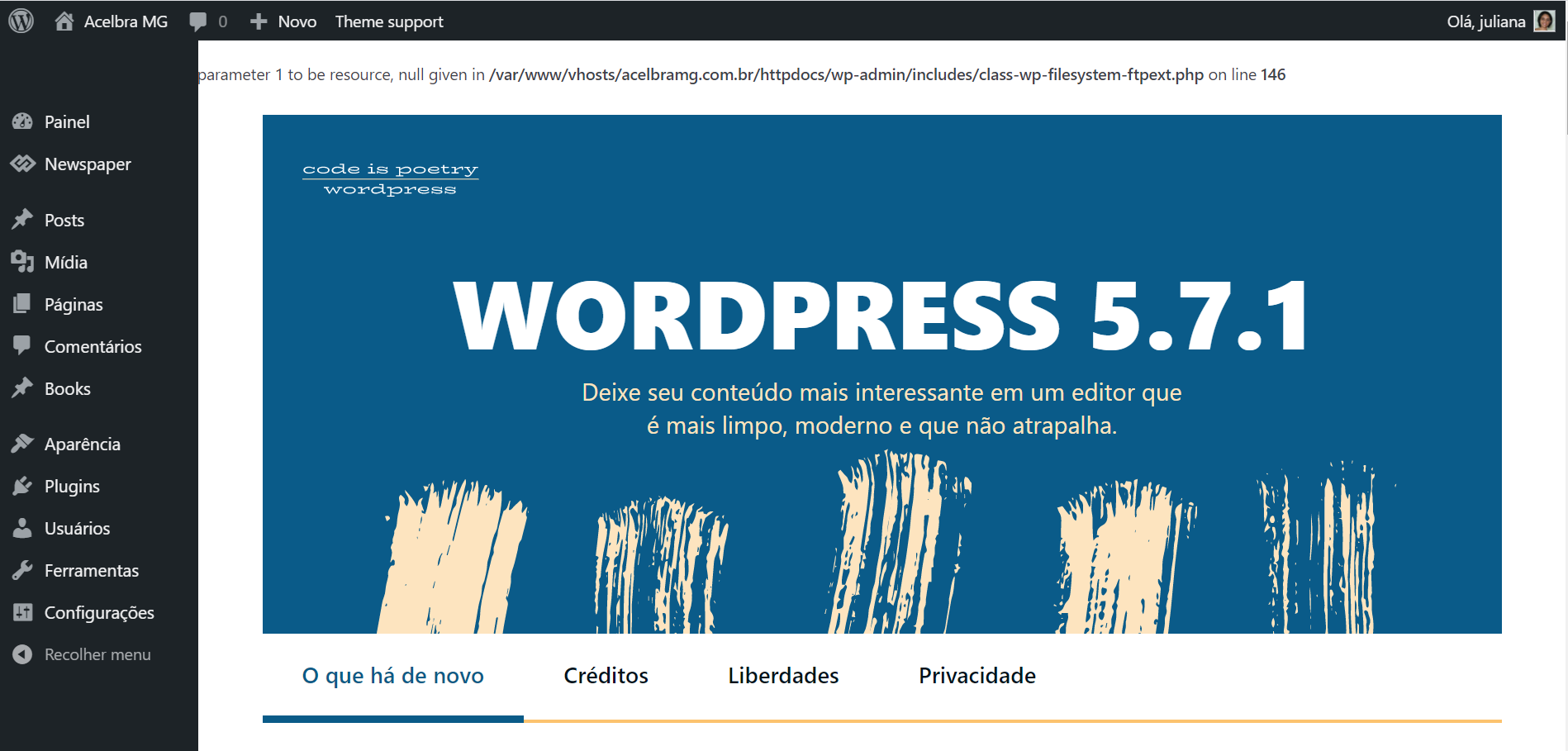
 qph9697
How to add external shortcodes when editing using tagdiv composer?
 ashwintembhekar
i am not able to allow add the image logo to the cloud header template through tagdiv composer i uploaded the logo image but its not showing the image . it is only allowing text to be used as header and not image. i downloaded the header 7 template. i faced the same issue with london news and gadgets pro header templates. please help. i have gone throuh all the troubleshooting given in the forum but nothing works .
 newspaper-user-2
I know my 5 direct competitors also using tagdiv newspaper theme, showing modified date instead of published date on SERP.
Therefore, I think there is a method to do it.
With tagdiv composer, I already added single post modified date before the author name and published date.
I can see the modified date on desktop version. However, I cant see the modified date on mobile version(inline).
https://ibb.co/w4pZHXr (desktop, two of them display)
https://ibb.co/2vJZVfg (mobile, just show the published date)
For both desktop and mobile version, no modified date on SERP.
 newsroomearth
Howdy!
This is my third install of Newspaper for a new site. This time I have been stopped by a new issue I had not experienced before.
When I attempt to install the TagDiv plugins from the theme page, I see an ajax error and the site shows:
“There has been a critical error on your website. Please check your site admin email inbox for instructions.”
This error also happens if manually install a plugin (td-composer) and then try to activate it.
I have made sure the settings for php.ini and wp-config are correct. I also have tried installing WP Super Cache and clearing the cache before installing or activating the TagDiv plugins. I have also tried rebooting the server before installing.
Even without any plugins enabled It results in the same error.
Can you help? Thanks so much!
David
 LucasGuerra
Hello, I needed to downgrade my PHP because the tagdiv composer was conflicting with it and broking my website how can I solve this trouble?
Thank you!
 kmanish95
Hi,
I have placed a custom ad (banner ad) from Amazon Affiliate on my website but I am unable to see it. Here are the steps that I followed-
1. Placed the script provided by Amazon banner ads into the custom ad spot 1 in newspaper x theme panel -> Ads (I have wrapped the script as stated in the documentation as <div class=”td-all-devices”> <!–Your script here > </div>
2. Placed an ad box from the tag div composer and defined -> use ad spot from -> custom as spot 1
3. Saved all the settings.
I have added element “ad box” from the tagdiv composer. Still I am not able to view the ad on the main website. I am just seeing a blank space on the spot.
This is the forum that I followed-
https://forum.tagdiv.com/using-other-ads-non-adsense-ads/
Please help, if I may have missed any steps.
Thanks.
 Nick
NickHello,
I use Fast News template on my website https://bucha.life and trying to add new element to column on home page but cannot doing it because it is creating just a name of element without possibility to work with it.
Please help.
