- TutorialsFrom WPBakery to tagDiv Composer
- TutorialsDefault Block Settings Guide
- TutorialsOffset Feature
- TutorialstagDiv Social Counter Tutorial
- TutorialsHow to Update the WPBakery Page Builder plugin
 Anamaria
 Hello,
1. You can assign a footer template to be Global =>https://www.screencast.com/t/OsT9ga0ta for posts/pages you want to be normal, and you can assign a particularly footer where you want to be different. You can import a footer from Cloud Library with tagDiv Composer -> Manager (Website Manager) => https://i.imgur.com/vlvXloM.png
2. Make sure you use the logo full width and for change the header background image, you need to go on the header, select the row from header, go in CSS and you have a background image => https://www.screencast.com/t/IIbhYhtaln
3.If is still a problem we would like to investigate the issue, if you agree please make a full backup and contact us at contact@tagdiv.com, provide wp-admin and credentials, also a link to this topic in order to identify you.
4.Those are some extra parameters for schema, also these parameters are optional, is no need for them, therefore you can ignore the warnings, this will not affect your website.
Please try not to reply multiple times in your own topic, this will only delay the response from us because it will move the topic to the back of the line. We always answer from oldest to newest.
Thank you!
 Bettina
 Hello!
If you use a cloud template for single post template, you can edit that page with TagDiv Composer and add the element called “Single Post Tags”.
If you use a default template for it, then you can set up by accessing Newspaper -> Theme panel -> Post settings -> Post and Custom Post Types -> Show categories tags : enabled.
Hope that helps you!
Thank you!
 reded
reded wp_booster error:
td_api_base::mark_used_on_page : a component with the ID: single_template_3 is not set.
/mnt/data/public_html/wp-content/plugins/td-composer/legacy/common/wp_booster/td_api.php
Display backtrace
wp_booster error:
td_api_base::get_key : a component with the ID: single_template_3 Key: file is not set.
/mnt/data/public_html/wp-content/plugins/td-composer/legacy/common/wp_booster/td_api.php
Display backtrace
wp_booster error:
The path of the single_template_3 template not found. Did you disable a tagDiv plugin?
/mnt/data/public_html/wp-content/plugins/td-composer/legacy/common/wp_booster/td_api.php
Display backtrace
wp_booster error:
td_api_base::get_key : a component with the ID: single_template_3 Key: bg_use_featured_image_as_background is not set.
/mnt/data/public_html/wp-content/plugins/td-composer/legacy/common/wp_booster/td_api.php
Display backtrace
 allmyhoney
Hi there, the tagdiv composer it running under my site a little like so https://share.getcloudapp.com/p9u8zgoY and basically its a little tricky to see the different elements to edit. Is there a fix for this? I am using the latest version of the theme 10.3.9.1 and I have no plugins installed as I checked for conflicts.
Thanks
 AndreasMairold
I have a new installation of newspaper, so I switched from another theme. If I try to create a new post, there is no option where I can choose to use a page builder (e.g. the tagDiv composer). However for a new page this option is available. (composer is also installed of course) So there is only the text editor.
What can I do to make the visual builder work for posts (for new posts)?
Is there a chance to edit posts from an previous wordpress theme? Or is it better to create the posts entirely new?
Kind regards,
Andreas
Bettina Hello!
A solution for you could be found if you take a look in this topic: https://forum.tagdiv.com/topic/tagdiv-composer-doesnt-saving/
Hope that helps you!
Thank you!
 Vlad S
 Hello !
It looks like the plugin tagDiv Composer is disabled, simply enable TagDiv Composer plugin and the issue should be fixed.
Let us know the result !
Thank you !
 V3N0M
V3N0MI create a new block using the API function td_api_block::add. However, the parameter “category” is completely ignored and tdc_category accepts only default values.
If I set this parameter it will be ignored (https://forum.tagdiv.com/td_api_blockadd/).
If I use tdc_category Blocks, Extended or other the blocks are displayed in the middle of the default blocks.
But I want to group the blocks separately => https://prnt.sc/y5aybz
td_api_block::add('td_block_creative',

            array(

                'map_in_visual_composer' => false,

                'map_in_td_composer' => true,

                "name" => 'Facebook Page',

                "base" => 'td_block_creative',

                "class" => '',

                "controls" => "full",

                'tdc_category' => 'GoGames', <-- will not displayed when use a own groupname

                'category' => 'GoGames', <--- will be ignored

                'icon' => '',

                'file' => $this->plugin_path . '/shortcodes/td_block_creative.php',
Bettina Hello!
If your page was built with TagDiv Composer plugin, then you can not display the page content on AMP.
A solution for this could be to edit the page normal and set this setting disabled: https://www.screencast.com/t/BtU34Vje
After this, the page content will be displayed the same like in desktop.
Thank you!
 Oleksii Bielokopytov
Hello,
I would like to get some help. After Updating of Plugins, i got this problem
Fatal error: Cannot redeclare td_wpseo_title_for_loop() (previously declared in /var/www/dein-finanzerfolg.de/blog/wp-content/plugins/td-cloud-library/includes/tdb_functions.php:297) in /var/www/dein-finanzerfolg.de/blog/wp-content/plugins/td-cloud-library/includes/tdb_functions.php on line 297
After some analysis, I determined that the problem was found on the pages that were imported from TagDiv Cloud. Pages created manually via Composer work fine. Please help me solve the problem.
Thank you in advance
My Website: https://www.dein-finanzerfolg.de/ (now in Maintance Mode)
Bettina Hello!
If you use a default template, then you can not edit that page with TagDiv Composer plugin. Also, make sure you have installed Cloud Library and Standard Pack.
Thank you!
 Admbrb
Hi,
My site is not showing image thumbnails & menus in the homepage.
https://drive.google.com/file/d/1QlG5JQTZHkssXky5rXdPmqq-guhXDaHK/view?usp=sharing
I tried to debug (file permissions, deactivate plugins) and contacted the hosting company as well.
It seems it is a plugin issue of td_composer.
https://bulevardionline.com/wp-content/plugins/td-composer/legacy/Newsmag/assets/images/no-thumb/td_300x194.png
could you please help me?
The only change I did was installing wp-rocket a week before the issue happened and the site was working perfectly.
Bests,
A.
Anamaria Hi,
There are multiple headers in our theme, for example, if you are using tagDiv Standard pack the file that you want to edit is this one -> wp-content/plugins/td-standard-pack/Newspaper/header.php if you do not use standard pack, only tagDiv Cloud Library with tagDiv Composer, then the file is this one -> wp-content/plugins/td-composer/legacy/Newspaper/header.php
Thank you!
Anamaria Hi,
In most cases when you get a similar message “ Error at zones: 2(models) : 1(dom). The model does not match the content Current state has involved an issue. You could try an UNDO operation (CTRL+Z / CTRL+SHIFT+Z)” then indeed it is a problem, most of the time the problem is from a shortcode that is not compatible with our theme, therefore after you set it with tagDiv Composer and save the page/cloud template, the next time when you try to edit it, you’ll get that error.
We have a guide for how to investigate this problem and fix it -> https://forum.tagdiv.com/tagdiv-composer-not-working/
Thank you!
Bettina Hello @greenbooks!
TagDiv Composer is not working on that page because you use a default template. So, if you will use a cloud/PRO template, then you will see also the button right there.
Please read more about TagDiv Composer plugin functionality descripted in our guide:
https://forum.tagdiv.com/tagdiv-composer-tutorial/
Thank you for your understanding!
Anamaria Hi,
Unfortunately, we can only provide support on the forum and email. Woocommerce is tested with our theme but we would like to know more details about the other plugins to set up the store.
Also, we will like to investigate the problems that you have with the theme plugins in special with tagDiv Composer. If you agree please make a full backup and contact us at contact@tagdiv.com, provide wp-admin and credentials, also a link to this topic in order to identify you.
Thank you for your understanding!
 Simion C.
 Hi,
The “Global template” is the default setting. A mobile page requires a mobile header and footer template. At the moment there are only the blank mobile header and footer templates available for import https://prnt.sc/y4hchy -> https://prnt.sc/y4hhl1
Same for the footer.
So you can either import the blank header and footer templates and build them in the composer. Or convert a desktop header/footer template in a mobile template like this for example -> https://prnt.sc/y4i680 and customize it further. Same for the footer.
Please give it a try.
Thank you!
Vlad S Hello !
That can be done using tagDiv Composer in the STYLE Tab as you can see here: https://www.screencast.com/t/2IJ98l8kA
Thank you !
 Helpmetech
Hi everybody,
I’m trying to edit my cloud templates, but when hitting edit with tag composer it redirects me to 404 page!!!
It’s a nightmare, please help me…
Also if i create a new template from wordpress dashboard > cloud templates > it doesn’t import and redirect me to 404 tagdiv composer!
 SVPrasad
Hello I Have Lots of Issues with the Tagdiv composer Some Times Row Colors& Settings Not Updating Boarders Not Showing For Android Devices and many issues Please help me solve this problem, https://youtu.be/OTcQBNsCj3k Refer this video for the identify the problem in this video Not Applied Boarder to android devices but in my pc in developer tools showing boarder, Please Solve the issue, Website url :https://dev.digiap.in/test/
 hard8hopping
I imported “Header Template 62 – Gadgets Pro” and enabled it as the active header. In tagDiv Composer, I can replace the header logo image with an uploaded one, but it doesn’t show. I see the site title and tagline but not the inserted logo image. Doesn’t show in the Composer as I edit, when clicking View or after saving and viewing the live site. Perhaps this template is busted or incompatible with the Newspaper Pro theme? I imported the Nomad Pro header and it works. You can delete this post. There’s no option for me to delete.
chiyurealestate.com
 alexguemez
Hi guys,
tagDiv composer doesn’t load, I’m getting these type of errors: https://prnt.sc/y2yr1n
I’ve added this:
<IfModule mod_substitute.c>
SubstituteMaxLineLength 10M
</IfModule>
<IfModule mod_headers.c>
Header always append X-Frame-Options SAMEORIGIN
</IfModule>
from https://forum.tagdiv.com/tagdiv-composer-not-working/ but still not working.
Bettina Hello!
It seems you have installed Mobile theme plugin. If you created the mobile pages with TagDiv Composer, then when you install Mobile Theme plugin, your pages will be overwritten by the plugin.
The Mobile Theme is a performance optimized theme included in the Newspaper main theme and it loads only for mobile devices. It comes with it’s own templates for page, post, category, etc so your current templates from the desktop theme will get converted to the mobile theme layout. For more details, please take a look here: https://forum.tagdiv.com/the-mobile-theme/
Better deactivate the plugin and see the results.
Thank you!
 domingoz
How would you go about customizing the weather widget frontend on the top bar: ie, customizing the render_top_bar_template() inside the td-composer plugin?
 pepperandplatinum
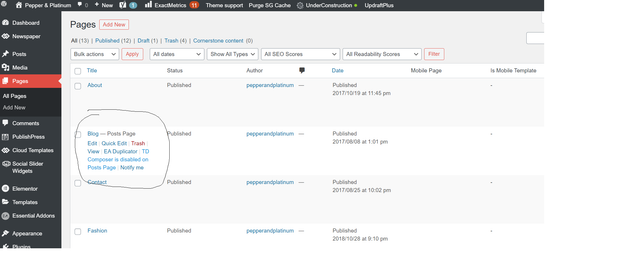
 I am resetting the theme entirely at this point, but cannot figure out why TD composer is not enabled on posts page.
How do I enable this so that I can edit my site?