
 Vlad S
 Hello !
Thumbs can be adjusted by editing the block with tagDiv Composer as you can see here: https://imgur.com/jgzFhBe
Thank you !
Vlad S Hello !
For that you will have to start shaping your website using tagDiv Composer. Flex blocks are way more editable now: https://www.screencast.com/t/NxpOrdlPmg They can be customized to any form and shape sort to speak.
This task will require for you to start customizing a bit more and get more familiar with tagDiv Composer. But this will just help you in the long run.
Thank you !
 VegasVanity
Hello Team,
I am receiving this error message when attempting to uploads photos to my site through the TD Composer. Right now I receive the error when trying to add a photo the ‘ad box’.
Error message – Invalid data Current state has involved an issue. You could try an UNDO operation (CTRL+Z / CTRL+SHIFT+Z)
 elvisfrog
I love this theme, but I am worried that the theme won’t work for my current application. I have several licenses and use on different sites, my major one is a news site that gets over 5 to 6k traffic a day and pretty constant traffic of 30-50 users. I have tried launching this with a dedicated server from GoDaddy 4cpu4ram, then switched to a VPS 4cpu8ram, and working with the managed team to try and get this to run as fast as possible, is this just not realistic? I made a post earlier that it seems to be the tagDivComposer & tagDivStandard pack that caused cpu to shoot through the roof, I have enabled memcache and other cache but not sure if I am just chasing my tail, we are not behind the launch of the new site over 2 weeks and wondering with your guys’ professional opinion is this a lost cause? I am happy to pay to have you guys look at it since it is your code, not sure what else I can do to see if this works.
Thanks appreciate any insight.
elvisfrogVPS Hosting Server 4 CPU, 8GB Ram, SSD drives:
We are setting up a new version of a site called beta site, we have everything looking good and when I went launch and change the DNS records we started to get a load on server with about 30-40 people on site, the server CPU skyrockets maxed out and nothing can be served, just server timeout. I disabled all plugins and found that tagDivComposer and/or tagDivStandard Pack installed site just doesn’t function, and well without no themed site. I have tried to see what might be going on and looked through this forum on many of the recommendations, and tested but so far to no avail. I am not sure where I go to find out what is causes the high CPU? Built site using IP and subdomain, but have run replace URL through WordPress to point to actually domain. It shows high MySQL action in the Process Manager. I love this theme but worried now that it won’t work, but the load isn’t heavy enough it makes me think something is misconfigured.
Thoughts:
Setup using IP maybe something in the plugin is not resolving properly?
Need to reinstall theme and plugins? How to do and not loose everything, perhaps something messed up in upgrades?
Where would I look or enable logging that might help specify what the theme is doing that is causing issue?
I have set PHP settings with mem limit 256 and configured things I found in this forum but not sure what else to check, looked at MySQL database, not sure there is anything off as it shows no errors, per se. I have a managed host site so I can have tech check stuff but not sure what, behind 2-week launch as this happens every time we switch the DNS over, the load, which 30-40 people shouldn’t be that heavy, pulls to a crawl if I disable the TagDiv the site looks awful but runs.
I feel like this is an error, not just a need to increase performance.
Help! Appreciate it!
 Tounizino
Hey
save button in TD COMPOSER KEEPS LOADING ENDLESSLY WHENEVER I MAKE SOME EDITS. THE WORK IS SAVED BUT THE BUTTON KEEPS LOADING FOREVER SO I HAVE TO RELOAD THE PAGE WHICH makes ME UNCOMFORTABLE AND MAKES THE WORK HARD ESPECIALLY THAT IVE JUST BOUGHT THE THEME AND IM working on MY WEBSITE
NOTE: ALL SYSTEM REQUIREMENTS ARE FULFILLED
INSTALLED PLUGINS: screenshot: https://i.imgur.com/wOYrjoY.png + wp super cache and YOAST (along with the theme plugins)
System status: https://i.imgur.com/XXu5up7.png
i also sent an email with login details
 Calin
Calin Hi,
Sorry, but I do not quite understand what you want to achieve, if you are using the newsletter element from tagDiv Composer, then you can not add any option to it. Unfortunately the newsletter will provide only the email field and subscribe button, if you want to have more fields, then you can set the code for mailchimp in appearance> widgets> in a text element -> https://i.imgur.com/SCYJLz0.png or using tagDiv Composer in a column text in text area -> https://i.imgur.com/nzkfTu6.jpg -> https://i.imgur.com/mdPpuaM.png
If this is not what you mean, please provide some more details and some screenshots if it is possible.
Thank you!
Calin Hi,
Indeed the font style is not apply, what you can do is to use a custom css like this one
.comment .comment-content, .comment .comment-content p {

    font-family: "Open Sans";

}
If you are using the mobile theme plugin with amp, then you can set it here -> https://i.imgur.com/GBLhxs0.png
In amp version is set a placeholder for Search…, this can be change only in theme files wp-content/plugins/td-composer/mobile/header-amp.php -> https://i.imgur.com/Vv97OdL.png
Thank you!
 rnbjunk
 Ok Calin, the issue still pending, so I’ll take it here.
Even testing without cache enabled, the error is coming from webmastertools on mobile theme:

Messaggi della console JavaScript
3 messaggi
Errore
00:48.000
Uncaught O
https://pagead2.googlesyndication.com/pagead/js/adsbygoogle.js:62
Errore
00:48.000
Uncaught O
https://pagead2.googlesyndication.com/pagead/js/adsbygoogle.js:62
Log
00:50.000
Secure Privacy is not enabled
https://app.secureprivacy.ai/secureprivacy-plugin/web-plugin/secure-privacy-v1.js?v=0.4406271942425519:1
Altro errore
Script
https://www.rnbjunk.com/cdn-cgi/apps/head/n6xhyHpZY9SiIIpWYH2WP5M7qH4.js
Altro errore
Immagine
https://www.rnbjunk.com/foto/2020/04/logo-mobile-rnbjunk.png
Altro errore
Foglio di stile
https://www.rnbjunk.com/wp-content/cache/min/1/wp-content/plugins/td-composer/assets/fonts/font-awesome/font-awesome-c7e66a4cf67a20c78f6ca158cc582125.css
Altro errore
Foglio di stile
https://www.rnbjunk.com/wp-content/cache/min/1/wp-content/plugins/td-composer/mobile/style-6cbad46c691cf0f6310254790ca2a019.css
Altro errore
Script
https://www.rnbjunk.com/wp-content/plugins/td-composer/mobile/js/tagdiv_theme.min.js?ver=10.3.2
Altro errore
Foglio di stile
https://www.rnbjunk.com/wp-includes/css/dist/block-library/style.min.css?ver=5.4
Altro errore
Script
https://www.rnbjunk.com/wp-includes/js/jquery/jquery.js?ver=1.12.4-wp
 SquallSFU
Hi guys,
how can I customize the styles of this text that appears on the search results page when there are no results to display?
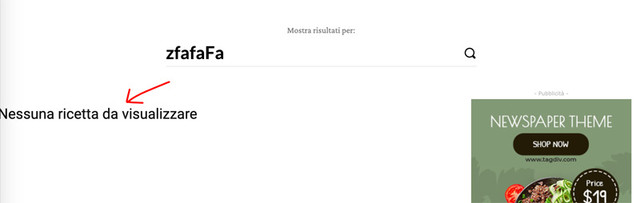
In tagDiv Composer I was unable to change the block without also changing the page with search results.
Calin Hi nycinsider,
The only page templates that our theme has are these from documentation > https://forum.tagdiv.com/page-templates-2/ what you can do is to make your own section and save the elements using the right clickafter that you can take that element from tagDiv Composer and reuse it, also you can import cloud sections from tagDiv Cloud Library -> https://i.imgur.com/vIXhGY8.jpg
Also tagDiv Composer is easy an is running normal -> https://www.screencast.com/t/9sIsUOgXXeO just make sure that the theme requirements are set correctly and you do not have a plugin conflict.
Thank you!
 Juztion
Hi,
I installed Gossip Demo with Content for my website https://www.techtarik.tv/
Now, I created some of my own posts and have deleted the Gossip Demo’s sample Posts and all of its Categories. I noticed a lot of the elements have become inactive after that since there are no more sample content.
I wanted to edit the demo’s elements on the Homepage but can’t seem to do so using TD Composer. When I click on the element, they retain their position but I can’t seem to find a way to link it to my very own new posts.
I tried with Post ID Filter and Category Filter but the element remains empty….
Basically, I want to retain the demo’s look and feel. I hope somebody can help me on this.
Calin Hi,
In order to read the content set with tagDiv Composer, you need to set some text in a column text or text with title, this will be seen by Yoast SEO. -> https://i.imgur.com/YDSqdYk.png -> https://i.imgur.com/wrFAfTW.png -> https://i.imgur.com/v1fB3IZ.png
Thank you!
Vlad S Hello !
Hello !
You can use the column text element in order to render shortcodes or use HTML codes.
Simply copy the shortcode and insert it in the text area of the column text as you can see here: https://www.screencast.com/t/UEMEsVKog
Column text is an element from tagDiv Composer.
Thank you !
Calin Hi,
1-2. To fix this problem -> https://postimg.cc/B8YDDBvn you need to make sure that you set the mega menu correctly, please check carefully our documentation for mega menu this need to look like this -> http://prntscr.com/pyfl24 not like this with sub menus -> http://prntscr.com/pyfl9q
3. You can regenerate the thumbs using our documentation from here -> https://forum.tagdiv.com/thumbnails-fix-strange-looking-images-on-blocks/
Also you can use flex blocks elements, this type of blocks has more options for images -> https://i.imgur.com/YpFFI1Z.png
4. if you want to remove RECOMMENDED VIDEOS you need to edit the page using tagDiv Composer and use the right click on it.
5. If the breadcrumbs is set as element in a page or single post template it can be edited using tagDiv Composer -> https://i.imgur.com/oPbuBu1.png
If there is still a problem, please provide me a link to your website to inspect it.
Hope this will help you!
Thank you!
Vlad S Hello !
You will have to use the mobile viewport from tagDiv Composer: https://www.screencast.com/t/1vNDvwgnHc5
Thank you !
Calin Hi,
If covid elements display 0 data:
To fix the covid counter you need to deactivate and delete tagDiv Composer plugin and install it again from Newspaper > Plugins -> https://i.imgur.com/3nvXhlS.png, after that clear all cache and the covid counter will work again after we’ll get data from the covid
api (it can take 1-2 hours).
If there is still a problem, you can send us an email at contact@tagdiv.com and provide admin login, as well as cPanel or FTP if possible. We will take a look. Include a link to this topic in the email.
Thank you for your understanding!
Vlad S Hello !
This is not possible using tagDiv Composer. Unfortunately we have not tested any plugins in this matter.
Thank you !
Calin Hi usman,
The problem us fixed, you need to edit the homepage with tagDiv Composer, click on social icons and set the no-follow attribute -> https://i.imgur.com/DmFx6X4.jpg
Thank you!
Calin Hi,
Please note that in order to tagDiv Composer work properly, you need to set the theme requirements as in our guide from here ->https://forum.tagdiv.com/requirements-for-newspaper/ also the WP Home URL and WP Site URL need to be the same -> https://i.imgur.com/AqmA6hi.png if these are different tagDiv Composer will not work.
Thank you!
Calin Hi,
1. In order to make the YouTube counter to work you need to set the api key in theme panel, also to make sure that there is no theme problems, you can disable and delete tagDiv Composer and install and activate it from here -> https://i.imgur.com/dPE3Azl.png -> https://forum.tagdiv.com/tagdiv-social-counter-tutorial-2/
2. If you set ads in theme panel and these are not displaying, most probably you are using a pro demo and you have single post template from tagDiv Cloud Library set on posts, if is so you need to edit it with tagDiv Composer -> https://i.imgur.com/lv0RUPC.png click on content and select the ads tab -> https://i.imgur.com/yID1fNz.png
Thank you!
Calin Hi,
Please make sure that tagDiv Composer is activate ->https://i.imgur.com/6QxSll0.png, Make sure that you do not have a plugin conflict, please deactivate ALL plugins except tagDiv plugins, also if you are using child theme or cache plugin, deactivate them, clear all cache and try again.
Let me know the results!
Thank you!
Calin Hi,
If you want to add that shortcode in some pages, then you can do it using tagDiv Composer, add a column text or text with title and set the shortcode in text area -> https://i.imgur.com/CSPcls9.png if this is not working, is possible to not be compatible with our theme.
On mobile the sidebar will appear at the bottom of the post.
Thank you!
Calin Hi,
If you are using the mobile theme plugin, you’ll gain a better speed then responsive version of theme, but in order to achieve that speed you’ll need to create a new content for pages because in the most of cases those were made with builders ( tagDiv Composer, WPBakery ) and you need to use only the mobile editor ( you need to set the content for pages in mobile editor and this content will be display on mobile theme)
-> https://i.imgur.com/9d0UWLT.png
Also you can show the responsive version on mobile theme -> https://i.imgur.com/m0bVB5T.png you can check more details about mobile theme in our documentation -> https://forum.tagdiv.com/the-mobile-theme/ or if you want to have the responsive version only, you can use the amp option from mobile theme -> https://i.imgur.com/oofST3D.png (to use the mobile theme template on amp) or you can disable the plugin.
Hope this will help you!
Thank you!
Vlad S Hello !
Unfortunately there are no page templates because they cannot be assigned. Each page can be designed. This is the only way. One of our users did a tutorial for Newspaper Theme, maybe this will be more helpful for you to learn using tagDiv Composer: https://www.youtube.com/watch?v=SHrkreJUKlc
Thank you !



