
- TutorialsFrom WPBakery to tagDiv Composer
- TutorialsDefault Block Settings Guide
- TutorialsOffset Feature
- TutorialstagDiv Social Counter Tutorial
- TutorialsHow to Update the WPBakery Page Builder plugin
 Anamaria
 Hello,
You have a standard template, so you can not edit it with tagdiv Composer. Can you please email us at contact@tagdiv.com with the wp-admin access and include the link to the topic in the email?
Thank you!
 nilasisx
 The site needs serious optimization:
Too much JavaScript – needs to be deferred. Screenshot: https://prnt.sc/ACCbGsnathL3
Fonts should be preloaded.
CSS needs optimization.
Many third-party requests should be deferred. Screenshot: https://prnt.sc/Yi662H8uUVWl
Cloudflare settings might not be optimized properly—I couldn’t verify them.
also, adjust the image resolution in the Tagdiv composer
use a better Cache plugin.
-
This reply was modified 1 year by
nilasisx.
 mundoplus
 Hi again,
I was able to solve the problem, and we successfully recovered the template.
However, I’m not sure how to edit the Authors template because I need to make some changes due to an issue with a plugin. The problem is that there is no “Edit with TagDiv Composer” button.
How can I edit it?
This is what I see:
https://postimg.cc/9DBkJxs2
 bluedot
Hello,
I have added a “Location” custom field to this post template which is intended to display the custom taxonomy selection for that post. I can see the correct ACF field as well as the “sample field data” in TagDiv composer. However, when I view the post, the field data comes up empty.
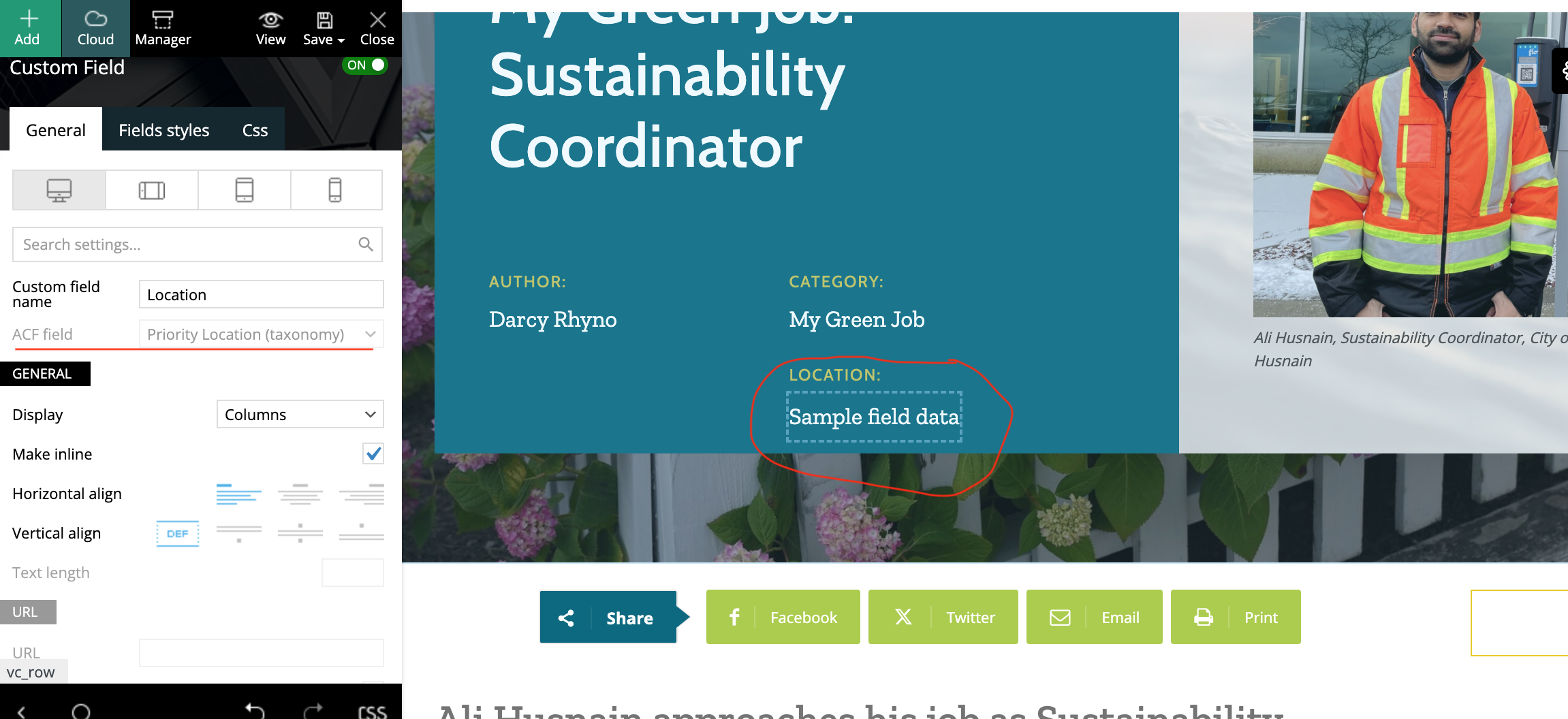
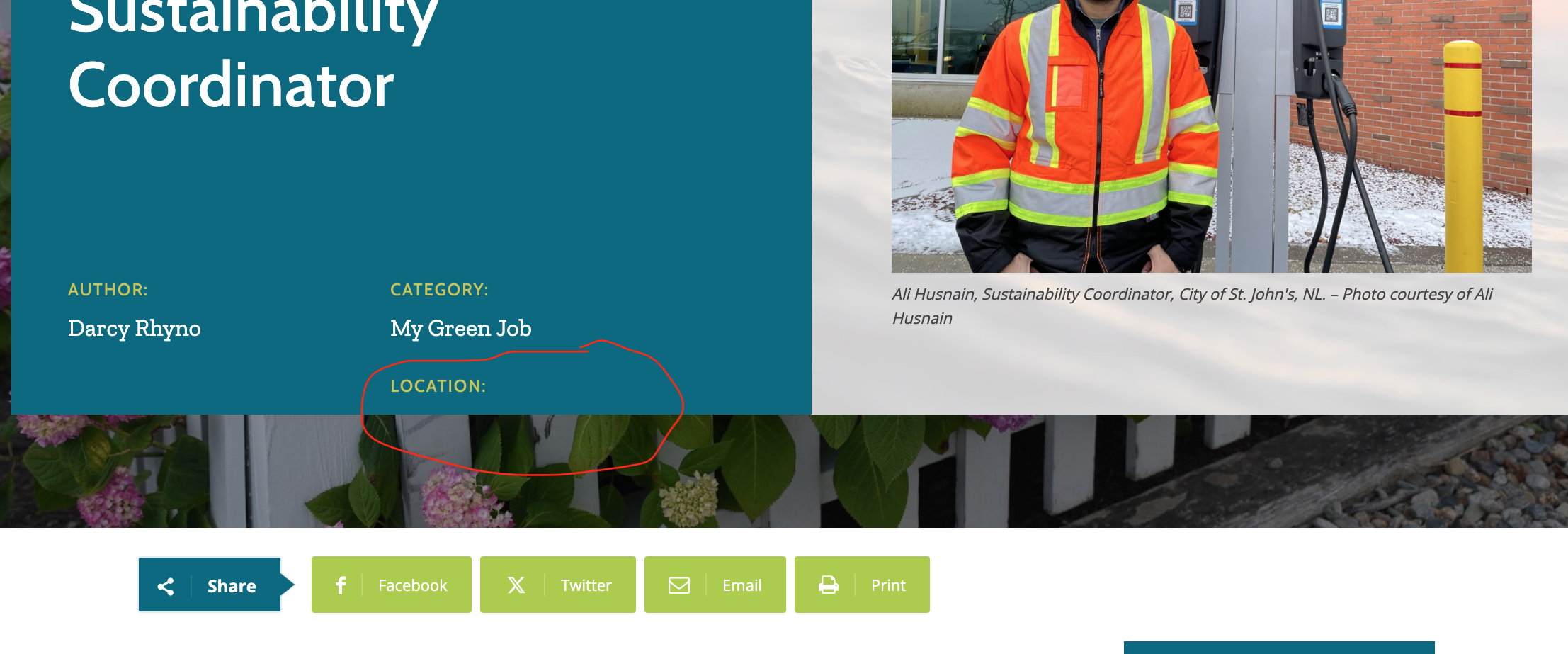
Example: https://bluedotliving.com/the-garden-of-the-future-food-from-your-backyard/
Thank you!
Anamaria Hello,
Please let me know what prebuilt website you installed, default pro or default RTL pro: https://demo.tagdiv.com/newspaper_default_rtl_pro/
The title of the posts you need to edit in the Gutenberg, and the names of the blocks you can edit with composer to change them https://i.imgur.com/uFWr8tG.png
For social icons you can use this code
.tdm_block_socials

{

text-align: left!important;

}
Thank you!
 Simion C.
 Hi,
Is the page built with the composer or WPBakery? This could be a conflict. Is WPBakery required for your website or could it be deactivated?
I would like to take a closer look at this. Please send us an email at contact@tagdiv.com and provide access to the website (admin login) and an example of the issue.
Thank you!
Anamaria Hi,
Please get in touch with us via email at contact@tagdiv.com and provide the wp-admin access.
Normally, when you create a new page, there is an empty row where you can add elements, but you can also add more rows to the page -> https://i.imgur.com/9NjR16H.png
If you want to make the layout full width, then to change the website width, you need to make sure that you don’t have set a background color/image in the Theme Panel because this makes your website boxed. Make sure this option is disabled => https://www.screencast.com/t/ejiNPCBF
To set a page to full width, you’ll need to edit it with tagDiv Composer like this -> https://i.imgur.com/i5IUJ9E.jpg add or select a row and stretch it after your needs -> https://i.imgur.com/WKYebPX.jpg -> https://i.imgur.com/TO1BZ3M.png -> https://i.imgur.com/Yq8UCv3.jpg
Thank you!
Anamaria Hello,
If you are referring to the posts, then you need to edit them in the Gutenberg editor -> https://forum.tagdiv.com/featured-image-or-video/
You can change the title of the blocks using tagdiv Composer -> https://i.imgur.com/JLTrDy8.png
Usually, the color and image are set on the row. Please edit with tagDiv Composer, select the row, go to the CSS tab, and there you can add or remove it https://i.imgur.com/svyHb9d.jpeg.
If this isn’t what you mean, please provide more details and screenshots.
A solution for sending a screenshot/video is this:
Download, capture, and send: https://www.techsmith.com/jing-tool.html
After making the screenshot, you will have a link; paste it here.
Thank you!
Anamaria Hello,
You have created a mobile page; for this , you need to convert the header and footer -> https://www.screencast.com/t/HrjOBNayd to edit with tagdiv Composer. Please check this video https://www.youtube.com/watch?v=SpGkOnJeNZY
Please check this topic where I explained each mobile version -> https://forum.tagdiv.com/topic/mobile-version-not-working-properly-2/
Thank you!
Anamaria Hello,
Do you have created a mobile page? If yes, you need to convert the header and footer -> https://www.screencast.com/t/HrjOBNayd to be able to edit with tagdiv Composer. Please check this video https://www.youtube.com/watch?v=SpGkOnJeNZY
Thank you!
 imcamg
There’s a WordPress plugin called widget logic that apparently lets you control what pages you want your widgets to appear on. I think the Newspaper theme has something called id filter in tagDiv Composer for the tag filter and there’s custom sidebars also. I’m trying to find the best implementation for showing certain tags on certain pages in the sidebars of specific archive pages.
For example, in my sidebar on huntcode.com on the homepage, if someone clicks Linux in the sidebar it will open the Linux tag archive page and it should show different tags than what shows on the homepage in the sidebar such as the different flavors of Linux like CentOS and Ubuntu instead it’s displaying Linux in the sidebar of every page even pages that aren’t related to the Linux topic like on the JavaScript tag archive page or something else.
Anamaria Hi,
Can you tell me what image you don’t want? Maybe you need only to edit with tagdiv Composer and with right-click delete it.
Thank you!
Anamaria Hello,
If you need to make an update, before please make a full backup to all files and the database, in case something goes wrong. => https://forum.tagdiv.com/how-to-update-the-theme-2/
Here you can find information about the changes that have occurred in each update over time https://tagdiv.com/newspaper/
After you update the theme, you need to update the theme plugins too.
In the worst cases, the settings in the theme panel may be lost (there have been isolated cases), in these cases, after the theme plugins that were previously used are activated, you will have to use a backup for the theme panel -> https://forum.tagdiv.com/import-export-theme-settings/
You could consider reinstalling the WordPress version, and checking for this plugin wp-zexit.php. It might be wise to inspect via FTP if it doesn’t appear in the WordPress -> Plugins. Additionally, using Wordfence to scan the website and remove unknown users would be prudent.
Change admin passwords and delete admin accounts you are not familiar with;
– Delete any weird/unknown plugins;
– Delete the weird/unknown themes;
– Clean unfamiliar Theme Panel injected code (example – https://i.imgur.com/4q70kCv.png);
– Clean WordPress files (example – https://i.imgur.com/stJCqiK.png)
Please block /wp-json/tdw/save_css
If an attacker wants to target this URL /wp-json/tdw/save_css they can do so. Even if the website uses a different theme, the attacker can still try that URL. We could add an option to be able to enable/disable the Live CSS, it will be considered. But for now in order to remove it this can only be done with a modification to the composer plugin. I think that all that removing it requires is to comment this line of code – https://prnt.sc/RtwvL5Nc4ikR -> https://prnt.sc/ymZmhdUfp57U But as I mentioned, the attacker can still try to access the URL.
If you want, you can contact our custom work team here, and they can help you update the theme safely: https://tagdiv.com/premium-customization-services/
Thank you!
Anamaria Hello,
You need to go to the frontend to be able to edit with tagdiv Composer https://forum.tagdiv.com/tagdiv-composer-tutorial/
The tagDiv Composer is our page builder. It can be used to create pages and cloud templates, but not posts. For this, you’ll need to use Gutenberg or a classic editor.
Using tagDiv Composer, you can build/edit the single post template (the layout of the posts).
Here is a video that will show you how to use the builder to create a website from scratch https://www.youtube.com/watch?v=SoGQ0d5kIBg to do this you’ll need to have the posts already.
Thank you!
Anamaria Hello,
You can filter the blocks as you wish. You need to edit with tagdiv Composer, select the block and here you can set filter and sort options https://i.imgur.com/36RhphI.png -> https://forum.tagdiv.com/flex-block-settings-guide/
For each category, on the flex block there is a special filter for the current category, which dynamically displays the posts from that category within each category.
The Posts Loop automatically filters the posts depending on the cloud template you set (for example, on the category page, there will be posted posts from that category) https://forum.tagdiv.com/posts-loop/
Please check the block with “No posts” and delete it the offset number; leave it empty with no space or value: https://app.screencast.com/Gh9jDf6t0XtLS
Thank you!
 marcedulli
Hi. my website is http://www.aircargolatinamerica.com. I have an old version of this theme, and my hosting service says it is presenting high vulnerabilities. Currently I can´t access my website (neither my readers), and I need to fit it immediately, but don´t know how. Any suggestion or guidance will be welcome. Following the message I receive when trying to access my website:
Fatal error: Unparenthesized a ? b : c ? d : e is not supported. Use either (a ? b : c) ? d : e or a ? b : (c ? d : e) in /home/cargolatam/public_html/wp-content/plugins/js_composer/include/classes/editors/class-vc-frontend-editor.php on line 646
 Motorpsycle
I have searched here but it seems what I need help with has not been discussed: how to move or remove an advertisement. I here below I include an image where a red arrow points to a block for advertising that always appears right below the main menu and I really don´t like it. I want to move or remove this block. However, using Tagdiv composer does not seem to work. At least not the way I have tried to do it. So how is it done?!
 dpernar
Hi,
I am having problems with infinite loading whenever I click on:
1. Load more
2. Next page
3. In the admin panel when trying to click on different drop-down options (example: changing fonts).
I tried disabling all plugins, reinstalling td composer, changing htaccess file, everything and nothing is working.
Anyone has any idea how to fix that?
Here are couple of screenshorts:
– admin panel errors
– infinite load on page
My site is: CuriousMatrix.com
 Srikant Sharma1
  Srikant Sharma1
 Yes, I have tried with Chrome and Microsoft Edge. No where I am getting tagDiv Composer.
Anamaria Hello,
You can change the category images from the theme panel for each category in part -> https://i.imgur.com/hj9E9sd.png. Those can be displayed on the Category Background Image element (on categories). You need to edit the category template with tagdiv Composer to add this element, but you can change the image in the theme panel.
Thank you!
Srikant Sharma1https://www.freshhindiquotes.com/
I am not able to edit and design my website in tagdiv composer is not coming.
Anamaria Hello,
You have the mobile theme plugin activated; please deactivate it and clear the cache.
Using our theme, you can choose from 3 mobile versions
-> mobile responsive => https://www.screencast.com/t/oJ2ShOp47
-> mobile theme plugin => https://forum.tagdiv.com/the-mobile-theme/
-> mobile page => https://tagdiv.com/newspaper-10-3-7-update-brings-customizable-and-fast-mobile-pages/ The option that you need to use.
Suppose you created the mobile pages with tagDiv Composer. In that case, when you install the Mobile Theme plugin, your pages will be overwritten by the plugin (the mobile theme comes with its templates for page, post, category, etc, so your current templates from the desktop theme will get converted to the mobile theme layout, the page content is made without builders in mobile editor => https://www.screencast.com/t/xbgZG8kH also, the options that are provided to edit the mobile theme version are limited (this keeps the things simple)).
This is a video about Responsive Newspaper Theme, AMP & Mobile Theme, Mobile Pages & Templates -> https://www.youtube.com/watch?v=SpGkOnJeNZY.
So, the mobile responsive is what you see when that you select the viewport on phone => https://www.screencast.com/t/matV17hH, so some settings may apply for each viewport(where is the border blue), and others are not(where the border is black).
The mobile page has the mobile templates from Cloud Library => https://www.screencast.com/t/YCcZ8rL8
The Mobile responsive version of the theme and the mobile page editor can be edit with tagDiv Composer, the mobile theme plugin cannot.
For example, you can have the mobile theme plugin activated and use the mobile page/mobile responsive version for the homepage/pages, but for the categories pages/404 page, you can’t use the mobile page/mobile responsive version if you have the mobile theme plugin activated.
So, if you want to design the pages with tagDiv Composer, you can use the mobile page or mobile responsive version.
Thank you!
Anamaria Hello,
The Bluesky and mastodon will be added on the next update in the social icons.
If you want to add the icons and the links, you can use the element social icons, where you can add the custom icons -> https://i.imgur.com/nOBMDFe.png You can use the same element to add more custom icons.
You can add the svg in the manager -> https://forum.tagdiv.com/tagdiv-composer-website-manager/
Thank you!
Anamaria Hello,
If you need to make an update, before please make a full backup to all files and the database, in case something goes wrong. => https://forum.tagdiv.com/how-to-update-the-theme-2/
Here you can find information about the changes that have occurred in each update over time https://tagdiv.com/newspaper/
After you update the theme, you need to update the theme plugins too.
In the worst cases, the settings in the theme panel may be lost (there have been isolated cases), in these cases, after the theme plugins that were previously used are activated, you will have to use a backup for the theme panel -> https://forum.tagdiv.com/import-export-theme-settings/
You could consider reinstalling the WordPress version, and checking for this plugin wp-zexit.php. It might be wise to inspect via FTP if it doesn’t appear in the WordPress -> Plugins. Additionally, using Wordfence to scan the website and remove unknown users would be prudent.
Change admin passwords and delete admin accounts you are not familiar with;
– Delete any weird/unknown plugins;
– Delete the weird/unknown themes;
– Clean unfamiliar Theme Panel injected code (example – https://i.imgur.com/4q70kCv.png);
– Clean WordPress files (example – https://i.imgur.com/stJCqiK.png)
Please block /wp-json/tdw/save_css
If an attacker wants to target this URL /wp-json/tdw/save_css they can do so. Even if the website uses a different theme, the attacker can still try that URL. We could add an option to be able to enable/disable the Live CSS, it will be considered. But for now in order to remove it this can only be done with a modification to the composer plugin. I think that all that removing it requires is to comment this line of code – https://prnt.sc/RtwvL5Nc4ikR -> https://prnt.sc/ymZmhdUfp57U But as I mentioned, the attacker can still try to access the URL.
If you want, you can contact our custom work team here, and they can help you update the theme safely: https://tagdiv.com/premium-customization-services/
Thank you!



