
- NewspaperWP Rocket and Newspaper Theme: Optimization Guide
- TutorialsFrom WPBakery to tagDiv Composer
- TutorialsDefault Block Settings Guide
- TutorialsHow to use custom fonts
 Bogdan B.
 Hi,
You can use this custom css for the background color:
.td_uid_61_566540d6a8760_rand{
background-color:black;
}
Thank you!
 Catalin
 Hello solo,
The meta box contains some information about the post, such as: Author name, Post date, views and comments. If you want to remove this, on your all post pages, it is necessary to use a BIT of Css to hide them. Please try the code below and place it in your Theme panel->Custom Css area, like this: http://screencast.com/t/1rsaswhD9vXj
header .meta-info {

display: none;

}
The result: http://screencast.com/t/IGHRpE7IRJ
You can create your side bar if you are using the Visual Composer like in the next screenshot -> http://screencast.com/t/jbNcO9iPlIqg . For more information about how to use this, please consult our documentaion here: https://forum.tagdiv.com/newsmag-how-to-use-visual-composer/
Also, for more information about post templates, smart side bar, please consult this: https://forum.tagdiv.com/newsmag-post-templates/ – https://forum.tagdiv.com/newsmag-smart-sidebar/
You can take a look over our You Tube section, because this contains a lot of tutorials and it may be useful
https://www.youtube.com/results?search_query=tagdiv+newsmag+
Hope this helps and let us know how it goes!
If is not what you mean, please provide more details about this, so I can be able to provide a more accurate response!
Thank for choosing our theme and thank you for your message!
Catalin Hello Syambarkah,
Unfortunately, there is no option for it in Theme panel, but you should try the code below to achieve what you want. Place the code in your Theme panel->Custom Css area alike this:
http://screencast.com/t/jRq4GQnNHb
If you want to have a full image in your header container, it is necessary to choose a correct size of image otherwise, you will have a free space in your header. The size of the container is 1021*130 px.
.td-header-header {

background-image: url("http://www.gettyimages.ca/gi-resources/images/Homepage/Hero/UK/CMS_Creative_164657191_Kingfisher.jpg");

background-repeat: no-repeat;

}
Here, you should see the result: http://screencast.com/t/4C8rrxjj
Hope this helps and let us know how it goes!
Thank you!
Bogdan B. Hello,
Unfortunately internet explorer 9 is way behind on everything and some features will not be recognized by iut especially in customized websites such as yours. The issue could come from the custom css you used to make your website rtl. Some css attribute and proprieties are not recognized by ie9. You can try to change the font of the menu to the default one or try a different one and see how they work. (right now you are using this one: http://screencast.com/t/6Nyuz4f8D)
Let us know how it goes.
Thank you!
 Sharozdawa
 Sir anything else I can do to move javascript and CSS to the footer?
 tripledm
Hello,
I have changed image sizes, or corrected them for products and regenerated the thumbnails but it’s still displaying products with massive height images as well, massive.
So the height:auto is not working but if I set it to height:200px as below:
.woocommerce ul.products li.product a img {
height: 200px;
}
It works… but it distorts the image.
If you can please help me to set thumbnail to max 200px and the bit of css that will help prevent it distorting.
Thank you in advance
 Ing Geek
 well, first of all google pagespeed its diferent than website speed 😛
PageSpeed
https://developers.google.com/speed/pagespeed/insights/?url=http%3A%2F%2Fwww.upsctoday.com%2F
Google Page Speed show you / make recomendations to get better web site experience. Like your problem now
Optimize CSS Delivery of the following: You should move to footer CSS related to your plugins wysija-newsletters, contextual-related-postsm, Easy table, and add to any, because they are blocking your site render speed.
You should move to footer wp-spamshield too.
Web Site Speed is how faster your site its loading for everyone.
https://gtmetrix.com/reports/www.upsctoday.com/FR1sMTBQ
http://tools.pingdom.com/fpt/#!/bIZ6TD/http://www.upsctoday.com/
Reduce server response time
You can check waterfall/timeline and see how your server is responding slowly. I check your source code and i cant find eneabled some cache plugin, Do you installed?
Only your server its making 4 seconds initial waiting time to start loading site resources. This cloud be dropped to 0.2 seconds if you activate Wp-cache or Zen Cache (free plugins)
 fathummus
 Never mind. I have disable it in editor-style.css
Ing Geek First of all you need to fix all your site issues. https://developers.google.com/speed/pagespeed/insights/?url=UPSCToday.com
-On newspaper theme panel go to blocks and select what blocks will you use in your site design.
-Go to plugins and install force and regenerate thumbnails. Activate plugin and run it. (may can take a while, depending your images quantity ).
-Before finish you have now all your images cropped correctly.
-install some cache plugin like wp cache, config an run it.
-Install and activate Tagdiv booster and.
Now your site it’s fast like a bullet.
Note: you site upsctoday has a lot of Js an Css files on every loading charge, you need to read documentation to setup tag div speed booster and send all these files to the footer in order to set your site blazing fast
 marketingthechange
I am having some issues setting up mu child theme.
It is all set up but when I activate it There appears to be no CSS.
Here is my child css:
/*
Theme Name: TeleRead
Description: TeleRead – Lovers of Books & Gadgets est. 1995
Author: Marketing the Change
Author URI: http://marketingthechange.com
License: Themeforest Split Licence
template: Newspaper
*/
@import (‘http://new.teleread.com/wp-content/themes/Newspaper/style.css?ver=6.5.1’);
 LeadTheWise
Just bought the Newspaper theme – great job!
Minor problem at http://www.dcextendedmultiverse.com/. Everything seems to work fine, except the search on the header. When you click on the magnifying glass so the Ajax search drops down, it works fine with the default theme settings. I had AdSense for Search in there so that the drop-down displays the Google Search Box, but it stopped working with the upgrade.
It looks fine, but when you click in the search field, it triggers something that makes the search box instantly vanish before a user can input their query.
The AdSense for Search works fine when I put it in the sidebar, so I’ve included one so you may see what the intended result is. I just don’t know why I’ve run into this problem all-of-a-sudden.
From “parts/header/header-menu.php”, I simply removed:
<input id="td-header-search" type="text" value="<?php echo get_search_query(); ?>" name="s" autocomplete="off" /><input class="wpb_button wpb_btn-inverse btn" type="submit" id="td-header-search-top" value="<?php _etd('Search', TD_THEME_NAME)?>" />
… and replaced it with:
<style type="text/css">
@import url(//www.google.com/cse/api/branding.css);
</style>
<div class="cse-branding-bottom" style="background-color:#FFFFFF;color:#000000">
<div class="cse-branding-form">
<form action="http://www.dcextendedmultiverse.com/search-results/" id="cse-search-box">
<div>
<input type="hidden" name="cx" value="partner-pub-XXXXXXXXXXXXX" />
<input type="hidden" name="cof" value="FORID:10" />
<input type="hidden" name="ie" value="UTF-8" />
<input type="text" name="q" size="15" />
<input type="submit" name="sa" value="Search" />
</div>
</form>
</div>
<div class="cse-branding-logo">

</div>
<div class="cse-branding-text">
Custom Search
</div>
</div>
Any help would be enormously appreciated.
 sonoria
 thanks,
this work fine but only for link, also how can I change the ad background image?
i have put this code in the same page from line 52
    private function add_css_custom_background() {

        $css_array = array();
if (!is_page(43)){
$this->background_parameters['theme_bg_image'] = 'anoter image';
}
//color handling
if (!empty($this->background_parameters['theme_bg_color'])) {....
it’s correct?
 Andrei L.
 Hi
1. Try this css in theme panel > custom code > custom css: http://screencast.com/t/R8bZO3DKmcu
.td-post-content ul{

    list-style-position: outside;

}
2. You can change the background color for the header from theme panel > theme colors: http://screencast.com/t/Dp3b7MS00tI5
The logo size depends by the header style used. With some header styles the logo it’s full width and with others have a limited size because it’s placed near the header ad. You can find more details about this in our documentation: https://forum.tagdiv.com/newsmag-logo-favicon/
If this is not what you mean please provide more details about this.
Thanks!
tripledm I don’t think we are on the same page.
Background image is to get the site boxed. Your theme is going on to a second media site in a month and if I don’t solve it have to use another.
So to repeat myself, background images cannot be used. Why?
Advert tags are used. Why?
Geo targeting, impression control & reporting.
Multiple background click ads = not possible.
For now I have set it global to display:none so it’s fine. No worries there I have solved it and will get someone/contractor to add it in via php/background file as css can be applied or a class via php based on category and the category a post is in. I just don’t think you are understanding what I am requesting.
Thanks for you time, I do honestly appreciate it 😉
Andrei L. Hi
You could try this css in theme panel > custom code > custom css: http://screencast.com/t/MK9OPhow Like this the quotes will have a full width on mobile devices:
@media (max-width: 767px){

.td-post-content .td_box_right{

width: 100%!important;

}

}
Let us know how it goes and if this is not what you mean please provide more details.
Thanks!
Bogdan B. Hello,
The theme does not have an option to disable the meta information but you can use a custom css to do it:
.td_block_slide .td-module-meta-info{

display:none;

}
Add the code in the theme panel->custom css box.
Thank you!
 Syambarkah
Hello,
First of all, I love your theme it’s been fantastic.
But, I need some little help here
#1. Bullets and numbering
I’d like to make the second row onward to start exactly the same with the first row
Tried to dig more on CSS (probably it’s about list-style-position), but I failed as I know next to little on CSS.
here’s how it looks like on my post
http://www.screencast.com/t/7bOdWtnlnT
#2. Header Background
I wandered in this forum, found your link to a post how to tackle this thing. But, the link is broken. So I think I should ask you guys again.
And please do tell me the pixel size for the image best fit the area
Here the area I want to give background to:
http://www.screencast.com/t/hcm1Ah6c
That’s all guys. Thanks for the hard work
Bogdan B. Hi,
Unfortunately yes, css does not work like that.(I quote myself:’Unfortunately you cannot do that with css’) You can use the method i provided above with the php files or you can use another method. We looked into this a bit further and found that you can add multiple background click ads like so: http://screencast.com/t/bcwMJ3S7
You can add id’s like the example I showed you above and add the links directly in the code.
I hope this helps and please understand that custom work is not part of support. For any further assistance in this regard you will need to hire a freelancer to help you out as time does not allow us to provide custom work.
Thank you.
 omar ahmed
 1- Gzip compression is still not active
enable sir but this messege from third party ( facebook) — please check messege
يؤدي ضغط https://static.xx.fbcdn.net/rsrc.php/v2/yp/r/sOXUQGepNJD.js إلى توفير ١٦٥٫٨ كيلوبايت (تقليل بنسبة ٧٥٪).
يؤدي ضغط https://static.xx.fbcdn.net/rsrc.php/v2/yI/r/jG4p3Ps_5O2.js إلى توفير ١٢٢٫٦ كيلوبايت (تقليل بنسبة ٧٢٪).
يؤدي ضغط https://static.xx.fbcdn.net/rsrc.php/v2/yf/r/eItQ6CL9r9J.js إلى توفير ١٢٢٫٥ كيلوبايت (تقليل بنسبة ٧١٪).
يؤدي ضغط https://static.xx.fbcdn.net/rsrc.php/v2/yR/r/JgJ7uCwXCUZ.js إلى توفير ٧٠٫٥ كيلوبايت (تقليل بنسبة ٧٠٪).
يؤدي ضغط https://static.xx.fbcdn.net/rsrc.php/v2/yB/r/lSRul-v_nG1.js إلى توفير ٢٤٫٤ كيلوبايت (تقليل بنسبة ٧٠٪).
يؤدي ضغط https://static.xx.fbcdn.net/rsrc.php/v2/yH/r/WaT-PMT8du6.js إلى توفير ٢٤٫١ كيلوبايت (تقليل بنسبة ٦٧٪).
يؤدي ضغط https://static.xx.fbcdn.net/rsrc.php/v2/y0/r/d-obwDWT0IV.js إلى توفير ٢٢ كيلوبايت (تقليل بنسبة ٧٤٪).
يؤدي ضغط https://static.xx.fbcdn.net/rsrc.php/v2/y0/r/ZP_M6dihf5_.css إلى توفير ١٧٫٣ كيلوبايت (تقليل بنسبة ٧٧٪).
يؤدي ضغط https://static.xx.fbcdn.net/rsrc.php/v2/ys/r/MtMLhaIG7mj.css إلى توفير ١٦٫٩ كيلوبايت (تقليل بنسبة ٧٤٪).
يؤدي ضغط https://static.xx.fbcdn.net/rsrc.php/v2/y1/r/OnEtjpeyyGe.css إلى توفير ١٣٫٣ كيلوبايت (تقليل بنسبة ٧٣٪).
يؤدي ضغط https://static.xx.fbcdn.net/rsrc.php/v2/yo/r/wKMVsNFz5XR.js إلى توفير ١١ كيلوبايت (تقليل بنسبة ٦٩٪).
يؤدي ضغط https://static.xx.fbcdn.net/rsrc.php/v2/yP/r/FIuGH8jAmLq.js إلى توفير ٩٫٨ كيلوبايت (تقليل بنسبة ٦٤٪).
يؤدي ضغط https://static.xx.fbcdn.net/rsrc.php/v2/yS/r/ZDQXrINXZRK.js إلى توفير ١٫٨ كيلوبايت (تقليل بنسبة ٥٢٪).
يؤدي ضغط https://static.xx.fbcdn.net/rsrc.php/v2/yj/r/n0F_FGOE19x.css إلى توفير ٦٥٨ بايت (تقليل بنسبة ٥٦٪).
2- please give me type file to put this cpanel in option gzip compression
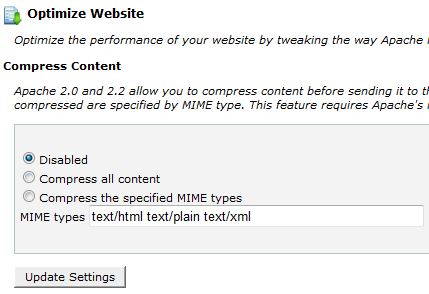
i used option number 3
3- Speed Booster show this messege in system status
v4.2 – Disabled – incompatible plugin detected: disqus-comment-system/disqus.php
i disable this plugin but still not active beacuse widget facebook and almost widget cause issue to speed booster
!!!!
finally i add plugin super cache and enable all option important in plugin but not effect also !!
-
This reply was modified 10 years by
omar ahmed.
Andrei L. Hi
You could try this css in theme panel > custom code > custom css to enlarge the imagee id it’s smaller then the thumb, but this could affect the image quality:
.td-module-thumb img{

width: 100%;

}
You can add js code in theme panel > custom code > custom javascript: http://screencast.com/t/ZXA54DgMK8Q
We have in our documentation a tutorial regarding banner ads if you intent to use them: https://forum.tagdiv.com/newsmag-using-other-ads/ If you simply want to add a link to an image that can be done by linking to an external url in media library: http://screencast.com/t/vabsgBAqTF
Hope this help.
Thanks!
 Twardy
I’d would like to remove the menu shadow, but the custom css mentioned below does not work…
.td-full-layout .td-menu-background{

background: none;

}

.td-full-layout .td-menu-background:after{

background: none;

}

 PatWire
 Driver 67
I hope you didn’t give up – I bought the theme two years ago – panicked – got a refund.
Then bought it again!
But I had always loved it from afar you see -I researched and researched while using my other theme -and with GoDaddy I had a ‘staging environment’ it’s a simple clone of your site where you can play with changes – I changed the theme there and found it actually is easy to do a simple set up. Then copied it back to live. All easy is you relax and research. I still don;t know much and plan to improve the rest of the capabilities as time goes on.
The customs CSS study isn’t necessary yet – but you’ll soon see it’s just a copy/paste thing if you do take any customisation ideas from the forum. The theme is as advanced as you want it to be – but it makes your site fly in loads of ways.
Pat
 Alin [tagDiv]
 Hi,
Please try this custom css in Theme Panel > Custom Css – http://screencast.com/t/y8Q79EFv9w
.td_block_slide .td-image-gradient:before {

opacity: 0;

}
Thanks!
tripledm Thanks Alin, I have changed some of the css on block 9 to reduce space ect. I will dig into modifying it later maybe pick some php from the other blocks to this one lol.
omar ahmed sir i see many modification in important file such as style.css
i can’t update this files !!
please give me manulley this modifcition to make this in style.css without lose any change
