- NewsmagtagDiv Composer Tutorial
- NewsmagBlock settings tutorial
- NewsmagLogo & Favicon
- NewsmagFooter templates
- NewsmagUsing other ads
- NewsmagUsing Typekit fonts
 gumball44
 Here my code in htaccess. is something wrong ?
And about cache, I follow newspaper guide (wp super cache)
# BEGIN SecuPress no_x_powered_by

<IfModule mod_headers.c>

    Header unset X-Powered-By

</IfModule>

# END SecuPress
# BEGIN SecuPress readme_discloses
<IfModule mod_rewrite.c>
RewriteEngine On
RewriteBase /
RewriteRule ^(.*/)?(readme|changelog|debug)\.(txt|md|html|log)$ - [R=404,L,NC]
</IfModule>
# END SecuPress
# BEGIN SecuPress wp_version
<IfModule mod_rewrite.c>
RewriteEngine On
RewriteBase /
RewriteRule ^readme\.html$ - [R=404,L,NC]
</IfModule>
# END SecuPress
# BEGIN SecuPress bad_url_access
<IfModule mod_rewrite.c>
RewriteEngine On
RewriteBase /
RewriteCond %{REQUEST_URI} !wp-includes/js/tinymce/wp-tinymce\.php$
RewriteRule ^(php\.ini|wp-config\.php|wp-includes/.+\.php|wp-admin/(admin-functions|install|menu-header|setup-config|([^/]+/)?menu|upgrade-functions|includes/.+)\.php)$ [R=404,L,NC]
</IfModule>
# END SecuPress
# BEGIN SecuPress directory_listing
<IfModule mod_autoindex.c>
Options -Indexes
</IfModule>
# END SecuPress
# o2s WpTiger Begin - Dont edit - Ne pas modifier - forceHttps
# Force le HTTPS
RewriteEngine On
RewriteCond %{HTTP:X-Forwarded-Proto} !https
RewriteCond %{HTTPS} !on
RewriteRule ^(.*) https://%{HTTP_HOST}%{REQUEST_URI} [L,R=301]
# o2s WpTiger End - Dont edit - Ne pas modifier - forceHttps
# Activation du suivi des liens symboliques
Options +FollowSymLinks
# Protéger le fichier wp-config.php
<files wp-config.php>
order allow,deny
deny from all
</files>
# BEGIN Expire headers
<ifModule mod_expires.c>
ExpiresActive On
ExpiresDefault "access plus 5 seconds"
ExpiresByType image/x-icon "access plus 604800 seconds"
ExpiresByType image/jpeg "access plus 604800 seconds"
ExpiresByType image/png "access plus 604800 seconds"
ExpiresByType image/gif "access plus 604800 seconds"
ExpiresByType application/x-shockwave-flash "access plus 604800 seconds"
ExpiresByType text/css "access plus 604800 seconds"
ExpiresByType text/javascript "access plus 604800 seconds"
ExpiresByType application/javascript "access plus 604800 seconds"
ExpiresByType application/x-javascript "access plus 604800 seconds"
ExpiresByType application/x-font-woff "access plus 604800 seconds"
ExpiresByType application/x-font-svg "access plus 604800 seconds"
ExpiresByType image/svg+xml "access plus 604800 seconds"
</ifModule>
# END Expire headers
<IfModule mod_deflate.c>
<filesMatch "\.(js|css|html|php)$">
SetOutputFilter DEFLATE
</filesMatch>
</IfModule>
<filesmatch ".(ico|pdf|flv|jpg|jpeg|png|gif|js|css)$">
Header set Cache-Control "max-age=2628000, public"
</filesmatch>
# Éviter que l'on découvre l'identifiant d'un auteur
<IfModule mod_rewrite.c>
RewriteCond %{QUERY_STRING} ^author=([0-9]*)
RewriteRule .* - [F]
</IfModule>
# BEGIN ShortPixelWebp
# Les directives (lignes) entre « BEGIN ShortPixelWebp » et « END ShortPixelWebp » sont générées
# dynamiquement, et doivent être modifiées uniquement via les filtres WordPress.
# Toute modification des directives situées entre ces marqueurs sera surchargée.
<IfModule mod_rewrite.c>
RewriteEngine On
##### TRY FIRST the file appended with .webp (ex. test.jpg.webp) #####
# Does browser explicitly support webp?
RewriteCond %{HTTP_USER_AGENT} Chrome [OR]
# OR Is request from Page Speed
RewriteCond %{HTTP_USER_AGENT} "Google Page Speed Insights" [OR]
# OR does this browser explicitly support webp
RewriteCond %{HTTP_ACCEPT} image/webp
# AND NOT MS EDGE 42/17 - doesnt work.
RewriteCond %{HTTP_USER_AGENT} !Edge/17
# AND is the request a jpg or png?
RewriteCond %{REQUEST_URI} ^(.+)\.(?:jpe?g|png)$
# AND does a .ext.webp image exist?
RewriteCond %{DOCUMENT_ROOT}%{REQUEST_URI}.webp -f
# THEN send the webp image and set the env var webp
RewriteRule ^(.+)$ $1.webp [NC,T=image/webp,E=webp,L]
##### IF NOT, try the file with replaced extension (test.webp) #####
RewriteCond %{HTTP_USER_AGENT} Chrome [OR]
RewriteCond %{HTTP_USER_AGENT} "Google Page Speed Insights" [OR]
RewriteCond %{HTTP_ACCEPT} image/webp
RewriteCond %{HTTP_USER_AGENT} !Edge/17
# AND is the request a jpg or png? (also grab the basepath %1 to match in the next rule)
RewriteCond %{REQUEST_URI} ^(.+)\.(?:jpe?g|png)$
# AND does a .ext.webp image exist?
RewriteCond %{DOCUMENT_ROOT}/%1.webp -f
# THEN send the webp image and set the env var webp
RewriteRule (.+)\.(?:jpe?g|png)$ $1.webp [NC,T=image/webp,E=webp,L]
</IfModule>
<IfModule mod_headers.c>
# If REDIRECT_webp env var exists, append Accept to the Vary header
Header append Vary Accept env=REDIRECT_webp
</IfModule>
<IfModule mod_mime.c>
AddType image/webp .webp
</IfModule>
# END ShortPixelWebp
# BEGIN WP Cloudflare Super Page Cache
# Les directives (lignes) entre « BEGIN WP Cloudflare Super Page Cache » et « END WP Cloudflare Super Page Cache » sont générées
# dynamiquement, et doivent être modifiées uniquement via les filtres WordPress.
# Toute modification des directives situées entre ces marqueurs sera surchargée.
# END WP Cloudflare Super Page Cache
# BEGIN WPSuperCache
# Les directives (lignes) entre « BEGIN WPSuperCache » et « END WPSuperCache » sont générées
# dynamiquement, et doivent être modifiées uniquement via les filtres WordPress.
# Toute modification des directives situées entre ces marqueurs sera surchargée.
# END WPSuperCache
# BEGIN WordPress
# Les directives (lignes) entre « BEGIN WordPress » et « END WordPress » sont générées
# dynamiquement, et doivent être modifiées uniquement via les filtres WordPress.
# Toute modification des directives situées entre ces marqueurs sera surchargée.
<IfModule mod_rewrite.c>
RewriteEngine On
RewriteBase /
RewriteRule ^index\.php$ - [L]
RewriteCond %{REQUEST_FILENAME} !-f
RewriteCond %{REQUEST_FILENAME} !-d
RewriteRule . /index.php [L]
</IfModule>
# END WordPress
 Berbi
Berbi Hi Calin,
No worries, I understand.
I would just like to ask for you help, even if it’s out the theme support.
I am now trying to create a web page on a directory, without wordpress, where I can paste my Iframe code independently of any css.
I did this :
1- I created a directory in the same root as the wordpress instalation (httpdocs), let’s call it “new”.
2- I created a blank html file caled “one”, with this code :
<html>
<head>
<title>Untitled</title>
</head>
<body>
my content
</body>
</html>
3 I went to www/my-domain/new/one/ but I found a 404.
I don’t know what I missed, but it would be nice if you could point me a tutorial that I could follow.
Many thanks in advanced.
 Vlad S
 Hello !
Please use this css code: .td-header-wrap .td-header-menu-wrap-full {
background: linear-gradient(to right,#e9452e 0,#ed0024 25%,#f38a31 100%)!important;
}
Change the colors with another HEX Colors.
The code must be inserted here: https://www.screencast.com/t/J1Nxw5s5
Thank you !
 Calin
Calin Hi Berbi,
Unfortunately for the moment using the Newsmag theme does not have the option to set the content to full width (100%), also it will be hard to apply a custom css to work correctly for entire website without braking some in your website.
Thank you for your understanding!
 Seashore
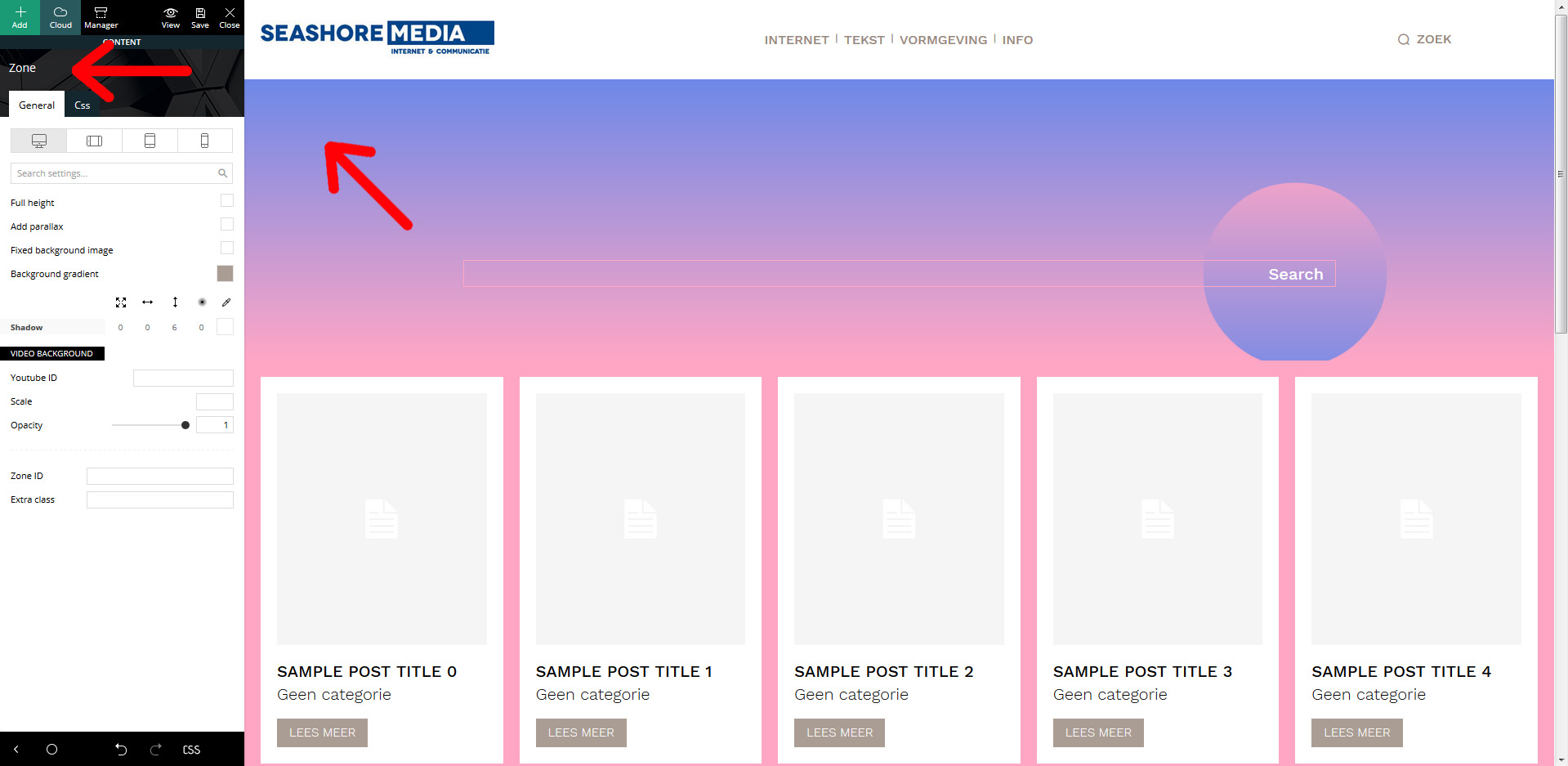
 Hi, yes, I understand how it basicly works. But when I want to edit the background, it says “zone”. And in the “zone” settings, there’s nothing in the settings (‘general’, nor ‘css’) that corresponds with the blue to pink background gradient. Hence, I don’t understand how to edit this.
See: https://seashore.nl/uitleg.jpg
Thanks.
-
This reply was modified 5 years by
Seashore.
Calin Hi,
Please try this custom css -> https://i.imgur.com/ZvBUd1m.png
 #bbpress-forums button {

    color: #222;

    background: transparent;

}

#bbpress-forums button:hover .mce-ico, #bbpress-forums button:hover span {

    color: #fff;

}
Set the code in theme panel> custom code> custom css.
hope this will help you!
Calin Hi,
In order to be able to see the form as you, I need an account to can sign in -> https://i.imgur.com/Pqb0Kb2.png in this way I will be able to provide a css to help you!
Thank you!
BerbiHello,
I have an Iframe that I implement with width 100 %.
However, my CSS seems to restrain the width 100%, as you can see here there are empty spaces: https://www.screencast.com/t/MZxtwiEyMbaz
How do I do to create a template that will allow 100 % screen width and 100 % height, but while still displaying header and footer ?
Thanks in advanced.
Calin Hi,
This is create when you install a demo, but, you can do it, there will be no problems.
Also this is working as in this documentation https://forum.tagdiv.com/featured-posts-2/ only for standard demos, for pro demos, you need to use a custom css like this one:
.tdb-category a[href$="/featured/"] , .tdc-content-wrap .td-module-meta-info a[href$="/featured/"], .td_block_wrap .td-module-container a[href$="/featured/"]{

display: none;

}
This code need to be set in theme panel> custom code> custom css.
Hope it will help you!
Thank you!
Vlad S Hello !
We have tested on our side and this is how the post template was created. The content has a margin set with css that works like this when no featured image is available. You can simply edit the template and remove that margin as you can see here: https://www.screencast.com/t/ob1lpyixbEca ; https://www.screencast.com/t/5NGLE88DC As you can see here I have set it to 170px.
Let us know the result.
Thank you !
 irmankarim
Hi! I am using Style 3 Multipurpose Header. I would like to ask, how do I make the header gradient, just like Style 1 Multipurpose and how can I change the colour of the gradient. I tried adding CSS to it but it doesn’t work.
 zebal
zebal Hi Calin,
This is not the problem. The TinyMCE editor works perfect inside wordpress/wp-admin.
The problem is when someone wants to reply in the forum. This Visual Editor is with a wrong CSS.
Please take a look this link to understand the problem –> https://support.dev4press.com/forums/topic/tinymce-editor-without-html-tags/#post-64454
And check what I telling you checking my website –> https://www.farobursatil.com/Foro/trading-algoritmico/
 Beldar
 Hello again. I think you don’t read all the messages… In the problem 1 I put you the code that I have put and that breaks me the web and you tell me that it tries to put the same code…
2. Thanks, I’ve fixed it by deleting the cache.
3. Here is an example of a published list: https://www.lacasadeel.net/2020/10/descubre-a-la-nueva-liga-de-la-justicia-de-dc-future-state.html
4. No, it is not a conflict with a plugin, except with yours. If I put the data in the td_config.php and td_config_Ad_block.php files and then update the plugin, that data is deleted… What I need is a way to get it in without it being deleted with each update.
5. This only happens with some templates, not all. I have fixed it by putting more space through CSS in the Tagdiv composer.
 Sommelierlife
Hello guys,
we need to create a database on the third domain level of our site and we would like to use the same theme, but we need to do it outside of wordpress. So I wanted to know if is there a version of the HTML and CSS theme unrelated to wordpress?
Thanks you
Vlad S Hello !
1. Please make sure that you do not have a plugin conflict, please deactivate ALL plugins except tagDiv Composer, also if you are using child theme or cache plugin, deactivate them, clear all cache and try again.
If the problem persist, please set this code in functions.php -> wp-content/plugins/td-composer/legacy/Newspaper/functions.php
add_action(‘admin_head’,function() {
echo ‘<style>.td-gutenberg-editor .editor-styles-wrapper .wp-block {max-width:726px;}</style>’;
});
Or you can send us an email at contact@tagdiv.com and provide admin login, as well as cPanel or FTP if possible. We will take a look. Include a link to this topic in the email.
2. Yes, you can make your sidebar smart as you can see here: https://www.youtube.com/watch?v=fa7GenCHcBU
3. That will require a css code. Please provide a link to your website in order to inspect.
4. That can be caused by a plugin conflcit. Check issue 1.
5. Check issue 1.
Thank you !
Calin Hi tanasis,
If you are using the Gutenberg editor, then there will be no sidebar in editor, this will look like this -> https://i.imgur.com/F6PUBhU.png
If you are using some classic editor plugin, then the sidebar can be removed only from them files, for this you need to go in -> wp-content/themes/Newspaper/editor-style.css and comment these lines of css -> https://i.imgur.com/DqjLdxU.png
Hope this will help you!
 Oswald
 Hello Calin,
I have not activated the Cache Plugin (WP Super Cache)
But instead have some code in the htaccess for this.
Could this be the issue? My site is very fast ever since, especially on mobile. I would prefer to keep this code
# BEGIN Expire headers
<ifModule mod_expires.c>
ExpiresActive On
ExpiresDefault “access plus 5 seconds”
ExpiresByType image/x-icon “access plus 604800 seconds”
ExpiresByType image/jpeg “access plus 604800 seconds”
ExpiresByType image/png “access plus 604800 seconds”
ExpiresByType image/gif “access plus 604800 seconds”
ExpiresByType application/x-shockwave-flash “access plus 604800 seconds”
ExpiresByType text/css “access plus 604800 seconds”
ExpiresByType text/javascript “access plus 604800 seconds”
ExpiresByType application/javascript “access plus 604800 seconds”
ExpiresByType application/x-javascript “access plus 604800 seconds”
ExpiresByType font/truetype “access plus 604800 seconds”
ExpiresByType font/opentype “access plus 604800 seconds”
ExpiresByType application/x-font-woff “access plus 604800 seconds”
ExpiresByType image/svg+xml “access plus 604800 seconds”
ExpiresByType application/vnd.ms-fontobject “access plus 604800 seconds”
ExpiresByType text/html “access plus 600 seconds”
ExpiresByType application/xhtml+xml “access plus 600 seconds”
</ifModule>
# END Expire headers
<IfModule mod_deflate.c>
<filesMatch “\.(js|css|woff|html|php)$”>
SetOutputFilter DEFLATE
</filesMatch>
</IfModule>
<IfModule mod_headers.c>
<FilesMatch “\.(ttf|ttc|otf|eot|woff|woff2|font.css|css|js)$”>
Header set Access-Control-Allow-Origin “*”
</FilesMatch>
</IfModule>
Thanks!
Britt
 kibiribi
 Just for test I’ve added CSS class directly in the text – https://prnt.sc/v270l3
On the mobile phone – I can see Ad custom banner well, but the same code doesn’t work correctly in section ARTICLE INLINE AD after 7th paragraph.
screen – https://prnt.sc/v273yq
kibiribiI use this CSS code according to support team recommendations – https://prnt.sc/v255ij
/* hide Recaptcha 3 */

/*.grecaptcha-badge { visibility: hidden; }*/

.grecaptcha-badge{

display: none!important;

}
But I can’t see Google Recaptcha 3 label for PC – it’s ok BUT Recaptcha 3 label visible for Tablet and phone
https://prnt.sc/v253j6
Do you have any solution for this?
Site – https://prostobzor.com/
kibiribiNewsPaper X version: 10.3.7
I set CSS classes for all types of devices according to manual https://forum.tagdiv.com/using-other-ads-non-adsense-ads/
screen of code – https://prnt.sc/v24pwa
Banner shows for all devices (PC, tablet horizontal, tabler vertical) except of Mobile phone (tested on Samsung S9).
Cache was cleared 5 times. incognito mode doesn’t help in testing.
this class doesn’t help – <div class="td-all-devices">
Any idea? 🙁
Calin Hi,
You can do that using tagDiv Composer, that is a cloud template and, using tagDiv Composer you can edit it like this -> https://i.imgur.com/DroPIep.jpg select the row and check the css tab -> https://i.imgur.com/vpkF04l.jpg is possible to need to do this for more rows.
If there is still a problem, let me know!
Thank you!
 KSARANG
 How can i optimize
wp-content/plugins/td-composer/assets/fonts/td-multipurpose/td-multipurpose.ttf
and
wp-content/themes/Newspaper/images/icons/newspaper.woff?19
and remove unused javascript and css from my page ?
Suggest plugins or ways to do so Site : hastysurf.com
 kinumedia
Hello!
Can you give meet the class or CSS to hide the subscribe button on mobile theme (see screenshot below). Right now it doesn’t link to anything, we might keep it if we can change the style and add the link, otherwise we’ll hid it. Can you tell me how to do this? Thanks!

 gadget-freakz
On my site I have used the default template for my site: gadget-freakz.com
But several tools like google pagespeed and rand math give me warnings I cannot resolve. I have spend hours and hours but my skills are not good enough too solve and improve this issues.
-Too many H1 tags found on your page (3). For the best SEO results there should be exactly one H1 tag on each page.
I think this comes to the fact there is an H1 for desktop, portrait, mobile etc, but can it nog be combined?
-pagesize too big:
The size of the HTML document is 766 Kb, over the average of 33 Kb and our recommendation of 50 Kb. How to reduce my html?
I think my site use a lot of custom css. (but I have not chose for it) And google tells me that I have unused css code. how to get rid of that?
after the last update of the theme I see double js code in google pagespeed mobile.
all about ads and amp. how to solve this?
I use cloudflare, wp-rocket and webp images to make my site as fast as possible. And I have tested a lot of others.
But still a very low score.
 sasquatters
 Here is my Mailchimp embedded form code.
<!-- Begin Mailchimp Signup Form -->
<link href="//cdn-images.mailchimp.com/embedcode/classic-10_7.css" rel="stylesheet" type="text/css">
<style type="text/css">
	#mc_embed_signup{background:#fff; clear:left; font:14px Helvetica,Arial,sans-serif; }
	/* Add your own Mailchimp form style overrides in your site stylesheet or in this style block.
	   We recommend moving this block and the preceding CSS link to the HEAD of your HTML file. */
</style>
<div id="mc_embed_signup">
<form action="https://welcometospacelounge.us2.list-manage.com/subscribe/post?u=70a4cd21e573c5ea055e67c60&id=d055bc6e63" method="post" id="mc-embedded-subscribe-form" name="mc-embedded-subscribe-form" class="validate" target="_blank" novalidate>
    <div id="mc_embed_signup_scroll">
	<h2>Subscribe</h2>
<div class="indicates-required"><span class="asterisk">*</span> indicates required</div>
<div class="mc-field-group">
	<label for="mce-EMAIL">Email Address  <span class="asterisk">*</span>
</label>
	<input type="email" value="" name="EMAIL" class="required email" id="mce-EMAIL">
</div>
	<div id="mce-responses" class="clear">
		<div class="response" id="mce-error-response" style="display:none"></div>
		<div class="response" id="mce-success-response" style="display:none"></div>
	</div>    <!-- real people should not fill this in and expect good things - do not remove this or risk form bot signups-->
    <div style="position: absolute; left: -5000px;" aria-hidden="true"><input type="text" name="b_70a4cd21e573c5ea055e67c60_d055bc6e63" tabindex="-1" value=""></div>
    <div class="clear"><input type="submit" value="Subscribe" name="subscribe" id="mc-embedded-subscribe" class="button"></div>
    </div>
</form>
</div>
<script type='text/javascript' src='//s3.amazonaws.com/downloads.mailchimp.com/js/mc-validate.js'></script><script type='text/javascript'>(function($) {window.fnames = new Array(); window.ftypes = new Array();fnames[0]='EMAIL';ftypes[0]='email'; }(jQuery));var $mcj = jQuery.noConflict(true);</script>
<!--End mc_embed_signup-->