
- NewsmagInstalling pre-built websites
- NewsmagIntroduction
- NewsmagSmart Lists
- NewsmagTheme thumbs
 howtoisolve
We want to complate a setup on my website that cares for speed, SEO, and Google Easy index features.
right now i am facing issue with Date, i installed on my demo website.
Modified Date is not working on Desktop and mobile theme.
if i enable last Modified Date in Mobile Them, Desktop theme options not showing. – Desktop theme showing only Published Date.
i recommend to use Mobile them for mobile users.
 the-website-builder
Hey there!
I’m going to try to keep my request super simple. I’ve read through about 15 posts in your forum here and none of the suggestions are helping. I’m not a CSS expert, but I definitely tried everything suggested and I’m still struggling.
All I’m trying to so is to make the sidebar/column sticky within the the Crypto News theme/template (I have the full Crypto News Demo site installed), and I’m trying to edit the “Single Template – Global”. I’m also running the latest version of your theme on WordPress 6.3.2. (Brand new install of everything on a new WordPress site this past week).
When I make the “Stay in the Loop” column sticky, the column WILL move up and down the page as a sticky column, however the column doesnt start to move until you are halfway down the contents of the column (the column doesnt “stick” until Ive scrolled down to about the middle of the column”)
I would like to make the “Stay in the Loop” column sticky starting at the top of the column where it says “Stay in the Loop”.
I’ve tried playing with -200 and 200 padding/margins in the CSS for the column (and higher and lower values), this doesnt help with the column becoming sticky when scrolling down, however it does affect the “timing” of when the column scrolls back up again.
I’ve also tried playing with the Sticky offset, which doesn’t seem to do anything at all, which confuses me. If I set sticky offset from 100 to 400 lets say, nothing changes…if I set the offset to 1000 or greater, the sticky column is no longer “sticky” at all even when “Sticky” is checked.
Can you please just install the Crypto News Demo site with all the content, and let me know what settings I need to change to make this work properly? I would appreciate this time-saving help. I’ve spent about 2 hours on this so far.
Thank you in advance for your time and help with this 🙂
 adventkaushik
Hi,
I have a question and I didn’t found any satisfactory answers from google or youtube that’s why I ‘m posting my queries here. I’ve a legal copy of Newspaper 12 Template and I liked one of their prebuilt theme (Garden Pro: https://demo.tagdiv.com/newspaper_garden_pro/) that prebuilt website is based on gardening and food related niche.
My question is: If I’ll use that prebuilt website and edit it using wordpress and tagDiv Composer, to create a Travelling Related Website(or any other topic) then will it do any problem for SEO and Google ad sense? As that is specialised and optimised for Gardening niche and I’m gonna change it to totally different niche website, is it ok? Or it’ll create issues with SEO, Marketing and getting desirable Traffic?
Please enlighten me.
 bcee
bceeHi,
I installed Newspaper in http://www.noleggiotuo.it
I installed the Shop Audio demo
When I go to Cloud Template/Shop the product template page to edit it tells me the page is non-existent.
Also, the template gives me a number of problems with product visibility.
I have tried uninstalling and reinstalling but, nothing has changed.
Can you give me YOUR assistance?
—
Ciao,
ho installato Newspaper nel sito http://www.noleggiotuo.it
Ho installato la demo Shop Audio
Quando vado su Cloud Template/Shop la pagina del template prodotto per modificare mi dice che la pagina e inesistente.
Inoltre il template mi da una serie di problemi di visibilità dei prodotti.
Ho provato a disinstallare e reinstallare ma, non è cambiato nulla.
Mi puoi dare la Tua assistenza?
 ACAD
ACAD Dear Support Team,
I have purchased the Momentum Pro theme with the intention of using the template displayed at the following link: https://demo.tagdiv.com/newspaper_momentum_pro/tdcpt_case_studies/personal-trainer-shop/. However, I am encountering difficulties in setting it up correctly, despite having installed the ACF plugin.
I would like to request a detailed tutorial on how to use this template. I am having trouble replicating it using ACF and CPT (Advanced Custom Fields and Custom Post Types). I would greatly appreciate your assistance in making the most of the product I have purchased.
I look forward to your guidance and thank you for your prompt help.
Sincerely,
Cristian
ACAD Inquiry about Template Usage After Installation
Dear support team,
Thank you for your prompt response. I have successfully installed the template. However, when I create a post and select the template, a different design is displayed when viewing the post. Could you please guide me on the correct way to use this template to load project content similar to the demonstration?
I look forward to your guidance to make the most of the template’s functionality.
Thank you in advance for your assistance.
Sincerely,
Cristian
 Bettina
 Hello @pricelesspassport !
That demo is using default templates, and there is no way to edit them with the TagDiv Composer. All the settings that are less could be found in the theme panel settings.
We recommend using cloud/PRO templates in order to have the possibility to edit them with the TagDiv Composer, which contains a lot of functions and features, Please check our tutorial here: https://forum.tagdiv.com/tagdiv-composer-tutorial/
More documentation about the cloud templates is here:
– https://forum.tagdiv.com/cloud-library-templates/
– https://forum.tagdiv.com/design-post-pages-using-cloud-library-templates/
– https://forum.tagdiv.com/cloud-library-category-templates/
Thank you!
 ArtSeine
Hello, I can’t remove the slider that I put on my home page “header” and which loads on each post that I create even though I don’t want it. (cf picture)
How to remove it just on posts
Thanks

 Iqtidar
 For example, the video here on the Default Newspaper theme is rendering properly: https://demo.tagdiv.com/newspaper_pro/td-post-after-effects-guru-tracking-and-stabilizing-footage/
But I cannot find a page with embedded video on the Life Pro News theme option.
Iqtidar I don’t fully agree, I have been a web dev for a long time and this has to do with how the video is rendering on the page (read my previous reply in detail).
I need to see and test a demo page on the Newspaper Life Pro theme to see how it renders on mobile. TagDiv did not embed a video in a single page on the Demo website to let us see how it looks and how to make it Full Widh, not even in the documentation.
I just want them to show us a page with embedded video, let’s see how it looks and renders.
The issue is widespread because the majority of existing websites aren’t rendering the video correctly. I have turned off Lazy Loading for videos on mobile for now to see if works, but apparently do not.
We’re here to solve the issue, not put it under the carpet. Since it is impacting my SEO and revenue, this is a serious issue.
The core developers at TagDiv can understand the technical issues I am talking about here.
Iqtidar I am using the Life Pro theme and on the demo website, you guys have only demonstrated a single page content page with no video inserted, how can that demonstrate the full functionality of the theme?
Please insert videos on some pages, post the URLs here, I need to test them as well so that we can estimate who’s at fault.
Iqtidar I did not make changes to any files, just some additional CSS through the Theme Panel.
The error started occurring after the new update.
I think it’s happening because I am stretching the video to Full Width horizontally. In the Demo websites, you showed Full Width videos on demo pages but when I installed the theme, it kept margins on both sides, I had to look at the code of your Demo website to make the videos go full-width and there is nothing recommended in Documentation for the best way to make videos full width on mobile devices.
Please recommend the best way to make videos Full Width like they are on Demo Pages.
 Calin
Calin Hello,
1. Yes, this can be done using the Opt-in builder, if you want you can check some or our demos to see how it’s work – https://i.imgur.com/vaQOZb0.jpg -https://demo.tagdiv.com/select_demo/newspaper-prebuilt-websites/
Also, you can check the documentation of tagDiv Opt-in builder to see how it can be set – https://forum.tagdiv.com/tagdiv-opt-in-builder/ – https://i.imgur.com/wPiKQsd.png
2. Normally the opt-builder subscription is based on subscriptions made using this plugin, so if the subscription was made using the woocomerce it will not work, but those will have access to the shop pas on the current account.
3. The opt-in builder plugin can be installed from Newspaper > plugins – https://i.imgur.com/yQre6j5.png
Thank you!
 AlemLolic
Hi,
i use Custom forms shortcodes from TagDiv Composer but i have this error, can someone help me to enable it.
Sorry, post create is disabled on this template!
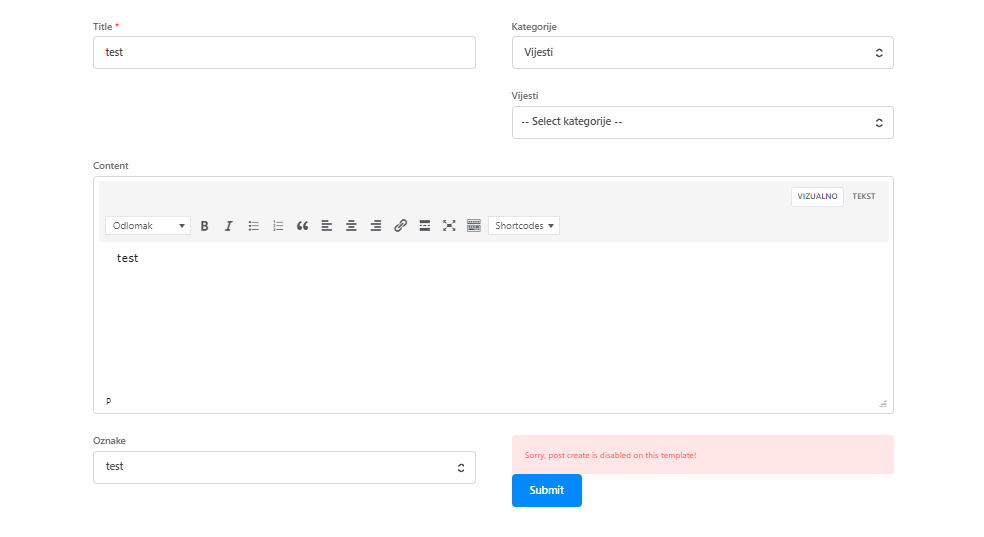
Current demo installed: Fitness Blog PRO
thanks.
 Anamaria
 Hello,
The Revolution Slider that we provide is a Bundled Plugins in our theme. No need to activate it, simply ignore the activation messages and you can use it for the sliders that our theme is providing -> https://forum.tagdiv.com/import-revolution-sliders-on-demos/.
What is a bundled plugin?
– https://help.market.envato.com/hc/en-us/articles/213762463-Bundled-Plugins
Thank you!
 maciejzakrzewski
What is the possibility of running Real Estate PRO as part of another demo?
Running Real Estate PRO as a demo to copy everything on another temporary WordPress is not possible because there is no second license.
Inserting individual elements via Cloud Library is also pointless because there are no other settings.
Is there any idea for this?
 jaydeedaley1
Dear Support
I have recently changed my template to the Watches shopping demo. It has a black banner on the homepage with a watch on it. How can it be removed so that I can replace it with a Rev slider?
I look forward to hearing from you.
Thanks
Jaydee Daley
Anamaria Hello,
Please check this guide https://forum.tagdiv.com/topic/dequeue_style-td-theme-demo-style/
Thank you!
 nosisnews
 Hi Bettina
https://app.screencast.com/fSHNjwsLWHsga
the first site is what i am currently using, at the footer only social icons. The second site i showed has about us, contact us, policy page etc. Those are what i want added to the demo site i am using
Hope it gets through
Thanks!
 mdev
mdevI would like to be able to remove the style: td-theme-demo-style-css.
<link rel=’stylesheet’ id=’td-theme-demo-style-css’ href=’/wp-content/plugins/td-composer/legacy/Newspaper/includes/demos/gossip_pro/demo_style.css?ver=12.6.1′ type=’text/css’ media=’all’ />
It is empty for my theme and not needed so I need to remove it from the page. How can I do that?
I’ve tried:
wp_dequeue_style(‘td-theme-demo’);
wp_dequeue_style(‘td-theme-demo-style’);
Non work.
 zklid
zklidHi, I’m using the template: https://demo.tagdiv.com/newspaper_week_pro/
Could you help me understand how to modify the css so that I can assign a certain color to each category item link? And the same thing for the subcategories?
For example: I want the politics category to turn blue on hover and when selected.
 llaporte
 Hello again,
I think you don’t understand my problem. The td_block_homepage_full_1 shortcode does not work at all, does not display at all in Desktop mode with version 12.6.1 but works in version 12.5.1
I did all the steps you suggested but it didn’t work. I still have the same problem. As for the X icons for Twitter, I don’t care a bit. This is the shortcode I need for the layout.
Unfortunately I play in my live website. I will wait until you have a new functional version or I will later set up a demo website to give you access and demonstrate the problem. Now I’m going to go back to version 12.5.1.
I’m really sorry this isn’t working right now.
Luc Laporte
Anamaria Hi,
You can create your own form for the company https://demo.tagdiv.com/newspaper_job_hunt_pro/create-a-company/. You can set what companies you want to have there.
If you want some custom functionality, you can request a quote here https://tagdiv.com/web-development-services/
Thank you!
 SBA
SBA I checked with https://demo.tagdiv.com/newspaper_job_hunt_pro/submit-job/
Where is the option to register/create company for job posting?
It seems that when submitting job the all companies are available in pulldown menu.
I dont want to be able to submit job for all companies.
 myartauction
Just installed the Newspaper theme with the Momentum demo earlier today. Has been working pretty great so far!
My website is: https://myartauction.org
1) In multiple sections on the demo site, there are animated underlines which trigger after a brief delay. How do you enable this animation and configure line color and position? The lines were working initially, but seem to have been disabled somewhere along the way while I was editing the website.
Example from demo: https://i.imgur.com/XAZ05di.png
2) There are custom SVGs that include an icon overlaid with a squiggle. Is it possible to change the icon? For instance, from a clock to a palette? Changing the icon under “General” settings doesn’t seem to make a difference.
Example from site: https://imgur.com/loNjHqW
3) Less of an issue, but is there a way to delete empty columns? I don’t seem to get the trashcan icon or the “Drag here to delete” message like when deleting a whole section.
Example from site: https://imgur.com/Vfyhg6X
Thanks!



