
- NewsmagInstalling pre-built websites
- NewsmagIntroduction
- NewsmagSmart Lists
- NewsmagTheme thumbs
 fenomeno0chris
 Hi, is it possible to create a block which is horizontally scrollable on mobile devices? It is a great way to help reduce the vertical height of dense pages.
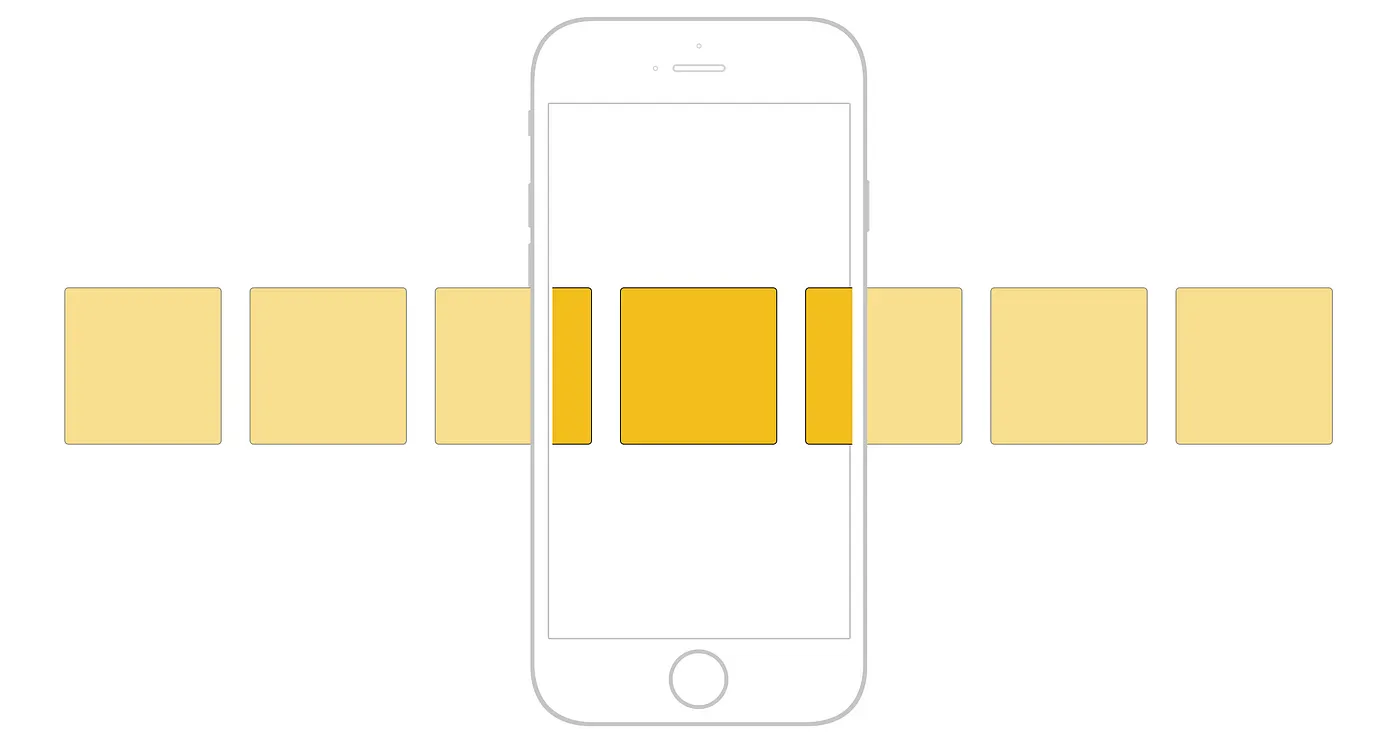
This website (please view on mobile device) demonstrates it very well what I want to achieve on my project.
-
This reply was modified 3 years by
fenomeno0chris.
 yahyaabushaar
Hello!
I purchased the theme and installed it correctly. I also activated it and downloaded the required plugins.
But after I installed the required demo version of the theme, all of the settings for the theme do not appear for me in the Theme Panel section. For example, I want to hide the top menu, but this option does not appear in the Header section, and also only one Header style appears for me in the same section.
I have attached two pictures to illustrate the problem.


Please help as soon as possible.
Thanks
 fabinhoalmeida
 Hi Calin,
Thank you again for your attention to this issue.
In reality, your example is similar to the method I had already tried without success. In any case, I strictly followed your example, in the same way as you demonstrated here, and the result for me was the same: the created field appears empty, blank, without the excerpt inserted in the post appearing, even after saving the entries made.
See: https://imgur.com/a/JWwrJ5v
What could be going wrong?
I would appreciate it if you could help me with this.
Thanks.
 Anamaria
 Hi,
In the demo are elements raw html or css, here is the extra code, you can check if the elements have an extra class set -> https://i.imgur.com/Z8oZ3q9.png -> https://i.imgur.com/Jkkv2T6.png
Thank you!
 Jimmy_X
 How can I do that?
I find another… unofficial way to edit homepage thru Cloud Templates – Homepage Templates – and select Prebuild Template that I like and edit from there with Composer, and but I don’t know how to import that modifications in prebuild demo…it is possible? One possibility is, after I make modifications I like in that metod, edit de prebuild demo, and, somehow, step by step, apply them from prebuild template to prebuild demo… I know, it is weird and complicated… well, yeah…
If it is another simple possibility please tell me.
Thank you again.
 Alex
Alex Hi @ncalex
Well, in addition to Search Form block, seems like Header Live Search block also have issues.
1. This new demo you just released uses Header Live Search. The issue is: Form elements do not have associated labels.
2. The second issue with Header Live Search is: Elements with visible text labels do not have matching accessible names. This happens when the additional text is placed in “Text” field under General > Search Icon section. Put, for example, Job Search, and the pagespeed will return error. From what I understand because aria label is set for “Search” by default, and doesn’t change to “Job Search”.
So basically, seems like none of the TD search blocks work properly.
Thanks.
 Anamaria
 Hi,
You need to edit this file tds_module_real_estate_pro_2 from this plugin td-demo-real-estate-pro -> modules and change here the symbol -> https://i.imgur.com/zKSnuqX.png
Thank you!
 zklid
zklidHi, I use the template: https://demo.tagdiv.com/newspaper_week_pro/
I have two problems:
a) I created a row and divided it into 4 columns. I then set a background color for each column. I can’t create a white dividing space between the columns: I tried both by inserting a value in “columns gap” and by inserting a padding value on the right and left for each column. Can you help me solve it?
https://drive.google.com/file/d/1dkwKgY-T3yECGNwp5deVOn-reb-dqrEI/view?usp=sharing
b) I noticed that in “Sticky” mode the drop-down megamenu does not span the entire width of the page.
https://drive.google.com/file/d/1MUb3gNvBeIRtjj23BVc9VqeLnB9cYfZl/view?usp=sharing
 lintas17
Hi,
How do I make a bullet list post like is being shown in the demo https://demo.tagdiv.com/newspaper_insightai_pro?
I have tried to import it from the cloud templates but it doesn’t work for my website.
Thanks.
 Bettina
 Hello @mattiave!
Please check if you do not have any font selected in theme panel settings or Composer.
Also, our demos use other fonts than the default ones.
The theme comes with two preset default Google Fonts: Open Sans and Roboto. You have the option to use custom font files; please check out our guide: https://forum.tagdiv.com/font-customization/
Thank you!
Bettina Hello!
You can choose to place your ACF fields into posts, or your taxonomies.
Unfortunately, we do not have a video guide.
Check our documentation from here:
– https://forum.tagdiv.com/introduction-cpt-acf-newspaper-theme/
– https://forum.tagdiv.com/create-frontend-submission-form/
In the next update, we will bring the CPTs by using the ACF plugin, and you won’t need to install the demo’s plugin.
Thank you!
Bettina Hello @obiwan!
No. Only if you will reinstall the DEMO/template again.
You can import the search template from this demo and customize it in the tagdiv Composer.
You can build a sidebar with the TagDiv Composer. Steps:
1. Insert one new row (or delete an existing one).
2. Divide into two columns (2/3 + 1/3).
3. You can add whatever element you want to the second column and consider it a sidebar.
You can also split the row into many columns and set a width for each column: https://prnt.sc/SUVH-Y15HNL9
Thank you!
Bettina Hello @jurishour !
Did you properly install the demo without any errors?
Make sure the cloud templates are set as global.
Thank you!
Bettina Hello!
You need to access wp-content/plugins/td-demo-cali-sight-pro/td-cali-sight-demo.php -> edit this word: https://prnt.sc/V9baIgiqRZMe SAVE and refresh your dashboard.
Thank you!
 jurishour
Newshubpro’s demo of your theme is not working properly. I tried many times but failed. Please check.
my website is
 gnai
gnaiI’m using chained news pro. Newly posted posts don’t show pictures and on the home page below “more categories” the latest post shows on the entire row (it’s not showing different posts from different categories”. It’s a freshly new installed theme. I activated all the security suggestions wp toolkit recommended not sure if that is making this buggy…
Also, one of the demo content (which I didn’t touch or edit is missing its original picture):
https://app.screencast.com/SJHGW9h9Xp2Jj
Middle body of the site showing only the latest post:
https://app.screencast.com/aPsrhVWbowCVh
This is what the add new post editor looks like from one recent post:
https://app.screencast.com/TD68WARuSzB1i
More categories (only the latest post shows on the entire row):
https://app.screencast.com/jUfQ6hvMzJ5WW
Whats going on here?
 studentka
Hello!
Im need job board template, looking this is https://demo.tagdiv.com/newspaper_job_hunt_pro/ but cab I ask question?
I cant understand site structure. For example: I looking job in Paris. Where I can find offer job in Paris? Or I would like found job in other country in Barcelona, where on this is site I can found it?
Will be nice if site have simple structure. How like this is: layboard.com/vakansii/franciya here site category include all job offers in France. Also important text area for SEO description, when user ask google job in france google must understand where on site job offers in France

how like this is.
This description not for human and you can add “read more” how like here https://themeforest.net/category/wordpress

will be nice, and very important for SEO.
Also add in filters countries and cities how like here layboard.com/vakansii/franciya

I hope you understand what I need. Because now you forget about Geolocation. For example, I babysitter from Amsterdam, how I can looking general job offers in Amsterdam. Or maybe in others city near Amsterdam. I cant understand how look it on this is site.
Maybe you add this is wishes.
If you planned upgrade this is template. If you interest my opinion. I recommended choice best way, looking on site from TOP 3 google. For job this is perfect layboard com.

and have great positions in Google if you interested you can check here.
https://komsomolka.works/wp-content/uploads/2023/09/layy.pdf
Thanks you!
 smga
smga Video link: https://1drv.ms/v/s!AsyBghFTVpCCguAuotrjQg1HYr59Cg?e=9xRBPd
But here’s what’s interesting
I just checked out your demo template at https://demo.tagdiv.com/newspaper_shop_watches_store/ from a mobile device
The “Add to Cart” buttons on this page from my phone do not work. Exactly the same as on my website.
Bettina Hello @manualedimari1 !
For default templates, you need to have the Standard Pack plugin.
I’ve tested, and for me, the accent color remains the same as before the update.
Only if you install a new demo will the color be imported.
Make sure this is not a plugin conflict.
This is the link color: https://imgur.com/gvoN3sh
Thank you!
 Calin
Calin Hi decorideas.us, only the pre-build websites that are PRO are made using cloud templates, the rest of theme are old demos that have been made a long time ago using the standard templates, before the cloud to be added in the theme (usually those are at the bottom of the list of demos).
Thank you for your understanding!
 tlonero
 hi bettina
https://www.studio93.it/screen.jpg
now the site I used in the beginning to build the site is here
https://www.ridetofinish.com/studio/
there is the demo information included when you install the template , here if you do a mouse over fashion gadgets ect you can see the photo and short descriptioin of the article, on our site studio93.it this stopped working I put a circle around the menu the screen shot that when you so a mouse over the photo and short description doesn’t show anymore
thanks
Calin Hi,
If I’m ight the demo you have installed is “KOREAN NEWS INSIGHT” – this demo has been made in Korean so the language and all text has been set using the Korean language, to change the text you need to edit the homepage (and cloud template) using tagDiv Composer – https://i.imgur.com/zT3xeIr.jpg select that text and just replace it with yours – https://i.imgur.com/HqWQ8ys.png – https://i.imgur.com/iLFMQ1T.png
I hope this will help you!
 Prateek
Hi,
Please add an option to add and style menu descriptions for menu items and display them for all menu shortcodes in TD composer (Header menu main, mobile horizontal menu, mobile menu, and list menu) like in newspaper default demo “FEATURES” menu item and tagdiv homepage “Services” menu item, etc.
Thanks.
 metometo
when i imported demo it became get me error and shown this message
Error at zones: 6(models) : 2(dom). The model does not match the content Current state has involved an issue. You could try an UNDO operation (CTRL+Z / CTRL+SHIFT+Z)
 fishinfool
 Hi Ana,
I agree, but it does.
These are the links I am sending you to demonstrate the template names are showing up( tdb_templates/custom-taxonomy-doctors-pro-3/ and /tdb_templates/blank-custom-post-type/)
I created the page, loaded the template, assigned the specific post type, save(from tag div composer, and click view. When it loads on the front end it uses the name of the templates instead of the post type or taxonomy.
When i try to do the same using the cloud template for /tdb_templates/blank-custom-post-type/ and /custom-taxonomy-doctors-pro-3/ it does not let me. it gives this message: Invalid template type! Please make sure your are editing a supported template type title.
I would add screen grabs but there is nowhere to attach files.
This is what I am trying to fix.
Any guidance on how to fix?



