
No search results were found in Documentation!
 Bogdan B.
 Hello,
CSS works in cascades so when there are more then 1 rewrite of the same color, you will be able to see each change happen especial if your connection is slow. If you load a theme demo that changes the colors that is one rewire and if you change the colors again that would be the second one and already you will be able to see the changes happen on page loading. That is the way css works and there is little to be done about it unfortunately. You can make the changes directly in style.css but you will have to re-add them on each update.
Thank you!
 olympicbird
Dear Sir/Madam
Few days ago I bought your theme and you had been suggesting me ( few hours before bought it), that I can use any Ads Manager plug in to control the ads inside your Theme. ( I wanted to control the ads based on the category ), I installed the plugin “advance-ads.1.7.16” which is one of the best in the market as many other failed to kept their promises..
I discovered the next:
DOCUMENTATION
1. your Documentation pages are empty … on Ads – Sidebar Ads and Ads – Article Ads. Even then I understand clear that you give emphasis on the Google adsense, something which I don’t use.
WIDGET
2. Your Ad Widget ([tagDiv] Ad box) not responding at all in any area I drag it (right of the activated widgets) ( Newspaper default .. Footer… td_demo_sidebar_any category..) I have to go to Newspaper Theme panel and remove or add from the ads section. This is not helpful because I can’t use the generated widgets from the “advance-ads.1.7.16”, but the most important is that I can’t categorized my ads based on the page or category of the ad. My customer need a simple way to produce an ad and put it in any sidebar based on the condition he need (categorized – sports – social life etc). Even if I use the generated widget from the “advance-ads.1.7.16” doesn’t appear to the end used page. Yours Ad widget also doesn’t appearing.
HELP
3.Please could you help me to show me the way to implement this function into your theme as it very important for my customer? ( hoping to not having to make any coding.. of course)
Thanks in advance for your help and support.
George
Sydney
 akukunis
Hi there, in the theme options panel i changed the background color of header footer, links etc
However on refresh of the page it shows original demo styles then reverts to mystyle changes.
How can i make the original theme not load the those demo styles.
Let me know
Thanks!
 newsmaguser
 I’m afraid that doesn’t do the job. I’m trying to change the color and font size on the body text of the article. Here is your demo page: https://demo.tagdiv.com/newsmag_scandal/2016/04/19/td-post-the-next-wave-of-superheroes-has-arrived/
Here is a screenshot of the area:

Bogdan B. Hello,
The Style of the block headers if left on default (header 1) it will show the header style aded by the theme demo you have installed. in your case bh1 is this header: https://www.screencast.com/t/X0mNVID8x
It features just a line and a transparent background. It’s the demo style applied to the demo. I have tested BH1 on the default demo and it changes the color without issues but in your case the demo style applies a transparent background to the title.
Bh3 has no issues with background colors or text colors: https://www.screencast.com/t/VVLVEsIPmNp
Thank you!
Bogdan B. The css you are seeing does not come from the theme. It comes from your site: The css that comes from the theme refer to style.css and demo_style.css. If a css rule is added over the theme css it will show the “index” provenience as it does on your site. https://www.screencast.com/t/ecK6ObQeh
It is either a code you added or plugins that add their own css over the theme css. The theme did not change anything. It is a change originating from your site.
Thank you!
 Catalin
 Hello News Stamps,
I have inspected your website and I saw that you are using the Mobile Theme for your mobile mode, right?
I suppose that you do not understand very good how mobile theme works, right? So, please notice that this theme concept intend to display a Big Grid feature at the top of homepage which shows the posts which are included in Featured category, then will show a text which you added in Mobile Editor in Visual Composer from backend and at the very bottom of the page you will bring the Latest Articles module. Please keep in mind that the Mobile Theme do not recognize the Visual Composer shortcode and that’s why you did not get the demo style for mobile theme. So, for more information about our mobile theme, please check the documentation here -> https://forum.tagdiv.com/the-mobile-theme/ If you are unhappy with this layout, and if you want to have the similar structure with our demo mobile, you will simply turn off the mobile plugin and the theme will be automatically switched to the general responsive mobile mode.
Thanks for your understanding!
Catalin Hello mmeida,
I have inspected your website and you are using the Mobile Theme for your mobile mode and it seems to work as properly!
I suppose that you do not understand very good how mobile theme works, right? So, please notice that this theme concept intend to display a Big Grid feature at the top of homepage which shows the posts which are included in Featured category, then will show a text which you added in Mobile Editor in Visual Composer from backend and at the very bottom of the page you will bring the Latest Articles module. Please keep in mind that the Mobile Theme do not recognize the Visual Composer shortcode and that’s why you did not get the demo style for mobile theme. So, for more information about our mobile theme, please check the documentation here -> https://forum.tagdiv.com/the-mobile-theme/ If you are unhappy with this layout, and if you want to have the similar structure with our demo mobile, you will simply turn off the mobile plugin and the theme will be automatically switched to the general responsive mobile mode.
Thanks for your understanding!
 Simion C.
 Hi,
From what I can see you are using a different page builder editor instead of Visual composer for your page, this may cause errors. You should create your pages in Visual composer – https://forum.tagdiv.com/how-to-use-visual-composer/ and also make sure you are using the latest version that comes with the theme package – https://forum.tagdiv.com/how-to-update-visual-composer-plugin/ Please try to disable all your plugins except Visual composer and see if the problem is still there. Then you can install the demo you choose – https://forum.tagdiv.com/installing-demos/
Also you can find more information about the theme as well as tutorials to get you started, in the theme’s documentation here – https://forum.tagdiv.com/newspaper-theme-documentation/
Thanks
Catalin Hello Sachin Guleria,
Please keep in mind that our Facebook Sharing feature works as expected, without any problems. So, I have made a test with one post of our demo and the Facebook Debugger returns no problems, as you can see here -> https://www.screencast.com/t/ah0en7h6 Since our demo goes right by your side means that should go properly. First of all, please try to revert the theme to the default state, if you are using some untested plugins try to remove them, leave just Visual Composer to active, clear all your caches and install only the plugins that come bundled with the theme packet and rule out any conflicting plugins. It is possible that your untested plugins to interact with the theme core files and cause a lot of unknown issues.
Hope this helps and let us know how it goes!
Thanks for the message!
 sambeyene
Hi,
I was hoping that my site (http://airnation.com/) just like the Demo Newspaper theme.
I know I need changed the banner picture, but
1) what happened to navigation menu
2) What is the error on the top right corner of the screen
Any advice you can share would be appreciated regarding duplicating the look of your Demo.
Thanks
 acespedes
I install the theme and download the demo content, but the structure on section don’t miss from https://demo.tagdiv.com/newspaper/ do not looks like the section SECCIONES from http://dev.eldecidor.com.mx/, where actually have the same structure applied.
Please help.
Catalin Hello 3wmedia,
Do you are referring to the margin-top? If yes, notice that this white space is from the style of this demo. If you want to remove it, you should use the code below and place it in Theme panel->Cusotm CSS area.
@media (min-width: 1180px){

.td-recipes.td-boxed-layout #td-outer-wrap {

margin-top:0!important;

}

}
The result is here -> https://www.screencast.com/t/JCnQdprmOh3
If is not what you mean, please provide more details about your problem so I will be able to provide a more accurate response.
Thanks for the message!
Simion C. Hi,
You could just install the demo you want – https://forum.tagdiv.com/installing-demos/ and take it from there, then further personalize it to your liking by editing and changing the page in Visual composer if you want, or just add your own content to it.
Thanks
Simion C. Hi,
@LeadingSport Unfortunatelly I can not view your test page – https://www.screencast.com/t/2jtJ5YcomMx If you also have the Newspaper magazine demo installed take a look at the answer below
@brigitte67 That is the transparent block titles style of Newspaper magazine as seen in the demo – https://demo.tagdiv.com/newspaper_magazine/ if you want to cancel the background transparency you will have to edit the demo_style.css found in the theme folder->includes->demos->magazine and comment or remove a line of code – https://www.screencast.com/t/kTBWhN7ISu8 it should look like this if you choose to comment it – https://www.screencast.com/t/tMVupdlmd5
The result is that now you can see the background set in each of the block settings – https://www.screencast.com/t/arzXTAcVKfN
Thanks
 JJK007
Hi,
I have a problem with the demo “Say What”…I can not display one of the images.
My site web: http://awafautbiendire.nc
Thanks in advance,
Jonathan from New-Caledonia
 LinkAntonDE
Hello all,
For our Website we are using Block 24 (though the question is valid for other blocks as well) and can´t display the categories next to the title as shown in the online showcase (great feature btw 🙂
Showcase Example:
https://demo.tagdiv.com/newspaper/block-24/
In our website the categories are displayed in a dropdown after clicking “more”.
This is set in the “Ajax Filter” of the block settings. But i must be missing something to have the same function as in the showcase, right?
Regards,
Christian
 Sebpa
SebpaHello
Which default template do I have to choose on a page to build the same homepage as the travel blog has:
http://demo.tagdiv.com/newspaper_blog_travel/
 asamirr
Hello,
The number of posts in the mega menu is only 4 and there is a white space in the end of the menu.
Thanks to help us to solve it .
Regards,
 Trigger56
 Hi there
that is the block I would like to install on my homepage
I’m also trying to figure out how to change the layout from a “blog” style to the categorised style as shown on that demo.
Thanks
Catalin Hello fitore,
We have tested the theme security rigorously before releasing and also it was tested and analyzed by Envato reviewers and if would have any security issues would not pass their reviews.
Checking our demo too can be seen that is no thread there so can’t be a theme’s issue: http://screencast.com/t/hfBXLFGJSqzD
Try to deactivate all plugins except Visual Composer, clear all caches and test again. Also, I found here some resources that may help you fixing this issues: http://smackdown.blogsblogsblogs.com/2008/06/24/how-to-completely-clean-your-hacked-wordpress-installation/ – http://vivavivugeek.blogspot.ro/2014/03/detect-and-remove-spam-seo-blackhat-seo.html
If the problem is still there, try to make a new clean install from scratch via FTP, use only the required plugins, clear all your caches, purge CDN files and check the results.
Hope this help.
Thanks!
Catalin Hello pedroreis,
Please keep in mind that is not the normal theme behavior, sorry! If you are using some untested plugins, please try to disable all of these, leave just Visual Composer to active, clear all your caches, purge CDN and check the results. Also, if you have some additional customizations through the theme code, please get rid of them and try to use the theme on the default state and check the results. Our demo preview works as properly in this way, without any issues, which means that the theme does not have any problems.
Thanks for your understanding!
 Callipus
Hello,
How could I remove “All” subcategory for example under Lifestyle Category in the main menu of this demo:
https://demo.tagdiv.com/newspaper_magazine/
Thanks!
Bogdan B. Hello,
Our theme has something similar but it does not feature a double clicking action. the read more button is present on the block directly: http://demo.tagdiv.com/newspaper/block-20/
I cannot recommend any such plugin as we have not tested any with the functionality you describe.
Thank you!
 Edward
 1. You can use different types of Quotes as in live example shown: http://demo.tagdiv.com/newspaper/blockquotes-pullquotes/
Quotes – This option lets you set up your quotes with style. There are 8 types of formatting options to make your quotes eye-caching: https://forum.tagdiv.com/post-formats-for-tinymce/
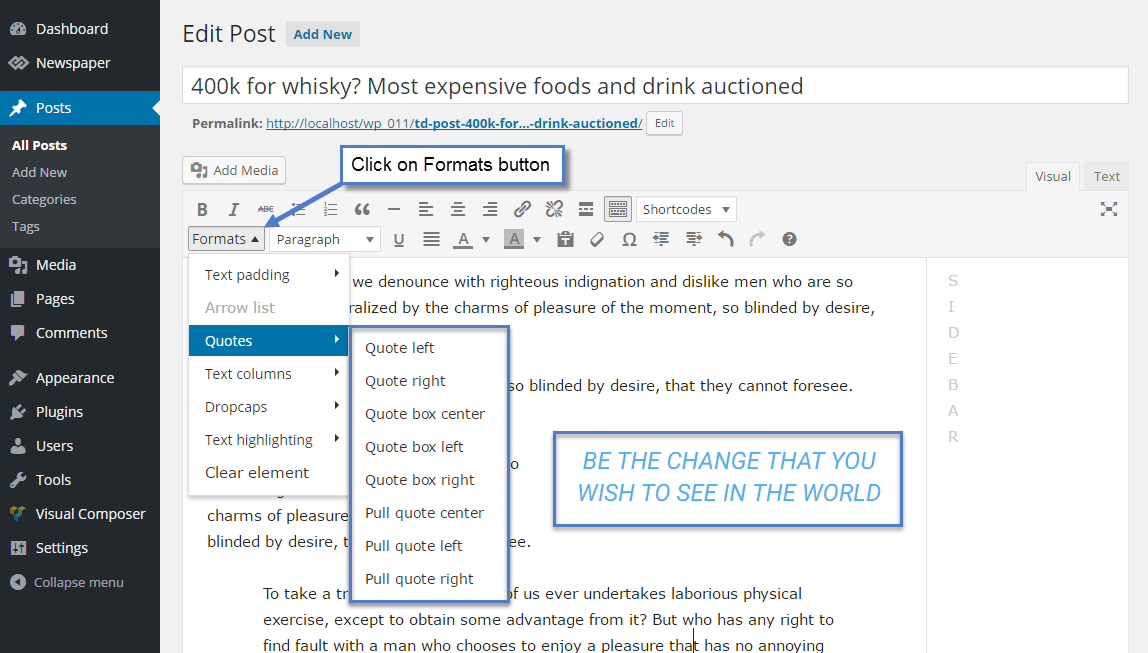
2. To change font settings in Quotes here:

