
- NewspaperWP Rocket and Newspaper Theme: Optimization Guide
- TutorialsFrom WPBakery to tagDiv Composer
- TutorialsOffset Feature
- TutorialsWhat is Ajax preloading?
- TutorialstagDiv Social Counter Tutorial
 Bettina
 Hello!
When you use the special filters you should place the shortcode/element (flex block) in the desired template in order to have effect: https://www.screencast.com/t/26s82FuUvqBw
For example: if you have a category template assigned on all the categories you have ( global template), then it is very useful to use a special filter category – current category in order to display the posts from the current category. In this mood you won’t have the same posts on each category page.
Hope that is more understandable now!
Thank you!
 segnali
 Hello , i have the same problem as in this thread https://forum.tagdiv.com/topic/flexblock-category-filter-not-working/
I did select “Category – Current Category” and excluded the category i don’t want.
But all the categories show the same posts, it does not show posts of that category.
My page https://segnalidiborsa.com/ Menu voice “Autore”
Thanks
-
This reply was modified 4 years by
segnali.
Bettina Hello!
For cloud/PRO templates: you should add the sidebar from tagdiv Composer. Steps:
1. Add 1 row
2. Split into 2 columns( 2/3 + 1/3 )
3. You can add whatever you want into the second column and consider it a sidebar.
Take a look here in this video for example where I build 6 columns: https://www.screencast.com/t/mZ2c5XamTFN
Also, you can add a flex block with one post: https://www.screencast.com/t/lMTepr9Uwc
Let me know the results!
Thank you!
Bettina Hello!
A workaround there could be to use flex block 3 which is similar with Block 17.
You can make the same design from settings:
– https://www.screencast.com/t/HdB2YSlQ
– https://www.screencast.com/t/o5GfhCPrKg3
– fonts and color settings for the titles you can find in the tab Style of the element
Thank you!
Bettina Hello!
A workaround there could be to add a flex block with infinite loading in your homepage like this: https://www.screencast.com/t/bumAjCwVi3c7
Hope that helps you!
Thank you!
 PeteMason
I feel certain I’ll benefit from understanding special filters – everything is so useful. But I don’t even know where to start to understand them – context – who is aiming to do what, where?
The documentation at https://forum.tagdiv.com/flex-block-settings-guide/ only states “Category Filter – Choose a specific category for the block from a drop-down menu containing all the existing categories.” Doesn’t mention the special filters.
I’m mystified. If I select “Current category” – it must know what the current category is – how does it know ? Is it to be used on a page where there is a category posts loop? because if i simply set a category in the Multiple taxonomies filter I get multiple categories.
Be great to get a full explanation.
Thanks!
 sar_news
I have 2 licenses. There are several differences between the versions, and I have some difficult to configure the second license.
1) http://www.salutetoday.info it’s ok
2) http://www.vitadacani.info has problem
First installation has, for example, 25 block shortcodes. Second installation has only 5 block shortcodes.
First installation has 10 Big Grid Flex, 12 Big Grid and 10 Big Grid Full. Second installation has 10 Big Grid Flex, 0 Big Grid, 0 Big Grid Full.
If you want I can send you the screenshots, and the keywords to access to websites.
Thank you very much.
 viaggindia
 Hi Calin,
Thanks for your support, yes it works perfect as i wanted.
However now would like to remain with td_module_flex_1, because i notice a wonderful benefit of this module in google search results, actually lots of my posts become 0 position in search results after i use custom field and td_module_flex_1.
1. https://www.google.it/search?q=viaggi+tribali+in+india&sxsrf=AOaemvIB5em7erpTx0c9bjwyIsgo_olw7g%3A1637662427543&ei=276cYYaxIJL2kwWvrLfwDQ&oq=v&gs_lcp=Cgdnd3Mtd2l6EAEYADIECCMQJzIECCMQJzIECCMQJzIECAAQQzIECAAQQzIECAAQQzILCAAQgAQQsQMQgwEyCAgAELEDEIMBMgsIABCABBCxAxCDATIICAAQgAQQsQNKBAhBGABQAFgAYK4TaABwAngAgAGQAYgBkAGSAQMwLjGYAQCgAQHAAQE&sclient=gws-wiz
Have a nice day,
Kesar – Viaggindia (net4italia on themeforest).
-
This reply was modified 4 years by
viaggindia.
Bettina Hello!
Unfortunately, we haven’t this element. But, we have different blocks which you can set them to display the date and time, the title of the posts, the category, effects/colors on hover, different filters for every page (tags,category,posts), different layouts of blocks : https://www.screencast.com/t/0h5BFtBL7Tgq
Thank you!
 Anamaria
 Hello,
You can set the video Background in the row settings, and you can add in that row flex block 1 and you can customize it with tagDiv Composer, or you can import a block => https://cloud.tagdiv.com/#/load/Blocks
Thank you!
Bettina Hello!
By editing a page with TagDiv Composer you could delete elements but also the row called “Empty column”.
You could try to delete it like this: select the row, press the button delete from your keyboard, then with your mouse select “YES”.
Also you have another option too, check this: https://www.screencast.com/t/pxuOzYIIpcG
In order to add your posts from that tag in the tag page, you need to add the element called “Flex block” or “Posts Loop”. Also, add the tag created to your posts. For example, for flex block choose the filter: Current tag in order to display the posts from the current tag. Also, for the category page, you can use a flex block with the filter: Current category in order to display the posts from the current category. Please check the video: https://www.screencast.com/t/dr5rNIts72lj
Hope that helps you!
Thank you!
Bettina Hello!
If you are referring about the flex blocks, then you should change the way of functioning. So, this means to edit the theme’s files which I do not recommend. Any change you make in the files after update will be overwritten and you have to make the changes again.
Please note that customization is not covered by the support team: https://forum.tagdiv.com/newspaper-theme-support/
For customization and other services you can contact our custom work team here: https://tagdiv.com/premium-customization-services/
Thank you for understanding!
 siobhan110
Hi,
Today, I noticed that all my Flex blocks were no longer working (e.g. on my homepage http://www.thevillage.be), but I managed to redo them all. Then, later, I noticed that in fact, NONE of the posts on my site are loading (e.g. https://www.thevillage.be/the-first-village-baby-eamons-birth/) and that I no longer have a choice of post templates via the theme panel, nor font settings for posts, which I’m sure I used to have.
Have I missed some huge updates to all this? Or is it possible that I’ve done something to mess up everything to do with posts on my site? Thanks for any help.
siobhan110 Very strange things happening with all my posts too. Plus, in the theme panel I seem to be missing lots of the settings I used to have for posts (e.g. different templates, font settings etc). Plus, all my Flex Blocks with posts curated by theme stopped working properly … but after redoing them all, it’s only now that I notice that the issue is likely with the post settings etc.
Following your post with interest!
 iwebuserstudio
https://www.awesomescreenshot.com/video/6090223?key=a8092a12cdc6055262f60f43f6e1bf86
(cursor pointing to name)
Hi,
I set white for author name, however, always turn black after loading. how can I set it to white and no black cover it.
Thanks
viaggindia @Calin, thanks your solution is still working on td_module_flex_1.php, wanted to use that on loop 2, but not able to found on which line i can put the code mentioned in your reply of Mar 27, 2019 at 1:27 pm.
If you can help me where i can put this code ?
So will continue to use loop 2 on my category templates, otherwise i have no other choice (means use of flex 1).
Here you can see that i use flex 1 and code is working (under title) https://www.viaggindia.it/offerte/
here i’m using loop 2 : https://www.viaggindia.it/destinazioni/india/viaggi-nord-india/
but not found where to put the code (i know the file path plugins/td-cloud-library/shortcodes/common/tdb_loop_2.php, but where exactly i have to use the code no).
Thanks for yor help.
 JohanM1228
Hi,
I have a flexblock in the right rail for all article pages on our site with the filter set to only show articles from the current category. However, the articles in the list are from all categories. How do I fix this?
Example: https://money.slickdeals.net/credit-score/free-weekly-credit-reports/
This has articles from the banking, credit cards and points & miles categories.
screenshot: https://drive.google.com/file/d/1H-ouB0oQ-1yh2ljfzH-CEWF2z0dnlQBa/view?usp=sharing
Bettina Hello Mike!
I just see the breadcrumbs are changing, so that’s why I said it is working well.
This is a flex block element and you need to edit the category with TagDiv Composer and change the filter: Current category in order to display the posts from the current category. Also, let the offset field empty with no space, no value : https://www.screencast.com/t/A4fx6DF2
Let me know the results!
Thank you!
Anamaria Hi Giri,
So,if you no longer want to use tagDiv Standard Pack, then please make sure you use cloud templates, for header/footer/category/posts, etc.
Also, you can add in the post, the Flex Block and filter it on Single -> Related by category/tags and more from author => https://i.imgur.com/OVaFnl0.png
Thank you!
 jitendrachrysolite
Hello,
Im using “flex block 4” and added hover effect but the hover effect is not smooth please let me know how I can add “transition-duration” CSS class to make it smooth or is there any other way to do that?
Anamaria Hello,
if I understood correctly, for that you want you can use the block Flex Block, filter it on “Category – Current Category” and you can exclude the category that you want using the sign “-id category” that you want to remove it => https://i.imgur.com/Mejd8gl.png
Hope this helps you!
Thank you!
 bidhi
bidhiHow to add Flexi carousel with auto scroll
 Cosmic Entertaiment®
 Hello Anamaria,
Although the “ad per flex element” is an awesome feature for advertisements (which I will be using), I would like to clarify what particular feature I was referring to. Video advertisements within the video player such as pre-roll, mid-roll, post-roll, ads are actually what I meant. Example: https://codecanyon.net/item/elite-video-player-wordpress-plugin/10496434?irgwc
Also please consider adding a “Video Gallery” feature to the Newspaper theme for maximum customization of your video player. These additions would be DEFINITELY a game changer for your themes! Example: https://wordpress.org/plugins/all-in-one-video-gallery/
Lastly I was wondering if you have or will have an affiliate program for your themes? We would love to become an affiliate for your products…
Best regards,
Matt D.
 complexs1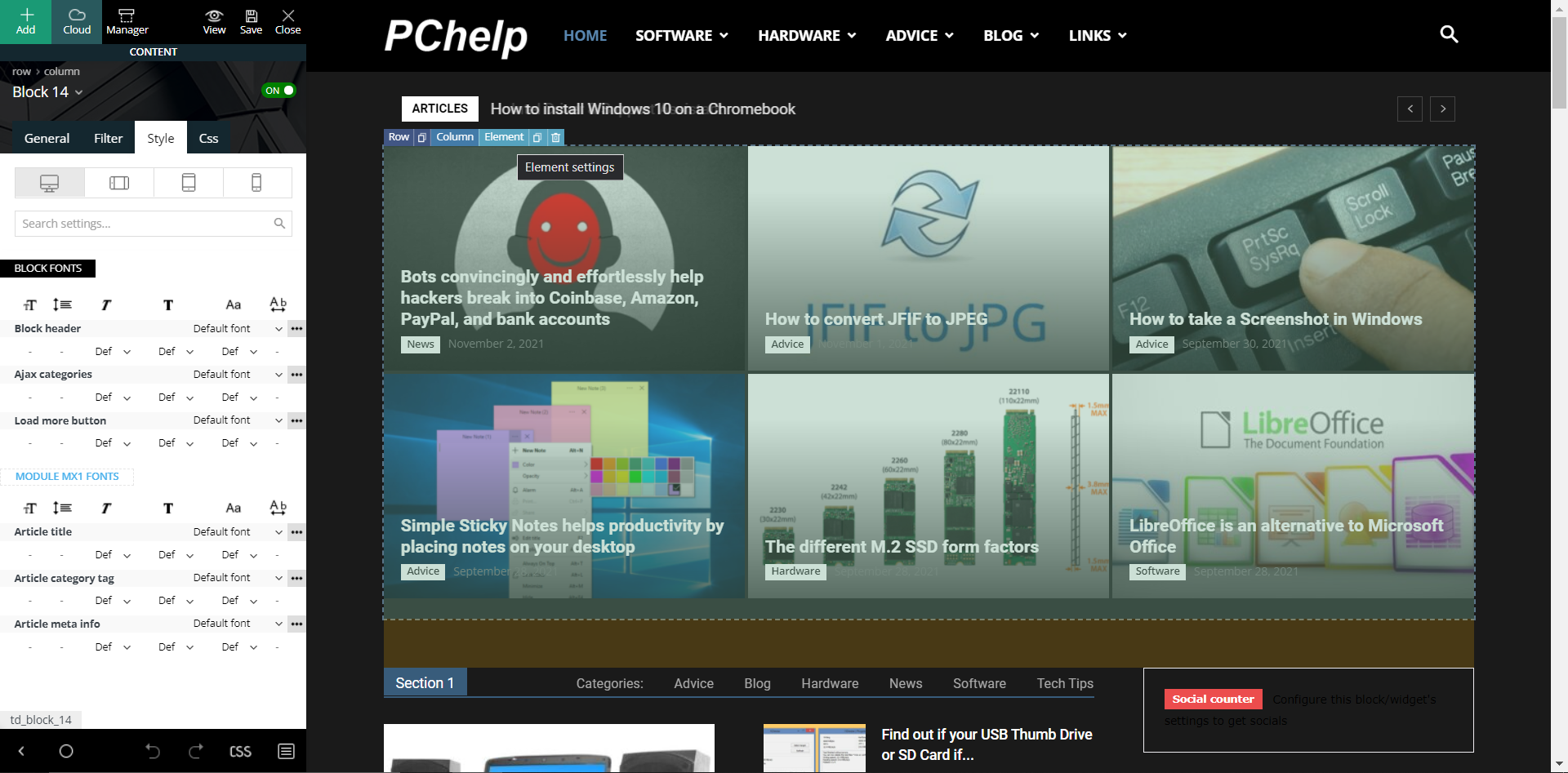
When I click on the “Element setting” for the “Block 14” I see this but no options to change the gradient effect. The prebuilt website is called “Black Version”. I appreciate the reply back but cannot find this setting to remove the gradient effect. The above picture shows exactly what I see when I select “Style” in the “Block 14” “Element setting”. I see nothing nowhere that says “flex blocks”.
-
This reply was modified 4 years by
complexs1.
 rahulroushan
 Does that even answer my question? I already know what you’ve linked to. I’m asking if there is any workaround to stop the extra thumbs for the mobile theme? Like in different Flex Boxes, I can always use the same image size despite different widths etc. of the boxes. The best way could be where you modify the mobile theme blocks and add the option where images are auto-selected from default images. This will require code changes, and you should either consider providing in any update or explain where that code is in the theme files.


