
 Anamaria
 Hello,
The footer template does not have the button to be edited with tagDiv Composer in the backend. Please check this guide:https://forum.tagdiv.com/footer-templates/
If you a Pro Prebuilt Website you can edit with tagDiv Composer the footer template can be edited only from the frontend if it is assigned, edit a page/post template with tagDiv Composer and go down to the footer. => https://www.screencast.com/t/rpfNhfyrF
Thank you!
 jnmcabee
Footer templates don’t give me the option to edit in TagDiv composer? Every other template works but no footers?
 Chris Baird
 Thank you – I kinda figured a round about way about it – i added 5px padding top and bottom and it made it stay visible in the backend . .
However –
Now I’m having issues with the Default Footer Template –
I made edits to it – and saved it – went out – and then went to go back in – but there is no longer the option in the Cloud Templates to edit it via composer?
Any idea why?
Note – it was the default footer pro – and I removed the top row.
I then thought – maybe I could start from scratch and create a new footer in the templates section – so i pulled in a blank template – created a single row – for a single black line at the bottom – and then added a menu . . saved it – went out of it. tried to go back in – and no longer allowed to be edited. not sure why.
Anamaria Hello,
Unfortunately, on the standard footer, you can’t set the width and height so it doesn’t appear in page speed, but you can use a footer template from Cloud Library and this problem will no longer appear in page speed.
Thank you!
Anamaria Hello,
Indeed, I did a test, and it seems to be a problem if you use a standard footer. the only solution for a moment is to use a footer template from the Cloud Library => https://www.youtube.com/watch?v=nE51MfLV7hE
Thank you for your understanding!
 Anonymous
Hi all,
Three monhts ago I added my website to Google Search to index it. But three ago Google return me two urls with Server error (5xx).
https://wifihouse.net/tdb_templates/404-template-magazine-pro/?amp
https://wifihouse.net/tdb_templates/footer-magazine-pro/?amp
When I inspect the url in Google Search return me this… “Tracking is allowed: Yes”
Can you help me please?
Thanks a lot,
Alex
Anamaria Hello,
The footer template does not have the button to be edited with tagDiv Composer in the backend. Please check this guide:https://forum.tagdiv.com/footer-templates/
If you a Pro Prebuilt Website you can edit with tagDiv Composer the footer template can be edited only from the frontend if it is assigned, edit a page/post template with tagDiv Composer and go down to the footer. => https://www.screencast.com/t/rpfNhfyrF
Also, if you have a standard footer template https://www.screencast.com/t/ND7OiqEpPFK ->https://www.screencast.com/t/Z5ZdVYY4wAuP then you need to make changes in Theme Panel -> Footer.
Thank you!
 Krimiwa
 Hi Bettina,
thanks for the answer.
Unfortunately that did not help me.
As I tried to describe:
– I am using Cloud/PRO templates
– I edit them right after downloading
– I hit the save button, close the template
– I want to edit them again, but there´s no way to open them in Tagdiv composer 8teh button does not show)
– the problem occurs only with footers. I can re-edit headers and any other template type.
I would like to use three different footers, each of them on up to 5-10 pages.
To edit each footer individually on page can not be the solution.
Thanks
Anamaria Hello,
I understand you have created a mobile page, please make sure you set it => https://www.screencast.com/t/bYroSq7x8T9, also, the header and footer are taken from the standard ones. All you have to do is edit the mobile page, and in Manager (Website Manager) you need to import or the easy way is to convert the existent footer like this => https://www.screencast.com/t/HrjOBNayd -> https://www.youtube.com/watch?v=SpGkOnJeNZY (03:11 – Mobile Templates & Pages)
Hope this helps you!
Thank you!
 Bettina
 Hello Kristof!
In order to edit a page with TagDiv Composer you need to use a PRO/cloud template and not a default one. If you have a cloud/PRO template, but you can’t edit the footer, then edit your homepage with TagDiv Composer, scroll till footer, click on footer zone and you can edit it.
For more information about this plugin, check this tutorial: https://forum.tagdiv.com/tagdiv-composer-tutorial/
Please take a look here also: https://forum.tagdiv.com/footer-templates/
Thank you!
Krimiwa Hi fabioloutfi, hi vlad,
I hope it´s ok with you that I join the conversation. It seems that I have encountered a similar issue, maybe it helps solving the problem. If not I can open another ticket.
So,here´s the issue:
I can install footer templates from cloud library and can edit them right after downloading.
But later in my list of cloud templates, the “edit with tagdiv composer” option is not displayed if the template type is “footer” – with all other templates it works fine…
In the theme panels´ footer options I selected an edited cloud template.
I don´t have the basic plugin installed (and I don´t want to install it again due to page speed).
cheers, Kristof
-
This reply was modified 5 years by
Krimiwa.
Anamaria Hello,
The footer templates do not have the button to be edited with tagDiv Composer in the backend. Please check this guide:https://forum.tagdiv.com/footer-templates/
If you a Pro Prebuilt Website you can edit with tagDiv Composer the footer template can be edited only from the frontend if it is assigned, edit a page/post template with tagDiv Composer and go down to the footer. => https://www.screencast.com/t/rpfNhfyrF
Also, if you have a standard footer template https://www.screencast.com/t/ND7OiqEpPFK ->https://www.screencast.com/t/Z5ZdVYY4wAuP then you need to make changes in Theme Panel -> Footer.
If this is not what you mean, please provide some screenshots and more details.
Thank you!
Bettina Hello!
In order to edit a page with TagDiv Composer you need to use a PRO/cloud template and not a default one. If you have a cloud/PRO template, but you can’t edit the footer, then edit your homepage with TagDiv Composer, scroll till footer, click on footer zone and you can edit it.
For more information about this plugin, check this tutorial: https://forum.tagdiv.com/tagdiv-composer-tutorial/
Please take a look here also: https://forum.tagdiv.com/footer-templates/
Thank you!
Anamaria Hello,
The footer templates do not have the button to be edited with tagDiv Composer in the backend. Please check this guide:https://forum.tagdiv.com/footer-templates/
If you a Pro Prebuilt Website you can edit with tagDiv Composer the footer template can be edited only from the frontend if it is assigned, edit a page/post template with tagDiv Composer and go down to the footer. => https://www.screencast.com/t/rpfNhfyrF
Also, if you have a standard footer template https://www.screencast.com/t/ND7OiqEpPFK ->https://www.screencast.com/t/Z5ZdVYY4wAuP then you need to make changes in Theme Panel -> Footer.
So, please check what type of footer you have assigned or you can send me a link to your website to investigate the problem.
Thank you!
Anamaria Hello,
The footer templates do not have the button to be edited with tagDiv Composer in the backend. Please check this guide:https://forum.tagdiv.com/footer-templates/
If you a Pro Prebuilt Website you can edit with tagDiv Composer the footer template can be edited only from the frontend if it is assigned, edit a page/post template with tagDiv Composer and go down to the footer. => https://www.screencast.com/t/rpfNhfyrF
And now you can select the text, hit the element and you can edit it => https://we.tl/t-J69lnPYecc
Thank you!
Anamaria Hello,
The footer templates do not have the button to be edited with tagDiv Composer in the backend. Please check this guide:https://forum.tagdiv.com/footer-templates/
If you a Pro Prebuilt Website you can edit with tagDiv Composer the footer template can be edited only from the frontend if it is assigned, edit a page/post template with tagDiv Composer and go down to the footer. => https://www.screencast.com/t/rpfNhfyrF
Also, if you have a standard footer template https://www.screencast.com/t/ND7OiqEpPFK ->https://www.screencast.com/t/Z5ZdVYY4wAuP then you need to make changes in Theme Panel -> Footer.
Hope this helps you!
Thank you!
 Andy81
Hi, I have added a “Client Logos – Dentist” section from Cloud templates to my footer, and I would like the links to be “nofollow”. I cannot find any way to do that but since external footer links are suggested to be nofollow for SEO reasons it would be a nice option to be able to do it.
Anamaria Hello,
Unfortunately, according to the banner, we have an Easter holiday, which means a limited support schedule.
I checked your website and seems you have set display: none; on the footer => https://www.screencast.com/t/9ncdwyZwoE3
I think this problem is caused by using two page builder.
I understand you have created a mobile page, please make sure you set it => https://www.screencast.com/t/bYroSq7x8T9, also, the header and footer are taken from the standard ones. All you have to do is edit the mobile page, and in Manager (Website Manager) you need to import or the easy way is to convert the existent header like this => https://www.screencast.com/t/z924EIRIMr1Y
The same must be done for the footer.
You can find more tutorials on our channel on youtube =>https://www.youtube.com/user/tagdiv which can help you to redesign.
This is a video about Responsive Newspaper Theme, AMP & Mobile Theme, Mobile Pages & Templates -> https://www.youtube.com/watch?v=SpGkOnJeNZY
Hope this helps you!
Thank you!
Anamaria Hello,
Where did you delete the footer? from the page with tagDiv Composer or from the backend?
if you deleted with the composer then go to Cloud Templates, and it should be there, edit it => https://www.screencast.com/t/yquLE1qr, and on the right, you will see the option to Revisions => https://www.screencast.com/t/bjd3BLmstE3J, and restore the version, like this => https://we.tl/t-OSsaNafw7k if delete it from Cloud Templates, then you need to find it in Trash =>https://www.screencast.com/t/AFBXg4Q1
Hope this helps you!
Thank you!
Anamaria Hello,
The footer templates do not have the button to be edited with tagDiv Composer in the backend. Please check this guide:https://forum.tagdiv.com/footer-templates/
If you a Pro Prebuilt Website you can edit with tagDiv Composer the footer template can be edited only from the frontend if it is assigned, edit a page/post template with tagDiv Composer and go down to the footer. => https://www.screencast.com/t/rpfNhfyrF
Also, if you have a standard footer template https://www.screencast.com/t/ND7OiqEpPFK ->https://www.screencast.com/t/Z5ZdVYY4wAuP then you need to make changes in Theme Panel -> Footer.
Hope this helps you!
Thank you!
 byothe
Hello
I am trying to install templates for different pages on my site but it get stuck on “installing”
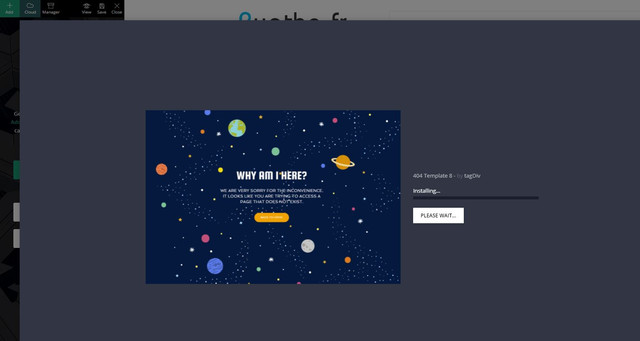
Just before doing that I had no problem to import a new footer template…
 comms
commsHi
> I have imported a single post template via the Cloud Library (Single Post Template – Magazine PRO). Edited the template for the desktop version, all good.
> Imported a header and a footer template and designed them to my liking (Header Magazine Pro Mobile & Footer Magazine Pro Mobile). These are only for the mobile view.
Now, I created a mobile version page of Single Post Template – Magazine PRO using the TagDiv Composer, assigned the two mobile header & footer templates but they are not showing.
If I would be able to edit the Single Post Template – Magazine PRO using the Gutenberg editor and disable the mobile theme settings I believe it would work, as it works for regular pages.
https://i.imgur.com/PFpL5vE.png
How can I disable the mobile theme for a desktop cloud library template?
Please advise.
Thank you
Anamaria Hello,
What type of prebuilt website did you install, pro or standard?
If you have installed a Pro Prebuilt Website, then these settings are for Standard Prebuilt Websites, create without Cloud Templates.
These changes apply for example only when you use the standard header/footer templates (and other standard templates) from Theme Panel (not a cloud template) => https://www.screencast.com/t/4gApdblBu8 -> https://www.screencast.com/t/m1vrJsvHM
You need to edit the page with tagDiv Composer to make changes, like in this is a video https://www.youtube.com/watch?v=HXQQygkCCJ
Hope this helps you!
Thank you!
Anamaria Hello,
These are the methods how you can install the theme
Install via WordPress -> https://forum.tagdiv.com/install-via-wordpress/
Install via FTP -> https://forum.tagdiv.com/install-via-ftp/
If you have installed a Pro Prebuilt Website, then these settings are for Standard Prebuilt Websites, create without Cloud Templates.
These changes apply for example only when you use the standard header/footer templates (and other standard templates) from Theme Panel (not a cloud template) => https://www.screencast.com/t/4gApdblBu8 -> https://www.screencast.com/t/m1vrJsvHM
You need to edit the page with tagDiv Composer to make changes, like in this is a video https://www.youtube.com/watch?v=HXQQygkCCJo<a
If you have other questions you can ask us.
Hope this helps you!
Also, please note that at the moment the Support team is not 24/7 available. We answer the topics from Latest to Newest Monday – Friday from 08:00 AM to 05:00 PM GMT+2
Thank you!
Bettina Hello!
I just explained you above that you are not able to customize so much the mobile theme version. So, unfortunately, you can not move the elements on the page, but what you can do there is to deactivate some elements(show/not): https://www.screencast.com/t/mrZoW8PdiQUm
Also, with mobile theme plugin enabled, you can not change your footer.
The Mobile Theme is a performance optimized theme included in the Newspaper main theme and it loads only for mobile devices. It comes with its own templates for page, post, category, etc so your current templates from the desktop theme will get converted to the mobile theme layout. For more details, please take a look here: https://forum.tagdiv.com/the-mobile-theme/
If you want to use a mobile page, then you need to assign it to your homepage. For more information about this mobile version please take a look in this article: https://tagdiv.com/newspaper-10-3-7-update-brings-customizable-and-fast-mobile-pages/
Please note you should deactivate the Mobile theme plugin if you want to use mobile pages.
Thank you!

