
 Simion C.
 Hi,
@printing3d This method is quite old, there are other ways now. Now it is possible to create category templates with the tagDiv composer (cloud templates)
– https://forum.tagdiv.com/tagdiv-cloud-library-plugin/
– https://cloud.tagdiv.com/#/load/Category
Using a cloud category template, the category description is an element, it can be positioned in any location possible – http://prntscr.com/njvs57 so displaying it just before the footer is a matter of drag and drop – http://prntscr.com/njvsjj
The code solution may still work, but it would be impractical. Since the 9.7 update many theme files were moved in the tagDiv composer plugin – https://tagdiv.com/updating-the-core-of-tagdiv-themes/
So they can’t be modified in a child theme anymore, they have to be modified in the plugin. This means this modification will have to be made after each theme update. The category template files are now here – http://prntscr.com/njvtzb
Let me know if you have more questions.
Thanks
 sujai.chand@gmail.com
How to customized footer if i am add cloud templates footer, home page footer visible but post page footer not visible.
hot resolve the footer
Screen shot: https://ibb.co/ZdG9ywT , https://ibb.co/ZdG9ywT
https://ibb.co/nkYBkD5
 Catalin
 Hi,
If you want to change these strings, you need to do it from the theme core files, according to the next useful screenshot from here -> https://www.screencast.com/t/6aNfG1ijxQ However, the About Us can be changed from the Translations section from here -> https://www.screencast.com/t/OO7QdlitPh Another alternative, in this case, might be to use another Footer, using the Footer page. Please check the documentation from here -> https://forum.tagdiv.com/footer-templates/
Thank you!
 Calin
Calin Hi,
If you want to edit the header you need to use the header manager and set a header from tagDiv Cloud Library.
The footer have some default templates -> https://www.screencast.com/t/mShaMP4H1H if you want to edit the footer with tagDiv Composer you need to set a footer page.
Footer templates -> https://forum.tagdiv.com/footer-templates/
Thank you!
 Tuudi
TuudiHi Guys!
I read previously that after update to 9.7.1 version my files from child theme will stop working. That’s exactly what happened in my website.
The problem what I have currently is how I can manually edit those files:
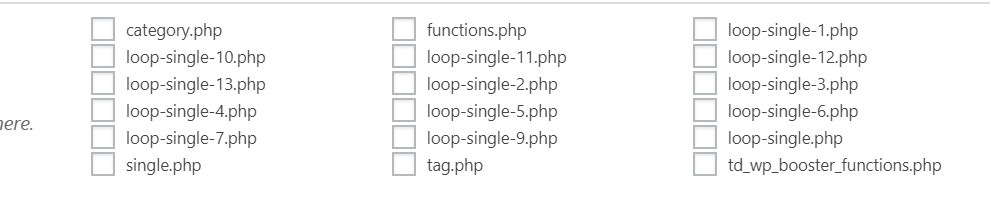
I manually implemented Ratings plugin into my website in every loop-single files:
` <div class="td-post-content">

        <?php echo $td_mod_single->get_content();?>

    </div>

<strong><div><?php if(function_exists('the_ratings')) { the_ratings(); } ?></div></strong>

    <footer>

        <?php echo $td_mod_single->get_post_pagination();?>

        <?php echo $td_mod_single->get_review();?>`
My question is: in which place can I now edit manually post templates?
Thanks a lot!
Calin Hi,
So if I’m right you want the width/stretch of row to be the 1200px, if so then the simplest way to achieve this will be to create or import a full width templates from the cloud library plugin. There is no one single button push. You have to import a post style and set it as the default post template in the theme panel post settings, then you need to import a category template that is full width and set that one as the default category template. The same for tags, author pages etc:
https://forum.tagdiv.com/tagdiv-cloud-library-plugin/ also for pages (stretch row and content ) https://www.screencast.com/t/VfJyFyhB .
Please read similar topics:
-> https://forum.tagdiv.com/topic/force-full-width-on-categories-post-grid/
-> https://forum.tagdiv.com/topic/homepage-full-width-content/
-> https://forum.tagdiv.com/topic/homepage-full-width-content/
Also from what I can see your header and footer is stretch to full width -> https://www.screencast.com/t/8dv4sZzdVu3o -> https://www.screencast.com/t/1nXlJduH7
Thank you for your understanding!
 Bogdan B.
 Hello,
To learn more about footer templates please read this guide: https://forum.tagdiv.com/footer-templates/
Yes the blocks are all different. Why would they be the same? IF they were the same it would not make sense to have multiple versions of the same block. Please read the theme documentation and check this section to see the different block layouts: https://www.screencast.com/t/l41HAGg8
https://demo.tagdiv.com/newspaper/
Thank you!
Catalin Hi,
I recommend you to use the Footer page functionality which allows you to create your own design to your footer section using the TD COmposer. You need to simply create a page which can be added to your footer section. Check the documentation from here -> https://forum.tagdiv.com/footer-templates/
Thank you!
Calin Hi,
So if I’m right you want the width/stretch of row, if so then the simplest way to achieve this will be to create or import a full width templates from the cloud library plugin. There is no one single button push. You have to import a post style and set it as the default post template in the theme panel post settings, then you need to import a category template that is full width and set that one as the default category template. The same for tags, author pages etc:
https://forum.tagdiv.com/tagdiv-cloud-library-plugin/ also for pages (stretch row and content ) https://www.screencast.com/t/i8SQ5eS4 .
Please read similar topics:
-> https://forum.tagdiv.com/topic/force-full-width-on-categories-post-grid/
-> https://forum.tagdiv.com/topic/homepage-full-width-content/
-> https://forum.tagdiv.com/topic/homepage-full-width-content/
Also from what I can see your header and footer is stretch to full width -> https://www.screencast.com/t/8dv4sZzdVu3o -> https://www.screencast.com/t/1nXlJduH7
Thank you for your understanding!
 Support Account
How do I modify the footer layout/content?
I see how to choose various FOOTER TEMPLATES in the theme panel, but am not able to customize them.
Bogdan B. Hello,
In order to create a landing page with no header or footer, ypou need to have the cloud library plugin installed. The header manager will allow you to remove the header. In order to remove the footer, you will have to use this custom page template:
http://cdn.tagdiv.com/wp-content/uploads/2019/02/page-empty.zip
Place it in the main root directory of the theme under wp-content/themes/newspaper
This will create a new page template called “empty page” This will be a page without a footer.
You can change page templates like so: https://forum.tagdiv.com/page-templates-2/
Thank you!
Calin Hi,
That one is the sub-footer, please check our documentation for footer and sub-footer ->
https://www.screencast.com/t/sIhnwRRxG4Si -> https://forum.tagdiv.com/footer-templates/
Thank you!
Simion C. Hi,
Some footer templates come with predefined content, others are blank and will display only the widgets you enter in the footer columns – https://forum.tagdiv.com/footer-templates/
The predefined content in the templates cannot be edited with settings.
The editors picks is a simple block 7 widget sorted by featured, so it will display featured posts only
– https://forum.tagdiv.com/featured-posts-2/
You could select a footer template with empty columns, for example
– http://prntscr.com/n3zqf3
Then enter the same block 7 widget in the first footer column – http://prntscr.com/n3zqwh
Now you can customize it as you want – http://prntscr.com/n3zrua
The popular posts in the second footer column is still a block 7 widget but filtered by popular posts. The widget in the third footer column is a popular category widget
– http://prntscr.com/n3ztjl
If you have more questions let us know.
Thanks
 rickman
Hi,
We have made a Footer page with tagDiv composer and we don’t know how but different types of contents (the YASR -Star rating, Quiz questions, content ads, and other automatic codes-) appear below the Footer only in posts.
We have tried everything: we deactivated all plugins and activating them 1 by 1; checked the Footer page, checked the developers code, checked the templates php to see if there was something wrong…
The only thing we know is that the content that is showing below the footer is content related to automatic plugins or codes that go in the td-post-content (it duplicates):
Here is a post url so you can check it: https://www.flipa.net/viajar-al-pasado-es-posible/
Can you please help us with this?? Any ideas of what is happening?
Thanks a lot!
Tina
Calin Hi,
Please check our documentation for Footer templates ->https://forum.tagdiv.com/footer-templates/
If you want to set a footer page you can create one or you can choose one from tagDiv Cloud Library and edit it.
How to Customize your Footer with Newspaper Theme -> https://tagdiv.com/how-to-create-a-footer-with-newspaper-theme/
Basics: Using the tagDiv Composer Front-End Page Builder ->https://tagdiv.com/tagdiv-composer-page-builder-basics/
Thank you!
Catalin Hi,
Unfortunately, in that case, you need to use another Pos Template which does not display you the featured image, like post template style 5,12 or you can create your own post template using the Cloud Library template. Check the documentation from here -> https://forum.tagdiv.com/footer-templates/ -> https://forum.tagdiv.com/tagdiv-cloud-library-plugin/
Thank you!
Calin Hi,
1. Please check our documentation for footer -> https://forum.tagdiv.com/footer-templates/
Please provide me a link were you do not have the footer or sub-footer on your website.
2. In order to change the color for the links from footer and sub-footer please use this custom css
https://www.screencast.com/t/QAYpAuwU
.td-footer-wrapper .td-footer-info .footer-email-wrap a,

.td-sub-footer-container .td-sub-footer-copy a  {

  color: #fff;

}
3. In Order to change the background color for categorys on modules you can use flex blocks, those have more options -> https://www.screencast.com/t/YMahsrWRhMd -> https://www.screencast.com/t/ekEfe2XQ6r or if you want you can use a custom css
https://www.screencast.com/t/WORbzu7fK
.td-post-category {

    background-color: red;

}
Feel free to change the color.
Thank you!
Calin Hi,
So if I’m right you want the width/stretch of row, if so then the simplest way to achieve this will be to create or import a full width templates from the cloud library plugin. There is no one single button push. You have to import a post style and set it as the default post template in the theme panel post settings, then you need to import a category template that is full width and set that one as the default category template. The same for tags, author pages etc:
https://forum.tagdiv.com/tagdiv-cloud-library-plugin/ also for pages (stretch row and content ) https://www.screencast.com/t/i8SQ5eS4 .
Please read similar topics:
-> https://forum.tagdiv.com/topic/force-full-width-on-categories-post-grid/
-> https://forum.tagdiv.com/topic/homepage-full-width-content/
-> https://forum.tagdiv.com/topic/homepage-full-width-content/
Also from what I can see your header and footer is stretch to full width -> https://www.screencast.com/t/8dv4sZzdVu3o -> https://www.screencast.com/t/1nXlJduH7
Thank you for your understanding!
Catalin Hi,
I have checked your website and I saw that your footer is the same with your homepage what is not right. Please do the following steps in order to have a right footer to your website. Create a new page with your desired style and layout for your footer and then, go to the Theme panel and add this individual page to be a FOOTER page, from here -> https://www.screencast.com/t/6xsQbIGr0F For more information about this functionality, please check the useful guide from here -> https://forum.tagdiv.com/footer-templates/
Thank you!
Simion C. Hi,
With the default footer templates there are a maximum of 3 footer columns
– https://forum.tagdiv.com/footer-templates/
However you can display a page in the footer, instead of the templates. A page that you can create in the composer – http://prntscr.com/n4hihd with the content and layout you want. This way you can have more columns in the footer.
Thanks
 Modo
Modo1. Mobile theme has a very small number of options in admin panel. Which makes it difficult to control the appearance.
2. AMP is not 100% functional. It would be better to add complete AMP support.
3. Design of my website is messed up in safari. (https://modo.pk)
4. It would be great if you can start rating as an option to individual templates it is a great option for posts like recipes. It needs to be added as an option to comments module.
5. It would be great to have post categories covers/thumbnails.
6. Too Many fonts setting based on this and that which makes it difficult to work with. A website should have similar user interface and type settings across the site. I am not sure if someone else needs these kinds of tons of options to go through every time you change your mind to change the font. Maybe grouping them into headings>post headings>category headings>Then body font that should do it. But if it is the requirement some other individuals it is completely okay to leave things as they are.
7. Search cloud custom template is not working. But the built-in template works fine.
8. A smart list custom template is not working because it places it in general templates which don’t work. Plus there is only module to control the smart list setting which is not sufficient. Maybe you need to do something about it, just not sure yet. I will post once something comes in my head.
9. Tooltips: They look great as well they make the site standout best use of the tooltips could be difficult words meanings, external/internal links, and Acronym/Abbreviations.
10. Last but not least. The print: I tested this on a custom template which prints like an entire page. Including social icons, tags, post images (only placeholder space), related posts, and breadcrumbs which is too much.
Here is how it should work: Title + featured image + content + name of the site/URL in the footer. That should be it.
Catalin Hi,
If you want to set up a footer page for your Footer section, you need to set up this page for that section from Theme panel, from here -> https://www.screencast.com/t/T6cRvtSK0 For more information about Footer section, please check the following useful documentation from here -> https://forum.tagdiv.com/footer-templates/ If is not what you mean, please provide more details so I will be able to provide a more accurate response.
Hope this helps!
Thank you!
Simion C. Hi,
Some footer templates come with predefined content, others are blank and will display only the widgets you enter in the footer columns – https://forum.tagdiv.com/footer-templates/
The predefined content in the templates cannot be edited with settings.
However the editors pick is a simple block 7 widget sorted by featured, so it will display featured posts only
– https://forum.tagdiv.com/featured-posts-2/
You could select a footer template with empty columns, for example
– http://prntscr.com/n3zqf3
Then enter the same block 7 widget in the first footer column – http://prntscr.com/n3zqwh
Now you can customize it as you want – http://prntscr.com/n3zrua
The popular posts in the second footer column is still a block 7 widget but filtered by popular posts. The widget in the third footer column is a popular category widget
– http://prntscr.com/n3ztjl
Let me know if you have more questions.
Thanks
Catalin Hi,
Please notice that Editor Picks is just a simple Block 7 which is set up to display the first three posts from Featured category, as you can see here -> https://www.screencast.com/t/JtEOAAPIQC This element is part of our default footer templates. So, if you want to change this category, you need to edit the theme core files where this element is created and modify it from the code. I have another alternative for you which is more simple than the first. You can use a footer page for your Footer section and create your footer layout, using the TD Composer. You can add a block 7 element and sort it by what kind of category you want. Also, if you will use the Cloud Template Library, you can load a Footer Template and edit it with TD Composer as you wish. You can take a closer look at our pre-made Footer Template from here -> https://affiliate.tagdiv.com/#/load/Footers to make an idea. More information about TD Composer and our Cloud Template Library can be found here -> https://forum.tagdiv.com/tagdiv-cloud-library-plugin/ -> https://forum.tagdiv.com/tagdiv-composer-tutorial/
I look forward to helping you!
Hope this helps and let us know how it goes!
Thank you!
 fnandocano
Hi,
I know this might be something very basic, but I already have edited one of the cloud templates for my footer. I went to the ‘pages’ section and didn’t find where to enable it. I also went to the ‘theme panel’ and unlike the header it is not possible to choose which template to enable. I also went to the documentation and searched for a topic in the discussion panel, but didn’t find anything. I feel a little silly, but nonetheless equally frustrating
Thanks
