
- NewsmagHeader styles
- NewsmagHeader ads
- NewsmagtagDiv Composer Tutorial
- NewsmagCategory templates
- NewsmagSmart list ads
- NewsmagWeather Widget
- NewsmagInstagram widget
- NewsmagPage Menu
- NewsmagMain menu
- NewsmagTop bar templates
- NewsmagLogin – how to enable the user registration
- NewsmagLogo & Favicon
- NewsmagFooter templates
- NewsmagCategory grid styles
- NewsmagCategory top post styles
- NewsmagHow category settings work
- NewsmagTheme colors introduction
 Redlemon
Hi,
I may have run into a problem with the header.php file in the most up to date version of your theme (v. 12.7.1). After experiencing images not loading in my front end from Firefox (v. 142.0.1 (64-bit)) I ruled out possible network issues with images fetching (all was well there), and then examined the source code and noticed that the Doctype declaration has an extra space after “html”.
<!Doctype html > instead of <!Doctype html>
I corrected this on my installation and it is running fine again on Firefox now.
The issue I was experiencing was related to the and <span class=”td-module-thumb”> images of posts, both of which would not load on Firefox (regular and private windows). There was no ad blocker running, and there was no Enhanced Tracking Protection either.
I am bringing this to your attention; perhaps you would like to take a look.
Best regards,
Konstantinos.
 Calin
Calin Hi,
Yes, this can be done. For this, you should not use the sticky row option, and you should use the sticky header from the manager – https://i.imgur.com/WorgraN.png https://forum.tagdiv.com/header-manager/. Using this option will have a sticky zone where you can add rows and elements that you want to have on the sticky header.
Thank you!
 cloverjim
Hi,
Does the Rank Math plugin also index Cloud Templates?
I mean, does it index header, footer, homepage templates, and other templates?
If yes, doesn’t that cause problems for the website?
Thank you!
cloverjim Hi,
Can the header menu and the sticky header menu be designed differently? If yes, how?
Thank you!
 scohen
 Hello, thank you!
I added you to my siteground account using the contact@tagdiv.com email. The problem is that even though I keep changing the header on the mobile version to say Better With Age NJ, it keeps reverting back to the “Town Talk” header, but only on the home page. Thank you for taking a look!
Calin Hi,
Most of the time, the problem is from a shortcode that is not compatible with our theme or a plugin conflict; therefore, after you set it with tagDiv Composer and save the page/cloud template, the next time you try to edit it, you’ll get that error.
If is only for one page or a cloud template (it can be on the header or footer, you can change them for tests and see if the problem persists), this is from some settings/shortcodes set on it and it can be fixed using the page revision https://wordpress.com/support/page-post-revisions/
Thank you!
Calin Hi,
Unfortunately, there is no option for the main header to have an offset; only the sticky header has one https://i.imgur.com/IPg1VPa.png
Thank you!
Calin Hi,
1. Edit the homepage using tagDiv Composer – https://i.imgur.com/VtfDXeh.png after that, select the manager and in header, tab uncheck the sticky option for desktop https://i.imgur.com/8nHMYyn.png you can do it for both, desktop and mobile.
2. Select the mobile viewport in tagDiv Composer – https://i.imgur.com/8nHMYyn.png then if the image and mobile element are in the same column, use the layout tab to align them https://i.imgur.com/yg1SbqV.png if are in different columns, but under the same row use the layout tab from the row – https://i.imgur.com/UNv0zTL.png
3. For this, you should set the header you want to use as global, then this will be used on the entire website that is not using an individual header. Right now you are using an individual header on the homepage and a global one on the rest of your website. So when the header is edited as you want just set it as global, this can be done from multiple places, for example, from Composer using the manager – https://i.imgur.com/tBSbwLu.png ot from cloud templates – https://i.imgur.com/ZMHim4S.png or from the theme panel – https://i.imgur.com/FE5hmWR.png
Thank you!
 duck1970
 Hi Calin, you’re a genius, you’ve mastered your craft. I’m just a beginner.
I think I was able to restore everything by following your instructions. It’s now displayed correctly, but I still have three problems that I can’t figure out how to fix. That’s why I’m asking for your help again.
1. I’m still having the same problem I mentioned with the menu bar on the website: when you scroll, the NEWSPAPER tab appears in the menu. How can I remove that tab?
2. I still don’t know how to control the mobile header. I’m doing my best. I’m attaching a photo of the home screen to see if it’s possible to make the first module appear a little larger with the photo I display in the header.
3. How can I customize the header of the other sections?
If you click on the dots on the home screen and go to any of the pages, the header only displays a logo.
How can I replace the current logo and display the same photo I have on the home screen?
ONCE AGAIN THANK YOU FOR EVERYTHING Calin.
https://new.radiomarcabarcelona.com/capture/header-mobil.png
Calin Hi,
This situation appears because you are using the header as an overlay, which means that the page content starts from the top, and the header section comes over it. What you should do is to set the header as the default, not the overlay https://i.imgur.com/xsOcQYV.png, and if you want to have a sticky header, then you can add it from the manager. Here is our guide for header – https://forum.tagdiv.com/header-manager/
Thank you!
Calin Hi,
The issue isn’t with the block itself the problem is that the desktop main header is set as fixed and overlay, which causes it to remain stuck at the top and overlap the content, as shown here: https://i.imgur.com/FBgfNvF.png
Additionally, when you scroll down, the sticky header appears on top of the already fixed main header, creating further overlap.
Recommendation:
Disable the overlay and set the main header to the default setting instead: https://i.imgur.com/cIEVrc3.png
After saving the changes, proceed to edit the sticky header as shown here: https://i.imgur.com/ZpaAd9B.jpeg
Make sure to do the same for the mobile view. Switch to the mobile viewport and then edit the mobile header accordingly: https://i.imgur.com/q1qdqT1.png
 letrud
I’ve used Newspaper as a theme for years, but there is one thing that has always been bugging me, and I’ve tried several times to work out the issue. Finally I’ve given up, so I’m here asking for assistance.
My header covers the top of my page, and whenever I scroll the page scrolls underneath the header. Which is okay.
What’s bugging me, is that the default offset of all pages and posts is at the top of the browser. Beneath the header.
So all images at the top of posts and pages are cut off. Headers are hidden or cut off.
It’s real easy to see here;

Where the arrow points, there should be a title – like this:
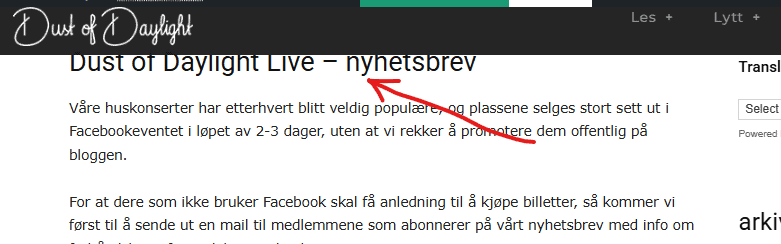
In some browsers you might see half the title, but if I open it in incognito mode, it looks like the first image.
I’m stumped… Header created with TD Composer, I’ve tried putting in empty spaces, extra rows, padding in all thinkable positions, etc. etc. etc. Running v12.7.1, but it’s been this way since I set it up in 2015 (!)
I know the solution is staring me in the face, but I can’t see it, so if anyone has any input – I’ll appreciate it.
duck1970 Hi Calin, I think I’ve more or less managed to create the mobile and header menus, solving points 2 and 3. But I couldn’t remove the NEWSPAPER tab. I did manage to keep the menu fixed without scrolling. However, I don’t know what I’ve done that broke the header. The main block isn’t visible in its entirety; it appears stacked. And I can’t find what I’ve done to get it back to the way it was, which showed the entire block. Can you help me figure out what I need to do to restore the first block? I’ve attached a photo.
Thanks and sorry for this inconvenience.
https://new.radiomarcabarcelona.com/capture/block.png
Calin Hi,
Our system cannot intervene over your custom code, that would mean modifying it and making it no longer work correctly.
As a test you can put the two svgs in a new post, if the ids are identical or the css applies to the same classes then the result will be as in the case try adding the svgs in the header svg section.
If you can please give me a link to the 2 svgs and I will try to help you with them.
Thank you!
 dimitrisv
Hello, are there any plans to support Object Cache (Redis).
The issues that the lack of support is causing are too many to bear.
Also please remove these licensing calls every time we login in to admin. Earlier today your licensing service was down and we could not enter the admin. The errors logged were something like this.
2025/09/09 04:21:22 [error] 5200#5200: *1296 FastCGI sent in stderr: “PHP message: WP_Error Object
(
[errors] => Array
(
[http_request_failed] => Array
(
[0] => cURL error 6: Could not resolve host: cloud.tagdiv.com
)
)
[error_data] => Array
(
)
[additional_data:protected] => Array
(
)
)
; PHP message: PHP Fatal error: Uncaught Error: Object of class WP_Error could not be converted to string in /home/1463218.cloudwaysapps.com/hvwkzdyqhn/public_html/wp-content/plugins/td-composer/includes/tdc_check_domain.php:151
Stack trace:
#0 /home/1463218.cloudwaysapps.com/hvwkzdyqhn/public_html/wp-content/plugins/td-composer/includes/tdc_check_domain.php(108): tdc_check_domain->check_domain()
#1 /home/1463218.cloudwaysapps.com/hvwkzdyqhn/public_html/wp-content/plugins/td-composer/includes/tdc_check_domain.php(41): tdc_check_domain->set_is_domain_active()
#2 /home/1463218.cloudwaysapps.com/hvwkzdyqhn/public_html/wp-content/plugins/td-composer/includes/tdc_check_domain.php(56): tdc_check_domain->__construct()
#3 /home/1463218.cloudwaysapps.com/hvwkzdyqhn/public_html/wp-content/plugins/td-composer/legacy/common/wp_booster/td_js_generator.php(18): tdc_check_domain::init()
#4 /home/1463218.cloudwaysapps.com/hvwkzdyqhn/public_html/wp-includes/class-wp-hook.php(324): td_js_generator()
#5 /home/1463218” while reading response header from upstream, client: 2a02:587:3215:e800:f91d:ec3d:d5eb:60cf, server: wordpress-1463218-5518663.cloudwaysapps.com, request: “GET / HTTP/1.0”, upstream: “fastcgi://unix:/var/run/fpm-hvwkzdyqhn.sock:”, host:
Calin Hello,
1. What you see is the sticky menu, which can be disabled using tagDiv Composer, checking the manager and disabling it https://forum.tagdiv.com/header-manager/ – https://i.imgur.com/ZXBFvVT.png. Do the same for both the desktop and mobile versions.
2. This situation appears because the header from desktop is using a different code nad the mobile header othere code, so those can be different, so what you can do is to use tagDiv Composer to edit the mobile header, edit the homepage, selct the mobile viewport and add a new row under the mobile header (make sure it’s under the header not content) an ad box element https://i.imgur.com/Oz1Ev58.png https://i.imgur.com/dxujNzQ.png
3. You need to have created a menu as in this guide https://forum.tagdiv.com/main-menu/, then use tagDiv Composer, edit the homepage and select the mobile viewport, then select the mobile menu and choose the created menu – https://i.imgur.com/MvNUaM8.png – https://i.imgur.com/KjMQiem.png – https://i.imgur.com/vFflmzh.png
Thank you!
Calin Hi,
Using the mentioned headers is good.
What I cna suggest is to try to see if you can check a mobile emulator on a desktop/laptop and let the browser console open to see if there are any errors or potential permissions policy violations.
Thank you!
 NyttenET
 Hi,
Regarding the CORS headers, we are using the AMP plugin. We have already reviewed the AMP plugin code, and the required headers are included by default.
Sample code from the plugin:
public static function send_cors_headers() {
		$origin        = null;
		$source_origin = null;
		if ( isset( $_SERVER['HTTP_ORIGIN'] ) ) {
			$origin = wp_validate_redirect( wp_sanitize_redirect( esc_url_raw( wp_unslash( $_SERVER['HTTP_ORIGIN'] ) ) ) );
		}
		if ( isset( self::$purged_amp_query_vars['__amp_source_origin'] ) ) {
			$source_origin = wp_validate_redirect( wp_sanitize_redirect( esc_url_raw( self::$purged_amp_query_vars['__amp_source_origin'] ) ) );
		}
		if ( ! $origin ) {
			$origin = $source_origin;
		}
		if ( $origin ) {
			self::send_header( 'Access-Control-Allow-Origin', $origin, [ 'replace' => false ] );
			self::send_header( 'Access-Control-Allow-Credentials', 'true' );
			self::send_header( 'Vary', 'Origin', [ 'replace' => false ] );
		}
		if ( $source_origin ) {
			self::send_header( 'AMP-Access-Control-Allow-Source-Origin', $source_origin );
			self::send_header( 'Access-Control-Expose-Headers', 'AMP-Access-Control-Allow-Source-Origin', [ 'replace' => false ] );
		}
	}
-
This reply was modified 1 year by
NyttenET.
Calin Hello,
Unfortunately, there isn’t a built-in option in the theme to set up a redirect for the login modal. This can only be achieved by modifying the theme files.
There are two files responsible for the modal login form, depending on the template you are using:
For the cloud template:
wp-content/plugins/td-cloud-library/parts/tdb-login-modal.php
For the standard template:
wp-content/plugins/td-composer/legacy/Newspaper/parts/header/td-login-modal.php
You’ll need to modify the relevant file to implement the redirect.
Thank you!
Calin Hi,
You can change the date format from the top bar by using the settings from the theme panel > header > top bar – https://i.imgur.com/d6o2aAt.png
Thank you!
 europeantimes
 Hello TagDiv Support,
I’m reaching out regarding two critical PHP 8.4 compatibility issues in the td-cloud-library plugin bundled with the Newspaper theme. These are causing repeated deprecation warnings and notices on my site (europeantimes.news), even though the site functions partially.
After thorough debugging, I’ve identified the following issues:
—
### 1. **Deprecated Constructor in Mobile_Detect.php**
**File:**
/wp-content/plugins/td-cloud-library/includes/Mobile_Detect.php (line 684)
**Issue:**
The constructor uses implicitly nullable parameters, which is deprecated in PHP 8.4:
`php
function __construct($userAgent = null, $httpHeaders = null)
`
This triggers the following error:
`
PHP Deprecated: Mobile_Detect::__construct(): Implicitly marking parameter $headers as nullable is deprecated, the explicit nullable type must be used instead
`
**Recommended Fix:**
Update the constructor to use explicit nullable types:
`php
function __construct(?string $userAgent = null, ?array $httpHeaders = null)
`
—
### 2. **Text Domain Loaded Too Early**
**Issue:**
The td-cloud-library plugin loads its translations **before the init action**, which triggers a WordPress 6.7+ deprecation notice:
`
PHP Notice: Function _load_textdomain_just_in_time was called incorrectly. Translation loading for the ‘td-cloud-library’ domain was triggered too early.
`
**Cause:**
load_plugin_textdomain() is called directly when the plugin loads, not within the init hook.
**Recommended Fix:**
Move the translation loading to the init action:
`php
add_action(‘init’, function() {
load_plugin_textdomain(‘td-cloud-library’, false, dirname(plugin_basename(__FILE__)) . ‘/languages’);
});
`
—
### Environment
– WordPress: 6.8.2
– PHP: 8.4.6
– Theme: Newspaper (latest version)
– Plugin: td-cloud-library (bundled)
– Redis: Active (Redis Object Cache Pro)
—
### Request
Could you please:
1. Confirm if these issues are known and if a fix is already available?
2. Provide an updated version of td-cloud-library with full PHP 8.4 support?
3. Advise on any known conflicts with Redis or high-traffic automated sites?
These notices are not just noise — they impact performance and indicate deeper compatibility issues.
Thank you for your time and support. I look forward to your response.
Best regards,
europeantimesDear TagDiv Support,
I am contacting you regarding critical compatibility issues between the Newspaper theme and PHP 8.4, which are affecting the performance and stability of my site (europeantimes.news).
After thorough debugging, I have identified two major issues in the td-cloud-library plugin, which is bundled with your theme.
❌ 1. Deprecated Constructor in Mobile_Detect.php
File:
/wp-content/plugins/td-cloud-library/includes/Mobile_Detect.php
Issue:
The constructor uses implicitly nullable parameters, which is deprecated in PHP 8.4:
php
1
function __construct($userAgent = null, $httpHeaders = null)
Error:
1
PHP Deprecated: Mobile_Detect::__construct(): Implicitly marking parameter $headers as nullable is deprecated
Solution:
Update the constructor to use explicit nullable types:
php
1
function __construct(?string $userAgent = null, ?array $httpHeaders = null)
❌ 2. Text Domain Loaded Too Early
Issue:
The td-cloud-library plugin loads its translations before the init hook, which triggers a WordPress deprecation notice:
1
PHP Notice: Function _load_textdomain_just_in_time was called incorrectly. Translation loading for the ‘td-cloud-library’ domain was triggered too early.
Cause:
load_plugin_textdomain() is called directly when the plugin loads, not on the init action.
Solution:
Move the text domain loading to the init hook:
php
1
2
3
add_action(‘init’, function() {
load_plugin_textdomain(‘td-cloud-library’, false, dirname(plugin_basename(__FILE__)) . ‘/languages’);
});
✅ Impact
These issues generate hundreds of PHP notices and deprecation warnings
They contribute to performance degradation
They indicate the plugin is not fully compatible with PHP 8.4
🔧 Request
Please:
Provide an updated version of td-cloud-library with PHP 8.4 support
Or confirm if a fix is already available in a newer release
Advise if there are any known conflicts with Redis, WP-CLI, or high-traffic automated sites
I am using:
WordPress 6.8.2
PHP 8.4.6
Redis Object Cache
Newspaper Theme (latest version)
Thank you for your support. I look forward to your response.
Best regards,
Calin Hi,
Please do not make changes to the theme files, as they will not work as you want and will be lost when the theme is updated. Additionally, it can break the theme.
If you have a code that needs to be set in the header or footer, then you can simply set the code in Newspaper > theme panel > analytics/js codes https://i.imgur.com/DdCRtRE.png
Thank you!
Calin Hi,
The scroll animation can only be achieved using a combination of CSS and JavaScript.
Regarding the theme functionality: it provides both a main header and a sticky header. These are separate, so you can assign different elements to each one. You also have the option to make the main header row sticky. However, if you do this, the same content will appear in both the main and sticky headers (which is expected behavior, as it’s essentially the same header).
To achieve the desired animation effect, you can use JavaScript along with specific CSS classes. By detecting the user’s scroll position, JavaScript can be used to trigger certain actions—like showing or hiding elements based on scroll behavior.
Thank you!
Calin Hi,
The “ Errors at columns elements: 1(models) : 2(dom). The model does not match the content Current state has involved an issue. You could try an UNDO operation (CTRL+Z / CTRL+SHIFT+Z)” most of the time the problem is from a shortcode that is not compatible with our theme or a plugin conflict, therefore after you set it with tagDiv Composer and save the page/cloud template, the next time when you try to edit it, you’ll get that error.
If is only for one page or a cloud template (it can be on the header or footer, you can change them for tests and see if the problem persists), this is from some settings/shortcodes set on it and it can be fixed using the page revision https://wordpress.com/support/page-post-revisions/
Thank you!



