
- NewsmagHeader styles
- NewsmagHeader ads
- NewsmagtagDiv Composer Tutorial
- NewsmagCategory templates
- NewsmagSmart list ads
- NewsmagWeather Widget
- NewsmagInstagram widget
- NewsmagPage Menu
- NewsmagMain menu
- NewsmagTop bar templates
- NewsmagLogin – how to enable the user registration
- NewsmagLogo & Favicon
- NewsmagFooter templates
- NewsmagCategory grid styles
- NewsmagCategory top post styles
- NewsmagHow category settings work
- NewsmagTheme colors introduction
 roc-100
 Hello,
How to customize the content list of the Header shortcode Header categories list?
https://www.screencast.com/t/9dMnsGJ96Qig
Thank you
-
This reply was modified 4 years by
roc-100.
roc-100 Hi there,
1. What is the difference between Mobile Menu and Header shortcode Header categories list?
2. How to edit or change the categories list that appears under the shortcode Head categories list?
https://www.screencast.com/t/9dMnsGJ96Qig
-
This reply was modified 4 years by
 slampty
Ok, the first problem I encounter is that I cannot change the logo, I have updated it on the theme Panel and on the header and nothing. I have searched here on the forums for an answer and I haven´t seen one. Please help. Thanks
 ahmetekinler
 There is no option to change subtitle, breadcrumbs and comment fonts in this field? -> https://prnt.sc/T8zWIMgv9VTm
and here the tema setting -> https://prnt.sc/tcrPBtw9C_LL
Also, the header logo has been changed.
 Amare
AmareHello
I am trying to override the global category settings for a specific category but I am unable to locate the 6 available category header templates
I am trying to follow the available guidance about this from the user documentation and I am in Newspaper > Theme Panel > categories but no luck.
Take a look at the screenshot of what I am able to see from my side.

 Maneek
Hi, I am trying to add an Article Inline ad as per screenshot (https://www.screencast.com/t/WaLGNypc) to all articles.. It is creating a space in the article, but not displaying the ad..
I have used the same code in Header Ad and Sidebar Ad and that works fine..
<div class=”td-all-devices”>
[the_ad id=”123338″]
</div>
This is a non-Adsense ad.. Pls assist.. My site is https://shippingandfreightresource.com
ManeekHi, I am trying to add an Article Inline ad as per screenshot (https://www.screencast.com/t/WaLGNypc) to all articles.. It is creating a space in the article, but not displaying the ad..
I have used the same code in Header Ad and Sidebar Ad and that works fine..
<div class=”td-all-devices”>
[the_ad id=”123338″]
</div>
This is a non-Adsense ad.. Pls assist..
roc-100 Thank you for your prompt reply.
For question 1 – the option SELECT MENU does not appear on the left side of the page as you have just mentioned in your above message or as seen in previous references in the forum. Where can I locate it?
As asked, the name of the element I am using is Header Categories List.
For question 2 – I will wait for your investigation. I have sent an email with my wp-admin and credentials.
Thanks for your support.
roc-100 Thank you for your prompt reply.
For question 1 – the option SELECT MENU does not appear on the left side of the page as you have just mentioned in your above message or as seen in previous references in the forum. Where can I locate it?
As asked, the name of the element I am using is Header Categories List.
Thanks for your support.
roc-100Hi there,
I use The Rimont Newspaper theme. My website address is http://www.leonjoleo.com
I have two challenges:
1. I want to change the current “Hamburger Menu” content display to a specific menu category that I have created.
Looking at past forum support answers, I see that using TagDiv composer > hamburger menu > Header categories list > General under which someone can select menu s/he want to display.
This option select menu does not display on my page.
What displays under the General tab is
a. Show categories list
a. Make inline
c. Align right
d. Horizontal align
The question is of knowing how to edit the hamburger menu content or/and can I make my own, if yes, what are the steps (how)?
2. Different from other pages, my posts or publications on the main page do not allow gaps between paragraphs or lines. Is there any way to make paragraphs be seen as such or at least for the reader to understand that there is a beginning and an end of a paragraph?
Many thanks for your invaluable support
 GP_Media
 When I update the theme I am missing Grid Modules in wp bakery and in the Theme panel setting I am missing Header Styles
 Revive the Netherlands
 Thank you for your answer. Sadly I could not change the selector.
I found an other fix:
 jQuery("#td-header-search-button a").click(function(e) {

   e.stopPropagation();

});
 Calin
Calin Hi,
You can use the same header and footer for desktop and mobile version and this will not affect if you make the pages with the Gutenberg or with the tagDiv Composer.
I see in that documentation that you can also use the shortocde in classic editor, so you can also set it using tagDiv Composer.
Thank you!
 neweuropa
 So i can’t use Gutenberg in pages and use the same mobile header used for mobile articles?
I need to use Gutenberg for GeoDirectory: https://wpgeodirectory.com/docs-v2/integrations/gutenberg
But obviously need the same header on pages as on articles…
Regards
 Anamaria
 Hello,
You need to disable the sign-in/join from Theme Panel -> Mobile Theme -> Header https://i.imgur.com/1XdWker.png
Thank you!
Calin Hi,
If the changes are saved but after page refresh old settings are back, then it is possible that the changes to be delivered from an object cache.
Also, some times can be a plugin conflict, so you can also make a test using only tagdiv plugins.
On this post https://www.rcrwireless.com/qualcomm-analyst-day-2022 you have set a different header per single post template and this is also set on the mobile using the same element from desktop and not the mobile menu (you can edit it using tagDiv Composer) -> https://i.imgur.com/qExqf5r.jpg -> https://i.imgur.com/w00kC00.png
Thank you!
Anamaria Hello,
I saw you have the website under construction, and I can’t check it.
Please try to copy the menu sticky and set it for header menu -> https://www.screencast.com/t/B0wqfT84t
Thank you!
neweuropaI need to use Gutenberg & shortcodes on pages for example: Privacy page, Contact form, Donation form, but when I set page to mobile page… the content doesn’t show on mobile.
How do I set global mobile header & footer, while using Gutenberg & shortcodes on pages?
Regards
 TennisChick
Hi there 🙂 I would like to use the Gourmet Pro header, however, when I removed the existing background image and replaced it, all I see is a blank white space. It is very frustrating, considering I changed none of the settings – just the image, which is the exact same size as the demo. I even tried it as a PNG and a JPG, and I waited for over an hour to see if it was just taking a long time to change. All help with this issue will be greatly appreciated.

 theasiandigest
Yesterday I updated the newspaper theme to the latest version of WordPress. But then, it was working fine. But when today I started working with WordPress, I found that the newspaper theme has been automatically deactivated and twenty-one is directly installed.
When I reactivated the theme it came complete in broken pieces like all the CSS were looking and the header was missing the logo was missing. Some elements are in place while some elements are nowhere seen. Please help me to figure out the problem as there has been no change done from my side and everything was working quite efficiently and fine. Please help me.
Now I tried to do everything best from my side and the theme looks fine but still, I’m trying to figure out why the theme got deactivated and another theme got installed.
 Ryu234
Hi.
I am considering using WPML.
When using WPML Can the search result page be displayed in each language?
Headers, footers, descriptions, etc.?
Thank you for your help.
 stanipro
Hello,
Can the header search bar suggestions be changed to match the search results page? When searching a term in the header the suggestions shown are different than if you use the site search.
We are using the Relevanssi plugin now for indexing the site and would like the header search suggestions to match the regular site search results.
Thanks-
Stan
 Eighthats
Currently, when using the tagdiv editor, changes made to the mobile menu, such as selecting which menu it should use,
do not save when the page is updated.
The mobile menu always pulls up the menu from the main header, even if the menu itself is set to a different menu.
This page is using a different overall header:
https://www.rcrwireless.com/qualcomm-analyst-day-2022
The mobile menu will not retain the settings so we’ve had to leave the horizontal menu layout in place.
I have also been unable to change the CSS on the page. Any changes made are erased when the page is updated.
Theme status page:
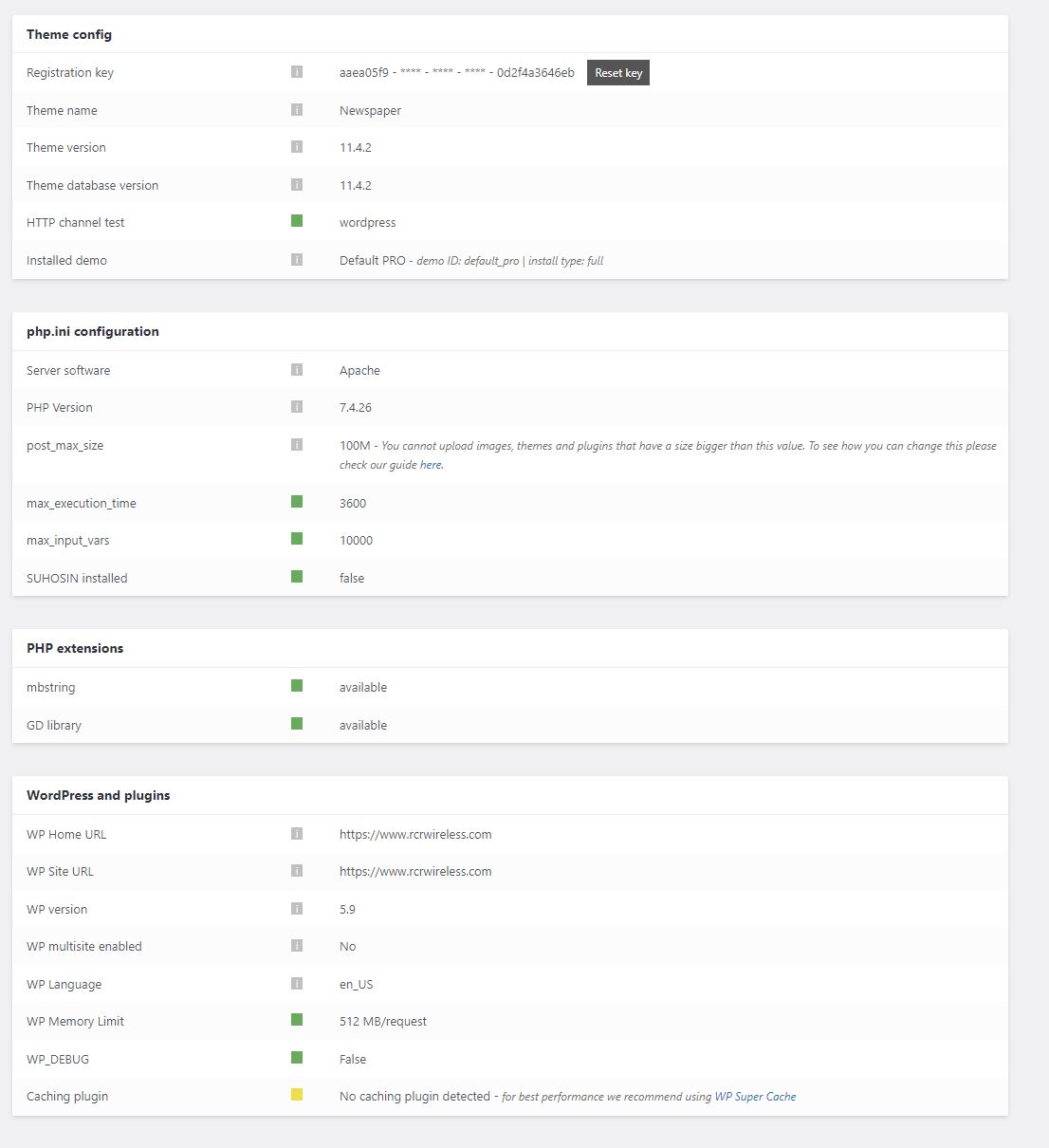
Calin Hi,
You need to get the AdSense ad code from your google ads account and set it in the theme panel => https://i.imgur.com/a6Lt2e1.png -> https://forum.tagdiv.com/newsmag-header-ads/
If is auto ad, then that code need to be set only between < head > and -> https://i.imgur.com/3FNqhsZ.png
Thank you!
Anamaria Hello,
You can add the top bar if you use a header template -> https://www.screencast.com/t/YqnngRKe or you can import a header template that is exactly like header style 1 -> https://i.imgur.com/EAothGC.png -> https://cloud.tagdiv.com/header-template-1/ and this way you can customize each element like logo -> https://forum.tagdiv.com/add-logo-newspaper/ , with tagDiv Composer -> https://forum.tagdiv.com/tagdiv-composer-tutorial/.
Please check this video about how can create a website from scratch https://www.youtube.com/watch?v=SoGQ0d5kIBg
Thank you!



