- NewsmagHeader styles
- NewsmagHeader ads
- NewsmagtagDiv Composer Tutorial
- NewsmagCategory templates
- NewsmagSmart list ads
- NewsmagWeather Widget
- NewsmagInstagram widget
- NewsmagPage Menu
- NewsmagMain menu
- NewsmagTop bar templates
- NewsmagLogin – how to enable the user registration
- NewsmagLogo & Favicon
- NewsmagFooter templates
- NewsmagCategory grid styles
- NewsmagCategory top post styles
- NewsmagHow category settings work
- NewsmagTheme colors introduction
 AndyMoD
Hi,
I’ve installed the theme and imported a prebuilt style without all the content in it. I’ve managed to edit the Cloud Template – Header and Footer Template so have the logo in etc but can’t for the life of me find where to change all the default fonts and colours?
Tried Global in the Header template…

Changed all in Theme Options:

Changed them in the Category Template (include the colour of the tabs):

But…none do anything front end to the content???
https://correspondent.theabbey.co.uk/
Do I edit theme all in the templates and ignore the theme options?, or leave templates alone and just do theme options?
Thanks
Andy
 cavalrydesign
Hi. I’m using the Newspaper theme along with the plugin Web 2.0 Directory plugin Version 2.9.3. The plugin works fine with the Theme until I click on a ‘Tag’ in the directory. When I do that I get the following errors:
Notice: Trying to get property ‘ID’ of non-object in /home/xxxxxxxx/public_html/wp-content/plugins/td-composer/legacy/common/wp_booster/td_wp_booster_functions.php on line 993
Notice: Trying to get property ‘ID’ of non-object in /home/xxxxxxxx/public_html/wp-content/plugins/td-composer/legacy/common/wp_booster/td_page_generator.php on line 703
Notice: Trying to get property ‘ID’ of non-object in /home/xxxxxxxx/public_html/wp-content/plugins/td-composer/legacy/common/wp_booster/td_page_generator.php on line 719
Notice: Trying to get property ‘ID’ of non-object in /home/xxxxxxxx/public_html/wp-content/plugins/td-cloud-library/shortcodes/header/tdb_header_logo.php on line 857
Notice: Trying to get property ‘ID’ of non-object in /home/xxxxxxxx/public_html/wp-content/themes/Newspaper/includes/tagdiv-page-generator.php on line 272
Notice: Trying to get property ‘ID’ of non-object in /home/xxxxxxxx/public_html/wp-content/themes/Newspaper/includes/tagdiv-page-generator.php on line 288
If I change the Theme to Twenty Twenty-One it works fine.
Do you know what might be causing the issue, and how I might be able to fix it?
Thanks
 whoknows
Hi,
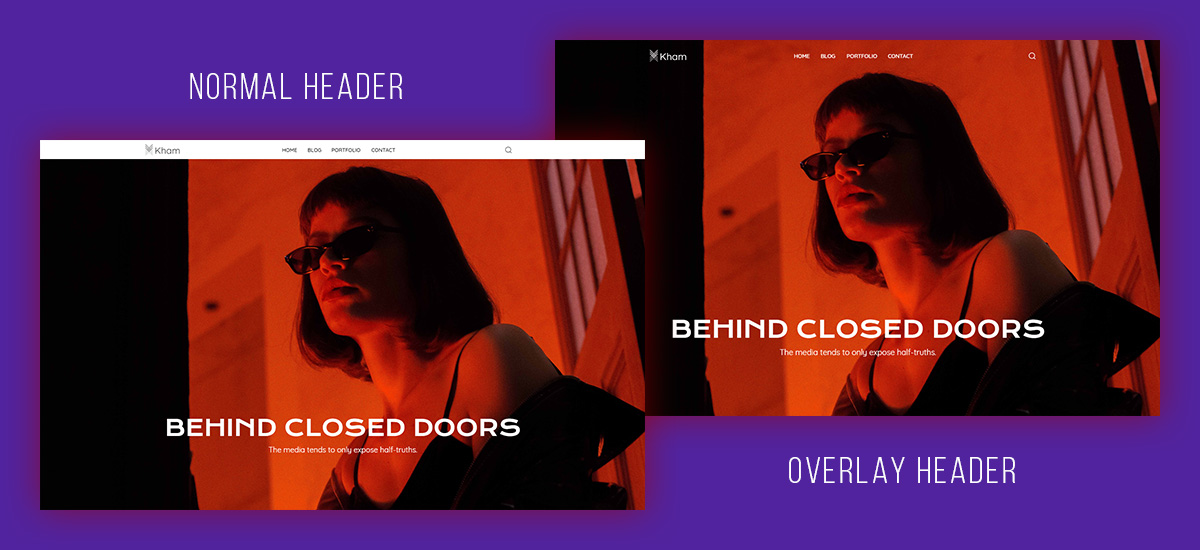
Display = Overlay does not work when I set it in the header zone menu. After saving it still looks like overlay was not set – exactly like this:
https://tagdiv.com/wp-content/uploads/2019/03/What-an-Overlay-Header-looks-like.jpg
 Anamaria
 Hello,
You can create a header template like this -> https://www.screencast.com/t/yOrQi9V0E
Thank you!
 Calin
Calin Hi,
What you can do to remove the elements you can use this css
.td-review .td-review-header,

.td-review .td-review-row-stars,

.td-review-footer .td-review-summary{

display: none;

}
This code need to be set in the theme panel > mobile theme > custom code> css.
To move the review at the top of the post, you’ll need to edit the code, the file is this one wp-content/plugins/td-composer/mobile/single.php and you need to move this code -> https://i.imgur.com/atConWX.png you can set it before, between or after those elements -> https://i.imgur.com/p4WIf8I.png
Unfortunately, those changes can not be saved in a child theme so, when the plugins will be updated those will be removed.
Thank you for your understanding!
Calin Hi,
If you do not want the mobile theme, then try the mobile page, what you need to do is to convert the pages and cloud templates to mobile pages and templates. -> https://prnt.sc/263dbqj -> https://prnt.sc/263ddw9then edit one of theme with tagDiv Composer and convert the header and footer -> https://prnt.sc/263diuk -> https://i.imgur.com/bb811mB.png
I hope this will help.
Calin Hi,
You need to make sure that all your templates are from cloud, this can be done easily if you install a pro demo, but before this please make a full backup. (steps to disable the standard pack).
The second method required some more time, but is better. What you need to do is to import the cloud templates from tagDiv Cloud Library and assign them (replace the homepage, category, author posts, header, footer,.. templates ). After all those are done, disable the tagDiv Standard Pack, if there are no shortcode on website, then you replaced all standard elements, but if there are, the set back that plugin and replace that element.
Also you can make those changes on subdomain and when everything is done just transfer theme on live website.
Thank you!
 arqsanchezmota
Hi, how can I create a header layout like this? I would appreciate your help as I have tried your custom templates but was unsuccessful.
If you could provide me with the code for that style, I would appreciate it.
 unixanet
Hello guys,
when iam trying to add custom code via default wordpress editor, in header.php after <head> and save, i can’t see them after saving and refreshing.
Iam trying to add custom code via them panel, same..
How to add code ?
Can’t integrate Yandex Ad code to my website..
I try to do that via Ads menu in theme panel, but after ading, 0 ads are coming.. i think something was wrong..
 andreaskas
 Another issue i noticed is that although i have sign-in & join disabled from the header options through theme settings, i can still see the login/register link on the header. The same applies for the comments section within a post. Comments are disabled but the comments section is shown without the form.
Calin Hi,
There is added an request to set a button for on of the sticky header form the mobile theme plugin, but for the moment this was not implemented. W hope it will be in the coming updates.
Thank you!
 jamonkey
I’m having an issue with my site. I’ve selected the “Drop menu items in More” in the Header Menu element and it works in the composer but when I save and publish the site isn’t showing the same thing. I though it was slow caching or something but it’s still happening. Any tips?
jamonkey.com
Calin Hi,
Normally, by setting the code in the theme panel should do the job -> https://i.imgur.com/jrthHDD.png in case that this is not working, then you need to set it in the theme files, for this please use our guide from here https://forum.tagdiv.com/topic/how-can-i-get-theme-header-section/
Also setting file in a child theme are usually working only if are from standard pack, but this file I think that can work from composer -https://forum.tagdiv.com/the-child-theme-support-tutorial/
Thank you!
Anamaria Hello,
To make the website full width please check this topic https://forum.tagdiv.com/topic/change-header-and-body/ the same steps can be done for the posts.
Thank you!
 doublesimon
Hi,
I’m very new with newspaper theme. I install black pro, I sucessfully modified the home page and the header, but I cannot modify the single post page (for example add the header even there, etc). If I click on tagdivcomposer in a article it doesn’t work.
Can you help me?
Calin Hi,
You can disable that option from the theme panel > mobile theme > header -> https://i.imgur.com/C3wDZxC.png
You can check some more details in our guide from here -> https://forum.tagdiv.com/the-mobile-theme/
I hope this will help you!
Calin Hi AK Rayhan,
Our theme as a special filed that will set the code between the
Our theme has 3 header files, on in theme, one in tagDiv Composer (wp-content/plugins/td-composer/legacy/Newspaper/header.php) and one in tagDiv Standard Pack (wp-content/plugins/td-standard-pack/Newspaper/header.php), now if the standard pack is enable and you do not use a cloud template then you’ll use the file from standard pack, if this plugin is disable or you use a cloud header from tagDiv Cloud Library then it will be used the file from composer, if both of these are disable will be display the one from theme (wp-content/themes/Newspaper/header.php).
I hope this will help you!
Thank you!
 stephenetta
hi,
i would like to add google ad manager tags with custom php (that echo page id and tags) within a header template AFTER the doctype is declared, but the “Google Analytics and JavaScript Codes” section doesn’t seem to work inside the loop.
could you please advise how i can add? via template? via child header?
thanks!
any tips?
 Suphani
Hi,
we are not using a cloud template for header and footer, but since many years the TagDiv Composer footer on https://mrsbridal.de/
since a theme update, we cannot change the footer widgets anymore, f.e. the recomended post section on the footer is empty and we would like to add some posts here like we had earlier.
how can we edit the no-cloud-footer and no-cloud-header with Newspaper 11.4?
Thank you
 c386
c386Hi,
I’m using the tagDiv Mobile Theme plugin as an easy way to create a mobile version of our site. It covers most of the basics without having to create everything manually, but I’m experiencing problems with the ad configuration.
Under theme panel -> mobile theme -> header ad, I have a Google Adsense code that specifies a 320×100 ad. I have verified the code is correct – if I insert it into a post I see the 320×100 advertisement – yet on the mobile site the header ad is a large square.
What could be going wrong?
 AK Rayhan
Dear Team, I need to find the theme head section for paste the googl ads code. I already add the code in the theme panel ads section but google team did not find it. They reply us to add in the head section. Now how can i find out the them head section.
Thanks
Calin Hi yeahthatskosher,
1. This situation appears because the cloud header that you are using is set as an overlay on content. Please edit the homepage using tagDiv Composer, select an element from header and click on the header -> https://i.imgur.com/vfLelhI.png then change the display option on default -> https://i.imgur.com/7dOQpHA.png
2. In page’s template is the wordpress editor, is only “default” when tagDiv Standard pack is not installed (because is no need for other settings, now those can be done with tagDiv Composer).
A page to be editable with tagDiv Composer this must be made from the start with the theme builder.
If when you edit the page and you can not edit the content, then most probably that content was set is the wordpress editor, That text should be set in tagDiv Composer in a column text or a text with title.
I hope this will help you!
Happy New Year!
Calin Hi,
The live search is disabled only for the header search on mobile search there is no option to disable it -> https://i.imgur.com/xdYMY3C.png
I added on our list and I hope that this option will be add in the coming theme update.
Thank you!
 Mediaguy2021
 I have tried all of whats mentioned in the tread. This should be an easy fix with many people having the same issue.
1. I don’t have in my theme panel:
A. The Drop downs to change or add information Like in The header Panel.
B. I also went and edited the footer copyrite in the theme editor
It still does not work.. I was trying to upload screen shoots here there is no way on here upload.
 yeahthatskosher
I am currently editing pages for my site yeahthatskosher.com here (https://yeahthatskoshercom.bigscoots-staging.com/).
I am seeing two issues:
1) All pages and posts are defaulting so that the main content of the page, particularly the title and whatever is near the top of the content is buried underneath the header and menus. While I was able to manually override this for posts, I was unable to do so for pages.
2) There seems to be no tagdiv template for pages for my site. In the tagdiv editor, I do not have any way to edit the content layout as I do for posts, thus I can’t fix the issue. Also, there’s no way to choose my page’s template is the wordpress editor, only “default”.
Please assist.