
- NewsmagHeader styles
- NewsmagHeader ads
- NewsmagtagDiv Composer Tutorial
- NewsmagCategory templates
- NewsmagSmart list ads
- NewsmagWeather Widget
- NewsmagInstagram widget
- NewsmagPage Menu
- NewsmagMain menu
- NewsmagTop bar templates
- NewsmagLogin – how to enable the user registration
- NewsmagLogo & Favicon
- NewsmagFooter templates
- NewsmagCategory grid styles
- NewsmagCategory top post styles
- NewsmagHow category settings work
- NewsmagTheme colors introduction
 learn4funs
How to place an image with a link attached to the space provided there.
The sections are available empty but have not an option to add image only ads code can be put here.
But I just want to add an Image my own with A link so how can I do that.
My site is
https://www.learn4funs.com/
Please have a look on these screenshot.
https://prnt.sc/q2l3si
 anirbanroy2002
I cannot find where to place the header code provided by adsense for amp auto ads.
 MrAdler
Hi, there. It is kind of an urgent situation. I would like to use the Gaming Demo for my website so I just installed it. And I want to make a multilingual website with WPML, so I have bought the plugin. However, I cannot figure out how to set different fonts for headers of different languages. For instance, Lato for English version of my website and Noto Serif TC for Chinese. I am aware that I can get a header template from the Cloud Library, but the Gaming Demo has not yet provided a header template. So what should I do now? Looking forward to your reply.
 boogieboa
Social media icons are not showing in the top header menu, main menu, and footer area of my website since the latest update. I tried your suggestion below, but it didn’t solve the issue. Can you please take a look?
—-
Please make sure that you use the latest theme version 10.1, also if you used predefined header styles check if the standard pack plugin is active. We could take a look if the problem remains, but you will have to extend the support by using this guide: https://help.market.envato.com/hc/en-us/articles/207886473-Extending-and-Renewing-Item-Support
Thank you! Simion C.
 teknobilimadami
Hi I have problems with Header menu. There is a Header Menu on the Home Page. But there is no header menu on the pages. When I scroll up the page, it appears. But there is no header menu at the beginning of the page. How do we fix this fault?
########
Please review the pictures. I do not know what to do.
Please review the pictures. I do not know what to do.
https://prnt.sc/q29tc3
When I click on the page link there is no header menu …
https://prnt.sc/q29u7d
 mrg
mrg Hey sorry i cant find single post templates and where i choose it exactly? I can only choose custom header and category from CLOUD LIBRARY TEMPLATE dropdown menu.
 arnoldoeloy
 OK,
Can’t I use the same desktop version header? (as in the tablet version)
Did you see the demo site at: https://staging-laiguanatv.kinsta.cloud/ ?
 Grexi126
Hi,
I am wondering why there is duplicate content in the source-code.
Example: view-source:https://zock-around-the-clock.com/conventions/
* portrait */
@media (min-width: 768px) and (max-width: 1018px){
.tdi_66_dc5 .tdb-menu > li > a,
.tdi_66_dc5 .td-subcat-more{
padding: 0 9px;
}.tdi_66_dc5 .tdb-menu > li > a,
.tdi_66_dc5 .td-subcat-more > .tdb-menu-item-text{
font-size:11px !important;line-height:40px !important;
}.tdi_66_dc5 .td-subcat-more{
line-height: 40px;
}
}
</style>
<style>
.tdi_66_dc5 .tdb-menu > li > a:after,
.tdi_66_dc5 .tdb-menu-items-dropdown .td-subcat-more:after{
background-color: ;
bottom: 0px;
}
</style>
<style>
</style><div id=tdi_66_dc5 class=”td_block_inner td-fix-index”><div class=”tdb-menu-items-pulldown tdb-menu-items-pulldown-inactive”><ul id=”menu-unten-kategorien-2″ class=”tdb-block-menu tdb-menu tdb-menu-items-visible”><li class=”menu-item menu-item-type-taxonomy menu-item-object-category menu-item-first tdb-menu-item-button tdb-menu-item tdb-normal-menu menu-item-3809″>News
<li class=”menu-item menu-item-type-taxonomy menu-item-object-category menu-item-has-children tdb-menu-item-button tdb-menu-item tdb-normal-menu menu-item-39093 tdb-menu-item-inactive”>Reviews<i class=”tdb-sub-menu-icon td-icon-down”></i>
<ul class=”sub-menu”>
<li class=”menu-item menu-item-type-taxonomy menu-item-object-category tdb-menu-item tdb-normal-menu menu-item-39094″>Hardware
<li class=”menu-item menu-item-type-taxonomy menu-item-object-category menu-item-has-children tdb-menu-item tdb-normal-menu menu-item-39098 tdb-menu-item-inactive”>Games<i class=”tdb-sub-menu-icon td-icon-right-arrow”></i>
<ul class=”sub-menu”>
<li class=”menu-item menu-item-type-taxonomy menu-item-object-category menu-item-has-children tdb-menu-item tdb-normal-menu menu-item-39099 tdb-menu-item-inactive”>Konsole<i class=”tdb-sub-menu-icon td-icon-right-arrow”></i>
<ul class=”sub-menu”>
<li class=”menu-item menu-item-type-taxonomy menu-item-object-category tdb-menu-item tdb-normal-menu menu-item-39100″>Nintendo
<li class=”menu-item menu-item-type-taxonomy menu-item-object-category tdb-menu-item tdb-normal-menu menu-item-39102″>Playstation
<li class=”menu-item menu-item-type-taxonomy menu-item-object-category tdb-menu-item tdb-normal-menu menu-item-39104″>Xbox
<li class=”menu-item menu-item-type-taxonomy menu-item-object-category tdb-menu-item tdb-normal-menu menu-item-39106″>PC
<li class=”menu-item menu-item-type-taxonomy menu-item-object-category tdb-menu-item-button tdb-menu-item tdb-normal-menu menu-item-39092″>Angebote
<li class=”menu-item menu-item-type-taxonomy menu-item-object-category tdb-menu-item-button tdb-menu-item tdb-normal-menu menu-item-3812″>Messen & Events
<li class=”menu-item menu-item-type-taxonomy menu-item-object-category tdb-menu-item-button tdb-menu-item tdb-normal-menu menu-item-39629″>Tipps
<li class=”menu-item menu-item-type-taxonomy menu-item-object-category tdb-menu-item-button tdb-menu-item tdb-normal-menu menu-item-43010″>Lifestyle
<div class=”tdb-menu-items-dropdown”><div class=”td-subcat-more”><div class=”tdb-menu-item-text”>More</div><i class=”tdb-menu-more-subicon td-icon-down”></i><ul class=”td-pulldown-filter-list”></div></div></div></div></div><div class=”td_block_wrap tdb_header_search tdi_69_68b td-pb-border-top td_block_template_1 tdb-header-align” data-td-block-uid=”tdi_69_68b” >
<style>
Grexi126Hey,
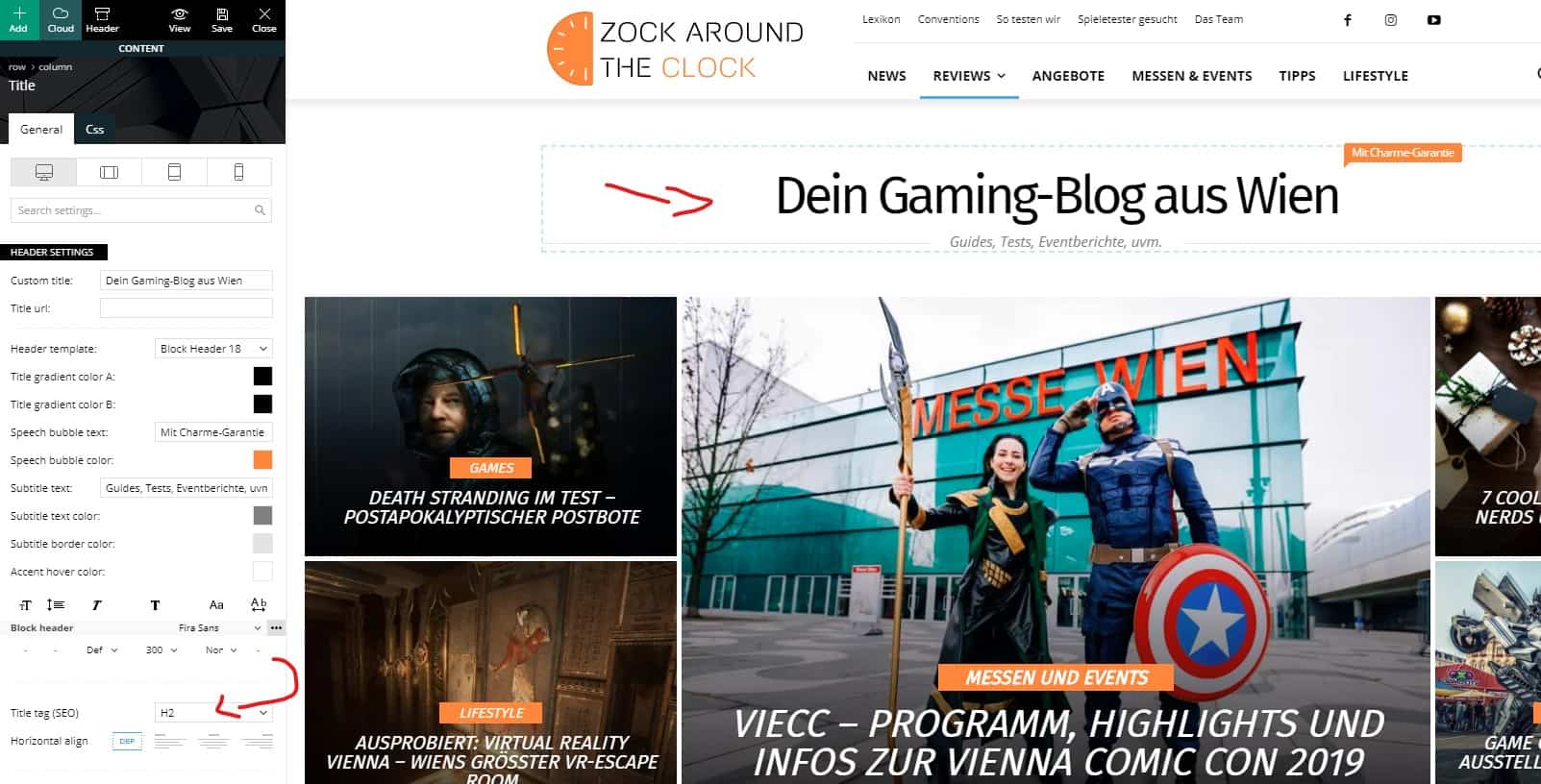
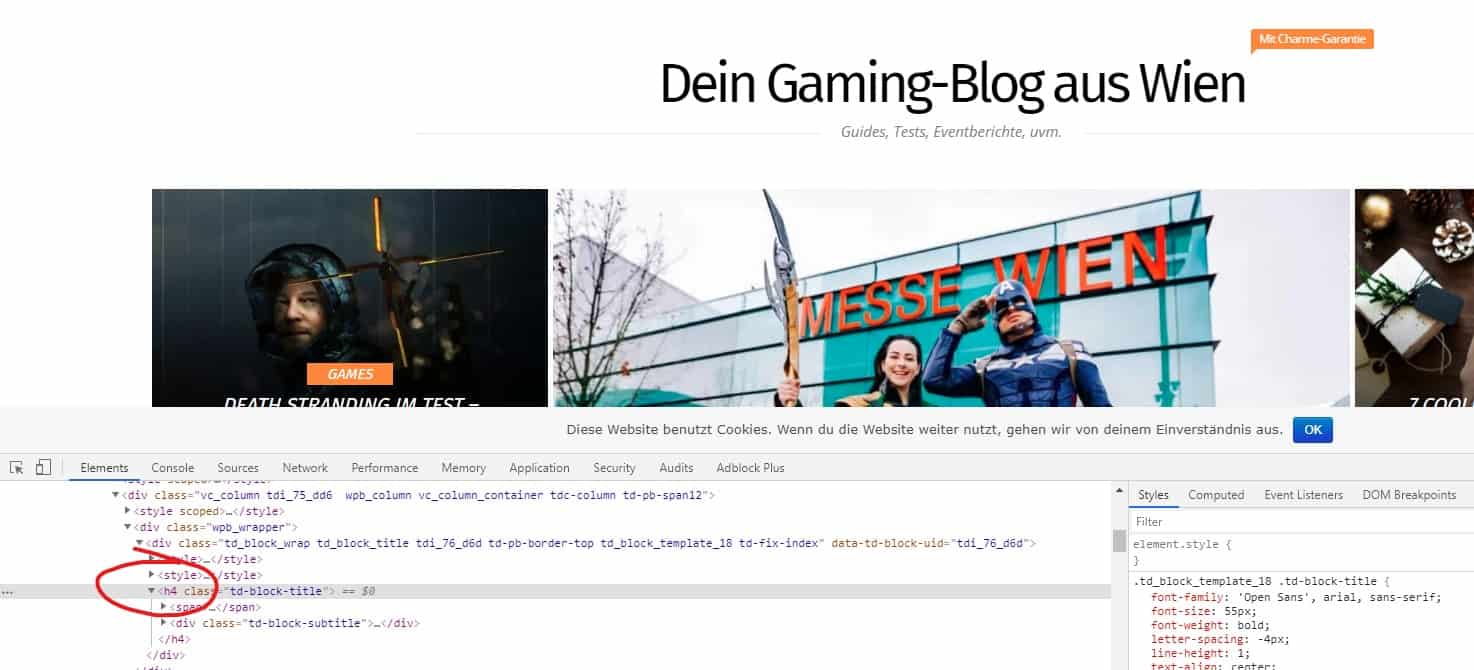
I am using the block header 18 and set the H2 tag in the composer.
Unfortunately it is not recognised as H2 but H4.
Ideas?
https://zock-around-the-clock.com/
and
Cheers,
Gregor
 Vlad S
 Hello !
When using the header manager you have the ability to select which viewport to edit as you can see it here:
So when you want to edit your mobile header you should be able to selet the Mobile Menu and start customizing it with Newspaper Theme.
Thank you !
Vlad S Hello !
When using tagDiv Composer you can see that on the header manager you have the option to select the headers and edit them as you can see it here: https://www.screencast.com/t/QCGnIALpj
Thank you !
 Calin
Calin Hi,
That is way was add this option on header cloud, to can have different H1 per page/posts, also using the Page Builder + Page Title prom page template, this should set your page title as h1 and remove the h1 from logo.
Thank you!
Vlad S Hello !
You can use this custom css code to adjust that: .td-header-wrap .td-drop-down-search {
right: auto;
left: 0;
}
The code must be inserted here: https://www.screencast.com/t/J1Nxw5s5
Thank you !
Vlad S Hello !
Please note that CSS coding is not a part of support team due to our support policy: https://forum.tagdiv.com/newspaper-theme-support/
You can achieve that by creating your custom header using the header manager here: https://forum.tagdiv.com/header-manager/
For custom work inquiries please contact us here: https://tagdiv.com/premium-customization-services/
Thank you for your understanding !
 nobledru
I tried setting the Header and Footer but when I go to save in the theme panel, it doesn’t save and just constantly spins. I need help.
arnoldoeloyHi,
I’m working with a custom header based on Cloud Template. Some rows and columns are not displayed in Phone Version (everything look fine in tablet and desktop but not in phone). What could be happening?
Please check here: https://staging-laiguanatv.kinsta.cloud/
Thanks!
 julian4239
 Also, I used the News Magazine demo to create the page.
When I went to the cloud library, I couldn’t find any News Magazine headers and templates.
Any ideas?
 fregini
We have a website where the category index does not display the category information.
Debugging the code I was able to find that in td_category_template, $current_category_obj is null.
Can you please help me find out where the issue is?
You can see the page here: https://staging-apc.exelab.net/psicoterapia-2/
Thanks.
 novaondanoticias
I have a news site that uses newspaper 9.8 months ago. We now installed version 10.1 and the site crashed 2x
[erro log]
[25-Nov-2019 13:36:31 UTC] PHP Fatal error: Uncaught Error: Undefined constant ‘CRYPTO_AEAD_XCHACHA20POLY1305_IETF_KEYBYTES’ in /home/u238832369/domains/novaondaonline.com.br/public_html/wp-includes/sodium_compat/lib/constants.php:22
Stack trace:
#0 /home/u238832369/domains/novaondaonline.com.br/public_html/wp-includes/sodium_compat/lib/sodium_compat.php(823): require_once()
#1 /home/u238832369/domains/novaondaonline.com.br/public_html/wp-includes/sodium_compat/autoload.php(45): require_once(‘/home/u23883236…’)
#2 /home/u238832369/domains/novaondaonline.com.br/public_html/wp-includes/compat.php(335): require(‘/home/u23883236…’)
#3 /home/u238832369/domains/novaondaonline.com.br/public_html/wp-settings.php(103): require(‘/home/u23883236…’)
#4 /home/u238832369/domains/novaondaonline.com.br/public_html/wp-config.php(79): require_once(‘/home/u23883236…’)
#5 /home/u238832369/domains/novaondaonline.com.br/public_html/wp-load.php(37): require_once(‘/home/u23883236…’)
#6 /home/u238832369/domains/novaondaonline.com.br/public_html/wp-blog-header.php(13) in /home/u238832369/domains/novaondaonline.com.br/public_html/wp-includes/sodium_compat/lib/constants.php on line 22
Server Report
https://www.novaondaonline.com.br/wp-content/uploads/2019/11/Histórico-de-Utilização.pdf
what should I do?
Calin Hi,
Unfortunately this header is not in cloud library, a similar one is Fast News or Nomad, hope this will help you!
Thank you for your understanding!
Calin Hi,
Unfortunately at the moment we are not able to provide a step by step tutorial.
First I recommend you to check documentation, in this way when you’ll star will start to work on your website will be more easy.
-> https://forum.tagdiv.com/newspaper-theme-documentation/
-> https://tagdiv.com/category/documentation/
You’ll see that you do not need to create everything from scratch, you can use demos, header/footer/post/category templates.
Thank you!
Vlad S Hello !
Please be a bit more specific. If you’re talking about the social icons in the tagDiv Composer find a quick fix for them in my latest reply here: https://forum.tagdiv.com/topic/how-can-i-add-telegram-icon-to-social-icons-in-my-header/
Thank you !
Calin Hi,
1. This can be don by setting a background image or color in theme panel -> https://forum.tagdiv.com/background-introduction/ but if you are using a pro demo or cloud elements, then you’ll need to exit these too with tagDiv Composer.
2. These files was moved in standard pack -> wp-content/plugins/td-standard-pack/Newspaper/parts/header/td_top_bar_template_1.php
Thank you!
 ToniLaird
 Hi Calin – I kinda get the idea of having the H1 tag in the header however doesn’t that mean every page gets the same H1 title?
Calin Hi,
I think that you had some individual header set, by removing all header and keep only the global one you removed these individual headers.
This message usually appear when the content was not save in tagDiv Composer, if you’ll save it then the message should disappear.
Thank you!
