
- NewsmagHeader styles
- NewsmagHeader ads
- NewsmagtagDiv Composer Tutorial
- NewsmagCategory templates
- NewsmagSmart list ads
- NewsmagWeather Widget
- NewsmagInstagram widget
- NewsmagPage Menu
- NewsmagMain menu
- NewsmagTop bar templates
- NewsmagLogin – how to enable the user registration
- NewsmagLogo & Favicon
- NewsmagFooter templates
- NewsmagCategory grid styles
- NewsmagCategory top post styles
- NewsmagHow category settings work
- NewsmagTheme colors introduction
 newspatron
Please point out how to verify site ownership using the following methods at newspaper theme.
1 How to and where exactly to verify site ownership using adsense code snippet Screenshot 1
2 How to and where exactly to insert meta tag for verfying site owenership
3 How to and where exaclty to copy adsense code in between the head tags. (tried it in header.php – didnt work)
4 Screenshot of headerphp
The link on how to does not work (404)
https://forum.tagdiv.com/ads-%3Cb%3Eadsense%3C/b%3E-overview/
Please post a comprehensive step by step guide for all recent aspects on implementing google AdSense successfully.
 Anamaria
 Hello,
You need to have the same settings for header menu on the sticky menu as you have for non-sticky menu -> https://i.imgur.com/evCZDiz.png
Thank you!
 mot9n
mot9nHello guys,
We have the header and footer correctly set. BUT
the footer menu shows in both locations
Can you help?
Thanks huys
 dharma3d
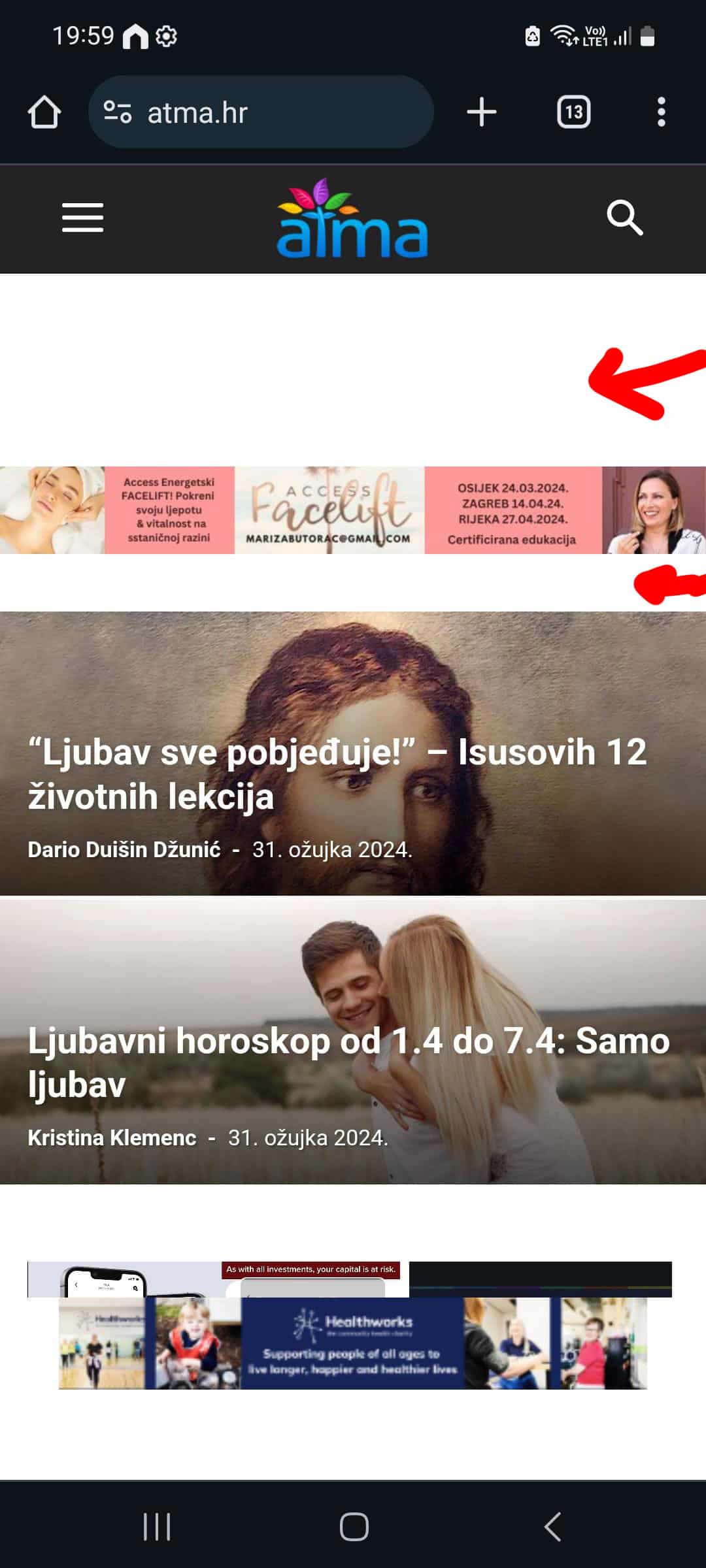
I’m having some undesired spaces in the hearder of my mobile theme, and I’m tryin to resolve that through custom css and that works when I load the mobile theme on desktop but on mobile phone I don’t see those changes.
For example
:
.td-a-rec-id-header_mob {
margin: 0;
}
This is how it looks on mobile phone:
And this is the result is see in DevTools when I switch to mobile view:
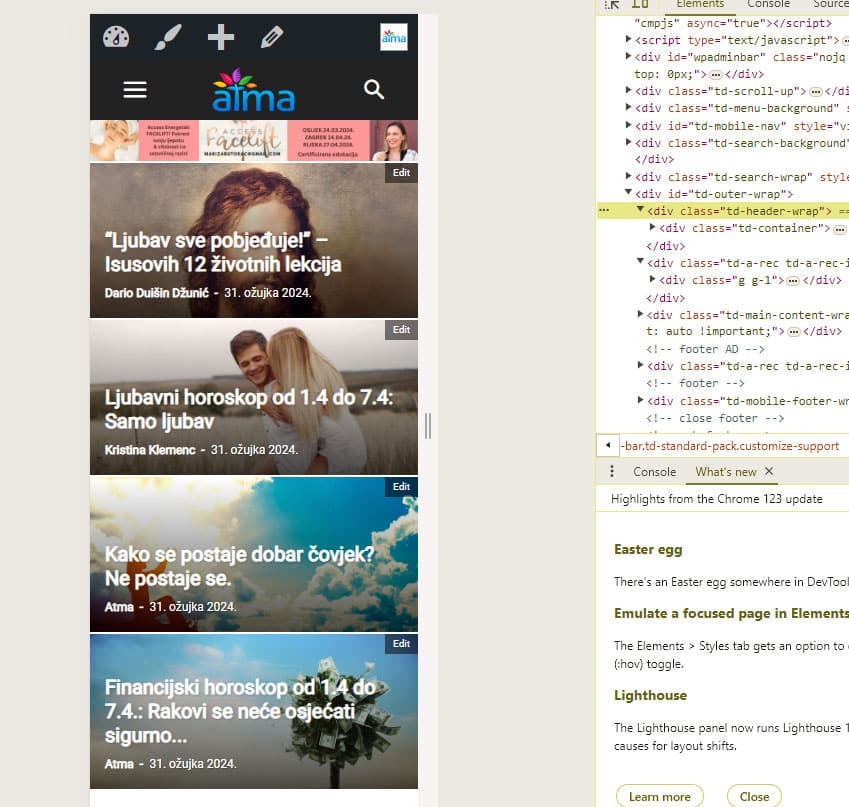
Or is there another way to get rid of those spaces?
Thanks!
My site is https://atma.hr/
 payoneer
There is a problem with the Theme Header, which shows header categories in a column, it should be in a row
Check the https://www.mianmudassar.com/
 DaveKinetic
Hello,
I managed to do this on an old site that is no longer available, bu struggling on a new site. I’m using the Cloud Library Template – Header Template – Default Pro. I’ve added a site background ad image but it’s being covered by the header section. I would like to confine the full header width to the same as the page size which is 1164px.
There is an option for the top menu row under extra to change Row Stretch to default which reduce the black tow at the top. I can#t find anywhere to do the same for the white background section containing the logo, header ad, menu and search bar. Whwn I check extra under the setting for that row, default is already selected.
 newspulpaper
 Hello again,
I’ve successfully managed to reinstall the TagDiv Composer plugin via the theme panel. However, after the reinstallation and reactivation, I’ve encountered a couple of issues. Firstly, the headers and footers appear to have been lost, and secondly, the failure to save the layout persists, as indicated by thebellow error screens.
I am now proceeding with the deactivation of the other plugins as initially advised, and will report back as soon as possible. I hope this step might help resolve the issues, but if not, I may need further assistance to address the persisting problems.


-
This reply was modified 2 years by
newspulpaper. Reason: Fix images
-
This reply was modified 2 years by
 Kari7
Kari7After the last update a blank space appeared on all of the pages of my site and there is an arrow top left that has no link.
I tried everything I could but nothing works.
my website was perfect before the update so I hope you can help me fix it please.
See image attached
Regards,
Kari
 hiteshvarma
i have a newspaper theme runningon Version: 12.6.5. i tried to import some header designs from library. when i import and activate them i see alot of errors in headers please check the Images attached.. Why like this ? Help
https://telugumic.com/wp-content/uploads/2024/03/2.jpg
https://telugumic.com/wp-content/uploads/2024/03/1.jpg
Anamaria Hi,
Do you use a cloud header? Please try using a cloud header and check after -> https://forum.tagdiv.com/header-manager/
Thank you!
Anamaria Hello,
Please let me know what template header you use. If you use a cloud template you can set the margin-left https://i.imgur.com/rduOdRN.png
Thank you!
 drniazi
I’m having trouble rendering the menu button in the header section of the mobile version. The problem is that I can’t move the menu button to the leftmost part. I tried all the settings, as well as stretch row and context. What could be the problem?
Here is screenshot: https://ibb.co/3vJW8dk
 Wriper
 Problem is with calling ads in header or any javascript in header. When header is clean the menu works. It doesnt matter if javascript is called via plugin or manually.
 todaysnifty
 My Header Main Menu is also not working.
Provide detailed article to fix this issue.
Anamaria Hello,
Please provide the link to your website. For mobile please edit with tagDiv Composer, select the viewport on phone, select the header logo and change it => https://i.imgur.com/cR7F0v4.png https://www.youtube.com/watch?v=HXQQygkCCJo -> https://forum.tagdiv.com/add-logo-newspaper/
Thank you!
 padelscene
Hi support team.
I’d like to start reset one of my currently sleeping website padelscene.nl and start posting a lot more content. The website currently is pretty messy when it comes to the original template Classic Blog Pro. Is there any way to reset the site to the original template while keeping the logo, colours etc? Mainly the header and footer are not working as well as the instagram all the way below. Help and tips would be greatly appreciated.
Kind regards,
Faris
 TheNCBeatNow
I am so sick and damn tired of having the same issues with Newspaper theme every single time I change my theme. Why don’t the freaking MOBILE header logo stay what i save it as instead of keep going back to the fucking default theme header. I didn’t pay for this!
 Jason Fernandes
hi, i went to my section on header, there is the slider of post but i want there too add custom css id or class, how can i achieve that
 pkvolattu
Hi,
I recently started using the single post template called ‘Today News Pro.’
After implementing this template, I wanted to ensure that the color of the ‘Site Identity Logo’ matched the theme color.
To achieve this, I uploaded a new logo sized 16 x 16 in ‘Theme Panel > Header > Logo & Favicon > Favicon’ and a larger version sized 512 x 512 in ‘Dashboard > Appearance > Customize > Site Identity.’
While I encountered no issues with the logo displaying correctly on the home page or post page, a problem arose when I clicked ‘Edit with TagDiv Composer’ on the single post page. It displayed my previous site identity in the browser.
Correct:
Incorrect:
I’ve cleared the cache multiple times, but the issue persists.
I suspect that this discrepancy might be the reason why Google has not replaced my old identity in search results.
Could you please advise on the changes I should make to address this issue?
 flygongonpriest
Dear Support,
I want to display custom multiple header adds on my header. The current is just one image. I want to add multiple ad images to display in the header, such as a slider or animation changing images. I want to have several ads showing on the header. Can I please get a custom code to resolve this? It’s really important to me. Please let me know how I can do this. Any help would be highly appreciated.
 saidsin
 I did everything you told me but still with the same error, activate debug mode so you can help me review the error. The requirements are the corrects:
PHP Version 8.0.30
WP Memory Limit 256 MB
PHP Execution Time 0
PHP Max Input Vars 2000
The error shows the mode debug is the following:
Fatal error: Uncaught Error: Call to undefined function iconv() in /home/rubenguajardo/public_html/wp-content/plugins/td-composer/legacy/common/wp_booster/td_util.php:5186 Stack trace: #0 /home/rubenguajardo/public_html/wp-content/plugins/td-composer/legacy/common/wp_booster/td_css_res_compiler.php(58): mb_detect_encoding(‘{“all”:”55″,”po…’) #1 /home/rubenguajardo/public_html/wp-content/plugins/td-composer/legacy/Newspaper/includes/shortcodes/td_block_slide.php(937): td_css_res_compiler->load_settings(‘td_block_slide:…’, Array) #2 /home/rubenguajardo/public_html/wp-content/plugins/td-composer/legacy/common/wp_booster/td_block.php(1630): td_block_slide->get_custom_css() #3 /home/rubenguajardo/public_html/wp-content/plugins/td-composer/legacy/Newspaper/includes/shortcodes/td_block_slide.php(957): td_block->get_block_css() #4 /home/rubenguajardo/public_html/wp-content/plugins/td-composer/legacy/common/wp_booster/td_global_blocks.php(27): td_block_slide->render(Array, ”) #5 /home/rubenguajardo/public_html/wp-includes/shortcodes.php(433): td_global_blocks::proxy_function(Array, ”, ‘td_block_slide’) #6 [internal function]: do_shortcode_tag(Array) #7 /home/rubenguajardo/public_html/wp-includes/shortcodes.php(273): preg_replace_callback(‘/\\[(\\[?)(td_blo…’, ‘do_shortcode_ta…’, ‘[td_block_slide…’) #8 /home/rubenguajardo/public_html/wp-content/plugins/td-composer/includes/tdc_composer_block.php(220): do_shortcode(‘[td_block_slide…’) #9 /home/rubenguajardo/public_html/wp-content/plugins/td-composer/includes/shortcodes/vc_column.php(407): tdc_composer_block->do_shortcode(‘[td_block_slide…’) #10 /home/rubenguajardo/public_html/wp-content/plugins/td-composer/legacy/common/wp_booster/td_global_blocks.php(27): vc_column->render(Array, ‘[td_block_slide…’) #11 /home/rubenguajardo/public_html/wp-includes/shortcodes.php(433): td_global_blocks::proxy_function(”, ‘[td_block_slide…’, ‘vc_column’) #12 [internal function]: do_shortcode_tag(Array) #13 /home/rubenguajardo/public_html/wp-includes/shortcodes.php(273): preg_replace_callback(‘/\\[(\\[?)(vc_col…’, ‘do_shortcode_ta…’, ‘[vc_column][td_…’) #14 /home/rubenguajardo/public_html/wp-content/plugins/td-composer/includes/tdc_composer_block.php(220): do_shortcode(‘[vc_column][td_…’) #15 /home/rubenguajardo/public_html/wp-content/plugins/td-composer/includes/shortcodes/vc_row.php(1177): tdc_composer_block->do_shortcode(‘[vc_column][td_…’) #16 /home/rubenguajardo/public_html/wp-content/plugins/td-composer/legacy/common/wp_booster/td_global_blocks.php(27): vc_row->render(Array, ‘[vc_column][td_…’) #17 /home/rubenguajardo/public_html/wp-includes/shortcodes.php(433): td_global_blocks::proxy_function(Array, ‘[vc_column][td_…’, ‘vc_row’) #18 [internal function]: do_shortcode_tag(Array) #19 /home/rubenguajardo/public_html/wp-includes/shortcodes.php(273): preg_replace_callback(‘/\\[(\\[?)(vc_row…’, ‘do_shortcode_ta…’, ‘[vc_row full_wi…’) #20 /home/rubenguajardo/public_html/wp-content/plugins/td-composer/includes/tdc_composer_block.php(220): do_shortcode(‘[vc_row full_wi…’) #21 /home/rubenguajardo/public_html/wp-content/plugins/td-composer/includes/shortcodes/tdc_zone.php(771): tdc_composer_block->do_shortcode(‘[vc_row full_wi…’) #22 /home/rubenguajardo/public_html/wp-content/plugins/td-composer/legacy/common/wp_booster/td_global_blocks.php(27): tdc_zone->render(Array, ‘[vc_row full_wi…’) #23 /home/rubenguajardo/public_html/wp-includes/shortcodes.php(433): td_global_blocks::proxy_function(Array, ‘[vc_row full_wi…’, ‘tdc_zone’) #24 [internal function]: do_shortcode_tag(Array) #25 /home/rubenguajardo/public_html/wp-includes/shortcodes.php(273): preg_replace_callback(‘/\\[(\\[?)(tdc_zo…’, ‘do_shortcode_ta…’, ‘[tdc_zone type=…’) #26 /home/rubenguajardo/public_html/wp-includes/class-wp-hook.php(324): do_shortcode(‘[tdc_zone type=…’) #27 /home/rubenguajardo/public_html/wp-includes/plugin.php(205): WP_Hook->apply_filters(‘[tdc_zone type=…’, Array) #28 /home/rubenguajardo/public_html/wp-includes/post-template.php(256): apply_filters(‘the_content’, ‘[tdc_zone type=…’) #29 /home/rubenguajardo/public_html/wp-content/plugins/td-standard-pack/Newspaper/page.php(51): the_content() #30 /home/rubenguajardo/public_html/wp-includes/template-loader.php(106): include(‘/home/rubenguaj…’) #31 /home/rubenguajardo/public_html/wp-blog-header.php(19): require_once(‘/home/rubenguaj…’) #32 /home/rubenguajardo/public_html/index.php(22): require(‘/home/rubenguaj…’) #33 {main} thrown in /home/rubenguajardo/public_html/wp-content/plugins/td-composer/legacy/common/wp_booster/td_util.php on line 5186
 sangha9
 Hi,
I need to add meta tag to header section of <head> <head> on home page Not Post page.
Is this possible to use SEO plugin?
 elitechronicle
how do I add code between these two? Is there any place I can add it? The header place in the theme panel already contains my adsense header code. I need to add another header code for functionality purpose. Where can I add it?
 hey
hey
please follow this ulr – https://wmhindia.com/
and at top of the page find the error.
sangha9Hi,
I have a question if I can add the following meta tag to Newspaper theme ANALYTICS/JS Code==>
Google Analytics and Java Script codes ===> Header Script code?
Meta tag:
<head>
<meta property=”og:type” content=”website”>
<meta property=”og:title” content=”title”>
<meta property=”og:description” content=”description”>
<meta property=”og:image” content=”http://www.mysite.com/myimage.jpg”>
<meta property=”og:url” content=”http://www.mysite.com”>
</head>
Thanks,



