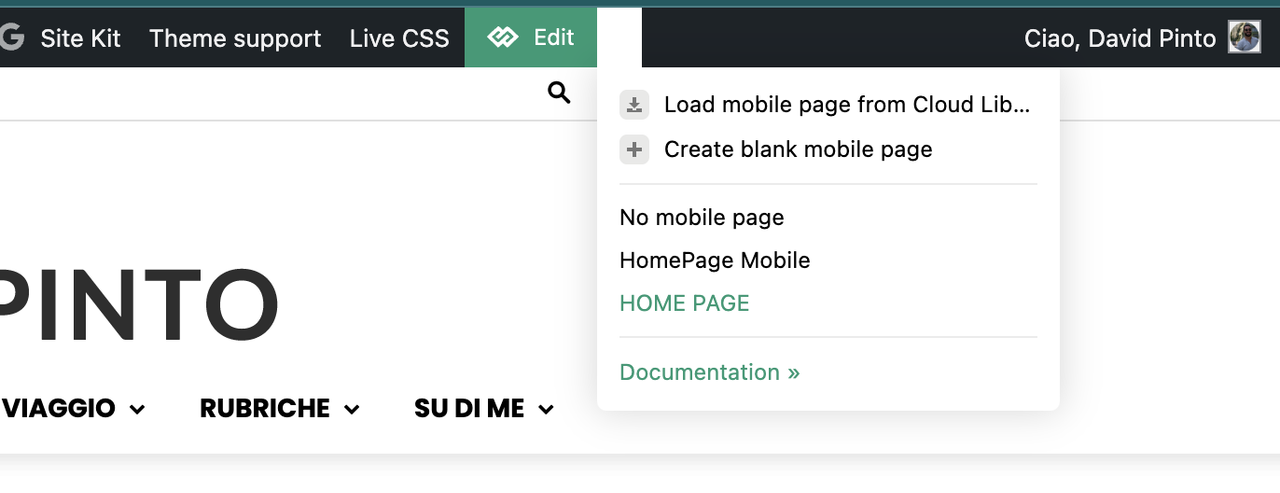
No search results were found in Documentation!
 Bettina
 Hello!
Is this the blog page generated by WordPress? If yes, please create another one.
We recommend using cloud/PRO templates to have the possibility to edit them with the TagDiv Composer, which contains a lot of functions and features; please check our tutorial here: https://forum.tagdiv.com/tagdiv-composer-tutorial/
More documentation about the cloud templates is here:
– https://forum.tagdiv.com/cloud-library-templates/
– https://forum.tagdiv.com/design-post-pages-using-cloud-library-templates/
– https://forum.tagdiv.com/cloud-library-category-templates/
About pages here: https://forum.tagdiv.com/page-templates-2/ -> https://forum.tagdiv.com/homepage-how-to-build-and-set-it/
Check out this video about how to create a website from scratch: https://www.youtube.com/watch?v=SoGQ0d5kIBg
Thank you!
Bettina Hello!
You can install only one demo. You can install the templates and sections of other demos for other pages. You can see all the templates in the Cloud Templates.
Check the guide: https://forum.tagdiv.com/installing-demos/
More documentation about the cloud templates is here:
– https://forum.tagdiv.com/cloud-library-templates/
– https://forum.tagdiv.com/design-post-pages-using-cloud-library-templates/
– https://forum.tagdiv.com/cloud-library-category-templates/
About pages here: https://forum.tagdiv.com/page-templates-2/ -> https://forum.tagdiv.com/homepage-how-to-build-and-set-it/
Check out this video about how to create a website from scratch: https://www.youtube.com/watch?v=SoGQ0d5kIBg
Thank you!
 Anamaria
 Hello,
You have the mobile theme version now, so you can disbale the plugins to check the responsive version.
Using our theme, you can choose from 3 mobile versions
-> mobile responsive => https://www.screencast.com/t/oJ2ShOp47
-> mobile theme plugin => https://forum.tagdiv.com/the-mobile-theme/
-> mobile page => https://tagdiv.com/newspaper-10-3-7-update-brings-customizable-and-fast-mobile-pages/ The option that you need to use.
Suppose you created the mobile pages with tagDiv Composer. In that case, when you install the Mobile Theme plugin, your pages will be overwritten by the plugin (the mobile theme comes with its templates for page, post, category, etc, so your current templates from the desktop theme will get converted to the mobile theme layout, the page content is made without builders in mobile editor => https://www.screencast.com/t/xbgZG8kH also, the options that are provided to edit the mobile theme version are limited (this keeps the things simple)).
This is a video about Responsive Newspaper Theme, AMP & Mobile Theme, Mobile Pages & Templates -> https://www.youtube.com/watch?v=SpGkOnJeNZY.
So, the mobile responsive is what you see when that you select the viewport on phone => https://www.screencast.com/t/matV17hH, so some settings may apply for each viewport(where is the border blue), and others are not(where the border is black).
The mobile page has the mobile templates from Cloud Library => https://www.screencast.com/t/YCcZ8rL8
The Mobile responsive version of the theme and the mobile page editor can be edit with tagDiv Composer, the mobile theme plugin cannot.
For example, you can have the mobile theme plugin activated and use the mobile page/mobile responsive version for the homepage/pages, but for the categories pages/404 page, you can’t use the mobile page/mobile responsive version if you have the mobile theme plugin activated.
So, if you want to design the pages with tagDiv Composer, you can use the mobile page or mobile responsive version.
Thank you!
 thelacivert
Hi,
I am trying to add “Text with Title” block to my homepage but when I click to “edit content” a loading bar keep circling endlessly. I tried with 3 different browsers with no extension or built-in protection.
Bettina Hello!
1. A responsive version of your website looks similar to the desktop version. TagDiv Composer is used to edit the page. Click on the mobile viewport: https://www.screencast.com/t/XDQJedlggSB. You can see your mobile version there and edit or adjust the elements to look better. Make sure you set the row/inner row to display horizontally like this: https://app.screencast.com/pP2VLHMKvhRCq, and you can set up the flex block to display in 1 column on mobile: https://app.screencast.com/6anFiiOrILAVV
2. You should edit the article with the tagDiv Composer and use the shortcode Single Post Subtitle. Or if you mean the caption of the featured image, then there are some settings if you use this shortcode: https://app.screencast.com/kJkfArS2iurHs
More documentation about the cloud templates is here:
– https://forum.tagdiv.com/cloud-library-templates/
– https://forum.tagdiv.com/design-post-pages-using-cloud-library-templates/
– https://forum.tagdiv.com/cloud-library-category-templates/
About pages here: https://forum.tagdiv.com/page-templates-2/ -> https://forum.tagdiv.com/homepage-how-to-build-and-set-it/
Check out this video about how to create a website from scratch: https://www.youtube.com/watch?v=SoGQ0d5kIBg
Thank you!
Bettina Hello!
You need to edit and customize the pages and your header with the tagdiv Composer: https://forum.tagdiv.com/main-menu/
A responsive version of your website looks similar to the desktop version. TagDiv Composer is used to edit the page. Click on the mobile viewport: https://www.screencast.com/t/XDQJedlggSB. You can see your mobile version there and edit or adjust the elements to look better.
More documentation about the cloud templates is here:
– https://forum.tagdiv.com/cloud-library-templates/
– https://forum.tagdiv.com/design-post-pages-using-cloud-library-templates/
– https://forum.tagdiv.com/cloud-library-category-templates/
About pages here: https://forum.tagdiv.com/page-templates-2/ -> https://forum.tagdiv.com/homepage-how-to-build-and-set-it/
Check out this video about how to create a website from scratch: https://www.youtube.com/watch?v=SoGQ0d5kIBg
Thank you!
Bettina Hello!
You need to edit and customize the pages and your header with the tagdiv Composer: https://forum.tagdiv.com/main-menu/
A responsive version of your website looks similar to the desktop version. TagDiv Composer is used to edit the page. Click on the mobile viewport: https://www.screencast.com/t/XDQJedlggSB. You can see your mobile version there and edit or adjust the elements to look better.
More documentation about the cloud templates is here:
– https://forum.tagdiv.com/cloud-library-templates/
– https://forum.tagdiv.com/design-post-pages-using-cloud-library-templates/
– https://forum.tagdiv.com/cloud-library-category-templates/
About pages here: https://forum.tagdiv.com/page-templates-2/ -> https://forum.tagdiv.com/homepage-how-to-build-and-set-it/
Check out this video about how to create a website from scratch: https://www.youtube.com/watch?v=SoGQ0d5kIBg
Thank you!
Bettina Hello!
You didn’t add the menu shortcode, and the needed plugins were not installed or active. Check now.
More documentation about the cloud templates is here:
– https://forum.tagdiv.com/cloud-library-templates/
– https://forum.tagdiv.com/design-post-pages-using-cloud-library-templates/
– https://forum.tagdiv.com/cloud-library-category-templates/
About pages here: https://forum.tagdiv.com/page-templates-2/ -> https://forum.tagdiv.com/homepage-how-to-build-and-set-it/
Check out this video about how to create a website from scratch: https://www.youtube.com/watch?v=SoGQ0d5kIBg
Thank you!
 Ericky
What are the fonts that Cali Sight Homepage uses?
Can you send me a screen shot of fonts tab please? I can’t check because I changed them.
Anamaria Hello,
You have the mobile theme version now, so you can disbale the plugins to check the responsive version.
Using our theme, you can choose from 3 mobile versions
-> mobile responsive => https://www.screencast.com/t/oJ2ShOp47
-> mobile theme plugin => https://forum.tagdiv.com/the-mobile-theme/
-> mobile page => https://tagdiv.com/newspaper-10-3-7-update-brings-customizable-and-fast-mobile-pages/ The option that you need to use.
Suppose you created the mobile pages with tagDiv Composer. In that case, when you install the Mobile Theme plugin, your pages will be overwritten by the plugin (the mobile theme comes with its templates for page, post, category, etc, so your current templates from the desktop theme will get converted to the mobile theme layout, the page content is made without builders in mobile editor => https://www.screencast.com/t/xbgZG8kH also, the options that are provided to edit the mobile theme version are limited (this keeps the things simple)).
This is a video about Responsive Newspaper Theme, AMP & Mobile Theme, Mobile Pages & Templates -> https://www.youtube.com/watch?v=SpGkOnJeNZY.
So, the mobile responsive is what you see when that you select the viewport on phone => https://www.screencast.com/t/matV17hH, so some settings may apply for each viewport(where is the border blue), and others are not(where the border is black).
The mobile page has the mobile templates from Cloud Library => https://www.screencast.com/t/YCcZ8rL8
The Mobile responsive version of the theme and the mobile page editor can be edit with tagDiv Composer, the mobile theme plugin cannot.
For example, you can have the mobile theme plugin activated and use the mobile page/mobile responsive version for the homepage/pages, but for the categories pages/404 page, you can’t use the mobile page/mobile responsive version if you have the mobile theme plugin activated.
So, if you want to design the pages with tagDiv Composer, you can use the mobile page or mobile responsive version.
Thank you!
 mongreanly
Hello,
Could you please help me resolve this issue?
1. When I click to + button of Homepage template, it’s open very slow (more than 10s).
2. I try to import the Momentum Pro template, I encounter a problem. Despite several attempts, the import gets stuck at the end, and I receive the following error message: “One of the images failed to upload.”
Thank you in advance for your assistance!
 SelcukikipinarAricilik
The changes I make on the homepage affect other pages.
The changes I make on other pages also affect the homepage.
Why does this happen?
How can I fix this issue?
Anamaria Hello,
You have the mobile theme version now, so you can disbale the plugins to check the responsive version.
Using our theme, you can choose from 3 mobile versions
-> mobile responsive => https://www.screencast.com/t/oJ2ShOp47
-> mobile theme plugin => https://forum.tagdiv.com/the-mobile-theme/
-> mobile page => https://tagdiv.com/newspaper-10-3-7-update-brings-customizable-and-fast-mobile-pages/ The option that you need to use.
Suppose you created the mobile pages with tagDiv Composer. In that case, when you install the Mobile Theme plugin, your pages will be overwritten by the plugin (the mobile theme comes with its templates for page, post, category, etc, so your current templates from the desktop theme will get converted to the mobile theme layout, the page content is made without builders in mobile editor => https://www.screencast.com/t/xbgZG8kH also, the options that are provided to edit the mobile theme version are limited (this keeps the things simple)).
This is a video about Responsive Newspaper Theme, AMP & Mobile Theme, Mobile Pages & Templates -> https://www.youtube.com/watch?v=SpGkOnJeNZY.
So, the mobile responsive is what you see when that you select the viewport on phone => https://www.screencast.com/t/matV17hH, so some settings may apply for each viewport(where is the border blue), and others are not(where the border is black).
The mobile page has the mobile templates from Cloud Library => https://www.screencast.com/t/YCcZ8rL8
The Mobile responsive version of the theme and the mobile page editor can be edit with tagDiv Composer, the mobile theme plugin cannot.
For example, you can have the mobile theme plugin activated and use the mobile page/mobile responsive version for the homepage/pages, but for the categories pages/404 page, you can’t use the mobile page/mobile responsive version if you have the mobile theme plugin activated.
So, if you want to design the pages with tagDiv Composer, you can use the mobile page or mobile responsive version.
Thank you!
 Guelven
 Problem with homepage on mobile phone
Hi, newspaper theme does not display some areas on mobile, logo, menu and other important areas, only displays most recent articles. any solution?
//Solution
Hello!
Please uninstall the Mobile theme plugin.
Thank you!
 Davidpinto
 Hi Anamaria,
thank you so much, I’ve just now activated the option and now works. But I have a dubt. In the post page i selected the template for mobile and works well, instead in homepage I have this issue, why I don’t see the option specific for mobile template?
It’s correct what i see? This section is only for homepage mobile?
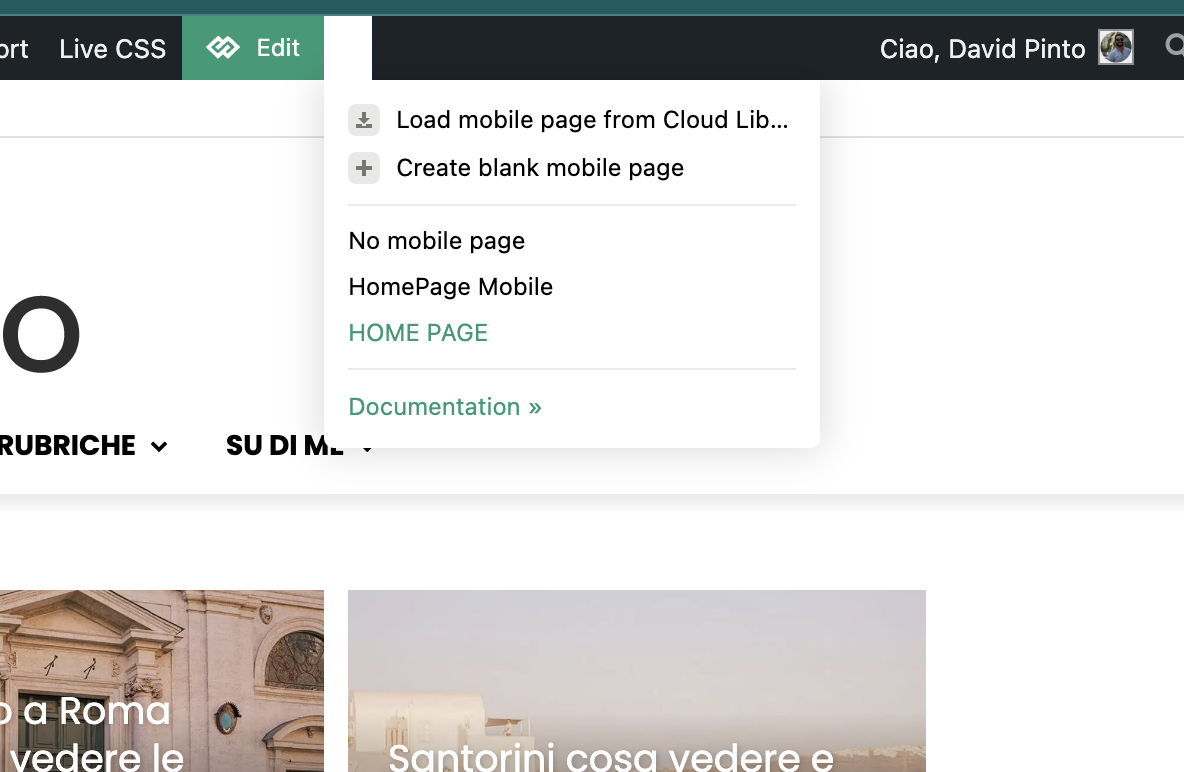
-
This reply was modified 1 year by
Davidpinto.
Davidpinto Ok I think the problem is on the setting…
On home page i saw this:
instead in the post page template is correct this view:
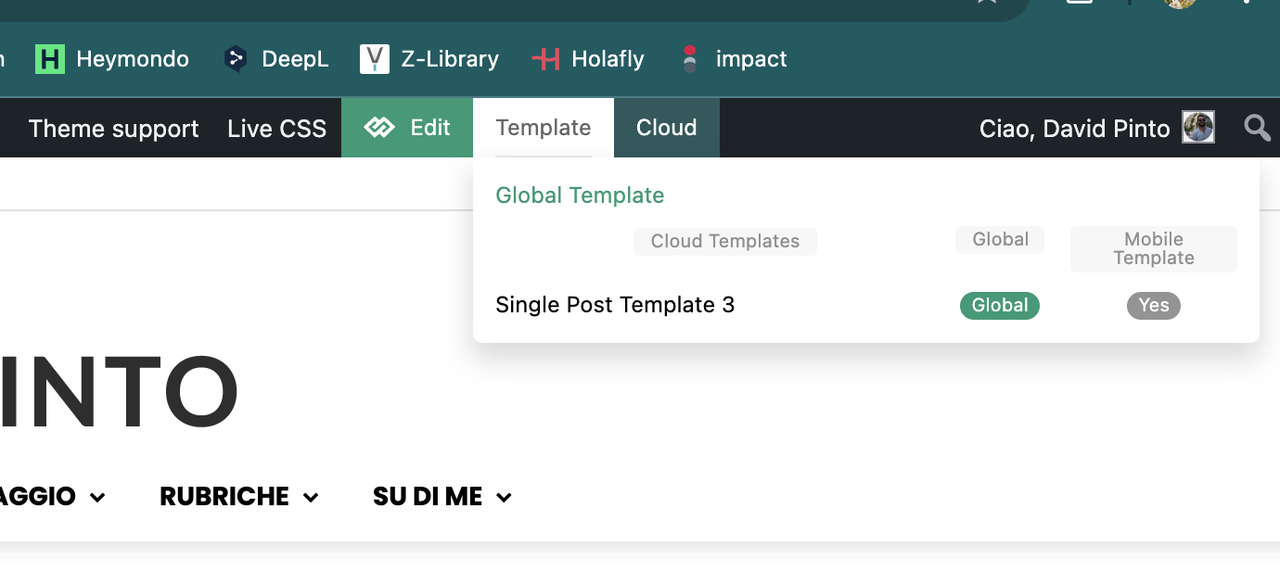
Why in the homepage I have that problem?
Thank you
DavidpintoHi,
I deactivated the plugin AMP and the Mobile Theme, because I would like to create a template only for mobile.
I tried with this guide: https://tagdiv.com/newspaper-10-3-7-update-brings-customizable-and-fast-mobile-pages/
and i created a template HomePage Mobile.
https://i.postimg.cc/PxcpTMwW/Screenshot-2025-02-18-alle-16-56-50.png
But I’m confused, because when i see on iPhone I have the flex verison of desktop mode.
the site is http://www.davidpinto.it
thank you
 muktipolice
 mr.simchris!I’m curious, there are 100 unnecessary posts that need to remove it, and remove this?If you did that, 100 redirects 100 redirected to my homepage? If I do, wouldn’t 100 redirection put pressure on my homepage for Seo Impact?
-
This reply was modified 1 year by
muktipolice.
muktipolice That writer url is exposed to all the posts, so about 400 url pop up as 404 error. Wouldn’t it have a negative impact if I redirect this to the main homepage at 301? I’m worried about that.
Anamaria Hello,
You have the tagdiv mobile theme plugin installed. You can disable the plugin, or you can disable the plugin on the page https://i.imgur.com/fZGN0pf.png
If you want to continue with the tagDiv Mobile theme plugin, then you can edit the homepage using the theme panel settings > mobile theme – https://i.imgur.com/485PT9t.png also using the mobile theme plugin you need to add content for your page in mobile editor, this editor is at the bottom of pages – https://i.imgur.com/dsnoZKP.png the mobile content should be created using only the mobile editor, no builders.
Thank you!
Bettina Hello!
You can set a featured image in Gutenberg, but it does not appear on the homepage. You can edit and customize the homepage with the tagDiv Composer and add a shortcode that displays an image if you like: https://app.screencast.com/Hxtph9QlmOVGl
Thank you!
 jrh
jrhHow do I set a featured image on a page–not a post. Currently, it displays the Old Fashion logo when submitting to social media platforms, even though I deleted it through the theme panel / Logo & Favicon settings.
The
https://johnrhall.com is the URL to the site and homepage.
Thank you
Bettina Hello!
You can use the tagdiv Composer and stretch the row how much you want. We have some settings for the rows and different stretch sizes: https://www.screencast.com/t/bsbB5P97A
More documentation about the cloud templates is here:
– https://forum.tagdiv.com/cloud-library-templates/
– https://forum.tagdiv.com/design-post-pages-using-cloud-library-templates/
– https://forum.tagdiv.com/cloud-library-category-templates/
About pages here: https://forum.tagdiv.com/page-templates-2/ -> https://forum.tagdiv.com/homepage-how-to-build-and-set-it/
Check out this video about how to create a website from scratch: https://www.youtube.com/watch?v=SoGQ0d5kIBg
Thank you!
 valerio88
 Good morning Bettina,
Comments are disabled on Dashboard -> Theme panel -> Template Settings -> Page template -> Disable comments. Also disabled in Dashboard -> Settings -> Discussion but the section keeps appearing on my homepage. Why?
 sjahan
Hi, we have a set number of articles showing on our homepage and then the user has the option of clicking the next page to see additional articles. When you click the pagination, no articles appear. There are a total of 231 pages under “Latest Articles” on the homepage. I can’t see anything wrong on our end. Do you know what’s wrong?
url: fugitive.com