
- NewsmagHomepage – How to build and set it
- NewsmagtagDiv Composer Tutorial
- NewsmagNewsmag documentation
- NewsmagMain menu
- NewsmagLogo & Favicon
- NewsmagPage templates
 Catalin
 Hello kuaza,
I have checked your website and I saw that you are using the Mobile Theme layout. Please notice that this feature will display on the mobile a different homepage compared to the desktop version. For more information about our feature, please consult the documentation here -> https://forum.tagdiv.com/the-mobile-theme/
If is not what you mean, please provide more details so I will be able to provide a more accurate response.
Thanks for your understanding!
 Bogdan B.
 Hello,
This depends on how the homepage gets it;s pagination. In our theme you can paginate any block at will. I assume though you use the pagebuilder + latest articles page template. You can deactivate the latest articles element by changing the page template: http://screencast.com/t/Zn816Klky9
If you still want the latest articles section but we no pagination you can use a visual composer block instead and not have it paginated.
I hope this helps.
Thank you!
Bogdan B. Hello,
Our blocks can display a custom post type but you have no control over a custom taxonomy though. If you want to show a book post type in a block you can simply type in the book type like so: http://screencast.com/t/05CUStsO
If you used our plugin and created the td_book CPT, you can set it from the block settings to display on your homepage: Simply use the ID you gave your CPT (our plugin uses ‘td_book’)
Thank you!
 vasavi
hello forum,
My url is http://www.vasanr.com
I want To highlight 4 specific categories on homepage(Apart from recent postings) but its not supporting at all.
Can you please highlight Health, Beauty, interesting and trending on homepage.
My site is very very slow…Please Check it?
 lewinandreilly
Maybe I’m mis-remembering how to edit our homepage, but I can’t see any page content in Visual Editor. Page loads fine, but am unable to make any edits as no content is loading in Visual Editor.
 meremetia
Hello,
After upgrading to latest version, I cannot achieve the full-stretch row on homepage like this: http://i.imgur.com/IZ88gbg.png
On the Row Settings, I have “Row stretch” -> “Stretch Row” and on “Extra class name field”, I have entered td-homepage-full-row
However the row does not stretch outside of the main page area.
Please help,
Thanks
 pacoesni
Hi Guys, recently I decided to remove my regular ‘latest article’ from the homepage. So I changed the Template: “Page Builder + Latest article + Pagination” to “Page Builder + Title”. The problem I’m facing right now is that I can’t remove the Title of the page from de body. Let me show you an example what I want to remove (looks the arrows):
http://oi65.tinypic.com/acwwsz.jpg
Would you mind to help me?
 seosmart
Hi, i want to know how i can disable pagination from homepage for Newspaper theme. Thanks.
 Sylvester77
Hello guy need some help,
i would like to have the Header image on Posts like this:
http://demo.tagdiv.com/newspaper_blog_travel/2015/12/15/td-post-lake-como-a-true-love-story/
At the moment it´s boxed: http://www.urban.dog/hundegesundheit/vorsorge/floehe-was-du-zum-flohbefall-beim-hund-wissen-solltest/
Can you help me? Also I would like to use the REv Slider on Fullwidth on my homepage header…
Thanks Sylvester
 djalejo
I would like to show the estimate time to read on each post (both homepage and post view). Can anyone recommend a plugin that works with Newspaper for this purpose?
Thank you!
pacoesni Now I get it. I change the homepage template using “pagebuilder + title”, and put some big grid showing my content with infinite scroll. But how I can rip off that disgusting title!? XD Please just that….
-
This reply was modified 10 years by
pacoesni.
pacoesni *above and behind Homepage latest article. sorry for being persistent dudes,
pacoesni Ok. It actually works, but with some glitches..lol…my bad…is because I was trying to use the Page Builder Content on above and behind the Homepage Latest Article….the code you give me works great but I’m unable to add content above and behind Page Builder Content.
-
This reply was modified 10 years by
 4Musky
 Hi,
Many thanks for your reply.
I tried your suggestions without success I’m afraid.
The main issue is that I cannot insert a paragraph break into my posts.
http://animal-welfare.org/famous-vegan-celebrities-woody-harrelson/
Please note that I normally make a post in OPEN OFFICE and then copy/paste into NOTEPAD .txt
Do you think that this is causing an issue?
If so, please can you suggest a workaround?
Also, I’ve just checked my homepage on my laptop and it looks corrupted.
http://animal-welfare.org/
Do you think this could be a hosting issue?
Many thanks
 okgo87
Hello,
I am linking a screenshot of one error coming from one your js files.
Uncaught TypeError: Cannot read property ‘top’ of undefined(anonymous function) @ tagdiv_theme.min.js?a8e95d:251
It is probably referred to this row located at 251: “k.content_top=k.content_jquery_obj.offset().top”
Whenever I scroll through the page its error counter keeps on growing and growing. I’ve never modified this file.
Link
You can check the console by inspecting my website http://okpronostico.it/blog2/
Hope you’ll find a solution.
Thank you!
 BurakBt
Hi,
I want to do front page with my custom page but I can not do anything beacuse, No front page displays in my setting section.
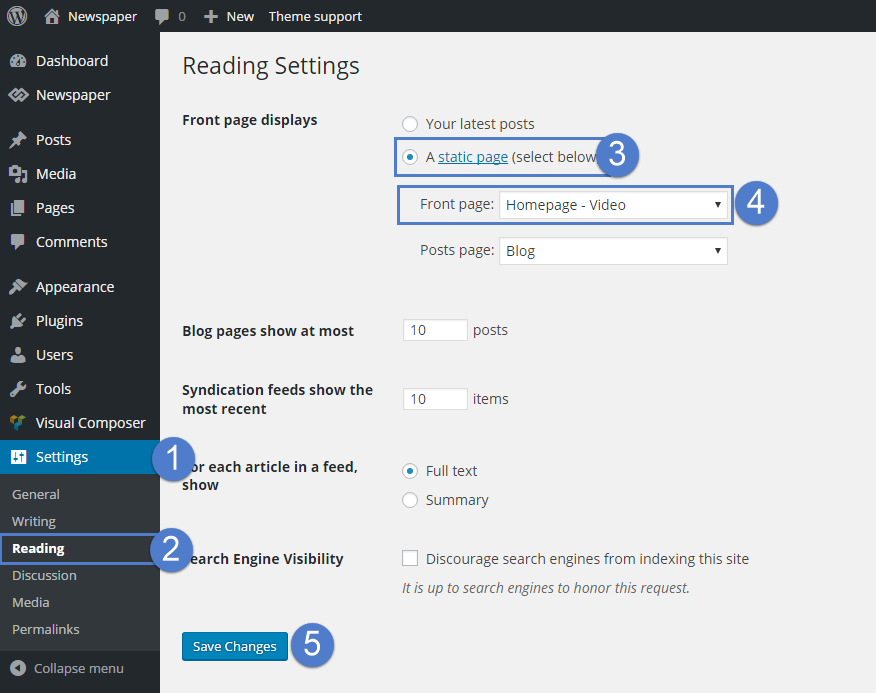
Bogdan B. Hello,
The mobile theme will convert your desktop homepage to a predefined one. Please read this guide to learn more about the mobile theme features: https://forum.tagdiv.com/the-mobile-theme/ If you do not want to use the mobile theme, you can disable the plugin and use the responsive version of our theme.
Thank you!
pacoesniHi Guys, I’m very satisfied with my Newsmag 3.1, hoping you add new features soon. I was thinking to put the Homepage Latest Article above Page Builder Content, just like Slashgear.com does. Is that possible?. How?…
Cheers,
 Tyler Smith
I just updated to the latest wordpress and latest Newspaper update, and my homepage is broken. I can’t even see my admin bar on top when on my homepage. However if i go to something on the menu, it is just fine. How do i fix this?
 charlottefive
The Visual Composer for my home page won’t load when I go to edit it. I just get a spinning black circle that will never actually load, so I can’t actually change the homepage of my website. Everything seems to be up to date. Any help is appreciated.
 David L
 Hi, Brian here.
Yes the site works with vanilla 7.3 and the sidebar is fine.
However: I’m trying to get a child theme working and every time I turn the child theme on the homepage messes up and the sidebar disappears.
Here’s what I’ve done:
Folder called: Newspaper-7_3-IC-Child
style.css
/*

 Theme Name:     Newspaper 7.3 Israellycool Child Theme

 Theme URI:      https://themeforest.net/item/newspaper/5489609?s_rank=1

 Description:    Newspaper 7.3 Israellycool Child Theme

 Author:         Brian of London

 Author URI:     http://www.israellycool.com

 Template:       Newspaper

 Version:        7.3 [corresponds to theme version 7.3]

*/
functions.php
<?php

// Added by Brian of London BoL 2016-07-20

// Updated 2016-08-18 to try to rework after 7.3

// switched from old method of child theme loading

// "Note that the previous method was to import the parent theme stylesheet using @import:

// this is no longer best practice, as it increases the amount of time it takes style sheets to load. "

//

//
function my_theme_enqueue_styles() {
$parent_style = 'parent-style'; //
wp_enqueue_style( $parent_style, get_template_directory_uri() . '/style.css' );
wp_enqueue_style( 'child-style',
get_stylesheet_directory_uri() . '/style.css',
array( $parent_style ),
wp_get_theme()->get('Version')
);
}
add_action( 'wp_enqueue_scripts', 'my_theme_enqueue_styles' );
?>
That’s it, no other changes made yet (I’ve got a screenshot.png file in the folder too).
As soon as I select that child the sidebar suddenly jumps to the bottom of the page, before the footer.
 teachercast
Thank you for the help. I just updated to version 7.3 through the Envato Plugin and then updated my visual composer successfully.
Everything seems to have gone perfect … except
My Big Grids on the front page are not looking so hot
I noticed on the http://www.teachercast.net/news page everything transferred over and is looking good.
On the homepage, I have deleted the grids, added different grids and for some reason no matter what grid I put on the homepage it doesn’t have the correct formatting.
Thank you for any help or suggestions on this.
Jeff
 sibinfotech
The stay connected widget on the homepage which we have used in http://www.bmcelections.com, it shows the number of twitter followers correctly but when we give the fb page link, it shows 0 fans, even though we have over 600 fans?
Why is that so?
Our fb page is http://www.facebook.com/electionstation
Also, we created a widget in twitter so that we can embed our timeline on our website. But when we put that code on the site, it does not show the tweets? Can you advise why?
Bogdan B. Hi,
Our demos are all static pages. That is what I am referring to. Change to static page as your homepage and then you can use visual composer and the latest articles section you can choose from the page template: http://screencast.com/t/BizGW5q1N
Thank you!
 aalmedia
Howdy
I have few questions about the possibility to move up the header´s post on the homepage Big Slide, because they appear below and I would like change the position much higher.
this is my site http://liberacionguerrero.net
Also if is possible to change the high size of the Big Slide to make it more narrow.
Another issue I have is on mobile because almost all the posts headers doesn’t shrink proportionally as the images.The photos on slide show wonderful but are almost hide from the big size of the post´s heads.
Thanks in advance for your support
Best Regards Fabien D


