
No search results were found in Documentation!
 manatwork81
Hello everybody,
does anybody know why the post images (featured images) aren’t full sized for the block ?
In the demo content all images are filling the whole div and at our sites the images are cropped.
We’ve used different sizes for testing (2304x1536px / 1021x 640px) but this doesn’t affect the output.
Demo page:

Portal page:

And here you’ll see how the images are cropped:

What are the real sizes of the images which should be uploaded?
Every picture is cropped and we don’t the solution for this problem 🙁
Best regards,
Daniel
 deanysus
 Hi Bogdan,
1) Got it!
2) This worked! Would you mind telling me the perfect size in width/height px for the background image in this? Also, after using the shortcode, I get some grey shadow covering background image all the way from top menu down to the bottom of the Big Grid (and the width of the shadow is as the width of Big Grid) – your Travel Demo doesn’t have that shadow. How do I remove it? Can’t seem to figure it out.
3) Got it!
4) I’m confused. Isn’t this a massive bug? How do I allow my website visitors to view articles on my homepage without showing them duplicates? If a person comes to the site, and wants to see what articles the site has, they scroll down to see older articles, and obviously if duplicates start showing up, it’s going to look very unprofessional. How do I avoid that? [Just FYI, I switched to standard view/block size and just off-set 3 posts from the big grid to avoid duplicates, seems to work but obviously not ideal. If you have any other ideas where I can use other block sizes and not have duplicates, that’d be great.]
5) Rocket Loader is disabled, and was never enabled for this site. So that is not the reason. Any other thoughts?
Thanks, Bogdan.
-
This reply was modified 8 years by
deanysus.
 simchris
 Note that Google News may skip images which are not photographic enough; such as gif images, 32 color png images, animated gifs, jpeg images under 20kb, logo grpahics, ad banner images with too much text, etc.
Look at your Google News site map XML — nothing to do with JetPack — and look at it in text editor, or view source in web browser — check to see WHICH image is actually there as the image for Google News, as THAT is what you need to make sure is a “good” image.
Not a lot else you can do. They do randomly skip images for no good reasons. Sometimes I go back and change the headline by one word, and it pops in (but NOT changing the permalink); sometimes image pops in after a couple more stories are live; sometimes it’s hours later it’s suddenly there. No rhyme or reason.
It’s all automated — you can’t “force” them to do anything at all; only “hint” them with the correct file types, sizes, content and whatnot.
Also – they may skip image if your story headline is identical to story they already captured; so “unique” headlines a must for GN.
That’s about all I can suggest.
 sldpsl
Hello,
The theme is perfect, however I found one issue that I can’t fix.
Thumbnails in search results.
Does not matter which block is selected from the panel as the search results, those results display only thumbnails of posts with featured images.
All the other thumbnails display only a placeholder.
For example – when you try to serach for a “metro” you’ll get the posts tagged “metro” with thumbnails, but items from the media library (tagged the same way) display only a placeholder, which is unuseful, when you’re looking for images.
Below is the example:
http://ursynow.org.pl/?s=metro
In the theme settings I’ve enabled all the thumbnails sizes, so the file is present – yet it can’t be dispalyed.
Could you please help me fixing this issue?
Maciej Mazur
 Bintmusic
 …The images missing in the above message are
img width=”100″ height=”70″ class=”entry-thumb” src=”https://www.site.com/wp-content/uploads/2015/01/image-100×70.jpg” srcset=”https://www.site.com/wp-content/uploads/2015/01/image-100×70.jpg 100w, https://www.site.com/wp-content/uploads/2015/01/image-218×150.jpg 218w” sizes=”(max-width: 100px) 100vw, 100px” alt=”alt tag” title=”image title”
img width=”100″ height=”70″ class=”entry-thumb” src=”https://www.site.com/wp-content/uploads/2015/09/image-100×70.jpg” srcset=”https://www.site.com/wp-content/uploads/2015/09/image-100×70.jpg 100w, https://www.site.com/wp-content/uploads/2015/09/image-300×214.jpg 300w, https://www.site.com/wp-content/uploads/2015/09/image-1024×730.jpg 1024w, https://www.site.com/wp-content/uploads/2015/09/image-218×150.jpg 218w, https://www.site.com/wp-content/uploads/2015/09/image-696×496.jpg 696w, https://www.site.com/wp-content/uploads/2015/09/image-1068×762.jpg 1068w, https://www.site.com/wp-content/uploads/2015/09/image-589×420.jpg 589w, https://www.site.com/wp-content/uploads/2015/09/image.jpg 1280w” sizes=”(max-width: 100px) 100vw, 100px” alt=”alt tag” title=”image title”

 Simion C.
 Hi,
The thumbnails will be created from the featured images you set for posts. They will be cropped center top, that was decided to be the best method in general.
Most of the images used in the demo are around 1068 × 713px to allow the theme to create proper thumbnails for all modules
– https://forum.tagdiv.com/theme-thumbs/
In order to achieve the result you want in the menu, experiment with different image sizes. Do not use such small images the thumbnails will not look properly. Take into account that they will be used on other modules as well, not just the menu.
Thanks
 Edward
 Each post needs to have a featured image set, in order for the thumbnails to be created
– https://forum.tagdiv.com/theme-thumbs/
The theme will crop the images and create thumbnails
– https://forum.tagdiv.com/featured-image/
If an image is not set, the theme will display a default no-thumb placeholder on the modules. As for the size of the featured image, there is no recommendation. The demo you install contains mostly images of 1068 × 713 px, as mentioned. However, for superior thumbnail quality you could use bigger image sizes. For example, in the live demo this featured image size is used for a post
– https://demo.tagdiv.com/newspaper/wp-content/uploads/2016/01/01-girl.jpg
– https://demo.tagdiv.com/newspaper/
The mega menu uses a thumbnail as well, the thumbnail size cannot be changed
– https://www.screencast.com/t/7OLNwwdDyR8U
There are multiple post templates that you can choose from
– https://forum.tagdiv.com/post-templates-2/
See them live in the demo (Features menu).
Edward Read this carefully (https://forum.tagdiv.com/topic/a-wish-for-future-theme-versions-generate-thumbnails-for-featured-images-only/#post-162094):
What you can do, and what is commonly done in WordPress news portals, is upload images via FTP into an /images/ folder, and then put the explicit URL for the image in the HTML of the article, and don’t use the media manager except for the featured image.
Note that WP makes images from anything added to the media manager, per the default sizes shown on the settings > media page for *all* themes, defaulting to those most commonly used by the default blog themes included with WP.
So, *all* themes follow this behavior by adding additional add image classes to fit theme layouts, and for this theme they can be disabled based on the theme panel.
The only solution that works across all themes, is to simply use the FTP method for common images, and then use the media manager only for the ‘featured’ image for a story.
 Freddy Meynard
 Hi
1. I am not sure i understood the instructions. How do i go about assigning the featured images by category this no-thumb folder? What i see here are fallback thumbnails for the different images sizes, what i need is to have auto-featured images by either category or
author.
2. I just want to know how i can build my own “franken-block” and add a cat-tag inside a thumbnail and what file to modify. I know there is a place to turn them on and off in theme panel, but i wanted was to combine two different layouts.
-
This reply was modified 8 years by
Freddy Meynard.
Edward Also:
When you decide to post content on your website, the theme automatically generates thumbnails from the featured image to display the content on your pages in an attractive way. This process creates 17 different thumbnail sizes. To make you website faster, you can control which thumbnail is generated. To do this go to Theme Panel > Block Settings > Thumbs on modules & blocks and disable the unused ones to save space on your server.
https://forum.tagdiv.com/newsmag-theme-thumbs/
-
This reply was modified 8 years by
Edward.
 Bogdan B.
 Hello,
1) sorry but the plugin is not among the tested and recommended plugins so I cannot say for sure if it will work or not. But I have a better solution that does not involve plugins. The theme already has a placeholder image. Simply replace the placeholder image for different sizes here: https://www.screencast.com/t/0YlKP2Z6 keep the file name intact as well as the size of the thumb but replace the image with your preferred fallback image.
2)Some blocks have certain meta info missing or hidden as a design choice. Here is a list of what modules are used on which block: https://forum.tagdiv.com/theme-blocks-modules/
Thank you!
 Ueilon Teixeira
Hello,
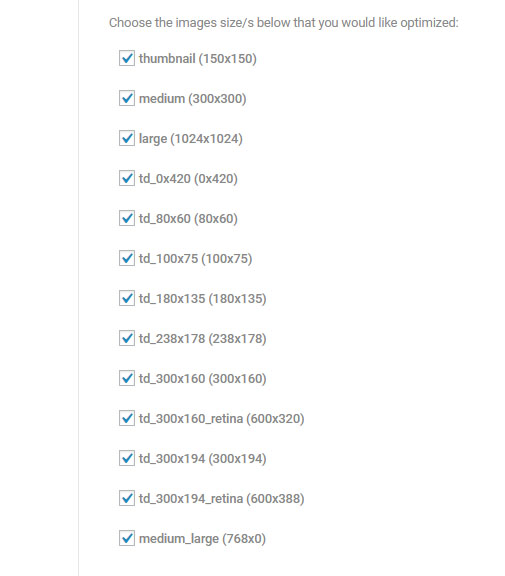
I’ve realized that Newspaper theme generates a copy of each image that I send to my site, in different sizes (as in the attached image), which is consuming lots of storage space and overloading my server.
I would like to know how do I disable this?
Simion C. Hi,
The other sizes of the image would have to be created by you, then uploaded in the media library. You can use different images in the ad codes, based on device
– https://forum.tagdiv.com/using-other-ads-non-adsense-ads/
– https://www.screencast.com/t/yhIdEKqN
So you could create different banners, containing links with images that would be suited for all devices.
Or simply insert the image you have in a text element and add a link to it
– https://www.screencast.com/t/qSjBLMGh
The image will be responsive like that, it could be a solution.
Thanks
 regio-online
Hi there,
I’m struggling to find an answer to the following. I have created a banner ad for a client and placed it on the static homepage of our newssite. I used Tag Div Composer and the block Single Image to place the ad on the desired place on that page.
The problem I have is that my image is not responsive for all devices. If I want to place it as a code in the Ads section I found the code to use, but can’t find other sizes for that image in the upload folder. Besides that, how do I make sure that when someone clicks on the ad, it will link to the site of my advertiser? I don’t see an example for that in the code given on the forum in the non-Adsense ads section.
So to put it simple: I have a selfmade image/banner ad, I want to place it with tag div composer on any place I prefer on my (home)pages and I want the image to be responsive when showing on a tablet or mobile phone. Is this possible?
Thanks in advance for any help you can give!
Simion C. Hi,
The mega-menu module thumbnail size is this one
– https://www.screencast.com/t/CE8kXkwkdvk8
An option to change the module in the mega-menu is not available, it will always use the same module and thumbnail size. You could maybe experiment with different featured image sizes and aspect ratios if possible for different results
– https://forum.tagdiv.com/thumbnails-vs-featured-image-size/
– https://forum.tagdiv.com/featured-image/
Thanks
 The Irish Place
How can I calculate the correct image dimensions for the header, footer and full width rows?
I would like to use background images but they are not coming out well at all. It is hard to estimate the what the image height to width ratio should be and I am worried on different screen sizes/devices it will be all wrong. Not sure how to get the background image settings correct in TD-Composer.
Any guidance on this?
Thanks,
Killian
 MartinLWilliamson
 Hey tagDiv guys – would appreciate your input please…. whenever I run Thumbnail Regenerate on my site it breaks image links that I’ve gone in and fixed!
(I’ve reduced the number of thumbnail sizes in use plus I still have a problem with images on posts not being the right ones)
So what happens is I run Regenertion, and look at my posts, and see random images appearing in the posts in place of the correct ones.
If I edit the post, then edit the image, the correct image shows up, so I can save this, and do it to all the images on the post, then Update the post.
And all is OK. Unless I do a regeneration, then the problem reappears.
(I have disabled JetPack as recommended by the guy above).
ALSO – since changing to your theme, I cannot upload any images to posts or to the Media Library; I get “The uploaded file could not be moved to wp-content/uploads”
What this means is that I’m starting to lose confidence in the theme and thumbnail handling… can you offer some guidance please on the Upload and on the Thumbnail problems?
Thanks.
 mortgageman
Hi,
I’ve created the site and it works fine on laptops and phones and have managed to troubleshoot everything with browsing through the forum which is great, however I can’t find a solution to my problem.
My problem is that on tablets – you can see images here
https://drive.google.com/open?id=1yzK4vIdcgSZtcehp-tzzIlERNsAH1tgO
1. The sidebar is cut off (no matter whether portrait or landscape)
2. The images on my pages/posts are also cut off (portrait and landscape)
I have used the widgetised sidebar and visual composer on all pages and then I’ve used the td composer to edit the image sizes so they appear correct, which they do on laptops and phone, just not on tablets. Please help.
 haqemcom
 hi tagdiv team!
I want to ask what kind of header image to be responsive for all screen sizes? Try to open https://haqem.my/ then lower your browser size and see the header image does not fit the screen / browser size as at demo.tagdiv.com/newspaper
 Hansjörg Leichsenring
Hi
you mentioned different sizes you are using in your demo:
On our demo we use 1021 x 640 px large Images here https://forum.tagdiv.com/image-size/
On our demo we use multiple sizes, most have around 1068 × 713 px. here https://forum.tagdiv.com/thumbnails-vs-featured-image-size/
So my question is: What is the best size?
I am planning to use post-template number 6 and block 23 and 4 on the start page
Cheers
Hansjörg
Simion C. Hi,
The theme will create only predefined thumbnails that will be used for the modules, nothing else. WordPress also creates thumbnails when you upload images
– http://www.wpbeginner.com/wp-tutorials/how-to-prevent-wordpress-from-generating-image-sizes/
Additionally plugins can create thumbnails, but if there is no such plugin installed then that may not be the case here.
Thanks
 Jose
Jose Hello Simion C.
Thanks for reply 🙂
Sorry but I need help with this topic. How is it possible that the theme has generated this size? I do not use any other add-on for images / homepage.
I only use an image optimizer (compressión): https://imagify.io/
Is it possible that my theme has gone crazy? How can I force him to use the sizes that have been set in the “Block” section within the theme panel options?
Thanks
 Mainzer105
Hi,
all my pages i built with single images with visual composer are damaged. The theme ignores the columns and the sizes and inserts pictures in full height. For example here:
http://www.lokalezeitung.de/kolumnen/
What could i do?
simchris For photos;
you need to upload optimized versions to begin with; obviously a 250kb image that should be 50kb will be problem with speed. Some plugins like ‘smush it’ or similar can help. If your host supports mod_pagespeed, that can also resave large images in faster formats like webp.
For thumbs, try changing default compression level (e.g., ’60’) in your wp-config.php file, then “regenerate thumbnails” to redo all those at smaller sizes.
-
This reply was modified 8 years by
simchris.
 Catalin
 Hello evilspyboy,
Yes, you should use four different sizes of images for each device to display another image for each device.
Thanks.



