
 Anthony43
Hello,
Here is my website : https://www.lesclesdelagriculture.com/
Everyone can see the source code like this :
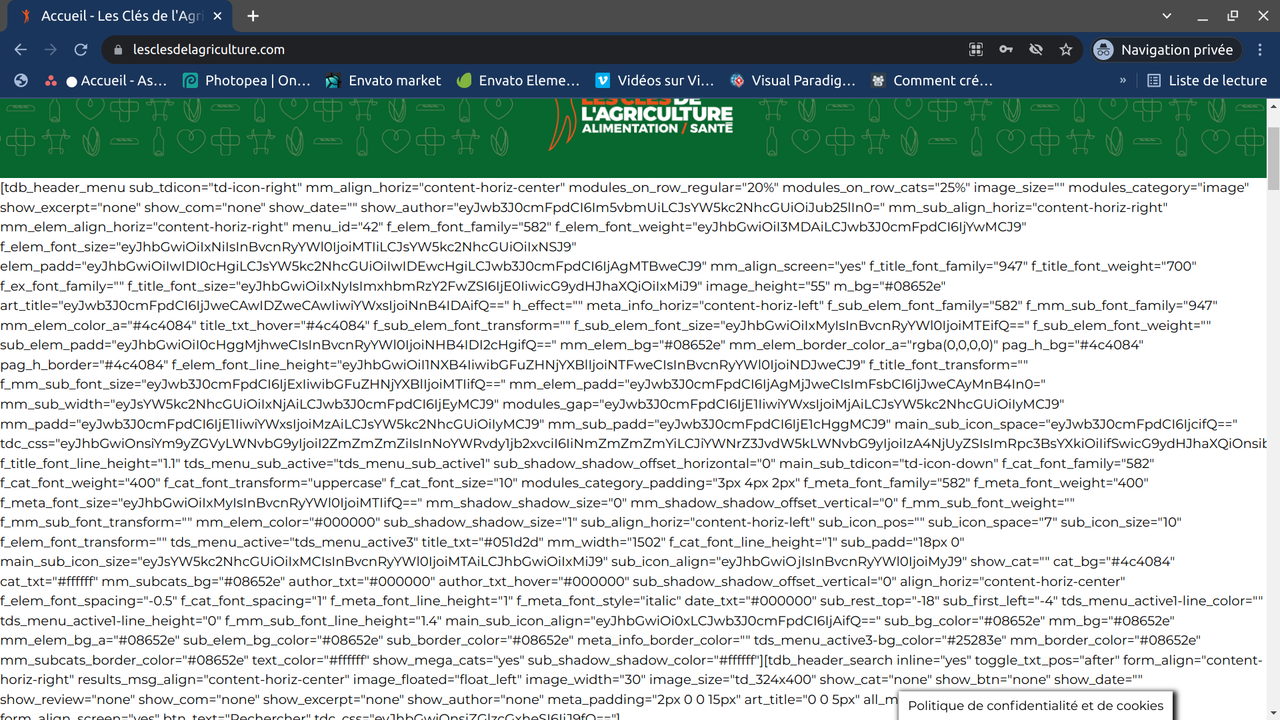
But when i’m logged in as superadmin I get this and that’s what I want :
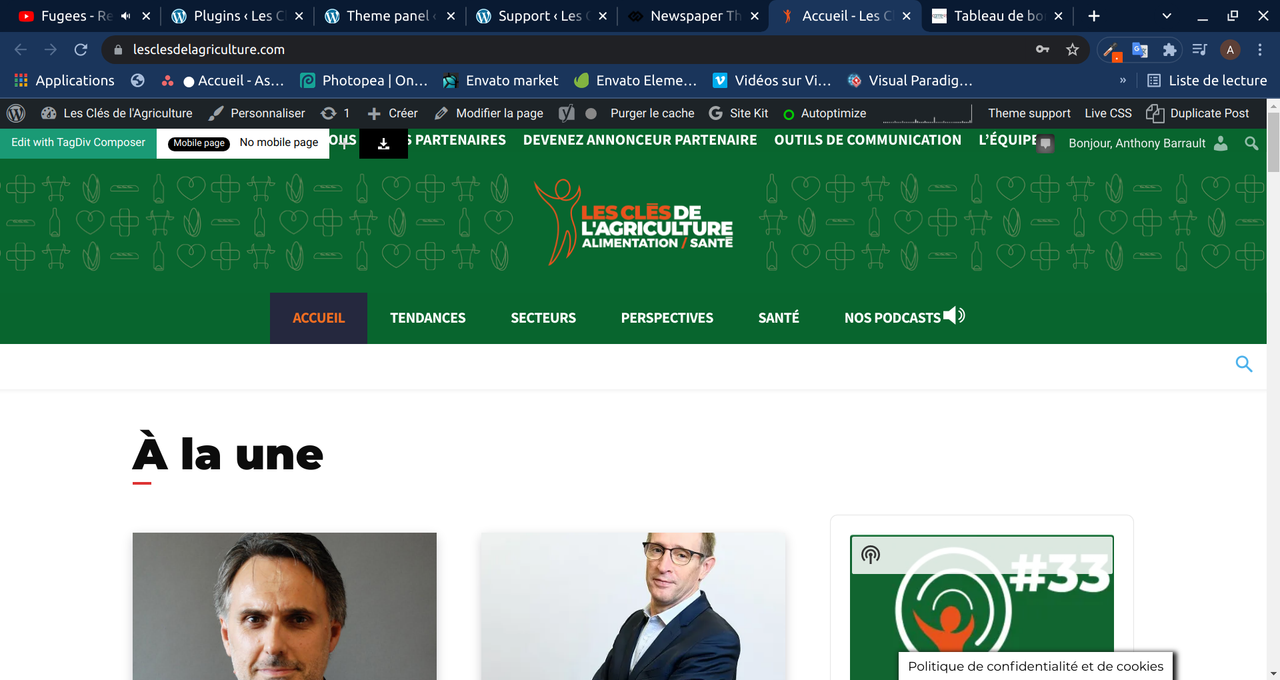
I’ve reinstalled Newspaper, the plugins too.
Version: 10.3.9.1
Thank you
 Anamaria
 Hello,
Please make sure that all theme plugins are installed (tagDiv Composer, tagDiv Cloud Library and tagDiv Standard Pack if you are using standard elements). Most of the time one of the theme plugins is not activated.
Thank you!
 Bettina
 Hello!
If you uninstall the Mobile Theme plugin, then it will appear how you’ve set up the mobile version from Composer.
This situation appears when you are using the mobile theme plugin and the cache plugin that you have does not feature options for a separate mobile theme plugin therefore do not know when to deliver the mobile version and when to deliver the desktop version.
We tested with our theme the WP Super Cache and with the settings from our guide this is working correctly: https://forum.tagdiv.com/cache-plugin-install-and-configure/
Hope that helps you!
Thank you!
 Paata
PaataI can’t change (and upload) photos in tagDIV composer.
I need help in this. I have installed SSL plugin but it still doesn’t work.
Here are the details – please check the link:
https://drive.google.com/drive/u/0/folders/1aiTEfbnI8tRVA5SDKJeztOx4t_EkzIgA
Anamaria Hello,
Please try to remove the Instagram, and deactivate/delete/install/activate the tagDiv Composer and tagDiv Social Counter, clear all cache, and connect the Instagram account again.
If the problem is not solved after, we have to investigate, because I did several tests, and I could not replicate this problem, in some users who had this problem, it was related to a memory cache, in others, we had to investigate more.
Thank you!
 Calin
Calin Hi Sam Trautman,
The theme display shortcodes because one of the theme plugins is not installed. In this case it is tagDiv Standard Pack, please install it from Newspaper > plugins and make sure that all the theme plugins that you used before the theme updated are installed.
Let us know the results!
Calin Hi,
I just checked your website and the problem is related to a theme plugin that is not installed, please check if tagDiv Standard Pack is installed, if not install it from Newspaper > plugins.
Let us know the results!
Thank you!
Calin Hi sbkalim,
If you want to update the theme, then the first step will be to make a full backup for your website and database. After that you can update the theme. I recommend to update the theme manually, via FTP/cPanel, upload the zip with the new theme version, then delete the existent theme and extract the theme zip, after that, from WordPress dashboard select the Newsmag > welcome and install/update the plugins from there, also, in case that you are using extra theme plugins and those are not in Newsmag > welcome section, check theme in Newsmag > plugins.
I hope this will help you!
Let me know the results!
 emmak
emmak OK its the new AMP plugin which auto installed and activated. I deactivated it.
 makerkook
I have the latest version of my WordPress Newspaper installed. I am using MegaMenu function in Header. However, there are many times when MegaMenu does not work. Sometimes it runs and feels like waiting to win the lottery. Can you help me with MegaMenu not working properly?
My WP Link: https://www.everwiki.net/
Bettina Hello!
In order to have a footer for all your pages, you need to install a template from cloud templates and set up a global footer in theme panel here: https://www.screencast.com/t/MVOiU2IhcM7 and save the settings.
For posts, you need to assign a single cloud post template for all your posts(global) and set up a footer from Website Manager like this(non-global): https://www.screencast.com/t/pkItwGWpgkZX
Thank you!
 Amit
Amit1. Add child theme support for mobile theme.
Many sites alter the layout or add some extra ad codes, widgets to a single post page. So, every time the theme gets an update, the developer needs to redo those customizations. (Single template, header, footer) [/wp-content/plugins/td-composer/mobile/]
2. td Plugin updates
Every time we update the theme it’s doesn’t auto-update all the plugins. Consider fixing this or provide plugin updates in the plugin section directly. Most of the time you just change the updated date of the plugin and not its version which confuses most of the users. Also, make sure it should not install or update the td plugin which is not in use. In our case, we don’t use td social counter plugin but on every update, it is being auto-installed from the welcome screen.
3. Changelogs and Patch files
Provide clear changelogs (you used to provide it earlier before you introduced td standard plugin and td composer) Now even on the minor updates like (Newspaper 11.3.2), we have been asked to update td composer plugin and we lose all the customizations made in the plugin files (especially for mobile). So releasing even minor updates takes a lot of time for each site. Earlier it was really super easy to release minor updates just by overwriting theme files with patch (https://www.screencast.com/t/BXNL8iaX). Now every update has a few changes to the plugin files as well. I will suggest you provide clear changelogs for plugin files as well.
4. AdSense Responsive ad units for AMP (AMP Compatible ad unit)
Google recommends using responsive ad units on the site as they have started auto optimizing ads on the page. The mobile theme supports responsive ad units, but it uses fixed-size for AMP.
AMP should support Responsive AMP-compatible ad units. I am using Responsive AMP-compatible ads and I have seen improvements in earning. The last time I shared a solution for this via mail was on April 2, 2019, with you, but you have not implemented it yet.
 /*

		         * if its a google adsense ad on amp..

		         * we use the 'g_data_ad_client' && 'g_data_ad_slot' to generate a adsense ad type > amp ad component

		         *

		         * <amp-ad width=300 height=250

				 *    type="adsense"

				 *    data-ad-client="ca-pub-2005682797531342"

				 *    data-ad-slot="7046626912">

				 * </amp-ad>

		         *

		         * */
/*
* Modified by Amit Refer: https://support.google.com/adsense/answer/7183212?hl=en
**/
$buffy .= '<amp-ad width="100vw" height="320" ';
$buffy .= 'type="adsense" ';
$buffy .= 'data-ad-client="' . $ad_array['g_data_ad_client'] . '" ';
$buffy .= 'data-ad-slot="' . $ad_array['g_data_ad_slot'] . '" ';
$buffy .= 'data-auto-format="rspv" ';
$buffy .= 'data-full-width> ';
$buffy .= '<div overflow></div> ';
$buffy .= '</amp-ad>';
5. Newsletter
The theme comes with Newsletter plugin, but it does not work with mobile theme and AMP. Now Google has started mobile indexing first. From the sites I am handling, I can see 80-85% of overall traffic is from mobile devices.
Try to make a Newsletter plugin compatible/usable with a mobile theme/AMP version. Having a Newsletter popup will be the cherry on the cake. Currently, we have added Newsletter on Mobile and AMP by modifying the code.
That’s it for now.
Anamaria Hello @jmtiongson,
I think this problem is caused because the install was not done correctly, please make sure your theme and plugins are updated correctly, also, you can try to reinstall the theme and plugins
-> https://forum.tagdiv.com/install-via-wordpress/
-> https://forum.tagdiv.com/install-via-ftp/
Also, please make sure you do not have other extra plugins activated during the installation, as this may interfere with the installation process.
This is a video on how to install a prebuilt website https://www.youtube.com/watch?v=ezaaE2VP7V8
Also, please make sure that all the settings are like in our requirements, please follow the guide carefully
– https://forum.tagdiv.com/requirements-for-newspaper/
and please increase all lower requirements, and follow all steps.
Thank you!
Bettina Hello!
We recommend using only one cache plugin, the WP Super Cache plugin with this configuration: https://forum.tagdiv.com/cache-plugin-install-and-configure
If you want to use Cloudflare, please make sure that is set as in our guide https://forum.tagdiv.com/cloudflare-cdn/, you need to disable the Rocket Loader. We do not recommend sucuri plugin.
In WP Super Cache to disable a cache for a particular page in WordPress, you simply:
Go to Settings>Advanced. Then where it says “add here strings (not file name), that forces a page not to be cached. Then you put in the URL slug of the particular page you want to exclude from caching.
Our theme doesn’t depend on caching, it’s optional.
Thank you!
Anamaria Hello @Satheeshraj
It is always advisable that the changes made in the theme files be put in the child theme.
Unfortunately, if you don’t update or reinstall the plugin I can’t help you.
Thank you for your understanding!
 jmtiongson
 Badly needed help.
After updating the Newspaper!
#1 Selling News Theme of All Time
Version: 11.3.2
tagDiv Composer
Failed to install
Pls. help
jmtiongson I have the same error. But I can’t reactivate my Tabdiv composer
and receiving this error.
Downloading installation package from https://cloud.tagdiv.com/td_plugins/td-composer/810534ce963cec6bd2e7978db2c935c9x/td-composer.zip…
Unpacking the package…
Could not copy file. td-composer/legacy/Newspaper/includes/demos/medicine/td_media_3.php
jmtiongsonhi,
After updating to Version: 11.3.2 , tagDiv Composer
Not installed. How to fix this?
Thanks,
Joe
 PeriodicoVision2021
Hello. I need help access my envato account. I forgot my username and password for it. I bought the newspaper theme over 3 weeks ago. I have the license for this theme, but I dont have the theme to install it. How can I recover my access to envato market ?
 msostar
 Resolved!
On top of your suggestion, it also required updating manually installing the td-composer plugin.
After this, all is working O.K
 jaydeedaley1
Dear Support
I decided to change the theme, installed Art Creek on http://www.jaydeedaley.com but the theme header is missing. When I tried to install a cloud template header, the download fails to load a template and there is the error:
Error at zones: 5(models) : 1(dom). The model does not match the content Current state has involved an issue. You could try an UNDO operation (CTRL+Z / CTRL+SHIFT+Z)
I urgently need to complete this website this week, but the page errors when trying to edit it, the cloud templates don’t install, the demo hadn’t installed complete.
I would be grateful if you can help me resolve this matter.
 kibiribi
 Hi there, Anamaria,
You were right.
From the start I’ve got on empty page: Tagdiv composer, Gutenberg editor, WPBakery Page Builder
I’ve disabled WPBakery Page Builder
After that, and page refresh, I can see only Tagdiv composer
Pre-made template was installed without problem
BUT the question: what should I do with WPBakery?
Activate it again to operate site properly or may I stay WPBakery disabled?
-
This reply was modified 4 years by
kibiribi.
 Satheeshraj
 I have resolved it by disabling and reinstalling tagdiv composer plugin. But the mail box is not working as expected. When I click the mail it is loading a mail id in the same page and showing 404 error
Satheeshraj I’m having many customized codes in td Composer. If I delete it and reinstall then I need to redo all those customizations. So is there any other way to achieve this?
-
This reply was modified 4 years by
Satheeshraj.
Bettina Hello!
I recommend you to make a backup and update plugins and the theme via file transfer, so that you don’t face any error: https://forum.tagdiv.com/how-to-update-the-theme-2/
Please make sure you have the latest version of the WordPress, theme, plugins and all the requirements are done as you can see here: https://forum.tagdiv.com/requirements-for-newspaper/
If that problem is still there, then please execute these steps:
1. disable TagDiv Composer
2. uninstall(delete) TagDiv Composer
3. clear cache (if cache plugin exists)
4. install TagDiv Composer
5. activate TagDiv Composer
6. clear cache (if cache plugin exists)
Sometimes, the issue can be from a plugin conflict or a cache issue, that’s why, please deactivate ALL plugins except tagDiv ones, also if you are using a cache plugin, deactivate it, clear all cache (also from your browser) and try again.
Let me know the results!
Thank you!
