
- TutorialsHow to install Revolution Slider
- TutorialsHow to Install bbPress forum
- TutorialsFrom WPBakery to tagDiv Composer
- TutorialsDefault Block Settings Guide
- TutorialsImport Revolution Sliders
- TutorialsSystem status parameters guide
- TutorialsHow to Update the WPBakery Page Builder plugin
- TutorialsExisting content
 Bettina
 Hello!
If you want to use a mobile page, then you need to assign it to your homepage. For more information about this mobile version please take a look in this article: https://tagdiv.com/newspaper-10-3-7-update-brings-customizable-and-fast-mobile-pages/
Try to delete your cache(also from your browser).
We recommend using WP Super Cache plugin https://forum.tagdiv.com/cache-plugin-install-and-configure/
Thank you!
Bettina Hello!
First of all, try to do these steps as quickly as possible, so your visitors do not notice the process:
1. disable TagDiv Composer
2. uninstall(delete) TagDiv Composer
3. clear cache (if cache plugin exists)
4. install TagDiv Composer
5. activate TagDiv Composer
6. clear cache (if cache plugin exists)
Also, make sure your WordPress and plugins are up to date(specially Standard Pack installed and active if you use default templates).
Sometimes, the issue can be from a plugin conflict, that’s why, please deactivate ALL plugins except tagDiv ones, also if you are using a cache plugin, deactivate it, clear all cache(also from your browser) and try again.
We recommend using WP Super Cache plugin https://forum.tagdiv.com/cache-plugin-install-and-configure/
Let us know about your results!
Thank you!
Bettina Hello!
First of all, try to do these steps as quickly as possible, so your visitors do not notice the process:
1. disable TagDiv Composer
2. uninstall(delete) TagDiv Composer
3. clear cache (if cache plugin exists)
4. install TagDiv Composer
5. activate TagDiv Composer
6. clear cache (if cache plugin exists)
Also, make sure your WordPress and plugins are up to date(specially Standard Pack installed and active if you use default templates).
Sometimes, the issue can be from a plugin conflict, that’s why, please deactivate ALL plugins except tagDiv ones, also if you are using a cache plugin, deactivate it, clear all cache(also from your browser) and try again.
We recommend using WP Super Cache plugin https://forum.tagdiv.com/cache-plugin-install-and-configure/
Let us know about your results!
Thank you!
 shtv
shtvNewspaper version: 10.4
WordPress version: 5.7.1
PHP-Version: 7.4
Browser: Chrome (latest)
Installed plugins:
– tagDiv Cloud Library
– tagDiv Composer
– tagDiv Social Counter
– tagDiv Standard Pack
Hello,
When adding a new element via Composer the element is added, but not usable. When trying to delete the element, we encounter multiple errors, see https://imgur.com/a/IU09YPf
We tried to deactivate all unnecessary plugins, but the error still occurs.
Any help is highly appreciated.
 Vlad S
 Hello !
You will have to first start looking for a plugin conflict. please deactivate ALL plugins except tagDiv ones, also if you are using child theme or cache plugin, deactivate them, clear all cache and try again.
Also you can try and remove and re-install the tagDiv Composer plugin and please send us a link to your website in order to take a look.
Let us know the results.
Thank you !
 gasthis
Hello!
I’d like to add AdSense to my site. I’ve already installed Google Site Kit as suggested, but a few weeks on AdSense tells me that it “couldn’t find the AdSense code” on my site and that I should copy and paste the code “between the <head> and </head> tags”.
How and where do I do this?
 Anamaria
 Hello,
Our developers are constantly trying to fix the issues, so please disable the tagDiv Composer plugin again, delete it, and reinstall it from the newspaper plugins => https://www.screencast.com/t/WLy01lbc
Unfortunately, we can’t disable the composer for GiveWP custom post type.
Let me know the results!
Thank you!
 chabotjeff
Hi. I just updated to the newest version of the theme and now my website says:
There has been a critical error on your website.
Learn more about debugging in WordPress.
Can you tell me what may have happened? Need help immediately.
Bettina Hello!
Please make sure your WordPress and TagDiv plugins are up to date(specially Standard Pack installed and active if you use default templates).
Unfortunately, Newspaper theme does not support RTL.
We are sorry for the inconvenience!
Thank you for your understanding!
 Breinblik
 Your colleague already pointed me to this page: https://forum.tagdiv.com/custom-post-type-support/ and thank you but it doesn’t help me. Also i suspect the info on this page is outdated because i can’t find these files:
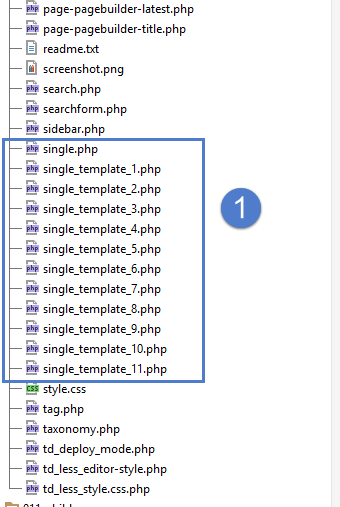
It looks like the root of the Newspaper theme but i don’t see these files in my theme folder, where are the located?
I would like to disable/uninstall WP Bakery pagebuilder but i first need to be sure that TagDiv Composer can offer me the same solutions.
-
This reply was modified 5 years by
Breinblik.
Bettina Hello!
I just checked your website and now all seems to work just fine.
This situation appear when you are using the mobile theme plugin and the cache plugin that you have does not feature options for a separate mobile theme plugin therefore do not know when to deliver the mobile version and when to deliver the desktop version.
We tested with our theme the WP Super Cache and with the settings from our guide this is working correctly: https://forum.tagdiv.com/cache-plugin-install-and-configure/
Or maybe you had this situation: https://forum.tagdiv.com/topic/website-look-is-different-in-mobile-browser/
Thank you!
Bettina Hello!
First of all, try to do these steps as quickly as possible, so your visitors do not notice the process:
1. disable TagDiv Composer
2. uninstall(delete) TagDiv Composer
3. clear cache (if cache plugin exists)
4. install TagDiv Composer
5. activate TagDiv Composer
6. clear cache (if cache plugin exists)
Also, make sure your WordPress and plugins are up to date(specially Standard Pack installed and active if you use default templates).
Sometimes, the issue can be from a plugin conflict, that’s why, please deactivate ALL plugins except tagDiv ones, also if you are using a cache plugin, deactivate it, clear all cache(also from your browser) and try again.
We recommend using WP Super Cache plugin https://forum.tagdiv.com/cache-plugin-install-and-configure/
Let us know about your results!
Thank you!
Bettina Hello!
This is a strange effect.
First of all, try to do these steps as quickly as possible, so your visitors do not notice the process:
1. disable TagDiv Composer
2. uninstall TagDiv Composer
3. clear cache (if cache plugin exists)
4. install TagDiv Composer
5. activate TagDiv Composer
6. clear cache (if cache plugin exists)
Also, make sure your WordPress and plugins are up to date(specially Standard Pack installed and active if you use default templates).
Sometimes, the issue can be from a plugin conflict, that’s why, please deactivate ALL plugins except tagDiv ones, also if you are using a cache plugin, deactivate it, clear all cache(also from your browser) and try again.
We recommend using WP Super Cache plugin https://forum.tagdiv.com/cache-plugin-install-and-configure/
Let us know about your results!
Thank you!
Anamaria Hello,
If you have the latest theme update, then please do these steps:
1. disable tagDiv Composer
2. uninstall tagDiv Composer
3. clear cache (if cache plugin exists)
4. install tagDiv Composer from Newspaper plugins => https://www.screencast.com/t/WLy01lbc
5. activate tagDiv Composer
6. clear cache (if cache plugin exists)
Let us know the results!
Thank you!
Bettina Hello!
Check also if you have Standard Pack plugin installed and active because it seems that you use default templates.
Thank you!
Anamaria Hello,
Standard Pack is used only for default templates and not for cloud/PRO templates. In your case, if you want to use standard templates, then you can install the Standard Pack plugin.
This plugin is no longer required because the new demos are using cloud templates.
Thank you!
Anamaria Hello,
First, please make a full backup of all files and the database to your website.
After, please deactivate and delete all tagDiv plugins from plugins=> https://www.screencast.com/t/ddVDJfqw
Try to install the theme via FTP -> https://forum.tagdiv.com/install-via-ftp/ (before the install, make a full backup of all files, delete the files of the theme, not override), and install the theme plugins from WordPress -> Newspaper -> Plugins => https://www.screencast.com/t/3CTN3HggbJ and please install also, the tagDiv Standard Pack plugin.
Hope this helps you!
Thank you!
Anamaria Hello!
Yoast SEO Premium plugin should work well with our theme and with all demos.
If you have the latest theme update, then please do these steps:
1. disable tagDiv Composer
2. uninstall tagDiv Composer
3. clear cache (if cache plugin exists)
4. install tagDiv Composer from Newspaper plugins => https://www.screencast.com/t/WLy01lbc
5. activate tagDiv Composer
6. clear cache (if cache plugin exists)
Let us know the results!
Thank you!
Bettina Hello!
Yoast SEO plugin should work well with our theme and with all demos.
Please start looking for a plugin conflict, deactivate ALL plugins except tagDiv ones, also if you are using child theme or cache plugin, deactivate them, clear all cache and try again.
If you have the latest theme update, then please do these steps:
1. disable TagDiv Composer
2. uninstall TagDiv Composer
3. clear cache (if cache plugin exists)
4. install TagDiv Composer
5. activate TagDiv Composer
6. clear cache (if cache plugin exists)
Let us know the results!
Thank you!
 hanzosrl
We’re having lots of problems with Newspaper theme.
Particularly after wordpress updates. Actual version of wp brokes the tagdiv editor. It keeps loading without come to work. In console we have some error. Here only some of them:
Uncaught Error: Syntax error, unrecognized expression: undefined<div class=”tdc-sidebar-separator tdc-sidebar-text-separator”><span>Flex Block 5<
Uncaught TypeError: jQuery(…).live is not a function
<anonymous> http://valdarnopost.it/wp-admin/post.php?post_id=72989&td_action=tdc&tdbTemplateType=single&prev_url=//valdarnopost.it/wp-admin/edit.php?post_type=tdb_templates:4528
Now this problem is getting really frustrating cause this is only the last of a long series of bad behaviors. Another example? Global header can’t be updated or saved no more! Why is this happening?
Another issue? We can’t find widget similiar to a simple message form so we’ve installed contact form 7. So even in this case we have error results after cf7 was activated…
We have disabled all plugins, unistalled and after reinstalled them but with no clue.
In this situation it’s impossible to work. We need to restore theme and tagdiv-composer functionalities, as fast as possible. We really need your help. The situation is a totally mess now.
Anamaria Hello,
If your settings are missing from the Theme Panel, then make sure you have Standard Pack installed and active
Thank you!
 michelesfregola
I bought yoast premium and installed the plugin. some sections of the plugin (such as “search aspect”) are not displayed. I tried to disable all other plugins, but the problem was not solved. i installed the same plugin with another theme and all sections were visible. How can I solve?
Anamaria Hello,
What type of prebuilt website did you install, pro or standard?
If you have installed a Pro Prebuilt Website, then these settings are for Standard Prebuilt Websites, create without Cloud Templates.
These changes apply for example only when you use the standard header/footer templates (and other standard templates) from Theme Panel (not a cloud template) => https://www.screencast.com/t/4gApdblBu8 -> https://www.screencast.com/t/m1vrJsvHM
You need to edit the page with tagDiv Composer to make changes, like in this is a video https://www.youtube.com/watch?v=HXQQygkCCJ
Hope this helps you!
Thank you!
 Joda
JodaI have the Newspaper theme installed on the site http://www.fjclassitalia.it
On the website I installed the Newspaper 8.6 version, with the WP 5.4.2 version.
When WP automatically updates to later versions, I can no longer log in in pages using “EDIT WITH TD COMPOSER”.
In order to use the TD COMPOSER I have to restore the BackUp to a date prior to the WP update.
I tried to upgrade the theme to a later version but the site goes down and I get it the following error message:
<<An E_COMPILE_ERROR error was caused in line 33 of the file /home/customer/www/fjclassitalia.it/public_html/wp-content/plugins/td-multi-purpose/styles/tds_api.php. Error message: require_once (): Failed opening required ‘/home/customer/www/fjclassitalia.it/public_html/wp-content/themes/Newspaper/includes/wp_booster/td_api.php’ (include_path = ‘.: / Usr / local / php73 / pear ‘)>>
WordPress version 5.7.1
Current theme: Newspaper (version 10.3.1)
Current plugin: tagDiv Multi-Purpose (version 1.0)
PHP version 7.3.27
I contacted the Siteground host and this is the answer:
From what I see, there is no indication of any server problem logged in the error log. If restoring the backup worked for you, my personal advice would be to check the issue with the theme / plugin provider directly. Each theme / plugin has its own unique functions and features and I won’t be able to tell you what exactly is causing the problem. So it will be better to check the case further with plugin / theme support. As for hosting services, I can assure you that everything at the server level is running smoothly
Of course, if they require server-side changes, please contact us with exact instructions and we will be happy to assist you further.
Can you give me some help to solve the problem definitively?
Thank you Fabio
Anamaria Hello,
These are the methods how you can install the theme
Install via WordPress -> https://forum.tagdiv.com/install-via-wordpress/
Install via FTP -> https://forum.tagdiv.com/install-via-ftp/
If you have installed a Pro Prebuilt Website, then these settings are for Standard Prebuilt Websites, create without Cloud Templates.
These changes apply for example only when you use the standard header/footer templates (and other standard templates) from Theme Panel (not a cloud template) => https://www.screencast.com/t/4gApdblBu8 -> https://www.screencast.com/t/m1vrJsvHM
You need to edit the page with tagDiv Composer to make changes, like in this is a video https://www.youtube.com/watch?v=HXQQygkCCJo<a
If you have other questions you can ask us.
Hope this helps you!
Also, please note that at the moment the Support team is not 24/7 available. We answer the topics from Latest to Newest Monday – Friday from 08:00 AM to 05:00 PM GMT+2
Thank you!
