
- TutorialsHow to install Revolution Slider
- TutorialsHow to Install bbPress forum
- TutorialsFrom WPBakery to tagDiv Composer
- TutorialsDefault Block Settings Guide
- TutorialsImport Revolution Sliders
- TutorialsSystem status parameters guide
- TutorialsHow to Update the WPBakery Page Builder plugin
- TutorialsExisting content
 Vlad S
 Hello !
We are sorry for your inconvenience !
It is mandatory to delete all what was left from the older version before intalling this update. Overwriting the files would cause a lot of problems and maybe you’ve missed something while deleting the old files. Have you checked the plugins to be deleted too ? If you are certain that you have installed the updates correctly by deleting all of the older versions and made a clean install from scratch please contact us via email at contact@tagdiv.com and provide admin login, as well as cPanel or FTP if possible. We will take a look. Include a link to this topic in the email.
Also take a look at our documentation about installing the theme and plugins: https://tagdiv.com/how-to-install-plugins-and-update-plugins/ ; https://tagdiv.com/how-to-install-newspaper-theme/
Thank you !
 Catalin
 Hi,
Please make sure that you are using the latest version of the theme and the plugin installed via FTP way according to our documentation from here -> https://forum.tagdiv.com/install-via-ftp/ Also, please provide more details about your encountered error so I can identify it because it is not clear enough where exactly the TD Composer does not appear.
Thank you!
 Calin
Calin Hi,
You’ll need to use a plugin like Contact Form 7 -> https://wordpress.org/plugins/contact-form-7/ take the shortcode from contact and set it in a post/ single post template( from tagDiv Cloud Library ) or in a a page.
I will try to help you with some screenshots because is more easy to understand.
After you install the plugin go back on your WP Dashboard click on Contact > Contact Forms and copy the code under Shortcode https://www.screencast.com/t/NngJWh1j after that click on pages> hover the page you have for contact and select edit with tagDiv Composer ( https://www.screencast.com/t/sqDfb18UaqP ) or you can click on the page and after is open click the button TAGDIV Composer ( https://www.screencast.com/t/4iZR8xcZb5 ).
After TD Composer is open click on add element ( https://www.screencast.com/t/rHVSES71x ), click on the row and drag it at the bottom of your page (or were you like to be your contact https://www.screencast.com/t/pPYxfNGA) and drop the row there , then search for column text then drag it and drop him on the row ( https://www.screencast.com/t/YCmZGKn5Qwn ) click on it and the in sidebar from the left click on edit Content ( https://www.screencast.com/t/75fZTYkFoy ) then paste the code there and click on save and view page ( https://www.screencast.com/t/iT5Ex0ytiu ).
See the results : https://www.screencast.com/t/fDx1SAu6
Here is some documentation : https://contactform7.com/getting-started-with-contact-form-7/
I hope this will help you.
Thank you.
 alejandroman
Wordpress reports “The site is experiencing technical difficulties” after installing the latest version of Newspaper (9.74) updating from 9.71. Followed directions for updating the theme via WordPress. Installed successfully. Activated and then updated plugins. That’s when it started flashing the message. Please advise.
 aluc6rd
Hello,
I have installed Fast News Demo theme but my posts doesn’t look like this : https://demo.tagdiv.com/newspaper_fast/2018/08/16/td-post-social-media-marketing-for-franchises-is-meant-for-women/
It always stay as the default theme installed before.
Do i need to do some changes ?
Thanks
Calin Hi,
What I can recommend to you is to make a fresh install on a subdomain or localhost to check the AMP and if is work you can duplicate your live website and try on entertainment test to integrate the amp in the theme, we recommend the amp with mobile theme
Also please make sure that you do not have a plugin conflict with untested plugins, please deactivate all non theme, also if you are using child theme, clear all cache and try again.
If there is still a problem, you can send us an email at contact@tagdiv.com and provide admin login, as well as cPanel or FTP if possible. We will take a look. Include a link to this topic in the email.
Thank you for your understanding!
Vlad S Hello !
In order to have the benefits of a full Newspaper Theme you will have to activate the required plugins:
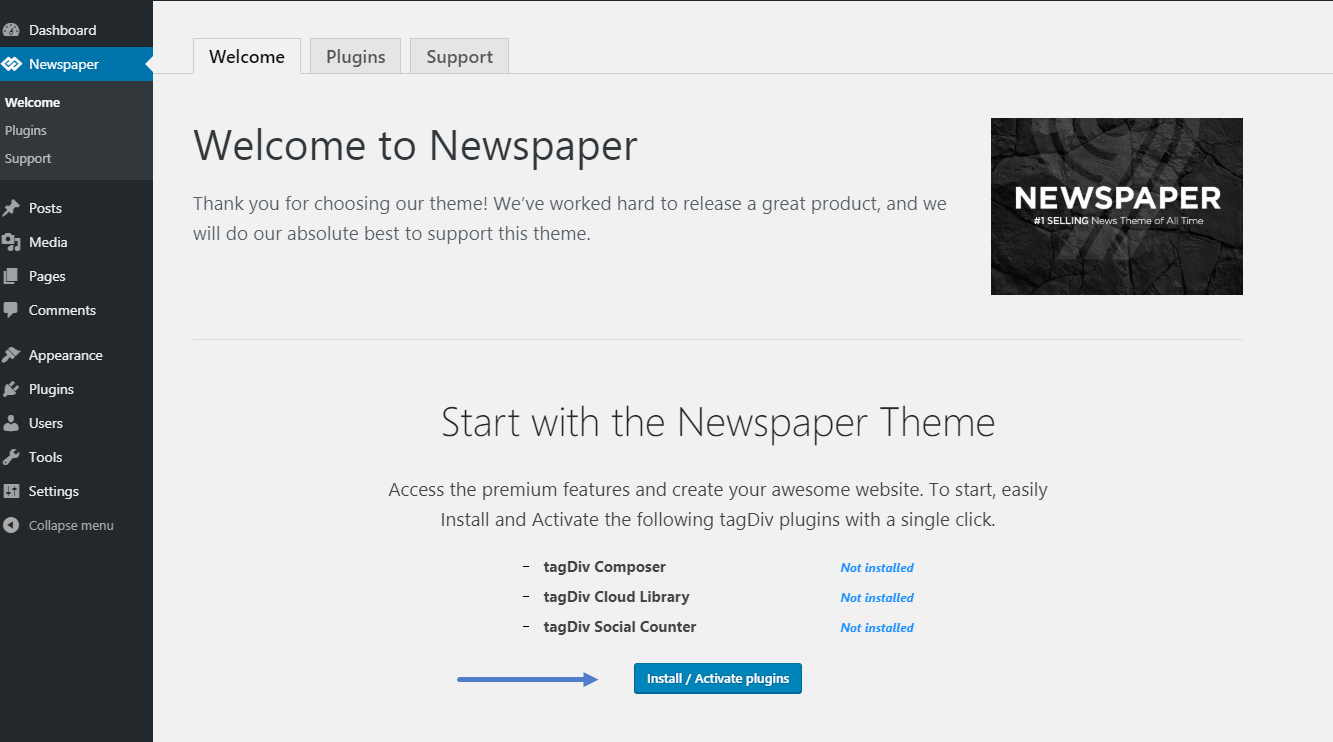
The child theme is in the Folder you have from Envato and requires manual instalation as you can see here: https://forum.tagdiv.com/install-via-wordpress/
I hope this was helpfull !
Thank you !
 marcos.jimenez@n-people.es
Good morning,
I just installed the theme “newspaper 9” bought in envato yesterday.
But i can not find the box in wordpres to insert the license code of my topic newspaper 9
I only have the welcome sections, plugins and support. The others are missing.
It is as if it were a demo theme, also the child theme does not appear.
What is the problem?
Thank you 🙂
Vlad S Hello !
Please make sure that you have met all the theme requirements: https://forum.tagdiv.com/requirements-for-newspaper/ Also make sure not to have a plugin conflict. This happened after you have installed the Newspaper Theme? Also please make sure that you have installed the theme properly as you can see here: https://forum.tagdiv.com/install-via-wordpress/
If you are certain that all of the steps found in those 2 tutorials are completed please let me know !
Thank you !
Calin Hi,
So the demo that you have install have a specific class that is overwrite the background color for footer from theme panel -> http://prntscr.com/oj94d3 if that class is removed the background color appear http://prntscr.com/oj94sx in order to do that you’ll need to add a custom css
http://prntscr.com/oj9a45
.td-footer-wrapper {

    background-color: #211d1d!important;

}

.td-sub-footer-container {

    background-color: #0d0d0d!important;

}
The code need to be set in Theme Panel >Custom code >Custom css
Hope this will help you!
Thank you!
 ysintos
Hello i have the child theme installed and after 9.7.4 update from 9.7.3 the site posts look weird.
The sidebars are gone and the adsense ads are not showing.
 Ginake
 1. I don’t have any other plugins except for the ones that the theme requires.
2. I’m not using any child theme nor any cache plugins.
I just installed the theme on a clean WordPress instance, installed the demo content from the theme, and now I’m trying to change that image with an image that I uploaded in media library. When I try to change the image I get this error.
 hmader
Hello tagDiv team,
Thank you for your great theme! I’m trying to make a new page using TD composer and on the left side, there are only three viewports to chose: Desktop, Landscape and Portrait. The 4th, Mobile, is missing there – but I can see ands edit it on other pages of the same Multisite installation. Mobile Theme was installed and deleted, cache deleted as well. I guess I’ve just forgot a checkbox anywhere but I can’t find that checkbox… May you help me please?
Kind regards,
Herwig
Vlad S Hello !
Please make sure to uninstall your plugins and re-install them manually as you can see in our tutorial: https://forum.tagdiv.com/newspaper-how-to-update-a-plugin/
If you uninstall them there should be no problem. And if the problem still persists please try uploading them via FTP.
Please make sure that you do not have a plugin conflict, please deactivate all non theme plugins, also if you are using child theme or cache plugin, deactivate them, clear all cache and try again.
Thank you !
Catalin Hi,
In major cases, that problem appears when the theme was not correctly installed! We recommend making a full backup to your database to avoid losing all of your data and then, install the theme via FTP way according to our documentation from here -> https://forum.tagdiv.com/newsmag-install-via-ftp/ Also, for more details about appearing of this problem, please check the following topic from here ->
https://wpfixit.com/wordpress-error-the-site-is-experiencing-technical-difficulties/ because it might be useful for you.
Let us know how it goes!
Thank you!
Vlad S Hello !
There is nothing that needs to be changed. You can simply install the Newspaper theme directly. Please make sure to follow this steps created for you in order to install the theme easier: https://forum.tagdiv.com/install-via-wordpress/
I hope this was helpfull !
Thank you !
Calin Hi,
First please make sure that the theme was install as in our guide -> https://tagdiv.com/how-to-install-newspaper-theme/
Please make sure that all the settings are like in our requirements, usually this problem can appear from a low WP_MEMORY_LIMIT , please follow the guide carefully
– https://forum.tagdiv.com/requirements-for-newspaper/
and please increase all requirements that are lower, and follow all steps.
Let me know the results!
Thank you!
 wladimir
 Hi Calin,
Thanks for getting back to me and I’m using the ‘Style 2’ footer:
1) If you look at my widgets section, there is nothing there for the ‘Popular Posts’ – https://www.screencast.com/t/s93EDvYgIHQ
2) If I try and install the footer cloud templates instead, none of the offered styles match the Newspaper theme I have installed.
Thanks again.
 Marcellino7
Hi,
Does NEWSPAPER come with a child theme in its current newly updated version?
Where can I download it?
Thanks.
Marcellino7Hi,
I would like to know if it is possible and 100% seamless to install Newspaper theme onto a fresh, https:// version of WordPress (site has an SSL certificate).
Anybody any first-hand experience with this? What do I need to pay attention to during installation – tips? The support team?
Also, in case on installing as an SSL site, is there any need for updating/ modifying code of the theme itself?
The numerous plugins?
Thank you,
M.
 magnustheender
Hi, no matter what I try and do (automatic update in both places, manual update) uninstall and fresh install of newspaper theme, it keeps telling me that my plugins are outdated. Any help would be greatly appreciated.
Also having an issue when downloading templates. Says not created via content creator even though its the version downloaded from tagdiv, and saving some things wont work (background image, etc.)
 Pomplemoose
Hi,
I have newspaper installed as my blog theme and the sidebar to sort by catetogy is not loading. I have gone through the site settings and am pretty sure it is enabled everywhere it should be. Including theme settings and on the individual posts themselves.
Could you please help?
Thanks 🙂
 lovelifelaurie@gmail.com
I’m a smart girl. I’ve been racking my brain for weeks trying to figure it out.
I used the DEMO on the Heaven Spa – just uploaded and changed out my info.
Easy – peasy.
The only thing I can’t figure out is this logo to the left at the top.
I’ve read everything on here about installing and uninstalling and there must be an easier way???
I just need this one thing – the logo in the left corner that says, “Heaven Spa” gone.
I don’t even need to put my logo in there.
Please help?
Thank you!
Laurie
Calin Hi,
Please try firs the update on a test install -> https://tagdiv.com/update-newspaper-theme/
Also please make sure that all the settings are like in our requirements, please follow the guide carefully
– https://forum.tagdiv.com/requirements-for-newspaper/
and please increase all requirements that are lower, and follow all steps.
If you are using child theme, please set the child theme from the Newspaper v9.7.4 package, only this will work properly with the theme.
Please make sure that you do not have a plugin conflict with untested plugins, please deactivate all non theme, also if you are using child theme, clear all cache and try again.
Let me know the results!
Calin Hi,
First please make sure that the theme was install as in our guide -> https://tagdiv.com/how-to-install-newspaper-theme/
Please make sure that all the settings are like in our requirements, usually this problem can appear from a low WP_MEMORY_LIMIT , please follow the guide carefully
– https://forum.tagdiv.com/requirements-for-newspaper/
and please increase all requirements that are lower, and follow all steps.
Thank you!
