
No search results were found in Documentation!
 Joseph Brown
Hello,
I’m currently using the Standard Pack with the default version of the Newspaper 10 theme. However, I am interested in removing all dependencies and deactivating the Standard Pack for increased site speed. I have a few questions regarding this process:
1. Will solely installing a demo marked with the “PRO” label be enough to remove ALL dependencies and deactivate the Standard Pack without breaking the site?
2. I have 37 posts on my blog with plenty of images- as such, I do not want to include the PRO demo’s dummy content. By leaving the “Include content” option OFF when I proceed to install the PRO demo, will the demo automatically import and add all of my 37 posts(with their own images) into the site?
Thank you.
 bizkanal
What is the most speedy setup in terms of loading time and loading size for the template?
– Cloud library
– Demo install
And which plugins do I need and which of them can be deactivated after setup of template like standard pack and cloud liberary?
As far as I understand … Cloud library is much faster than demo install, because the CSS files are only template specific and also I do not need to install standard pack to use the templates from cloud library? Also can I deactivate cloud library plugin after installing the different templates from the cloud library?
Best regards
 Simion C.
 Hi,
1. There are indeed a few demo ads, simple images, in the theme demos. But they can be removed and replaced after installing the demo. If demo ads are still displayed, that means you did not actually removed them from where they are set.
For the header, you are using a cloud header https://forum.tagdiv.com/header-styles/ Please edit for example the homepage with the composer, click on the header ad and remove the demo ad https://prnt.sc/10a6oe3
Then configure the ad box to display the header ad, if you entered a code in the theme panel header ad section https://prnt.sc/10a6pvj
2. How can I help with this exactly, screenshots to what? In the theme you can enter the ad codes or set the ads, and the theme will load them, that would be all there is to it. I don’t quite understand what you would like me to help with. If you have more questions about the method of displaying ads using the theme, or there are issues, with that I will try to help. Mention the details and I will take a look.
Thank you!
 Anamaria
 Hello,
You need to install the theme and activate it. After installing the theme and activating it you will find in the Prebuilt websites all the theme demos and you can import whatever demo you want => https://www.screencast.com/t/6rf5g0Dxc0K
You can:
Install via WordPress -> https://forum.tagdiv.com/install-via-wordpress/
Install via FTP -> https://forum.tagdiv.com/install-via-ftp/
How to activate the theme -> https://forum.tagdiv.com/newspaper-6-how-to-activate-the-theme/
Those are the requirements for Newspaper => https://forum.tagdiv.com/requirements-for-newspaper/
Hope this helps you!
Thank you!
Anamaria Hello,
What is the problem with style.css? Did you try to install it and received this error message, “ERROR: The package could not be installed. The theme is missing the style.css stylesheet.”? If yes, you are probably uploading the whole theme package. You have to upload only the theme zip file, not the whole package which contains other items
– https://help.market.envato.com/hc/en-us/articles/202821510-Theme-is-missing-the-style-css-stylesheet-error
Install via WordPress -> https://forum.tagdiv.com/install-via-wordpress/
Install via FTP -> https://forum.tagdiv.com/install-via-ftp/
Requirements for Newspaper => https://forum.tagdiv.com/requirements-for-newspaper/
After installing the theme and activating it you will find in the Prebuilt websites all the theme demos and you can import whatever demo you want => https://www.screencast.com/t/6rf5g0Dxc0K
If this isn’t what you mean, please provide more details and screenshots.
Thank you!
 IndianStartupNews
How can i use amp without mobile theme? I’m using tech news demo
It would be great if anyone can give a documentation to implement AMP without installing mobile theme
thanks
 cryptovimto
Hey guys, just a quick one. After installing the crypto demo version to our site it’s asking for us to download the crypto ticker? Can someone please advise which one and where from? Also, how to set it up, thanks.
 pulsonoticias
Hi, I’m trying to activate the STICKY VIDEO AT SCROLL option and it doesn’t work. I’ve already tried removing the plugins, removing the Cache, and reinstalling the theme.
I am attaching screenshots of how I am using it.
Screenshots 1
Screenshots 2
Screenshots 3
The url of my news with featured video
And a link of how I would like it to work.
Thanks!
 Lukas Fila
 Hello Vlad,
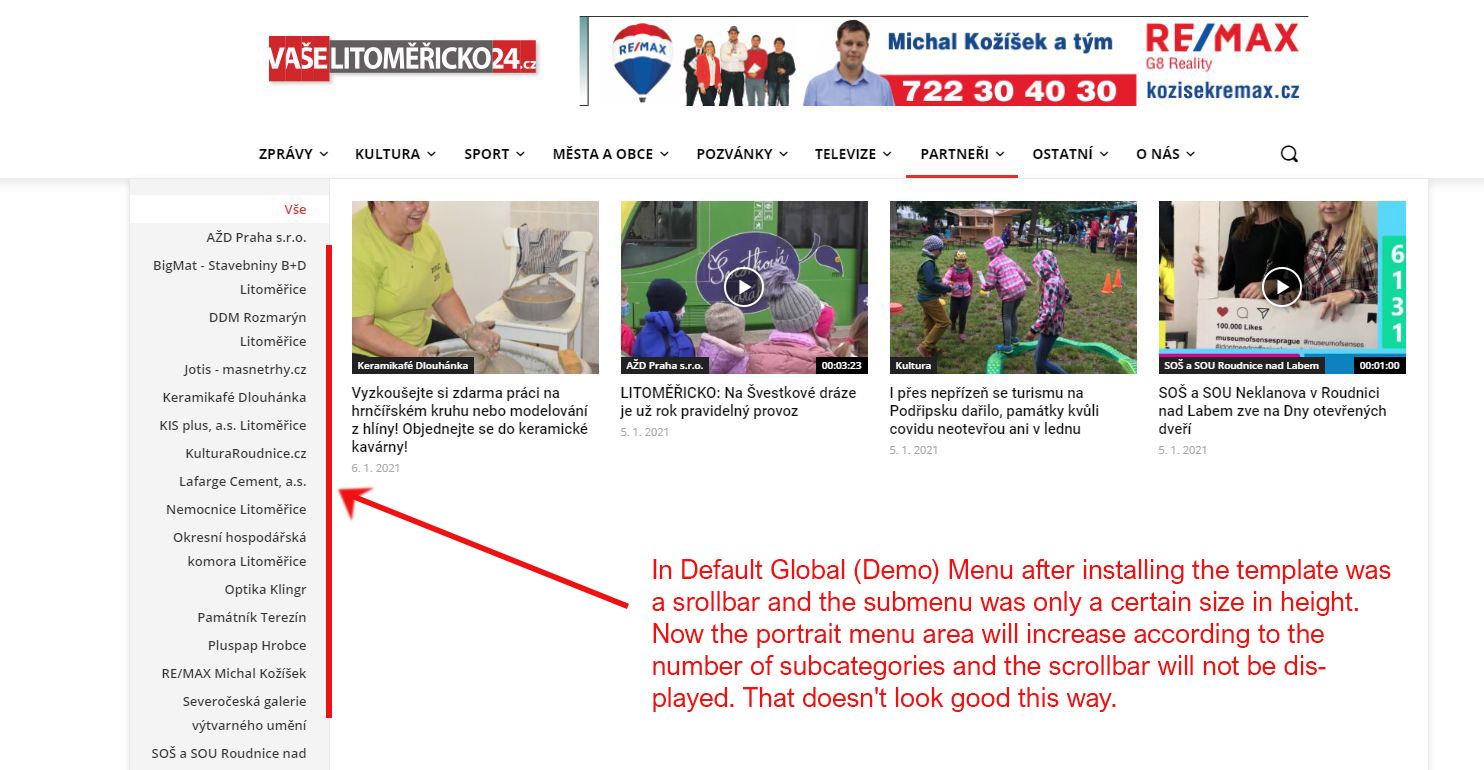
I’m sorry to react so late, but only now is my problem really current. The point is that after setting my own form of the header from the cloud, the scrollbar disappeared from the Mega menu.
In Default Global (Demo) Menu after installing the template was a srollbar and the submenu was only a certain size in height. Now the portrait menu area will increase according to the number of subcategories and the scrollbar will not be displayed. That doesn’t look good this way. My web: https://litomericko24.cz/
 deepak soni
hi
Happy New Year
i am using following parameters
System: Linux
PHP Version: 7.4.9
Memory Limit: 512M
Max Execution Time: 300
Upload Max Filesize: 512M
max_input_vars 6000
the problems hich i am facing are as follow
1)the theme is not working properly i am not able to save any changes made in theme
2)when i am trying to uninstall the prebuilt demo version it is not uninstalling
3)in system status of theame the memory limit, it is asking to increase the memory from 40 mb and vars from 1000 to 2000 but the same had already been done
please help me to find a solution
thanks in advance
 mjb
mjbAfter installing the demo, the menu label has additional tag to display the icon.
Something like this:
<i class=”tdc-font-tdmp tdc-font-tdmp-home”></i>
<i class=”tdc-font-tdmp tdc-font-tdmp-globe”></i>
<i class=”tdc-font-tdmp tdc-font-tdmp-bicycle”></i>
<i class=”tdc-font-tdmp tdc-font-tdmp-lotus”></i>
<i class=”tdc-font-tdmp tdc-font-tdmp-chip”></i>
Do you have the full list of the icons?
 Calin
Calin Hi greenbooks,
That is a pre-build website -> https://forum.tagdiv.com/installing-demos/
What you can do is to make your own posts -> https://wordpress.org/support/article/writing-posts/ also that is a pro website, therefore it was created using tagDiv Composer and tagDiv Cloud Library for cloud templates. Therefore all pages and templates can be edited with tagdiv Composer builder -> https://i.imgur.com/IqjK0nX.jpg
You have some ore documentation for our theme here -> https://forum.tagdiv.com/tagdiv-composer-tutorial/ and here -> https://tagdiv.com/category/documentation/
Hope this will help you!
Calin Hi chip303, if you want only to see the demo/Prebuilt Site, you can do it by clicking on the one you like from here -> https://i.imgur.com/X0D31Ss.jpg
Also if you want to trey a demo, then it will be better to test it on localhost or subdomain in this way you’ll keep the live website intact. Or if you want to check only some templates, then you can get theme from tagDiv Cloud Library and you can edit all of them with tagDiv Composer.
Hope this will help you!
Calin Hi,
You can do that, there are no problems, but you must know that if you edited the NewsMag pages, posts that are coming with the demo, those will be lost -> https://i.imgur.com/L6dPJtj.png. If you do that what you can do is to copy/duplicate those pages and posts.
-> https://forum.tagdiv.com/newsmag-installing-demos/
Hope this will help you!
Calin Hi,
I think that the problem is that you installed a different demo (prebuild website), you need to go in Newspaper > install demos (prebuild website) click on all and use ctrl+f to find the one that you want to install -> https://i.imgur.com/O4ZQWtw.jpg -> https://i.imgur.com/OoGTcoV.jpg -> https://tagdiv.com/newspaper-theme-installing-demos/
Hope this will help you!
Thank you!
 Vlad S
 Hello !
To start with I recommend you to take a look at our documentation here. In my opinion the most important would be the following:
https://forum.tagdiv.com/header-manager/
https://forum.tagdiv.com/installing-demos/
I recommend you to go with a PRO demo because that will make it fully editable with TagDiv Composer. Also take a look at our short tutorials for a better understanding of how it works here: https://www.youtube.com/user/tagdiv
Also when sending a support topic it is easier to open one for each problem, we can handle them more easier. Also provide as many information as possible so we can help you as fast as we can.
You can pay for development of your theme by contacting our team here: https://tagdiv.com/web-development-services/
I hope this was helpful !
Thank you !
 Bettina
 Hello!
After activate the theme, you need to install a demo like this: https://forum.tagdiv.com/installing-demos/
There you can choose to import with content or not. If you choose a demo with content you can see it like in preview.
Hope that helps you!
Thank you!
Vlad S Hello !
Please take a look at our documentation here: https://forum.tagdiv.com/installing-demos/ Also from the loading speed of your website I would recommend you to make sure that you follow our system requirements here: https://forum.tagdiv.com/requirements-for-newspaper/
Let us know the result !
Thank you !
Calin Hi,
If you have a demo installed and you made changes on it the changes on the demo posts and pages will be lost -> https://forum.tagdiv.com/installing-demos/
Also if the posts and pages were made using our theme then it should work to edit the pages. Please make sure that you do not have any conflict plugins, please deactivate ALL plugins except tagDiv plugins (theme plugins), also if you are using child theme or cache plugin, deactivate them, clear all cache and try again.
If there is still a problem, you can send us an email at contact@tagdiv.com and provide admin login (to can login in WordPress admin zone) and the license. We will take a look to the problem and we’ll fix it. Include a link to this topic in the email.
Let me know the results!
 ch.rammohan
 Hi Calin, after the recent update it seems the option to exclude content while installing demo theme is removed??
It really painful to clean install a demo theme.
Calin Hi,
This https://demo.tagdiv.com/newspaper_influencer/ is just a demo from our Newspaper theme, you have many demos that are free in our theme and you can install the one that you like the most.
Installing demos -> https://forum.tagdiv.com/installing-demos/
Also what problems are you facing when you try to activate the theme? Let me know some more details to can help you! -> https://tagdiv.com/how-to-activate-the-newspaper-theme/
Thank you!
Calin Hi salestaal,
You can install a demo without content -> https://i.imgur.com/hiAkwG1.jpg or you can get the templates you like directly from tagDiv Cloud Library and you can edit theme using tagDiv Composer.
Hope this will help you!
Calin Hi Gamervines, you just need to hover the demo that you want to install and this option will be display -> https://i.imgur.com/IBAyKLM.jpg -> https://i.imgur.com/iHtVKNn.png -> https://forum.tagdiv.com/installing-demos/
Hope this will help you!
 ermannaro
 No trial available, I buy it.
The instructions say this… see the picture:
https://www.awesomescreenshot.com/image/5675857/6ca9e6dc1e0629cd1e5d80d3d90bd5ba
But in your composer tagdiv I don’t understand how to insert it in the home.
Please help me
On November 11th I sent a never with subject: “installing demo problems” in which I indicated the site name and access data.
Thanks
ermannaroHow do you add the sticky menu in the “travel memories” demo?
In panel I don’t find useful settings and with the builder it seems not to work, see image below.
https://www.awesomescreenshot.com/image/5674271/a31d2f2ee7528d185da5227487c46566
if you need to see the site to understand something I sent an email with subject:
“installing demo problems”
in there I indicated the name of the site and the access data.
Thanks



